No no, they are only connected to the MCU via I2C, but their job is to expose 16 additional GPIOs, just like the ones on the MCU itself. You can connect up to 8 of these chips to a single ESP, which gives you an additional 128 GPIOs. Each chip is only 1 to 2 $/€.
Ah I see. Good to know. Thanks.
Got any you recommend? Preferably on Ali.
There are a bunch of different versions with different packages or even with SPI instead of I2C. I personally prefer the I2C DIP version (MCP23017-E/SP) because it is easy to solder. Best ask ChatGPT about the existing versions. Just (try to) make sure that you buy an original from Microchip, not from a Chinese copy cat.
There is also a concurrent chip design called PCF8575 from NXP that is also a good product with just some restrictions (again ask the AI).
1 Like
I absolutely agree, and I can only add that I’ve started my journey from:
- NodeMCU ESP8266 (Wemos D1 Mini clone)
- NodeMCU ESP-32 ESP-WROOM-32S CP2102
Without any issues, just reading the docs and adding configs, I managed to smartify my inverter and create a simple CO2 sensor with Wemos.
However, I ordered C6 as the next board to play with all fancy things like Zigbee, and most of the time, I’m busy seeking docs and configs to make this board useful.
Finally:
I have a working CO2 sensor at the C6 board after this:
I only managed to create a blinking LED after this:
The most essential things are working fine. I could recreate a simple interlock relay logically and physically, control external LED with GPIO, etc.
But I would not recommend this journey to the past version of myself if I could.
2 Likes
This is quickly becoming one of my favorite boards. S3, POE, easy camera interface and works with raspberry pi cameras. USB C for optional power and flashing and an sdcard slot. Great for BT applications because WiFi isn’t used. If you look at the S3 lillygo version, which has POE but it costs the same as the board (or very close), has no USB C but that’s a non issue if you have a serial adapter but without POE you have to run cables to the board to power it.
While not getting to off topic it appears you can use the P4 now although I’m not an expert in PR’s. I wish I had snagged a wave share esp32-p4 with the POE shield but they are all out of stock and the full kits with touchscreen and camera are 80+ on AliExpress. Waveshare with POE hat is 25 with C6 for WiFi/BT… Pretty sure you need to run the dev version of ESPHome builder also. More of an FYI than to start a discussion but if I’m reading the PR wrong please correct me. If anyone has.a P4 to test any results would be appreciated.
2 Likes
Amazing find  Thanks for sharing!
Hi,
Was wondering if you could post a simple yaml for a BT Proxy (as a starting point) for the board you recommended please?
I found some step files for 3D Printing a case for it and it is a decent price with decent options (seems to be a Waveshare or Waveshare clone actually)?
Thanks a lot!
1 Like
Replying to myself.
Found @ginandbacon’s post with the yaml for the board he referenced (from Aliexpress) here.
It seems to be a WavShare or WavShare clone.
[EDIT]
Providing my simple yaml for this board, for reference / to assist others.
Only used as an Ethernet Based BT Proxy at this point. Not for use with Wifi.
substitutions: # name substitutions ref Digiblur https://digiblur.com/wiki/ha/esphome-bluetooth-proxy-esp32c3/
  display_name: esp32s3poebtproxymb
  friendly_name: ESP32S3PoEBTProxyMB

esphome:
  name: ${display_name}
  friendly_name: ${friendly_name}
  min_version: 2024.11.0
  name_add_mac_suffix: false

  # Optional Manual IP in wifi section
  # manual_ip:
  #   static_ip: 192.168.53.xxx
  #   gateway: !secret gateway
  #   subnet: !secret subnet

ethernet: # For S3
  type: W5500
  mosi_pin: GPIO11
  miso_pin: GPIO12
  clk_pin: GPIO13
  cs_pin: GPIO14
  reset_pin: GPIO9
  interrupt_pin: GPIO10
  clock_speed: 25MHz


esp32:
  variant: ESP32S3
  board: esp32-s3-devkitc-1
  flash_size: 16MB
  framework:
    type: esp-idf # This is important: the default "arduino" framework does not perform well.
    sdkconfig_options:
      CONFIG_BT_BLE_42_FEATURES_SUPPORTED: y # BLE 4.2 is supported by ALL ESP32 boards that have bluetooth, the original and derivatives.
      CONFIG_BT_BLE_50_FEATURES_SUPPORTED: y # Also enable this on any derivative boards (S2, C3 etc) but not the original ESP32.
      CONFIG_ESP_TASK_WDT: y
      CONFIG_ESP_TASK_WDT_TIMEOUT_S: "10" # Extend the watchdog timeout, so the device reboots if the device appears locked up for over 10 seconds.

psram: # For S3
  mode: octal
  speed: 80MHz

switch: # For S3
  - platform: gpio
    name: ws-poe-32-relay1
    id: relay1
    pin: GPIO8
    restore_mode: ALWAYS_OFF
    setup_priority: 800

logger: # Enable logging
  level: DEBUG # Debug=Default; use Verbose if error checking
  # baud_rate: 0  # 0 Enables logging, but disables serial-port logging to free CPU and memory

ota: # Allow Over-The-Air updates
- platform: esphome
  # password: !secret ota_password

api: # Enable Home Assistant API; MUST check option under ESPHome Configure!
  encryption:
    key: !secret encryption_key

# Requires wifi
# captive_portal:

esp32_ble_tracker:
  id: ble_tracker
  scan_parameters: # Bermuda suggests 280/320 or 920/1000 to allow offset BT/Wifi
    interval: 320ms # default 1100ms - Bermuda's defaults but also suggests 1000/900
    window: 300ms # default 1100ms
    continuous: true # Unlike Wifi Devices there is no control in the `api` block's automation, so for PoE makes this true
    active: true # defaults to true - selecting false saves power but may not work - Bermuda also says select true

bluetooth_proxy:
  active: true # Optional, defaults to false - true allows outbound connections from HA to devices.

button:
  - platform: restart
    name: "Restart"
    entity_category: config

  - platform: factory_reset
    id: factory_reset_btn
    name: Factory Reset

  - platform: safe_mode
    id: button_safe_mode
    name: Safe Mode Boot

sensor:
  - platform: uptime
    # The uptime sensor is extremely helpful to know if your device is rebooting
    # when it shouldn't be. This might indicate your interval-to-window timing is
    # too tight, and the window needs to be reduced.
    name: "Uptime Sensor"
    update_interval: 60s

# time:
#  - platform: homeassistant
#    id: homeassistant_time
My bad, been a while since I been on here. Here is my full configuration, found an OV2060 camera from an old lilly flag device I wasn’t using. Actually pretty good frame rate but at lower resolutions.
I can’t wait for the P4 to be added, I got a dev kit, even though I died really need it but you can use a camera and it handles up to 1080p24fps using h264. It has a 7" screen and I can view video from the camera and it looks better than any S3 camera I’ve tried and that’s without a display. Saw a video on YouTube, apparently someone got Quake running on one. I guess Doom is to easy now? Around the seven minute mark
Uptime, IP and temperature are good sensors, not really sure what heap size is although I’m pretty sure it has to do with RAM.
substitutions:
  name: ws-poe-s3
  friendly_name: ws_poe_s3
  device_sampling_time: 90s

esphome:
  name: ${name}
  friendly_name: ${friendly_name}
  on_boot:
     priority: 700
     then:
        - switch.turn_off: relay1
        - lambda: |-
              delay(1200);
  #includes:
 #   - idfWifi.h
 #   - idfWifi.c

esp32:
  board: esp32-s3-devkitc-1
  framework:
    type: esp-idf
    version: recommended
    sdkconfig_options:
     CONFIG_ESP32_DEFAULT_CPU_FREQ_240: "y"
     CONFIG_ESP32_DATA_CACHE_64KB: "y"
     CONFIG_ESP32_DATA_CACHE_LINE_64B: "y"
     CONFIG_ESP32_INSTRUCTION_CACHE_32KB: 'Y'
  flash_size: 16MB

psram:
  mode: octal
  speed: 80MHz

switch:
  - platform: gpio
    name: ws-poe-32-relay1
    id: relay1
    pin: GPIO8
    restore_mode: ALWAYS_OFF
    setup_priority: 800

esp32_camera:
  setup_priority: 200
  name: "My Cam"
  external_clock:
    pin: GPIO3
    frequency: 20MHz
  i2c_pins:
    sda: GPIO48
    scl: GPIO47
  data_pins: [GPIO41, GPIO45, GPIO46, GPIO42, GPIO40, GPIO38, GPIO15, GPIO18]
  vsync_pin: GPIO1
  href_pin: GPIO2
  pixel_clock_pin: GPIO39
  max_framerate: 60 fps
  idle_framerate: 0.01 fps
  resolution: 640x480
  jpeg_quality: 10
  frame_buffer_count: 2
  aec2: true
  aec_mode: AUTO

# Enable logging
logger:

debug:
  update_interval: ${device_sampling_time}

# Enable Home Assistant API
api:
  encryption:
    key: "Georgecarlin"

ota:
  - platform: esphome
    password: "dog"

#wifi:
#  ssid: !secret wifi_ssid
#  password: !cat

ethernet:
  type: W5500
  mosi_pin: GPIO11
  miso_pin: GPIO12
  clk_pin: GPIO13
  cs_pin: GPIO14
  reset_pin: GPIO9
  interrupt_pin: GPIO10
  clock_speed: 25MHz

time:
  - platform: homeassistant
    id: homeassistant_time

button:
  - platform: safe_mode
    name: Safe Mode Boot

  - platform: factory_reset
    name: Factory reset

  - platform: restart
    id: reboot_btn
    name: restart

sensor:
  #-------------------------------------------------------------------------------
  # ESP32 internal sensors
  #-------------------------------------------------------------------------------
  # Temperature
  - platform: internal_temperature
    name: Internal Temperature
    update_interval: ${device_sampling_time}

  - platform: debug
    free:
      name: Heap free
      id: ${friendly_name}_heap_free
    block:
      name: Heap max block
      id: ${friendly_name}_heap_max_block
    loop_time:
      name: Loop time
      id: ${friendly_name}_loop_time

  - platform: template
    name: Heap free (%)
    id: ${friendly_name}_heap_free_percent
    unit_of_measurement: '%'
    accuracy_decimals: 2
    icon: mdi:percent
    update_interval: ${device_sampling_time}
    entity_category: diagnostic
    # 524288 B (SRAM total)
    # 327680 B (DRAM usable)
    lambda: return ( id(${friendly_name}_heap_free).state * 100 / 327680 );

  - platform: template
    name: Heap max block (%)
    id: ${friendly_name}_heap_max_block_percent
    unit_of_measurement: '%'
    accuracy_decimals: 2
    icon: mdi:percent
    update_interval: ${device_sampling_time}
    entity_category: diagnostic
    # 524288 B (SRAM total)
    # 327680 B (DRAM usable)
    lambda: return ( id(${friendly_name}_heap_max_block).state * 100 / 327680 );

  - platform: uptime
    name: "Uptime Sensor"
    id: ${friendly_name}_uptime_sensor
    update_interval: ${device_sampling_time}
    internal: true
    on_raw_value:
      then:
        - text_sensor.template.publish:
            id: ${friendly_name}_uptime_human
            state: !lambda |-
              int seconds = round(id(${friendly_name}_uptime_sensor).raw_state);
              int days = seconds / (24 * 3600);
              seconds = seconds % (24 * 3600);
              int hours = seconds / 3600;
              seconds = seconds % 3600;
              int minutes = seconds /  60;
              seconds = seconds % 60;
              return (
                (days ? to_string(days) + "d " : "") +
                (hours ? to_string(hours) + "h " : "") +
                (minutes ? to_string(minutes) + "m " : "") +
                (to_string(seconds) + "s")
              ).c_str();

  #-------------------------------------------------------------------------------
  # Custom Text sensors
  #-------------------------------------------------------------------------------

text_sensor:
  - platform: ethernet_info
    ip_address:
      name: "IP Address"

  - platform: template
    name: Uptime Human Readable
    id: ${friendly_name}_uptime_human
    icon: mdi:clock-start

# include commented out files and copy locally for the below to work
#  - platform: template
  #  id: wifi_channel
  #  name: "Net WiFi Channel"
  #  lambda: |-
  #    static char str[3]; // two digits (or -1) plus NULL
  #    sprintf(str, "%2d", idfWifiGetChannelNum());
  #    return (std::string) str;


#web_server:
#  port: 80
#  version: 2
#  include_internal: true
#  ota: false

  # Enable fallback hotspot (captive portal) in case wifi connection fails
  #ap:
  #  ssid: "Ws-Poe-S3 Fallback Hotspot"
  #  password: "AB6J9ECa7R0F"

#captive_portal:
1 Like
Cheers thank you, much appreciated!
Hey! How did you find the usable DRAM for your ESP32? The size is discussed here, but certain factors play into it. Is there a way to ask ESPHome?
Which board are you suggesting to buy in 2025?
I need something that works well with mqtt tls (and autodiscovery in HA) + ble_tracking + at least another UART component and i had some heap memory issue with an esp32doit-devkit.
I need something that is purchasable with no huge shipping costs from Italy (aliexpress?). Welded pins would be better.
Thanks!
Something to be aware of: Be Wary Of Flash-less ESP32-C3 Super Mini Boards | Hackaday
2 Likes
Esp32 C3 super minis are tempting go-to cheapies but the hardware issues people are reporting (per forum searches) are concerning.
Does anyone have purchasing tips so that you don’t end up with  ?
?
I will even pay an extra 50 cents! 
Edit: Will try to add/update/edit some buying tips here. I’m not sure all of my info below is correct so feel free to chime in and correct me.
On Ali Express:
- Seller quality: choose ≥4.9★ with high sales volume.
- Negative reviews: filter 1–3★; if recurring faults appear, switch seller.
- Antenna check: use photo reviews to confirm red antenna and proper spacing (per reference).
- Chip marking: photo reviews should show a clearly marked chip package (not blank). Exact code usually unreadable but presence matters.
- Regulator risk: some boards use undersized LDOs; hard to pre-screen reliably. Prefer reputable sellers or known board brands when possible.
See if you can at least spot some chip markings in review photos:
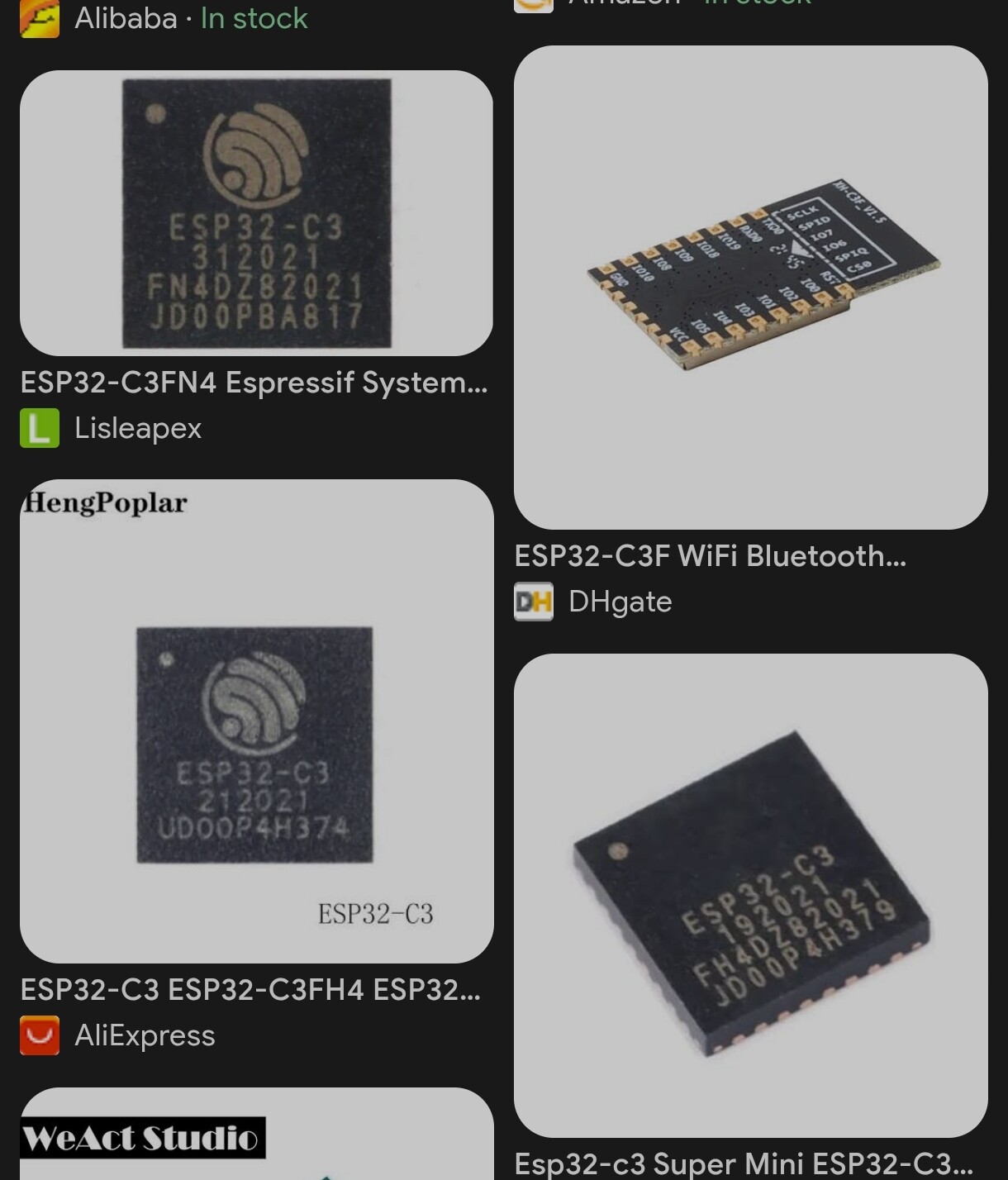
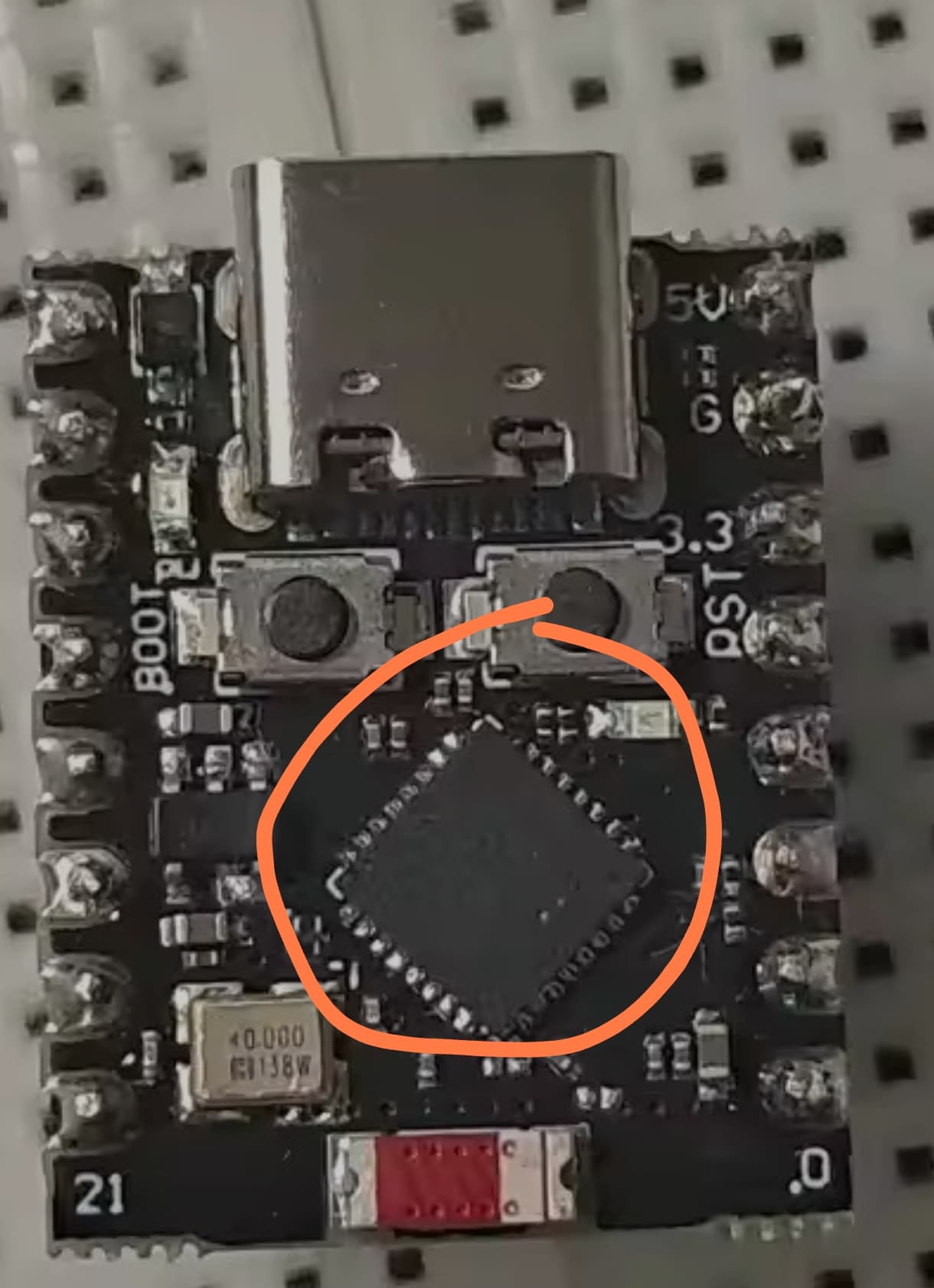
Check antenna spacing in review photos:
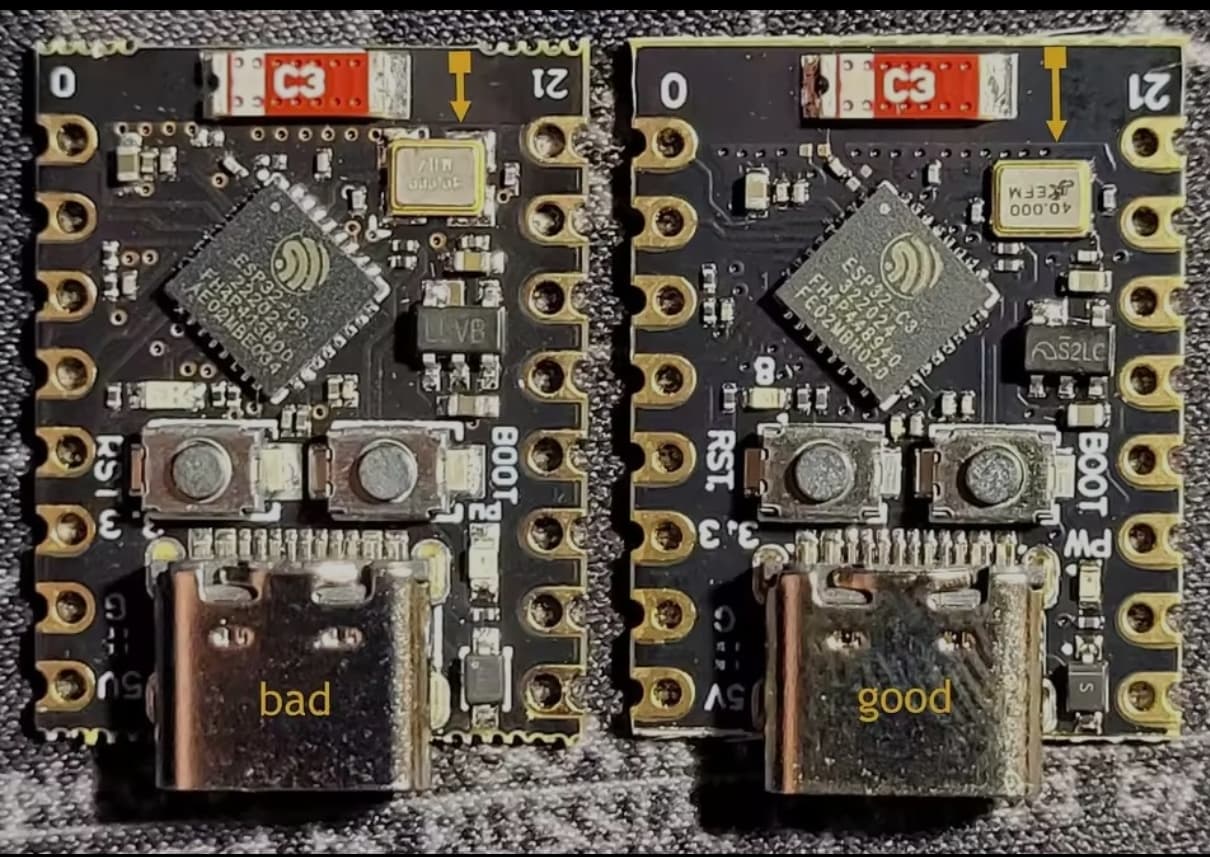
https://www.reddit.com/r/esp32/comments/1dsh3b5/warning_some_c3_super_mini_boards_have_a_design/
Apparently a lot of the batches of bad designs are now out of circulation (but that’s rumour status).
1 Like
This is what I did and 8/8 work just fine (6 different orders/sellers). Wasn’t always visible in the reviews but sometimes the listing also has real photos (and no renders) which also helped 
2 Likes