I have such a weird issue. When HA OS is running for some days and I want to start the addon like Music Assistance or Studio code or do a backup the OS stops and turns off. I’m very sure I have plenty of space, 8-11hb of ram and running in a vm on Proxmox on good hardware. Where can I look for the issue or what should I check?
With the list of what you said (two known ram heavy hitters…)
Id definitely start with free system ram. Was there even enough to load the addon…
1 Like
If you have not updated VSCode addon yet, then do it.
The old version had a CPU and ram big.
2 Likes
Which addon is this please? Or do you mean the Studio Code Server? But it is not even running, if I start it, it takes a lot of ram and it has been updated
What is the best to have of ram for HA then? I read a lot about 4-8gb, I sure have that but maybe there’s another addon or integration which is using a lot of ram during the system is running ?
VSCode = Visual Studio Code
The real name of the addon.
And I have seen some posts here with HAOS not behaving right with more than 8Gb, but I have not looked further into it.
8Gb should be more than enough though.
1 Like
Thanks, I have done a restore from the latest backup which was done last night at 03am and restored it to a new vm and adjusted the ram to non ballooning and with 8gb ram, any other tips which could point me to have a good and correct hardware configuration for a HA OS in vm on Proxmox?
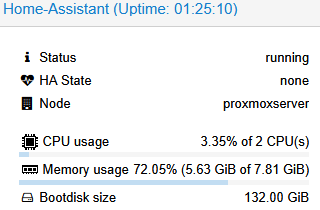
At this moment the memory usage is already 72% RAM without having VSC or Music assistant running but htis is info taken from proxmox UI
If I check the ram usage in HA itself it shows me 1.5 from 8gb
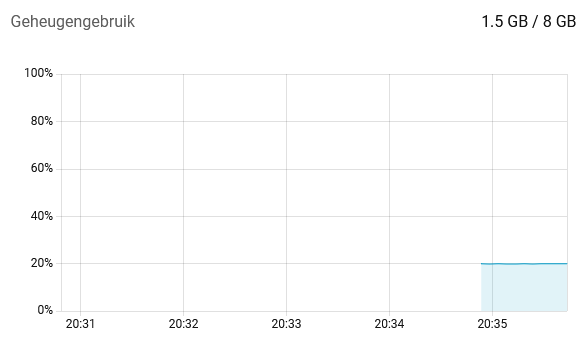
You can not use memory sensors in Proxmox for anything in regards to what happens inside the VM.
1 Like