Where have my sensor's attributes gone?

I have previously been using a SNZB-02 sensor with Zigbee2MQTT (a battery powered temperature and humidity sensor). This device previously exposed an entity for temperature, but this temperature entity also previously had attributes associated with it for some other measurements (humidity, battery level, link quality, etc). It used to look like this:
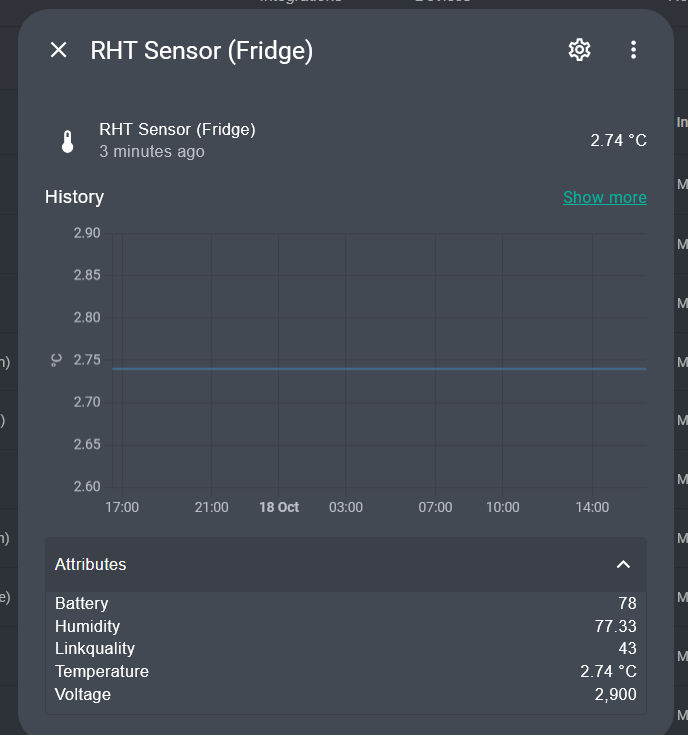
However, I have recently come to re-pair my Zigbee network, and the attributes have gone. This is what it looks like now:

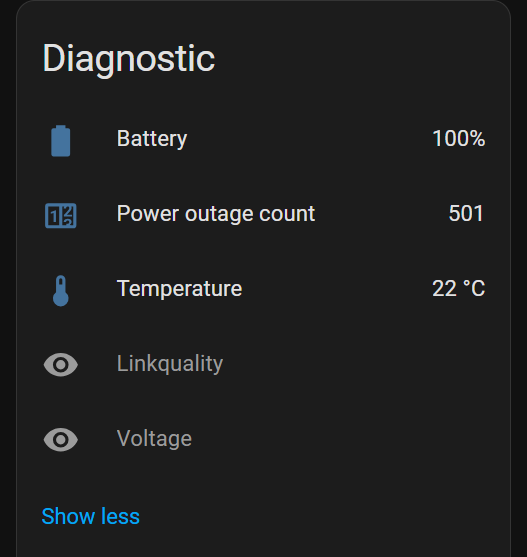
Instead, there are separate entities now for each of the measured quantities:

My question: Is this something that has changed in a version of Home Assistant? If so, is it documented somewhere?

(The reason this matters is because it has caused a breaking change in my system. I was previously sending the temperature entity to InfluxDB, which also passed along all the humidity, battery, etc, attributes for the entity as well. See bottom of this post for details. I am aware that I can use template sensors for everything to get back attributes, but it is very cumbersome for many sensors.)
There is a general move in home assistant away from using attributes when they should be their own sensors. Attributes should not change often.

However your issue is not home assistant’s fault, it is how the zigbee2mqtt device driver now reports the states. So it is zigbee2mqtt that was updated to do this.

Looks like this change was made back in October 2020: Expose temp/humidity for HEIMAN HS1HT and SNZB-02 by sjorge ¡ Pull Request #1638 ¡ Koenkk/zigbee-herdsman-converters ¡ GitHub

There is a specific Z2MQTT setting which controls this.
Can’t remember what it’s called right now, but have a look at the Z2MQTT settings page and it’s there, along with a description.

If you didn’t change anything in Z2MQTT settings before this occurred, you should have a look at the Z2MQTT release notes in case this was intentional.

EDIT: @teeeeee found the setting. It’s in Z2M > Settings > Home Assistant Integration tab > Home Assistant legacy entity attributes:

    # Optional: Home Assistant legacy entity attributes, (default: shown below), when enabled:
    # Zigbee2MQTT will send additional states as attributes with each entity. For example,
    # A temperature & humidity sensor will have 2 entities for the temperature and
    # humidity, with this setting enabled both entities will also have
    # an temperature and humidity attribute.
    # Note: Disabling this option, requires a Home Assistant restart
    legacy_entity_attributes: true

For some reason, the description is no longer visible in the Front End, but you can still see it in the Z2M docs.

1 Like

@ShadowFist Good spot. I wasn’t aware of this setting. Perhaps I had it enabled previously. This brings back the attributes for the entity as they used to be. Thanks for making me aware of this.

@tom_l I understand, and it makes sense to move away from attributes that should be their own sensors. The issue really is how data is forwarded on to an InfluxDB database. With the attributes attached to the entity as I want to have, the InfluxDB integration inserts these attributes as fields in the same measurement, which is nice. So it looks like this in the database:

> select * from RHTsensors where time>now()-5m
name: RHTsensors
time                battery domain entity_id                      friendly_name                    host humidity linkquality temperature value voltage
----                ------- ------ ---------                      -------------                    ---- -------- ----------- ----------- ----- -------
1731016532160275000 100     sensor rht_sensor_kitchen_temperature RHT Sensor Temperature (Kitchen) hass 87.61    69          18.51       18.51 3000
1731016563039998000 79.5    sensor rht_sensor_lounge_temperature  RHT Sensor Temperature (Lounge)  hass 79.08    174         16.32       16.32 2900

(The only downside here is that the temperature is stored twice in the database - once from the temperature attribute, and once from the entity state and appears under the field name “value”. As far as I’m aware, there is no way to prevent this “value” being inserted, and only inserting the attributes).

You can also do things like

> select temperature from RHTsensors where time>now()-5m group by friendly_name

which will return all the temperatures associated with the RHT sensors.

Using the “group by” in this way wouldn’t work if we piled all temperature data on our system into a measurement called “temperature”. It could return all kinds of things unrelated (e.g CPU temperatures, which have nothing to room temperatures).

Ultimately, it is nice to have multiple fields associated with each entity. At the moment, it doesn’t seem possible with the InfluxDB integration to specify multiple fields. You only get the entity’s state, which always appears as a field called “value”. So using the attributes is a workaround.

The reason it makes sense to have temperature/humidity/battery etc as multiple fields in the same measurement is because the sensor physically acquired the data at the same time, and transmitted it all at once. So the values should all share a timestamp and be tied together.

1 Like

My issue seems related.
I have a button switch (Aqara WXKG12LM) which reports device_temperature.
This shows in Z2M and in MQTT debug messages in the Device Info page for the device in HA.
But the device only shows sensors for Action and Battery,
(Link Quality and Voltage are shown without values if I click ‘show more’.)

MQTT Info shows:

zigbee2mqtt/Doorbell
10 most recently received messages

  • Received 03:42:30
    • QoS: 0
      action: null
      battery: 100
      device_temperature: 27
      linkquality: 25
      power: 2
      power_outage_count: 319
    • Payload: voltage: 3025

Any ideas how I persuade HA to show this. It used to a while back but I 've only recently noticed that that it doesn’t anymore.

I have some WXKG11LM which look identical and they deliver temperature ok.

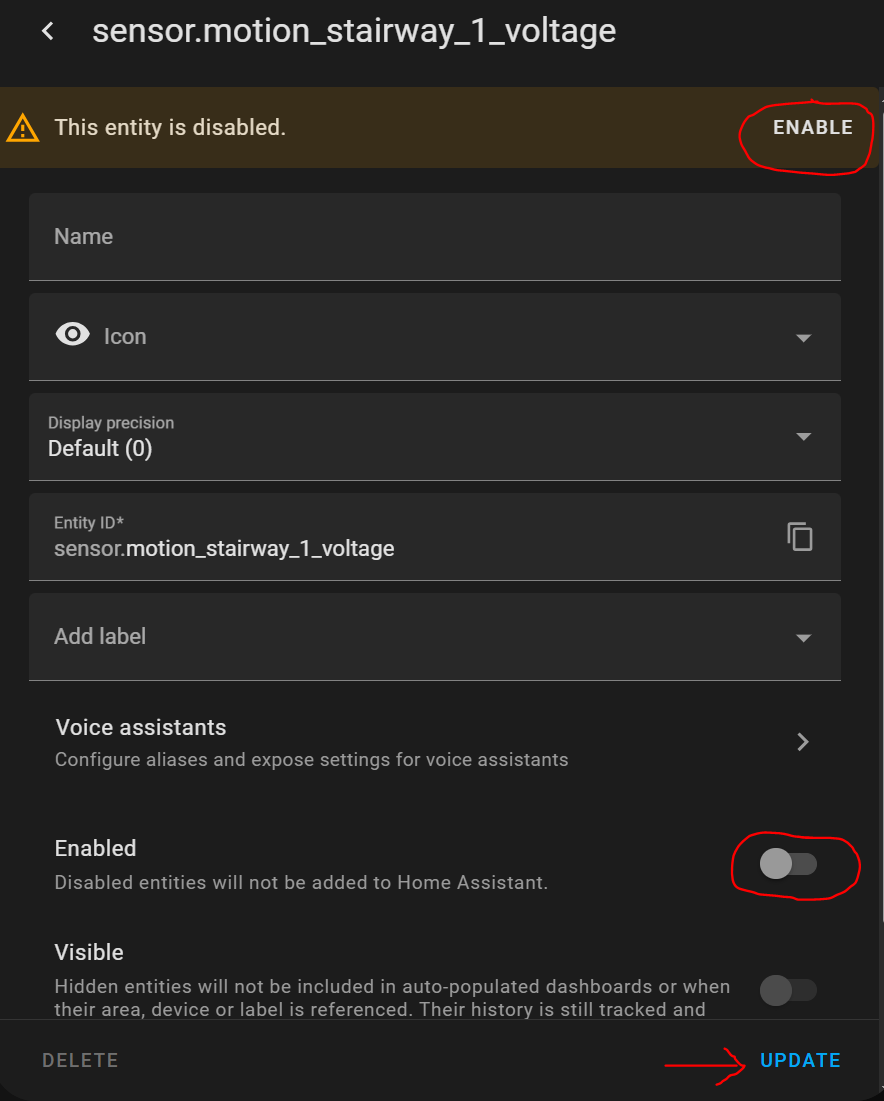
Did you enable them in the device page in HA? Those sensors are disabled by default and you have to enable them manually


Sorry, i may have unnecessarily confused. I want the temperature, which is not listed nor found in the show more section.

Are you sure the Doorbell mqtt message you’re posting belongs to the WXKG12LM? This doesn’t seem to have a device temperature according to the Z2M page.

Only the WXKG11LM lists the device temperature.

I agree that the link from Z2M to the spec sheet does not mention temperature but the the ‘state’ tab shows:
{
“battery”: 100,
“device_temperature”: 28,
“linkquality”: 32,
“power”: 2,
“power_outage_count”: 319,
“voltage”: 3025,
“action”: null
}

This temperature passes through MQTT and is visible, as I said earlier, in the MQTT Info.

I am guessing that some piece of HA code that now moves attributes into sensors has made the decision to ignore temperature since it isn’t in the specs.

Below is a more comprehensive paste of the info showing it is a WXKG12LM

Ah well, I’ll see if I can find a WXKG11LM in my spares box and swap it out.!!

Entities
Doorbell Battery (sensor.doorbell_battery)
MQTT discovery data:
Topic: homeassistant/sensor/0x00158d0002eb5c71/battery/config
Payload
availability:
  - topic: zigbee2mqtt/bridge/state
    value_template: '{{ value_json.state }}'
device:
  hw_version: 1
  identifiers:
    - zigbee2mqtt_0x00158d0002eb5c71
  manufacturer: Aqara
  model: Wireless mini switch (with gyroscope)
  model_id: WXKG12LM
  sw_version: 3000-0001
  via_device: zigbee2mqtt_bridge_0x00124b00258cb36c
  name: Doorbell
device_class: battery
enabled_by_default: true
entity_category: diagnostic
object_id: doorbell_battery
origin:
  sw_version: 2.1.1
  name: Zigbee2MQTT
  support_url: https://www.zigbee2mqtt.io
state_class: measurement
state_topic: zigbee2mqtt/Doorbell
unique_id: 0x00158d0002eb5c71_battery_zigbee2mqtt
unit_of_measurement: '%'
value_template: '{{ value_json.battery }}'
Subscribed topics:
zigbee2mqtt/bridge/state
1 most recently received message
Received 14:04:37
QoS: 0, Retained
Payload: state: online
zigbee2mqtt/Doorbell
10 most recently received messages
Received 04:30:47
QoS: 0
Payload: action: null
battery: 100
device_temperature: 28
linkquality: 25
power: 2
power_outage_count: 319
voltage: 3025
Received 05:21:26
QoS: 0
Payload: action: null
battery: 100
device_temperature: 27
linkquality: 25
power: 2
power_outage_count: 319
voltage: 3025
Received 06:15:48
QoS: 0
Payload: action: null
battery: 100
device_temperature: 28
linkquality: 29
power: 2
power_outage_count: 319
voltage: 3025
Received 07:14:52
QoS: 0
Payload: action: null
battery: 100
device_temperature: 28
linkquality: 21
power: 2
power_outage_count: 319
voltage: 3025
Received 08:06:43
QoS: 0
Payload: action: null
battery: 100
device_temperature: 27
linkquality: 25
power: 2
power_outage_count: 319
voltage: 3025
Received 09:04:14
QoS: 0
Payload: action: null
battery: 100
device_temperature: 28
linkquality: 21
power: 2
power_outage_count: 319
voltage: 3025
Received 09:58:11
QoS: 0
Payload: action: null
battery: 100
device_temperature: 27
linkquality: 21
power: 2
power_outage_count: 319
voltage: 3025
Received 10:54:53
QoS: 0
Payload: action: null
battery: 100
device_temperature: 28
linkquality: 18
power: 2
power_outage_count: 319
voltage: 3025
Received 11:46:54
QoS: 0
Payload: action: null
battery: 100
device_temperature: 27
linkquality: 25
power: 2
power_outage_count: 319
voltage: 3025
Received 12:40:28
QoS: 0
Payload: action: null
battery: 100
device_temperature: 28
linkquality: 32
power: 2
power_outage_count: 319
voltage: 3025
Transmitted messages:
Doorbell Action (sensor.doorbell_action)
MQTT discovery data:
Topic: homeassistant/sensor/0x00158d0002eb5c71/action/config
Payload
availability:
  - topic: zigbee2mqtt/bridge/state
    value_template: '{{ value_json.state }}'
device:
  hw_version: 1
  identifiers:
    - zigbee2mqtt_0x00158d0002eb5c71
  manufacturer: Aqara
  model: Wireless mini switch (with gyroscope)
  model_id: WXKG12LM
  sw_version: 3000-0001
  via_device: zigbee2mqtt_bridge_0x00124b00258cb36c
  name: Doorbell
entity_category: diagnostic
icon: mdi:gesture-double-tap
object_id: doorbell_action
origin:
  sw_version: 2.1.1
  name: Zigbee2MQTT
  support_url: https://www.zigbee2mqtt.io
state_topic: zigbee2mqtt/Doorbell
unique_id: 0x00158d0002eb5c71_action_zigbee2mqtt
value_template: '{{ value_json.action }}'
name: Action
Subscribed topics:
zigbee2mqtt/bridge/state
1 most recently received message
zigbee2mqtt/Doorbell
10 most recently received messages
Transmitted messages:
Triggers
MQTT discovery data:
Topic: homeassistant/device_automation/0x00158d0002eb5c71/action_single/config
Payload
MQTT discovery data:
Topic: homeassistant/device_automation/0x00158d0002eb5c71/action_hold/config
Payload
MQTT discovery data:
Topic: homeassistant/device_automation/0x00158d0002eb5c71/action_release/config
Payload
MQTT discovery data:
Topic: homeassistant/device_automation/0x00158d0002eb5c71/action_double/config
Payload

Weird AF. I’m literally looking at the code for those 2 models and only the WXKG11LM has ever had the device_temperature and power_outage_count exposed:

        zigbeeModel: ["lumi.sensor_switch.aq2", "lumi.remote.b1acn01"],
        model: "WXKG11LM",
        vendor: "Aqara",
        description: "Wireless mini switch",
        meta: {battery: {voltageToPercentage: {min: 2850, max: 3000}}},
        exposes: [
            e.battery(),
            e.battery_voltage(),
            e.action(["single", "double", "triple", "quadruple", "hold", "release"]),
            e.device_temperature(),
            e.power_outage_count(),
        ],
        fromZigbee: [lumi.fromZigbee.lumi_action_multistate, lumi.fromZigbee.lumi_action, lumi.fromZigbee.lumi_basic],
        toZigbee: [],
        extend: [m.quirkCheckinInterval("1_HOUR")],
    },

The WXKG12LM has never had those 2 properties (I checked the code history and the only change to the exposes line was a switch from single to double quotes ), so I’m not entirely sure how yours is possibly sending it:

    {
        zigbeeModel: ["lumi.sensor_switch.aq3", "lumi.sensor_swit"],
        model: "WXKG12LM",
        vendor: "Aqara",
        description: "Wireless mini switch (with gyroscope)",
        meta: {battery: {voltageToPercentage: {min: 2850, max: 3000}}},
        exposes: [e.battery(), e.action(["single", "double", "hold", "release", "shake"]), e.battery_voltage()],
        fromZigbee: [lumi.fromZigbee.lumi_basic, lumi.fromZigbee.lumi_action_multistate],
        toZigbee: [],
        extend: [m.quirkCheckinInterval("1_HOUR")],
    }

Unfortunately, they have decided to remove this setting now:

https://github.com/Koenkk/zigbee2mqtt/discussions/24198

To be honest, I’m glad they did, despite the fact that mine was previously enabled.

Like Tom said in the previous post:

It made no sense to have eg. a Temp/Humidity sensor with the following:

  • Temp entity with humidity & battery attributes
  • Humidity entity with temperature & battery attributes
  • Battery entity with temperature & humidity attributes

That’s just for 1 device with 3 entities. Imagine the unnecessary attributes created when a device contains way more entities.

Yes I can see that it is a lot of repeated data. You would want to have either:

  • One primary entity with secondary attributes (e.g. temperature as the main entity state, with humidity and battery as attributes).

OR

  • One entity for each, and don’t duplicate the information inside attributes (e.g. a temperature entity, a humidity entity, and a battery entity).

The only reason I can advocate for the first option, is as I gave in my previous explanation.

  1. It makes sense to have the data as part of the same object (i.e. a single entity with attributes), because all the temperature/humidity/battery data was physically sent over from the device in one go at the same time. So logically should be tied together in some way.
  2. It makes much more sense when you start to push values to an external database (e.g. InfluxDB) that they are separate “fields” of the same “measurement”. Having data as attributes makes this trivial.

I get it - it makes things easier for you because you get all the entries in one line.
You even acknowledged the duplicate data being shown as both a value and an attribute, which is something I had forgotten about in my previous example.

But, consider your first option above and ask yourself this - who gets to decide what the primary entity is?

  • I want the primary to be temperature
  • You want the primary to be humidity
  • Some weirdo wants the primary to be battery.

Disabling the remaining non-primary entities won’t work, since you lose history, so there would have to be some new feature to define which entity is primary.

Ask yourself - How many people use Z2M+Influxdb and care whether the data is presented in a single row? Compare that to the tens of thousands of users who use Z2M, both with HA as well as with other Home automation platforms.

Do you honestly think it warrants a new feature development just for the convenience of a single-digit percentage of users?

1 Like

Yes I know - I totally agree with you by the way, you make the argument nicely.

My use case (admittedly probably in the minority) would better be addressed in the way that the data is inserted into InfluxDB, rather than adding the extra data as attributes. So I don’t really have any problem with Z2M removing this legacy attribute features to be honest.

And to your question - I would think the answer is pretty obvious. It should be the weirdo who wants the primary entity to be the battery :laughing:

1 Like