Whisper on GPU

Intro

I’m running Whisper with (Nvidia) GPU support for local speech to text (STT) recognition. It was surprisingly difficult to find all required information in one place, so I thought I’ll share my results:

To be precise, I’m using the Faster Whisper implementation. There is a linuxserver/faster-whisper docker image, which adds the Wyoming protocol for HA along with GPU support.

I’ve kept my German configuration example as I think this is mostly interesting for non-English setups. Should be easy to adjust though.

Setup

I’m running it externally on a basic Ubuntu server.

Setup: Prerequisites

You’ll first need to install docker (incl. docker compose), if not done yet.

A little less common may be the requirement for Nvidia Container Toolkit to be installed on your host. Example instructions for Ubuntu:

curl -fsSL https://nvidia.github.io/libnvidia-container/gpgkey | sudo gpg --dearmor -o /usr/share/keyrings/nvidia-container-toolkit-keyring.gpg \
  && curl -s -L https://nvidia.github.io/libnvidia-container/stable/deb/nvidia-container-toolkit.list | \
    sed 's#deb https://#deb [signed-by=/usr/share/keyrings/nvidia-container-toolkit-keyring.gpg] https://#g' | \
    sudo tee /etc/apt/sources.list.d/nvidia-container-toolkit.list

sudo apt-get update

export NVIDIA_CONTAINER_TOOLKIT_VERSION=1.17.8-1
  sudo apt-get install -y \
      nvidia-container-toolkit=${NVIDIA_CONTAINER_TOOLKIT_VERSION} \
      nvidia-container-toolkit-base=${NVIDIA_CONTAINER_TOOLKIT_VERSION} \
      libnvidia-container-tools=${NVIDIA_CONTAINER_TOOLKIT_VERSION} \
      libnvidia-container1=${NVIDIA_CONTAINER_TOOLKIT_VERSION}

sudo nvidia-ctk runtime configure --runtime=docker

sudo systemctl restart docker

Setup: Docker Compose Service

Example setup for /opt/faster-whisper:

cd /opt
sudo mkdir faster-whisper
sudo chown server:server faster-whisper
cd faster-whisper
vim docker-compose.yml

docker-compose.yml

services:
  faster-whisper:
    image: lscr.io/linuxserver/faster-whisper:gpu
    container_name: faster-whisper
    environment:
      - PUID=1000
      - PGID=1000
      - TZ=Europe/Berlin
      - WHISPER_MODEL=large-v3
      - WHISPER_LANG=de
      - WHISPER_BEAM=20
      - LOG_LEVEL=DEBUG
    volumes:
      - ./faster-whisper/data:/config
      - ./faster-whisper/run:/etc/s6-overlay/s6-rc.d/svc-whisper/run
    ports:
      - 10300:10300
    restart: unless-stopped
    network_mode: host
    runtime: nvidia
    deploy:
      resources:
        reservations:
          devices:
            - driver: nvidia
              count: all
              capabilities:
                - gpu
                - utility
                - compute

Setup: Override initial-prompt (optional)

Unfortunately, the docker image does not expose the initial-prompt option yet. So I’ll simply duplicated the file with the relevant command to bind-mount it:

sudo vim /opt/faster-whisper/faster-whisper/run

faster-whisper/run

#!/command/with-contenv bash
# shellcheck shell=bash

export LD_LIBRARY_PATH=$(python3 -c 'import os; import nvidia.cublas.lib; import nvidia.cudnn.lib; print(os.path.dirname(nvidia.cublas.lib.__path__[0]) + "/lib:" + os.path.dirname(nvidia.cudnn.lib.__path__[0]) + "/lib")')

exec \
    s6-notifyoncheck -d -n 300 -w 1000 -c "nc -z localhost 10300" \
        s6-setuidgid abc python3 -m wyoming_faster_whisper \
        --uri 'tcp://0.0.0.0:10300' \
        --device cuda \
        --model "${WHISPER_MODEL}" \
        --beam-size "${WHISPER_BEAM:-1}" \
        --language "${WHISPER_LANG:-en}" \
        --data-dir /config \
        --download-dir /config \
        --initial-prompt "Du sollst primär Sprachbefehle für unser Smart Home erkennen. Alle Sätze sind Befehle oder Fragen. Entferne jegliche Hinweise auf Untertitel. Ein Satz fängt selten mit Ich an."

Setup: Final Steps

Run:

docker compose up [-d]

For use with Home Assistant Assist, add the Wyoming integration and supply the hostname/IP and port that Whisper is running on.

Tuning

Tuning: Beam Size

Try different values for WHISPER_BEAM. Default of the original Whisper implementation is 1. Default of Faster Whisper is 5. Higher values should result in higher accuracy, but also higher VRAM usage.

I’m currently using a quite high value of 20, because at least for German accuracy still seems to be a more relevant problem than speed.

Tuning: Model

You can adjust WHISPER_MODEL to any of the predefined models:

_MODELS = {
    "tiny.en": "Systran/faster-whisper-tiny.en",
    "tiny": "Systran/faster-whisper-tiny",
    "base.en": "Systran/faster-whisper-base.en",
    "base": "Systran/faster-whisper-base",
    "small.en": "Systran/faster-whisper-small.en",
    "small": "Systran/faster-whisper-small",
    "medium.en": "Systran/faster-whisper-medium.en",
    "medium": "Systran/faster-whisper-medium",
    "large-v1": "Systran/faster-whisper-large-v1",
    "large-v2": "Systran/faster-whisper-large-v2",
    "large-v3": "Systran/faster-whisper-large-v3",
    "large": "Systran/faster-whisper-large-v3",
    "distil-large-v2": "Systran/faster-distil-whisper-large-v2",
    "distil-medium.en": "Systran/faster-distil-whisper-medium.en",
    "distil-small.en": "Systran/faster-distil-whisper-small.en",
    "distil-large-v3": "Systran/faster-distil-whisper-large-v3",
    "distil-large-v3.5": "distil-whisper/distil-large-v3.5-ct2",
    "large-v3-turbo": "mobiuslabsgmbh/faster-whisper-large-v3-turbo",
    "turbo": "mobiuslabsgmbh/faster-whisper-large-v3-turbo",
}

Alternatively, you can also easily use any CTranslate2-compatible model. This link gives you a filtered list of supported models on Hugging Face. Just use the model name (e.g. guillaumekln/faster-whisper-large-v2) from the website for the value of WHISPER_MODEL and Faster Whisper will automatically take care of downloading it etc.

Again, I prefer accuracy and so I’m using the “best” default model large-v3. I’ve also tried
quite a few others, but couldn’t find a better one, even though it may have been optimized for German etc.

Tuning: Initial Prompt

You may want to optimize the --initial-prompt setting mentioned earlier. I haven’t put too many thoughts into this yet though.

Performance

On my 3090 RTX, local speech-to-text recognition now takes about half a second. Quality is the best I could get so far. To be honest, it’s still rather acceptable and not too good yet. Looking forward on receiving feedback to optimize.
4 Likes

Rhasspy has docker image as well

They also have stt and tts so I use they individually for my local assistant.

Rhasspy has an open source voice assistant that has integration with HA as well. This was added a while back but I didn’t remember this until I tried to find link.

Thanks for the suggestion. That’s kind of “the official” HA way to go, isn’t it? The problem is that this version does not have the required GPU support yet (see e.g. this PR).

On my CPU, I can run only very small models. Unfortunately, those ones are absolutely useless for German.

1 Like

what kind of issues did you faced using GPU?

I’m trying to use my Quadro P1000 that is working fine to transcode in docker Jellyfin but in whisper is crashing like this:

INFO:faster_whisper:Processing audio with duration 00:05.580

ERROR:asyncio:Task exception was never retrieved

future: <Task finished name='wyoming event handler' coro=<AsyncEventHandler.run() done, defined at /lsiopy/lib/python3.12/site-packages/wyoming/server.py:31> exception=RuntimeError('cuDNN failed with status CUDNN_STATUS_EXECUTION_FAILED')>

Traceback (most recent call last):

  File "/lsiopy/lib/python3.12/site-packages/wyoming/server.py", line 41, in run

    if not (await self.handle_event(event)):

            ^^^^^^^^^^^^^^^^^^^^^^^^^^^^^^

  File "/lsiopy/lib/python3.12/site-packages/wyoming_faster_whisper/handler.py", line 76, in handle_event

    text = " ".join(segment.text for segment in segments)

           ^^^^^^^^^^^^^^^^^^^^^^^^^^^^^^^^^^^^^^^^^^^^^^

  File "/lsiopy/lib/python3.12/site-packages/wyoming_faster_whisper/handler.py", line 76, in <genexpr>

    text = " ".join(segment.text for segment in segments)

                   ^^^^^^^^^^^^^^^^^^^^^^^^^^^^^^^^^^^^^^

  File "/lsiopy/lib/python3.12/site-packages/faster_whisper/transcribe.py", line 1148, in generate_segments

    encoder_output = self.encode(segment)

                     ^^^^^^^^^^^^^^^^^^^^

  File "/lsiopy/lib/python3.12/site-packages/faster_whisper/transcribe.py", line 1358, in encode

    return self.model.encode(features, to_cpu=to_cpu)

           ^^^^^^^^^^^^^^^^^^^^^^^^^^^^^^^^^^^^^^^^^^

RuntimeError: cuDNN failed with status CUDNN_STATUS_EXECUTION_FAILED

nvidia-smi:

+-----------------------------------------------------------------------------------------+
| NVIDIA-SMI 570.172.08             Driver Version: 570.172.08     CUDA Version: 12.8     |
|-----------------------------------------+------------------------+----------------------+
| GPU  Name                 Persistence-M | Bus-Id          Disp.A | Volatile Uncorr. ECC |
| Fan  Temp   Perf          Pwr:Usage/Cap |           Memory-Usage | GPU-Util  Compute M. |
|                                         |                        |               MIG M. |
|=========================================+========================+======================|
|   0  Quadro P1000                   On  |   00000000:01:00.0  On |                  N/A |
| 34%   42C    P8            N/A  /  N/A  |     930MiB /   4096MiB |      0%      Default |
|                                         |                        |                  N/A |
+-----------------------------------------+------------------------+----------------------+

+-----------------------------------------------------------------------------------------+
| Processes:                                                                              |
|  GPU   GI   CI              PID   Type   Process name                        GPU Memory |
|        ID   ID                                                               Usage      |
|=========================================================================================|
|    0   N/A  N/A            1625      G   /usr/lib/xorg/Xorg                       40MiB |
|    0   N/A  N/A            1939      G   /usr/bin/gnome-shell                      8MiB |
|    0   N/A  N/A          242850      C   python3                                 844MiB |
+-----------------------------------------------------------------------------------------+

as you can see the model is in gpu memory
the docker setup is like this

services:
  wyoming-whisper:
    image: lscr.io/linuxserver/faster-whisper:gpu
#    image: lscr.io/linuxserver/faster-whisper:latest

    container_name: whisper
#    user: 1000:100
    user: root

    ports:
      - "10300:10300"
    volumes:
      - /Containers/Whisper/data:/data
      - /Containers/Whisper/config:/config
#      - /Containers/Whisper/tmp:/etc/s6-overlay/s6-rc.d/svc-whisper/run
      - /etc/localtime:/etc/localtime:ro
      - /etc/timezone:/etc/timezone:ro
    environment:
      - PUID=1000
      - PGID=100
      - NVIDIA_VISIBLE_DEVICES=all
#      - NVIDIA_DRIVER_CAPABILITIES=all
      - WHISPER_MODEL=medium-int8
      - WHISPER_BEAM=20 #optional
#      - WHISPER_MODEL=small-int8
      - LOG_LEVEL=DEBUG
      - WHISPER_LANG=en
#    command: --model tiny-int8 --language en
#    command: --model large-v3 --language en
    restart: unless-stopped
    runtime: nvidia
    deploy:
      resources:
        reservations:
          devices:
            - driver: nvidia
              count: all
              capabilities:
                - gpu
                - utility
                - compute
    devices:
      - /dev/dri/renderD128:/dev/dri/renderD128
      - /dev/dri:/dev/dri
      - /dev/nvidia-caps:/dev/nvidia-caps
      - /dev/nvidia0:/dev/nvidia0
      - /dev/nvidiactl:/dev/nvidiactl
      - /dev/nvidia-modeset:/dev/nvidia-modeset
      - /dev/nvidia-uvm:/dev/nvidia-uvm
      - /dev/nvidia-uvm-tools:/dev/nvidia-uvm-tools

is the cuda version to new? tried 12.2, 12.8, 12.9, nvidia-smi in docker returns the same version
Ubuntu 24.04

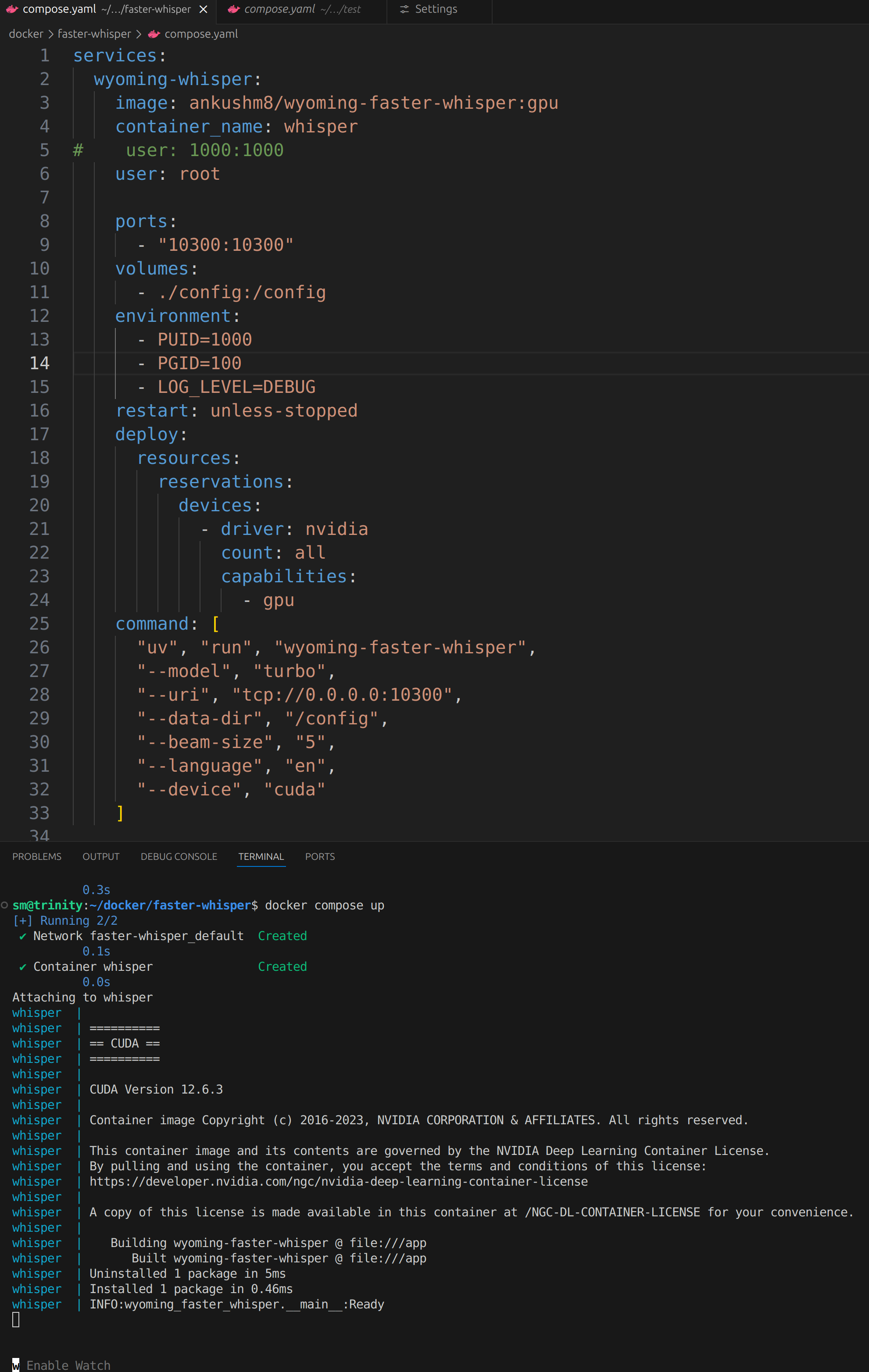
in the end managed to use this image

services:
  wyoming-whisper:
    image: ankushm8/wyoming-faster-whisper:gpu
    container_name: whisper
#    user: 1000:100
    user: root

    ports:
      - "10300:10300"
    volumes:
      - /Containers/Whisper/config:/config
    environment:
      - PUID=1000
      - PGID=100
      - LOG_LEVEL=DEBUG
    restart: unless-stopped
    deploy:
      resources:
        reservations:
          devices:
            - driver: nvidia
              count: all
              capabilities:
                - gpu
    command: [
      "uv", "run", "wyoming-faster-whisper",
      "--model", "medium-int8",
      "--uri", "tcp://0.0.0.0:10300",
      "--data-dir", "/config",
      "--beam-size", "5",
      "--language", "en",
      "--device", "cuda"
    ]
1 Like

Hi @lucize great to see your response, i have been doing similar debugging as well.

I took your compose, it looks like nothing after the warn? whisper server is not up at port 10300 when i curl it? Am i missing something here?

I am trying setup local whisper for HA core (docker version). My HA core installed on NAS as container. I got spare Win11 PC with i7-8700, 16mb ram and Nvidia GPU. I installed docker desktop with Nividia toolkits, Then, installed rhasspy/whisper container successfully, it listens 10300 port (confirmed). HA core wyoming protocol integration connects to whisper on win11 pc. However, STT test failed. don’t know why. And confused with fast-whisper linux/whisper and etc.

Neither do we.
Please post logs from HA and whisper or tell some error you are receiving.

Please post docker run/compose so we may see what you are running.

thanks all. problem solved. it is whisper docker crash when using gpu mode. Even cudn and nvidia tool kits are installed and confirmed on WSL. Change to cpu mode. works ok. a bit slow through. Maybe my Nvidia P620 won’t work properly I guess.

p620 is low on memory, you have to use some lite models

find out cuda version mis-match. as P620 is low on memory. I kept use cpu mode.

In the end, Whisper couldn’t really convince me regarding quality. If you’re interested, I’ve just released a small project to let you use Mistral’s Voxtral model as an alternative to Whisper.