Why are all Z-Wave devices installed as Z-Wave Plus instead of Long Range?

I got a ZWA-2 controller a few weeks ago. I just noticed that all of my Z-Wave devices are installed as Z-Wave Plus, not LR. I thought maybe I was not pairing the devices correctly, so I just reset then paired a Zooz ZSE42 800LR water sensor and ensure using the phone app, I selected LR. But it’s still installed as Z-Wave Plus. What do I need to do to install devices as long range?

-Thanks

All LR devices support Z-Wave Plus v2. Z-Wave Plus has no relation to whether the device is included as LR or mesh.

The way to confirm if LR is being used in Home Assistant is to look at the Node ID. Anything 256 or higher is LR.

1 Like

Also, LR connection is not a mesh and should not be the default method of connection.

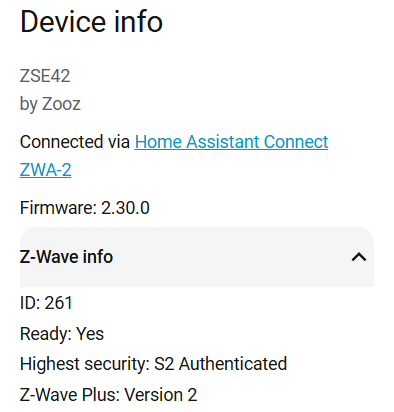
This device is node ID 261. Why then does it say Z-Wave Plus?

I was asking how to add a device as LR. I’ve tried pairing devices and specified LR, but they still indicate Z-Wave Plus.

All LR devices support Z-Wave Plus v2. Z-Wave Plus has no relation to whether the device is included as LR or mesh.

The way to confirm if LR is being used in Home Assistant is to look at the Node ID. Anything 256 or higher is LR. 261 is higher than 256, so it is included with LR.

Thank you for the clarification!

1 Like

It would be nice if the HA UI had some indicator to show how the device is included (Z-Wave JS UI supports this), besides just relying on the node ID (which not everyone knows about).
Feature requests can be created at home-assistant · Discussions · GitHub if anyone is inclined to do so. :slight_smile:

Yes, I was reading about Z-Wave JS UI and thought I needed that to enable Z-Wave LR. Glad I checked!

I just checked and about 1/2 of my ZSE42 water sensors are NOT LR. I think because I didn’t scan the QR code to add them. But I’m not certain.

018 - Water Sensor - Bernard Bath Toilet
019 - Water Sensor - Bernard Bath Vanity
256 - Water Sensor – Dishwasher
013 - Water Sensor – Garage
261 - Water Sensor - Half Bathroom
022 - Water Sensor - Karen Bath Toilet
023 - Water Sensor - Karen Bath Vanity
015 - Water Sensor - Kitchen Sink
258 - Water Sensor - Master Bath Toilet
257 - Water Sensor - Master Bath Vanity
260 - Water Sensor – Refrigerator
017 - Water Sensor – Washer

Yes, including with LR requires scanning the QR code. To convert you would have to exclude and re-include.