Just installed a Yale lock, which is functional.
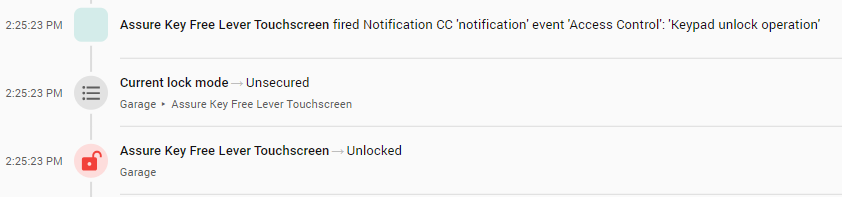
When I’ve installed zwave locks on other home automation platforms, I’ve been able to see proper lock events in the activity log. Things such as how the lock was unlocked (manual or keypad), which user code unlocked it, etc. In HA I get none of that.
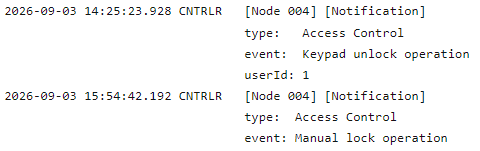
I know that all of command classes needed for this are operating properly because if I go to the Zwave logs I can see:
Understood, but before submitting a feature request it would need to be determined if there is operator error (namely me) involved and is a correctable issue.
If more experienced users coma back with “nope, it’s just the way HA is” then I will gladly submit a FR (if one has not already been submitted).
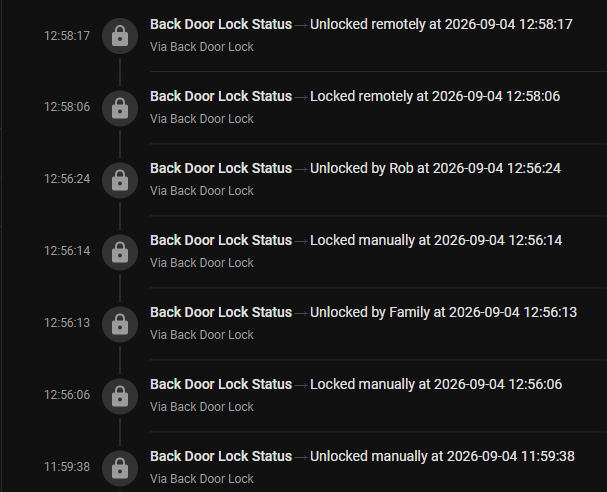
You are correct in that the information is already there. It’s just not being placed in the activity log that way. For my locks, I decided a simple trigger-based template sensor would do the trick. I capture the information from the lock event, then log it the way I want it logged. In my situation, I have 4 locks, and 5 users. All 5 users will have their codes entered into all of the locks in the same order. So I define my logging logic one time, and repeat it for my other three locks. Same with my users array. Here are my templates:
# Identical lock status templates are de-duplicated by using YAML ahchors to define
# the users_dict and lock_state_logic in the first template, and referencing them
# in the remainging templates.
- trigger:
    - platform: event
      event_type: zwave_js_notification
      event_data:
        home_id: 3471584883
        node_id: 81
        label: "Access Control"
  variables:
    users: &users_dict
      0: 'Unknown'
      1: 'Family'
      2: 'Dean'
      3: 'Mike'
      4: 'Rob'
      5: 'Stewees'
  sensor:
    - name: Front Door Lock Status
      unique_id: front_door_lock_status
      icon: "mdi:lock"
      state: &lock_state_logic >
        {% set label = trigger.event.data.event_label | lower %}
        {% set user_id = trigger.event.data.parameters.userId | default(0) %}
        {% set time = as_local(trigger.event.time_fired).strftime('%Y-%m-%d %H:%M:%S') %}
        {% if 'keypad unlock' in label %}
          Unlocked by {{ users.get(user_id, 'User ' ~ user_id) }} at {{ time }}
        {% elif 'rf unlock' in label %}
          Unlocked remotely at {{ time }}
        {% elif 'unlock' in label %}
          Unlocked manually at {{ time }}
        {% elif 'rf lock' in label %}
          Locked remotely at {{ time }}
        {% elif 'auto' in label %}
          Auto-locked at {{ time }}
        {% elif ' lock' in label %}
          Locked manually at {{ time }}
        {% elif 'jammed' in label %}
          ⚠️ Lock jammed at {{ time }}
        {% else %}
          {# This catches everything else. #}
          {{ label | title }} at {{ time }}
        {% endif %}

- trigger:
    - platform: event
      event_type: zwave_js_notification
      event_data:
        home_id: 3471584883
        node_id: 47
        label: "Access Control"
  variables:
    users: *users_dict
  sensor:
    - name: Back Door Lock Status
      unique_id: back_door_lock_status
      icon: "mdi:lock"
      state: *lock_state_logic

- trigger:
    - platform: event
      event_type: zwave_js_notification
      event_data:
        home_id: 3471584883
        node_id: 52
        label: "Access Control"
  variables:
    users: *users_dict
  sensor:
    - name: Garage Door Lock Status
      unique_id: garage_door_lock_status
      icon: "mdi:lock"
      state: *lock_state_logic

- trigger:
    - platform: event
      event_type: zwave_js_notification
      event_data:
        home_id: 3995556417
        node_id: 30
        label: "Access Control"
  variables:
    users: *users_dict
  sensor:
    - name: Shop Door Lock Status
      unique_id: shop_door_lock_status
      icon: "mdi:lock"
      state: *lock_state_logic
Interesting and efficient code. It’s a shame we have to do that because recent blog updates to HA indicated that lock code management would get easier. When I go into ZwaveJS interface to set up users, we were supposed to be able to name the users… unfortunately it’s only taking User 1, User 2, etc.
I will open a feature request because having to update a template and the user mappings, every time a user is added or changed, is not good for end-user normal usage (disclosure, I’m a systems integrator considering HA installs).
One other possible solution is using an add-on like KeyMaster which takes care of all the mappings. But from past testing, that too has its quirks and it’s just one more thing to troubleshoot if it breaks.
HA really should have better native lock code management. Many other platforms with smaller user bases seem to do it better.