Why to HA users buy "themostats"?

I must have too much free time because I’m starting too many new projects.

One is to make the heating in our house better. I live in Southern California where it is mostly shorts and T-shirts year-round, so maybe I see HVAC as a simpler problem than a person who lives where it gets hot in summer and cold in the winter.

So I think of heating as just a dry contact relay that closes, and the forced air heater comes on until the thermostat opens the contact and the system shuts off. Cooling is the same, a contact closes, and the AC comes on. The system only needs to be smart enough not to run both at the same time.

So why does a person with an HA server need a Nest or Ecobee thermostat? My plan is to use data from a few cheap Zigbee temperature sensors I have in various rooms to drive an automation that then opens and closes a Shelly relay.

I think my automation could be smart too, and ignore temperature sensors that are in unoccupied rooms. something those $200 thermostates can do.

But people buy them, there must be a good reason. I ask because maybe they do a funtion I don’t know about that is hard to automate.

Thermostats themselves are basically what you describe though even the dumbest ones have a little more smarts in them if they service both heating and cooling, particularly in an auto mode. HVAC systems are actually more complex as they have safety features in place to do certain things depending on the type of call that they are getting.

For instance, if you’re on a gas furnace central air system, then when the system gets a heating call it engages the blower and runs for a minimum of 2 minutes before it even starts an ignition sequence. The ignition sequence is also a small dance of safety measures to make sure the system doesn’t blow up, or upon failure to ignite within a certain amount of time, to bring the whole call sequence to a halt, including stopping the blower.

Yes, you can do all of this with some DIY circuits, but most folks don’t want to delve that deep into making sure it works correctly.

Myself, I use ZWave thermostats at my various properties, no WiFi needed. No talking to the mother ship. I can push a schedule into them for my rental guests, a different one when nobody is there, and change it all up based upon the weather in a smart fashion but I don’t have to worry about did I do my sequencing correct.

The other reason that folks still buy them is that most have scheduling built in, so even if your HA system is offline, they can continue to follow a “dumb” schedule.

2 Likes

I don’t have one and I agree with your idea that a thermostat is binary in its core function.
However, if you have a thermostat on the wall currently and need/want to replace then a nest is better looking than a DIY solution.
And it might require less time to install and setup to get to a smart point.
Whereas your solution will take time to figure out and set up all automations.

Don’t get me wrong, I don’t have such an thermostat and mine is DIY just as you are saying, just different since we don’t have air heating.
If you don’t mind the DIY look or have a way to hide it, and you don’t mind setting up the automations (also meaning you know exactly how it works and no “AI” will fail to understand something basic), then go ahead and build it.
It will be cheaper or have more features of you spend the same money (if we exclude hourly pay).

I live in the upper midwest US, so if my HA goes down or something breaks, I don’t want the house to freeze. I want it to be able to stand alone.

But there is a generic thermostat integration as a core integration if you want to do this.

3 Likes

The “call” (for service) is likely going to be binary (or ternary: Off, Cool, Heat).

Downstream of the call, there may be intricacies (per @tykeal’s description) - however for most of us we don’t care about those since it doesn’t really impact us - we make the call regardless of what happens downstream.

Upstream of the call it probably comes down to two issues:

  • The interface exposed to users - as “HA People” we may be comfortable with simply changing an automation (coding) to encapsulate our desires. However others may not want to go down that path, so a simple interface that they are familiar with may be desireable.
  • Learning of preferences - I have spent some time adding additional sensors (with corresponding automations) so that I can just leave HA on and it will bring in the AC when desired - a single temperature sensor is not sufficient to handle variations in humidity, sunlight / time of day. I can see the desire to have a setup that provides similar functionality (learns what you want) without having to spend time configuring it.

Also when I sell my house I don’t want to have to change everything for the buyer who may not want a smart house. I try to keep my control local when possible. Thus, I have Venstar - it is local. The next owner can use the smart features if they want or not. Same with irrigation and most other features of the house.

1 Like

Most people buy Nest or Ecobee because they want a simple, polished, all in one solution that works without building automations in HA. They also handle HVAC safety logic, scheduling, app control, and keep working even if HA goes down. And yes, looks are part of it too. For a DIY user, your sensor plus relay approach can work great, but most people are paying for convenience and reliability.

For instance myself id never use a fucking device that would allow someone to raise my electric so i follow you on my own automation (all outlets turn off when no one home, bathroom heater controlled by temp sensor, door sensor, window sensor, and din rail power monitor for auto on/off and power monitoring) even if someone tried to turn on heater by pressing physical switch on din rail breaker my code sees that and turns it off even before the heater gets time to blow air :slight_smile: highly responsive

Don’t forget that not all thermostats are binary but some of them can also modulate the heating device to make it work okay while using less energy.

2 Likes

There are many examples of people on this forum reporting that they have returned home to a house that is either a furnace or an icebox because they used a software thermostat and Home Assistant had crashed while they were away.

Use a hardware thermostat. Connect it to Home Assistant to automate temperature set points and modes. Much less likely to go wrong.

6 Likes

Yes, I know about what the forced air unit does. It does have all that safety controls and runs long enough to flush the vents and so on. But all that logic is on the furnace. All a thermostat does is close a contact when it gets cold. The “smarts” are built into the HVAC units. No way would I touch that.

My current thermostat is just a mechanical one with a bi-metallic spring. There is zero electronics inside. When the spring gets cold, it turns over a glass vial of mercury and shorts two conductors. Not rocket science, but there is some sophistication in the mechanical design. The contacts don’t flutter near the set point because the mercury tipping over happens all at once, and the spring action is not fast. I guess the design must be 50 or 60 years old.

One does not need DIY circuits. Shelly makes this, and it has, I think, “platinum level” integration with Home Assistant.
https://www.amazon.com/Shelly-Bluetooth-Automation-Compatible-Required/dp/B0CQCHS2QS?th=1

Thanks, this kind of practical thing is what I was hoping to hear.

If my server or the WiFi went down, the Shelly relay would stay in whatever state it was in forever. I do not want that.

I actually do have intentional redundancy with my lights. I use a Hue Bridge even though I have Zigbee2mqtt set up and running. If my HA server dies, I can still control the lights with the Hue dimmers I have in every room. But normally, the HA server tells the Hue Bridge what to do.

I think now I can use a simple thermostat but control it from HA in real time based on sensors, time of day, and room occupancy. Then if the HA dies, the thermostat would be stuck at a setpoint, but not stuck either on or off. Thanks.

Yep. That’s the crux of the matter.

2 Likes

You’re missing the feedback loop here, which is the temperature sensor.

And overall it’s not quite as simple as you’re making it to be. There is thermal lag in a system like this and you want the average temperature to be your target temperature. If you simply switch on or off when reaching the target temperature, you’ll be either too high or too low, on average, depending on whether you’re cooling or heating.

And the various forms of cooling and heating also influences things. Some inverter-based systems can also do much more fine-grained control than traditional bang-bang control (this is what you’re talking about, which is what it is called in control theory).

So, yes, you can do what you say, but it would be the most basic form of automated control possible. You’d need to find an industrial-quality relay though to be able to constantly switch.

1 Like

For old-school home system from 40 years ago, it was simple. Those thermostats had 2-3 wires that turned on/off and used a simple “bang-bang” control design.

Today is so much different. Modern systems must consider variable outputs, reversing valves for heat pumps, secondary power sources, interlocking devices, thermal PID variations for customized plant models, zoning equipment, fan level outputs, solar power considerations, and command response requirements from the grid. And that’s just standard wire thermostats. Communicating thermostats are a whole other ball of wax. Those share the complex work with the air handler computer and any number of other external devices like multiple condensers, air pressure sensors, and many more.

1 Like

One observation here, is you don’t need a flashy hardware smart switch to achieve the same result.

You could buy the dumbest mechanic thermostat ** and simply put it in line with the AC or heater and set a temperature that is beyond what you would ever want - that way if your software automation fails the heating or cooling will just run up to the limit set by the mechanical thermostat.

** - Likely your house already has one.

2 Likes

Not all the smarts are built into the furnace. For example, many fire detection systems in modern houses are tied into the hvac system so that when it gets hot due to a fire, it kills the hvac to prevent the ac from kicking in and fanning flames and spreading the smoke.

As others have said, just get a proper thermostat and if you want, connect it to HA.

I myself have a Honeywell, but there are SO many more features in the app that are not available in HA that I really only have it connected to report temperature. I can’t remember the last time I controlled it via ha - even though I can do the basic stuff from there (temperature adjustment, mode, fan on/off, etc).

You could flash the Shelly with ESP-Home and add a small on board temperature sensor that it could fall back to.
It won’t be perfect, at some point it could also fail.

LOL, you just made me realize that replacing a modern thermostat by HA operated bang-bang control is actually making a smart device dumb.

On a more serious note, many thermostats do not make very clear what techniques they actually use to do it properly, such as employ a PID, apply self learning, utilize weather as input, granular burner levels, … which makes it hard for people to understand the level of sophistication offered.

1 Like

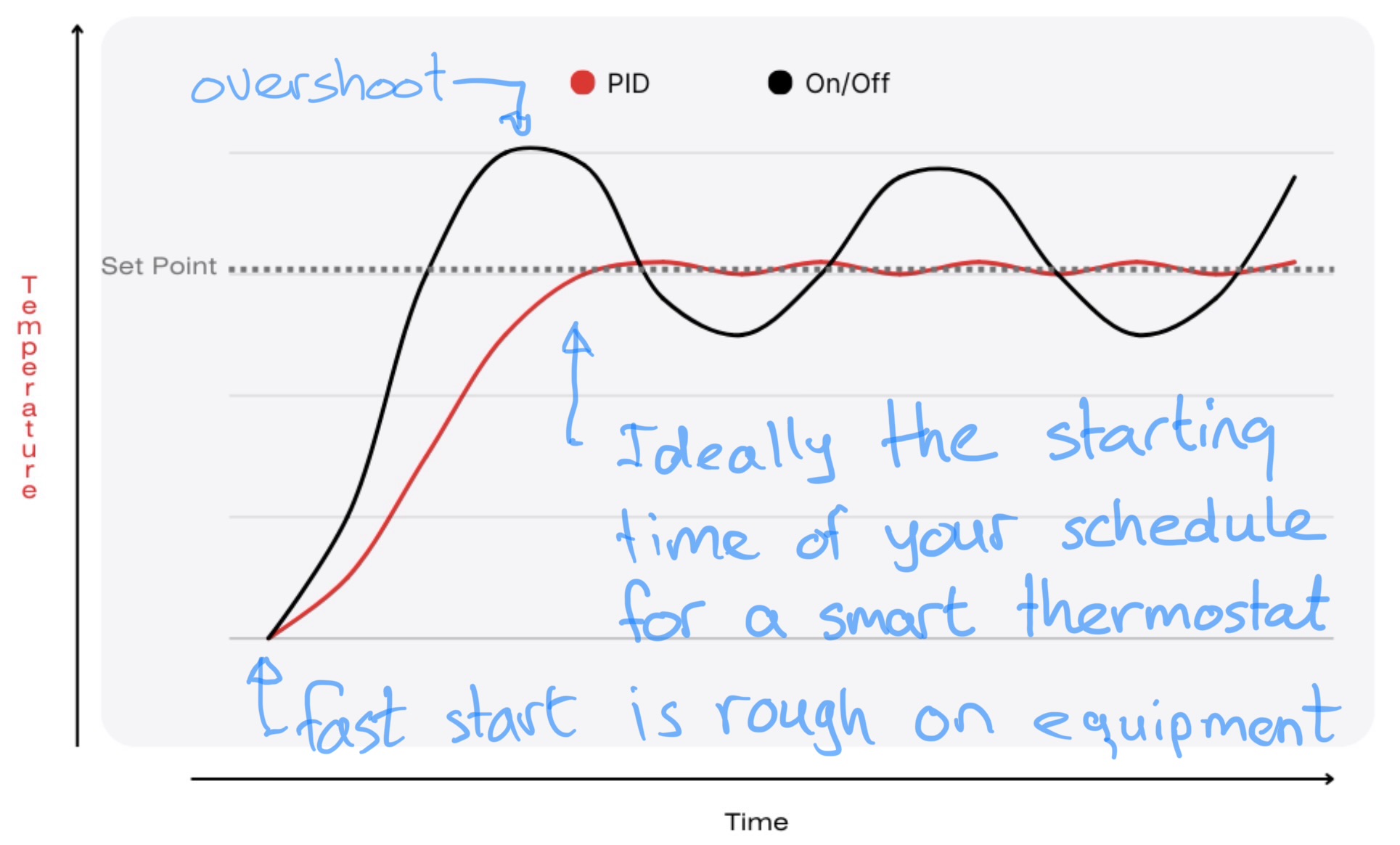
While it has been said before in different forms, it boils down to this: heating and cooling takes time to start and time to stop. For some systems this time can be very long, and environmental factors like weather influence this. Start to late and your temperature is not nice at the beginning. Stop too late and you get “overshoot”. You burn energy too long or make it too hot or too cold. And by using granular heating/cooling levels your temperature fluctuates way less too, while saving energy.

A good thermostat uses the schedule, geofencing, weather conditions and system characteristics to pick the right starting time, ending time and level of heating/cooling. If the HVAC devices do not have granular levels of heating/cooling, they use modulation (periodical on/off) to simulate granular heating/cooling levels. They often learn the right parameters from use, so it takes the smarter thermostats a couple of weeks to work optimally when newly installed.

The below graph is a representation between what a good, modern thermostat can do, compared to the simple logic that the Home Assistant Generic thermostat provides. Turn it upside down and you have a cooling version:

Add to that the logic to pick the right start/stop time, so the moment that the temperature is right coincides with the time that you want it to be so, and so you do not keep pooring in energy when the effect lasts way longer then when you need it. So basically they shift the graph left to match the point that the setpoint is reached with the scheduled time. Or they stop ahead of time without you noticing a thing.

The effect is three fold: you have more comfort, while using less energy, and it is kinder to your equipment so it requires less maintenance and lasts longer.

Manufacturers like Honeywell made their thermostats smart (as in working optimally under varying conditions) long before they were made connected, or cloud (what is now generally meant when called smart). The cloud ones may stop working without internet. The problem is that nowadays the dumbest of thermostats are still being used because they are cheap. It is even worse when those are made cloud. The best ones are smartly optimized and locally connected.

What HA can add is geofencing, room based presence, open window detection, voice control, etc. But in general, if the thermostat can do it then leave it there. Especially the picking of start/stop times relies on the thermostat knowing when you will need the right temperature ahead of time. You also want things to work also when internet or HA is down.

If you like this answer then please mark it as the solution, so others can find it easily.

2 Likes

I have a shelly solution instead of a thermostat.

If HA goes down (which it hasn’t in the last 5 years) - I would notice, since I probably check on the house at least once a day if I am away.

If I could’t revive HA ---- and short of a hardware problem, I just can’t imagine any scenario where that would be the case — I can still operate the Shellys though the Shelly app, so there is reduncancy!

The house would maybe not be at the perfect temperature upon my return, but it wouldn’t be far off.