I have an Aeotec Gen 5 (not 5+) with 1.0 firmware. In Zwave-JS, I’m able to create a backup from my Zwave network page. The heading says “Backup and restore” and "Back up or restore your Z-Wave adapter’s non-volatile memory (NVM). "
It’ll give me a file like: zwave_js_backup_2025-08-18T21-41-58-464Z.bin
Is this backup different than the kind I’ll need when my ZWA-2 arrives? I guess I don’t understand how to tell when a backup is portable.
I’m seeing info that suggests that I need firmware 1.02 on my Aeotec, but I’m not sure if that info is dated.
The update only works on sticks from 2018 or newer. I have an older stick and the update does not work. Is there a work around or is the only option to exclude and include each device one by one? If I buy a stick newer then 2018 could I load a backup from my system on it and then migrate to zwa-2?
Is that to say that you tried the update methods recommended by Aeotec and it failed? Or that you saw the note about 2018 or newer and didn’t attempt to update the firmware?
I can’t seem to find the information you are seeing that says that the update only works for sticks 2018 and newer. A couple of years ago, I successfully upgraded my old Gen5 (which is older that 2018) using instructions from Aeotec and from memory they are the same instructions that the guide points to.
I was able to find that I purchased my Gen5 stick in July 2016 and for the most part followed the same instructions you pointed to on Aeotec’s website for doing this upgrade.
Here is a post I made about it, but it mentions that as a precaution, I had also purchased a Gen5+ which comes with the correct firmware and I first backed up the nvram data from the old Gen5 to the new Gen5+ so in case I bricked the old Gen5 doing the upgrade, I would at least have the Gen5+ to use.
I successfully updated from my 2018 gen5 to the zwa2 under dockerized HA + zwave-js-ui. The procedures online are not correct for a dockerized setup, but the general gist of the steps works.
update the zstick to the required firmware. I had to (ugh) use windows for this unfortunately.
back up the zstick. You can use the windows app or zwave-js-ui for this
update HA and zwave-js-ui to the current versions
do a backup of each just in case
save your nodes.json file just in case
back up the zstick firmware to a file - it’ll be needed later
docker-compose down to shut down everything
unplug the zstick, plug in the zwa2, note the /dev/serial/by-id path it uses
edit docker-compose.yml to point to that /dev path for zwave-js-ui
docker-compose up -d
import the saved backup of the zstick
and all your zwave nodes will be there and it worked fine
And I did have a firmware update for the zwa2 available and did that as well.
(apologies if the above isn’t perfectly accurate - doing this from memory from yesterday and it took a few cycles to get it right in docker)
Mine took a couple hours to rebuild the network map of my small 15 door/window sensor network. Still awaiting things to check in to see what signal strength the new controller setup reports.
Seems to work faster, I noticed the lights on the sensors blink for ms not a second when they change state. It is a little interesting to see -88 dBm kind of signal strength with a unobstructed zwa2 antenna when the old zstick was in the -58 range for most sensors with the zstick inside closed furniture. I don’t know what to think about that either way.
Success. I followed the process from Settings >> Devices after the ZWA-2 was discovered.
The first time through, after disconnecting my Aeotec stick, it failed to restore the backed-up NVM (minor heart stoppage here…). But it gave me a “Try Again” button and that worked and everything looks to be working correctly now!
I got advice from Aeotec to make a backup of the old stick and restore it onto a new (post-2018) stick. From Z-Wave JS UI you can then migrate it to the ZWA-2.
I’ve since purchased a new stick and restored the backup onto it. However, it doesn’t get recognized.
I plugged the new stick into the t630, added it to the HA VM in Proxmox, and in HA → Z-Wave JS UI → Settings → Z-Wave → Port, I tried all the ports in the list, but I can’t get a connection.
I put the old stick back in and fortunately it was recognized, so we can control the lights and such again.
Using Zensys PC Controller 4.78 I did see that the new stick is populated.
Anyone have an idea how to get the new one recognized?
Is the new stick a 500 post-2018 series? Or a modern 700/800?
It’s my understanding that you can’t migrate across generations without your Gen5 being at firmware 1.2 (sometimes seen as 1.02)
This really helped me “back up the zstick. You can use the windows app or zwave-js-ui for this”
My backup in ZWave JS UI didn’t work for me so I connected the stick to a Windows machine, did the backup with the official tool. Then I could restore it in ZWave JS UI to the ZWA-2.
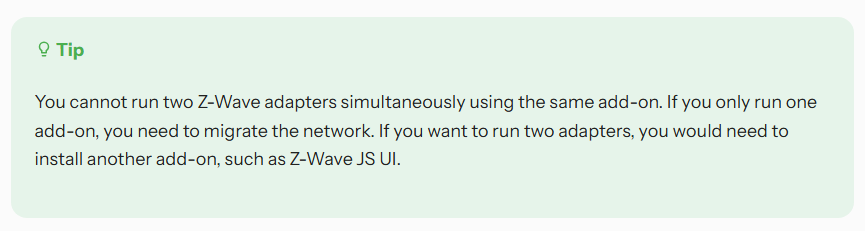
I have a really old Gen5 Aeotec. I am planning on getting the ZWA-2 to upgrade. Just wondering, in the event that the Gen5 stick won’t accept the firmware upgrade (theoretical here) is it possible to run both the old Aeotec Gen5 and the ZWA-2 in parallel and simply migrate each Z-wave device across from the Gen5 to ZWA-2 individually / manually?
I just read that it is possible as long as the new ZWA-2 is on a different Z-Wave add-on.
Just as a check, I’m wondering if what you read was about multiple ZWave networks controlled by one HA Server. A given ZWave network only allows for one Primary Controller, so both an Aeotec Gen5 and ZWA-2 can’t both be a Primary Controller.
which to me suggests that I can’t run two controllers with two separate Z-Wave networks and then slowly migrate devices from one controller to the other unless they use different z-wave add-ons, ie: one controller on Z-Wave JS and the other on Z-Wave JS UI.
That is of course doable and potentially something I can do if the Aeotec doesn’t accept a firmware upgrade.