Does anyone have any suggestions what to look for if I want a barcode scanner that is handheld in pistol grip style?
I realize most of them have USB connection and that needs to be cut off, but can ESP-Home connect to this?
How does that work?
You could (if you don’t need it to be portable) use a scanner with USB and connect it to e.g a Raspberry Pi Zero which runs a script to take input from the scanner and send it to HA…
We replaced our wired barcode scanners in my warehouse with Bluetooth models
I need the data inside the ESP. I have no use of it in HA.
I very much prefer wired since it does not require charging.
The idea is to create a very simple point of sale system using the scanner and a screen (not for professional use).
So wireless will probably just make it more complex.
Gotcha! I misunderstood the cut off comment.
and a lot more expensive.
Is this not a wired… wireless barcode scanner?
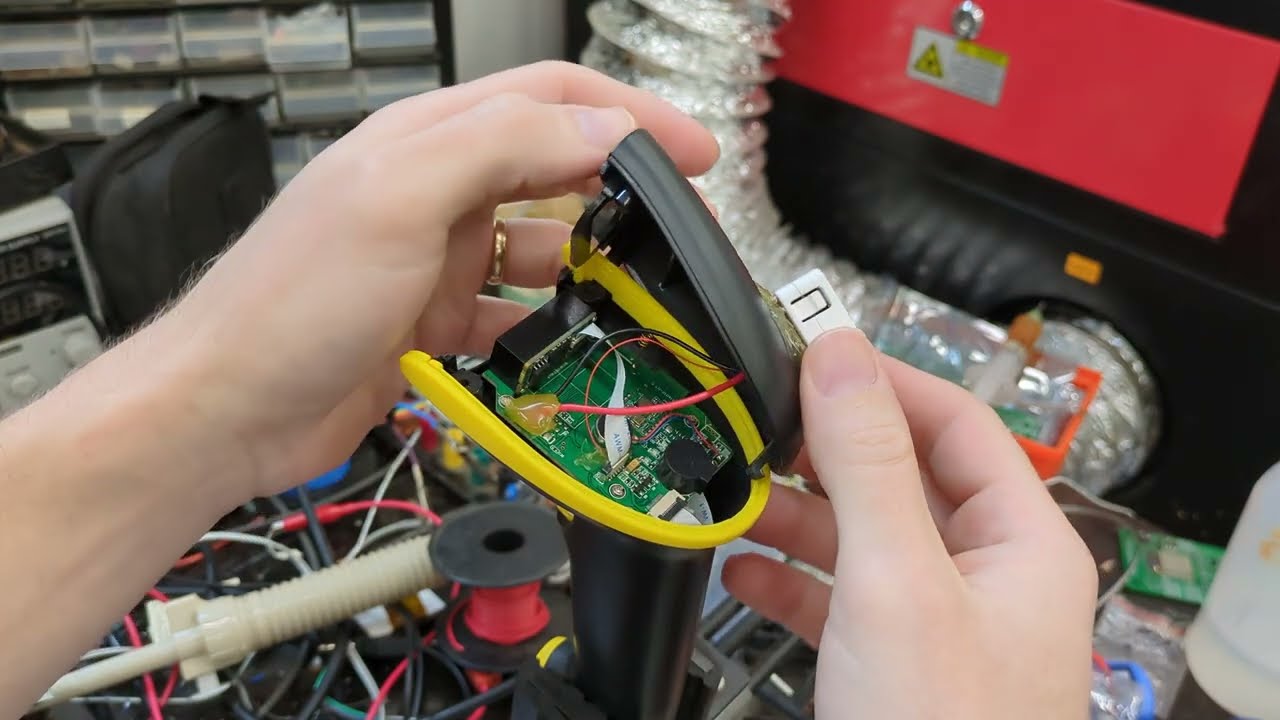
I mean it is wireless, but he seems to have connected the ESP with wires.
So as I see it. In a wired version this board he “taps” in to, does not exist. The wire going to USB is the equivalent.
Or do I miss something here?
I see what you mean
The transcript isn’t exactly clear
they reimplemented USB but I guess they needed to do that to get whatever functionality they needed Um so in terms of the stuff that I’m tapping into uh
Looking at the github it does seem as he just uses the UART TX of the scanner.
The code is:
uart:
   id: uart_bus
   baud_rate: 9600
   rx_pin: GPIO8
   debug:
    dummy_receiver: true
    sequence:
      # This runs when we scan a barcode.
      # First we tell grocy that we're adding, removing or zeroing the count on an item
      - lambda: |-
          std::string incoming(bytes.begin(), bytes.end());
          // Count the number of tabs in the incoming string.
          // This count will be the number of repeated scans
          // in this stream. There's a chance multiple different
          // barcodes will be jumbled together, but it's unlikely.
          int barcode_count = 0;
          int first_tab_index = -1;
          for (int i = 0; i < incoming.length(); i++) {
            if (incoming[i] == '\t') {
              barcode_count++;
              if (first_tab_index == -1) first_tab_index = i;
            }
          }

          id(barcode) = incoming.substr(0, first_tab_index);
          id(quantity) = "?";
          id(error) = "";
          id(payload) = "{\"amount\": \""+std::to_string(barcode_count)+"\"}";

          std::string action("");
          if (id(mode).state == "Add") {
            action = "add";
          } else if (id(mode).state == "Sub") {
            action = "consume";
          } else {
            action = "inventory";
            id(payload) = "{\"new_amount\": \"0\"}";
          }
          id(url) = "${grocy_url}/api/stock/products/by-barcode/"+id(barcode)+"/"+action;
But UART isn’t USB so, I guess the stuff coming form a USB cable is not the same.
So either I need to work out what is coming in the USB cable or run a separate wire back to the scanner and “tap” in to the scanner as he did.
Or go wireless, which opens up a lot of other issues. Like how to connect the scanner to an ESP and battery charging.
The charging of battery seems like such a small problem all of a sudden…
For me, it comes across as him describing that there are two USB interfaces. One delivering power and one providing data. The scan module attached to the carrier board doesn’t interpret all the scannable data via UART. Some of the processes, like the scanner’s setting (adjustable via the barcodes in the manual) are transferred via USB underlined in green.

He taps into the UART for data, but uses the unpopulated header(other USB) on the carrier board for powering his mods.
Yes that is what I meant.
I also managed to find this GitHub - danielBreitlauch/esphome_components and that seems like a good start.
Since I have had the Guition device in my thoughts as the screen then this should work if I use a USB A - USB C OTG adapter.
Perhaps…
Most usb barcode scanners act as usb hid keyboard. So I guess you can directly connect it to ESP32-S3-DevKitC using otg cable.
Yes, most of the scanners are serial output, which is connected via USB emulating either an UART/serial port or USB keyboard, and you just point it and it types in what it sees wherever the cursor is located.
If it’s emulating a USB serial device, then the USB Uart component on an S3 or S2 might work.
Interesting. Will try that too.
Do you have any insight on how this works?
I have tried all possible types but I get nothing.
I also tried adding USB host and tried with a few of those settings.
The scanner works, it scans but it beeps with “error sound”.
It does that also without the UART code.
Show your yaml and logs.
esphome:
  name: pos
  friendly_name: pos
  platformio_options:
    board_build.flash_mode: dio

esp32:
  board: esp32-s3-devkitc-1
  variant: esp32s3
  flash_size: 16MB
  framework:
    type: esp-idf
    sdkconfig_options:
      COMPILER_OPTIMIZATION_SIZE: y
      CONFIG_ESP32S3_DEFAULT_CPU_FREQ_240: "y"
      CONFIG_ESP32S3_DATA_CACHE_64KB: "y"
      CONFIG_ESP32S3_DATA_CACHE_LINE_64B: "y"
      CONFIG_SPIRAM_FETCH_INSTRUCTIONS: y
      CONFIG_SPIRAM_RODATA: y

psram:
  mode: octal
  speed: 80MHz

usb_host:
  enable_hubs: true
  devices:
    - id: device_0
      vid: 0
      pid: 0

usb_uart:
  - type: cdc_acm
    vid: 0
    pid: 0
    channels:
      - id: uch_1
        baud_rate: 9600
        buffer_size: 1024


# Enable logging
logger:

# Enable Home Assistant API
api:
  encryption:
    key: "ln7svk1Csrg1nsZhzpiJDybob+MJpE0PsJjGO68gYyA="

ota:
  - platform: esphome
    password: "c660977f5099bbfe0627b50975189b1c"


wifi:
  ssid: !secret wifi_ssid
  password: !secret wifi_password

  # Enable fallback hotspot (captive portal) in case wifi connection fails
  ap:
    ssid: "Pos Fallback Hotspot"
    password: "vuwXrlxLS0eo"

captive_portal:
Gives this:
INFO ESPHome 2025.7.5
INFO Reading configuration /config/esphome/pos.yaml...
INFO Starting log output from pos.local using esphome API
INFO Successfully resolved pos.local in 12.448s
INFO Successfully connected to pos @ 192.168.1.227 in 0.004s
INFO Successful handshake with pos @ 192.168.1.227 in 0.056s
[11:49:49][I][app:149]: ESPHome version 2025.7.5 compiled on Aug 15 2025, 16:30:16
[11:49:49][C][wifi:613]: WiFi:
[11:49:49][C][wifi:434]:   Local MAC: 8C:BF:EA:0D:BB:50
[11:49:49][C][wifi:439]:   SSID: [redacted]
[11:49:49][C][wifi:442]:   IP Address: 192.168.1.227
[11:49:49][C][wifi:446]:   BSSID: [redacted]
[11:49:49][C][wifi:446]:   Hostname: 'pos'
[11:49:49][C][wifi:446]:   Signal strength: -56 dB ▂▄▆█
[11:49:49][C][wifi:455]:   Channel: 2
[11:49:49][C][wifi:455]:   Subnet: 255.255.255.0
[11:49:49][C][wifi:455]:   Gateway: 192.168.1.1
[11:49:49][C][wifi:455]:   DNS1: 192.168.1.1
[11:49:49][C][wifi:455]:   DNS2: 0.0.0.0
[11:49:49][C][logger:246]: Logger:
[11:49:49][C][logger:246]:   Max Level: DEBUG
[11:49:49][C][logger:246]:   Initial Level: DEBUG
[11:49:49][C][logger:252]:   Log Baud Rate: 115200
[11:49:49][C][logger:252]:   Hardware UART: USB_SERIAL_JTAG
[11:49:49][C][logger:259]:   Task Log Buffer Size: 768
[11:49:49][C][usb_host:384]: USBClient
[11:49:49][C][usb_host:384]:   Vendor id 0000
[11:49:49][C][usb_host:384]:   Product id 0000
[11:49:49][C][usb_host:384]: USBClient
[11:49:49][C][usb_host:384]:   Vendor id 0000
[11:49:49][C][usb_host:384]:   Product id 0000
[11:49:49][C][usb_uart:177]:   UART Channel 0
[11:49:49][C][usb_uart:177]:     Baud Rate: 9600 baud
[11:49:49][C][usb_uart:177]:     Data Bits: 8
[11:49:49][C][usb_uart:177]:     Parity: NONE
[11:49:49][C][usb_uart:177]:     Stop bits: 1
[11:49:49][C][usb_uart:177]:     Debug: NO
[11:49:49][C][usb_uart:177]:     Dummy receiver: NO
[11:49:49][C][psram:016]: PSRAM:
[11:49:49][C][psram:019]:   Available: YES
[11:49:49][C][psram:021]:   Size: 8192 KB
[11:49:49][C][captive_portal:099]: Captive Portal:
[11:49:49][C][esphome.ota:073]: Over-The-Air updates:
[11:49:49][C][esphome.ota:073]:   Address: pos.local:3232
[11:49:49][C][esphome.ota:073]:   Version: 2
[11:49:49][C][esphome.ota:080]:   Password configured
[11:49:49][C][safe_mode:018]: Safe Mode:
[11:49:49][C][safe_mode:019]:   Boot considered successful after 60 seconds
[11:49:49][C][safe_mode:019]:   Invoke after 10 boot attempts
[11:49:49][C][safe_mode:019]:   Remain for 300 seconds
[11:49:49][C][web_server.ota:224]: Web Server OTA
[11:49:50][C][api:207]: API Server:
[11:49:50][C][api:207]:   Address: pos.local:6053
[11:49:50][C][api:212]:   Using noise encryption: YES
[11:49:50][C][mdns:122]: mDNS:
[11:49:50][C][mdns:122]:   Hostname: pos
[11:50:35][D][api:146]: Accept 192.168.1.147
[11:50:35][W][api.connection:122]: 192.168.1.147: Socket operation failed: BAD_INDICATOR errno=11
It’s as if it doesn’t recognize the scanner at all.
Are your serial port settings, DIP switches, connections, and voltages correct?
TTL vs RS232.
5V vs 3.3v.
OCR-A vs freeform.
Baud rate, stop bits and parity?
Yep, plug and pray! After all these years, you would think it was easy? Naah!
Cash registers are cheap these days and a suitable handheld scanner is only a bit extra. Debugging ESP firmware seems like so much effort for where a easy solution already exists.
You could also connect a handheld scanner via BLE to your cell phone and use an app to carry your cash register in your pocket.
Not sure where HomeAssistant would come into play hete.
Firstly, remove the device from the usb_host config - as the docs say this is not useful for anything much.
Your logger config should set UART0 as the hardware uart, you can’t use it for logs and USB host at the same time. If you don’t have a UART0 available for flashing and logs, set the logger baud rate to 0 to disable it.
What board are you using?
Watch the logs when you plug the USB device in. There should be messages about the device.
So you mean something like this?
usb_host:
  enable_hubs: true


usb_uart:
  - type: CP210X
    vid: 0
    pid: 0
    channels:
      - id: UART0
        baud_rate: 9600
        buffer_size: 1024


# Enable logging
logger:
  baud_rate: 0
And then I need to try different usb_uart → types?
I use this device ESP32-S3 4.0 Inch Development Board for Arduino LVGL WiFi Bluetooth 480*480 Smart Display LCD TFT Module IPS Touch Screen - AliExpress 7
And a noname USB 1D barcode scanner.
There are no dip switches as far as I know. It’s a complete product, not a component.
Voltage must be 5 since it’s USB, I have a hard time believing they would add power delivery to such a device.
3.3 volt would be out of spec for USB.
It’s not about cost.
It’s about flexibility. With a proper POS machine that uses scanners you need a database with prices and EAN codes. I don’t know for sure but I assume a server somewhere with that database? Networking to get it all connected, because using wifi is probably not going to be great.
With an ESP based system like this I’m planning on putting the prices in the barcodes which means all you need is a piece of paper with the prices/barcodes and power (which could be a USB power bank).
The actual transaction is done using the customers phone and a QR code on the screen.
So this has nothing to do with Home Assistant nor wifi really, but wifi would be a great tool to use to change parameters in the actual device.