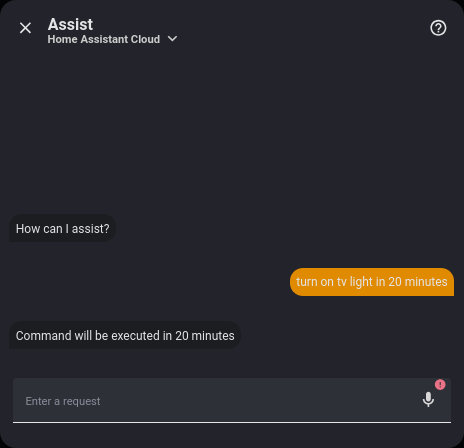
Sometimes I just want to turn off my bedroom lights in 30 minutes. Other times, I want to turn on my heater in 10 minutes. And sometimes, it’s the ceiling fan… I don’t want to create a dedicated helper and automation for every individual entity I might want to control this way.
I’d love to see Home Assistant provide a simple way to set up these timers directly from an entity’s More Info dialog. Lights already have options like favorites or effects on their More Info cards, so I think there’s room for a timer feature that lets you schedule an entity to turn on or off after a specified delay. This could work for lights, fans, switches, and other entities that support turning on and off.
I think the answer here is one-off timer based automations. So you could use Voice to say something like ‘do XYZ in 20 minutes’ and it creates a one-shot timer that after 20 minutes does XYZ.
That would enable a lot of functionality, such as reminder alarms, especially on Voice.
Everyone I know who has had a google home device basically just used it as a way to set timers via voice control.
I think that’s legitimately one of the only killer apps for that kind of thing. It’d be great if we could easily set timers that either perform a simple action or just alert when concluded.
Quite often I just want something to happen once, a bit later. For example: “start the robot vacuum in 30 minutes”, “turn on the car’s pre-heating in 1 hour” or “switch off the garden lights at 11 pm tonight”. I’m at my computer or on my phone right now, and I simply want to fire and forget.
Today there’s no simple way to do this in Home Assistant. The current workarounds is a timer or date/time helper plus an automation.
What I’d love to see:
A “Run later…” option in the more-info dialog of entities, scripts and scenes
Either a relative time (“in 30 min”) or a fixed one (“at 23:00”)
A list of pending scheduled actions where I can see, edit or cancel them
Scheduled actions that survive restarts
This would cover lots of everyday “just this once” cases without filling the system with single-use helpers and automations.
If there were a trigger for To Do items reaching their Due time, you could have a single automation that listens for that trigger then pipes the item summary to Assist…
That kind of thing can already be done with a Calendar event, though the event need to be at least 15 minutes in the future. You set up an automation that watches a specific calendar and pipes the calendar event’s summary or description into the conversation.process action. When you want to schedule a one-off action you add an event to the calendar with the appropriate command sentence like, “Set thermostat to 70 degrees”. This can also be done without leveraging Assist, but it requires a more template-heavy automation and structuring the data in the calendar event description
Many things I want Home Assistant to do happen only once, at a moment I choose, often with a bit of logic attached:
“Start the dishwasher at 22:30.”
“Start the washing machine as soon as the solar panels produce more than 1 kW, but no later than 16:00.”
“Open the blinds tomorrow at 9:00.”
“Turn off the heating in the guest room in 3 days.”
These aren’t recurring routines, so a full automation feels wrong. Today the options are:
An input_datetime plus an automation per device. This works, but needs a separate helper and automation for every device you might want to schedule. The logic is scattered, and “start when X happens” isn’t covered.
Scripts with delay or wait_for_trigger. These don’t survive a restart, you can’t easily see what’s pending, and cancelling means hunting down the running script.
Creating and then deleting a throwaway automation. This is clunky and clutters the automation list.
Custom components from HACS. These help, but every integration and dashboard ends up reinventing the same idea.
All of these technically work. The issue is that there’s no central, native place where one-off future actions live.
The proposal
A core concept of pending actions: a queue of actions that are scheduled but haven’t run yet.
Once an entry has run, been cancelled, or expired, it disappears from the queue.
Services
pending_action.create: add an entry, or replace it if the key already exists.
pending_action.cancel: remove an entry by key or ID.
pending_action.run_now: execute immediately and remove it from the queue.
pending_action.list: returns the queue as response data, so it can be used in scripts and templates.
UI
A “Scheduled” or “Pending” tab under Settings → Automations & Scenes that lists every pending action, its trigger, deadline and source, with cancel and run-now buttons.
A “Schedule…” option in the more-info dialog of entities, e.g. “Turn on at…” or “Turn off in…”, so non-technical household members can use it without touching YAML.
A dashboard card showing pending actions for a set of entities.
Why native, and not just helpers?
Restart-safe. Pending actions are stored and restored after a restart. Missed time triggers get a configurable grace period instead of silently disappearing.
One place to look. You can see what’s going to happen in your house, and cancel it, from one list.
A shared API for integrations. Integrations could use this instead of each building their own scheduling:
Appliance integrations (Home Connect, Miele…) offering “start when cheap or sunny”.
Dynamic tariff integrations (Nord Pool, ENTSO-E…) scheduling loads into the cheapest hours.
Energy management scheduling flexible devices around solar production.
Assist. “Open the blinds tomorrow at nine” or “turn off the lights in 20 minutes” maps directly to creating a pending action, and “cancel that” to cancelling it.
Less clutter. No more helper-plus-automation pairs for every device that occasionally needs a delayed start.
I have an input datetime that triggers my washing machine.
I could add an input text to write the entity it should trigger.
That could be your universal start/turn on things.
I guess you could add more logic to it to do more than just start.
Not as good as what you asked for, but this can get you at least some of the way right now:
I created an automation blueprint that looks for entity ids in a calendar event title or summary. If they are there, the entity is turned on when the event starts, and off when it ends. It also accepts scripts and timer id’s, they are started but not stopped.
Maybe you can extend this with a simple way to create the events in the calendar.
I’d love to see a native, general-purpose delayed-action feature in Home Assistant.
Today, if I want an action to execute after a certain amount of time, I generally have to use a delay in a script or automation, or build a solution around timer helpers or other helpers and additional automations.
But I don’t necessarily want to delay an entire automation or script. I want to schedule an individual action for later, independently of the execution flow.
Assign a delay to any individual action, natively. Option/tick-off to replace previously delayed actions
Continue executing subsequent actions immediately, without waiting for the delayed action. Automation/Script completes, but the action remain scheduled for execution.
Supporting functions:
Cancel a pending action before it runs.
Replace or reschedule an existing pending action when a new command for the same target arrives.
Simple use case;
Motion sensor controlling a light:
Motion detected → turn on the light.
No motion → action to turn off the light with a delay of 5 minutes.
Motion detected again before the 5 minutes expire → Automation in no. 1 run again with action to turn on the light, option selected to cancel all delayed actions for target.
This is a very common automation pattern, but implementing it currently requires helpers, timers or delays in the automation itself. In my opinion the delayed or scheduled action logic is much simpler and probably has a ton of use cases.
An existing example:
Indigo Domotics has offered this type of functionality for years through its delayed actions feature. You can delay individual actions and subsequently remove pending actions without having to manage the entire automation execution. This is where I used it all the time and have missed similar functionality in Home Assistant.
I think this would be a valuable native capability in Home Assistant, ideally available as a general action option that can be used from any automation or script.
Ok, agree that’s a better solution for my light example. And I use it myself.
Here is another use case:
I have an automation that stops the robotic lawn mower cuts power in case of a storm or thunder and lightning. I don’t necessarily want to turn it on again with an automation, but by confirming the weather is ok.
With a delayed or scheduled one-off action I could simply schedule an actionable notification in say 12 hours after cutting the power, or the next morning.
I know this can be accomplished in many ways, but a delayed action is simple and straight-forward.
Home assistant is a state- and event-driven platform. 90% of the time someone wants to use a delay, there is a more appropriate method without delays.
The motion light pattern that is recommended is to use for like this, from the cookbook:
triggers:
  - trigger: state
    entity_id: binary_sensor.your_motion_sensor_here # change this
    to: 'on'
  - trigger: state
    entity_id: binary_sensor.your_motion_sensor_here # change this
    to: 'off'
    for:
      minutes: 2 # adjust as necessary
actions:
  - action: "light.turn_{{ trigger.to_state.state }}"
    target:
      entity_id: light.your_light_here # change this