I find notifying people of stuff quite annoying. currently you notify devices, not people, which is counter intuitive.
I had a lot of automations with notifications. then my wife had a phone issue and for some reason a new device was created when she reinstalled everything. I had to go and fix things to point to the new entity.
an important notification came up while I work but I left the phone in the kitchen? I should get it on my laptop. Do I really need to maintain a list of every device where I install the app?
I think the paradigm should change. I should be able to pick users when creating notifications and it should be hass problem to pick a device (or more) to notify.
Notifications are much harder than seems reasonable, and partial efforts over the years (such as the new UI-based notify groups) have made the situation worse, not better.
Most notification scenarios are pretty straightforward: Send this message to these members of the household. Home Assistant doesn’t provide helpful abstractions to make this easy, or to make ongoing maintenance easier. A few examples of WTH-worthy notification issues:
iOS and Android have slightly different syntaxes to perform the same action - creating an actionable notification is similar, but incompatible, for instance. I shouldn’t have to care which device I’m writing a notification for in most cases.
Why do I have to target “devices” (more or less) rather than “people?” I don’t want to dig through dozens of automations to fix every location where a replaced device is located, and alternatives like creating YAML groups for notifiers seem like a step backwards.
Why were the new UI-configurable notify groups pushed out without any(?) supported platforms? This was confusing for me, and I’ve been using HA for almost a decade!
Why do I have to delve into the developer docs every time I want to do anything more advanced than “title and message” notifications? The more-advanced capabilities have not evolved much past their YAML roots.
Edit: I’m not sure if this is quite in the spirit of “one issue per notification” but I think these examples are all around the same core issue. Easy to split up if preferred.
I’ve been using the Ticker integration in hacs. It lets my wife decide which notifications she wants to receive or not. (I have it default to not send)
It would be nice if home assistant had at least some of these functions built in.
Before ticker came along, I just never used notifications. Too hard to configure, breaks super easy, then if you change device then good luck finding every instance that pointed to that device.
I have even tried naming devices the same as old, so the entity ids are the same. but ran into issues with my wife’s phone (you know, the one that actually mattered that things go smoothly)
@sanzky
Yes it indeed would be very helpful if you could send a notification to a person, instead of to a device. If I am not mistaken, there is already a roadmap item that should cover this: Notifying someone is simple · Issue #14 · OpenHomeFoundation/roadmap
Unfortunately that roadmap item has been blocked recently by another roadmap item, so it won’t arrive very soon I assume…
+1. I would LOVE for this to be improved. I built a script that allows me to generalize notifications (including nearly all optional notification features), but we shouldn’t have to do that to send a notification.
They sill have not even made Notification Groups to be 1st class citizens… it literally the easiest thing they (or AI) could do.
Someone from the core team needs to sit with users (like myself) who have years / decades of experience with multiple HA systems and have seen how good notification systems should work.
My integrations and blueprints strongly hint at some of the needed functionality…
Alert Ticker (they just added alerts to HA 11.x :: Alert Ticker is 1000x more functional)…
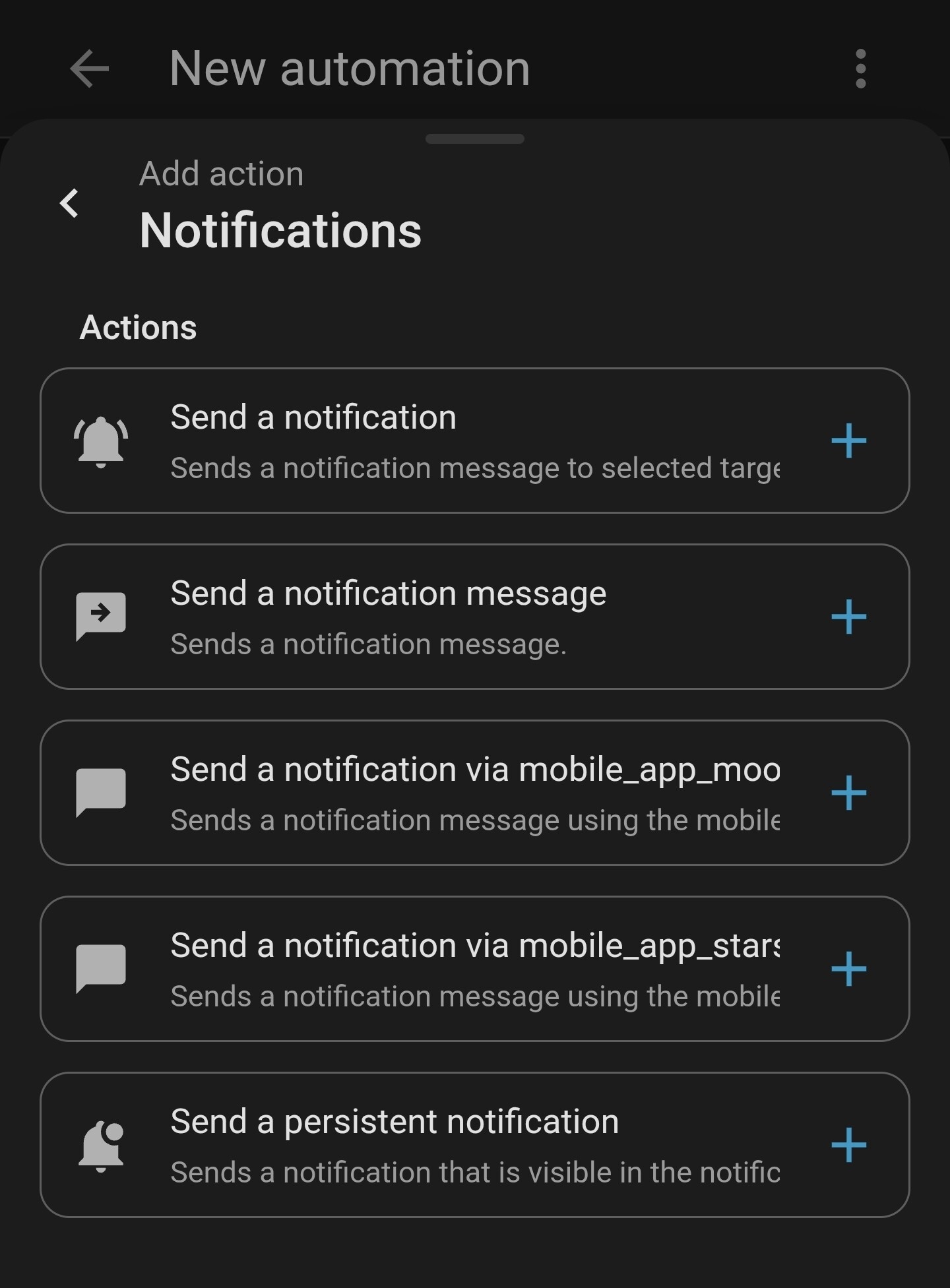
WTH are these automation notification descriptions? Every single time I make an automation, I can’t remember the differences between all the notification types, and waste 5min reading docs and scratching my head, and eventually going back to a previous automation to see what I did previously.
“Send via mobile_app_, xxx” is clear, but usually I want to send to ALL phones, not just one. It’s annoying to have to copy-paste my message and title to both phone actions.
“Send a persistent notification” initially made me think it’s a smartphone notification which is hidden by default but always there with a status. Like I have for AnkiDroid, my smart watch, car, etc. I’ve since learned this is for the HA UI notifications pane. How is “persistent” a reasonable description for that? It should be named “Send to notifications panel”.
“Send to selected targets” seems promising, but then clicking into it you apparently have to type the exact correct YAML or Jinja or whatever to get the desired targets. How the heck do I target the built in notifications panel?
“Send a notification” is meaningless. To where??? Clicking the help to read more says it’s for smart speakers, browsers, etc. OK I guess that doesn’t apply to me.
I struggle with this all the time. The new ways seem to work well. There seems to be a dependency on nabu casa subscription but maybe that’s only for tts notifications.
Nonetheless, I think it would be good to at least hide and possibly deprecate older methods and simplify the notification options in the UI as far as possible.
To address this, I use a script per person (Notify_A, Notify_B, etc…), which takes the same parameters as the notify function.
Then in all automation I only call those scripts, so updating a person notification method applies to every automation.
You can also have an extra parameter to the script if you want to select between several means of reaching a person.
Here is my script:
alias: Notify A
icon: mdi:notification-clear-all
mode: parallel
max: 10
fields:
  title:
    name: Title
    description: Notification title
    required: true
    selector:
      text: {}
  message:
    name: Message
    description: Notification message
    required: true
    selector:
      text: {}
  data:
    name: Data
    description: Additional notification data
    required: false
    advanced: true
    selector:
      text: {}
sequence:
  - data:
      title: '{{ title | default('''') }}'
      message: '{{ message | default('''') }}'
      data: '{{ data |default({}) }}'
    action: notify.mobile_app_iphone_a
description: ''
This originated from a old gist I cannot find anymore, about notifying people at home. So there is a similar script that call the notification script for only the people that are at home. It also store those notifications in case nobody is at home, so you get it when you come home.
It would also be very handy if you could save a notification to a history channel which would work on iOS and android. When you click the notification it would then open the history channel. Each history channel could then have a default max age, which would be cleared if the notifications are old enough.
This would help for doorbel notifications with an image for example.
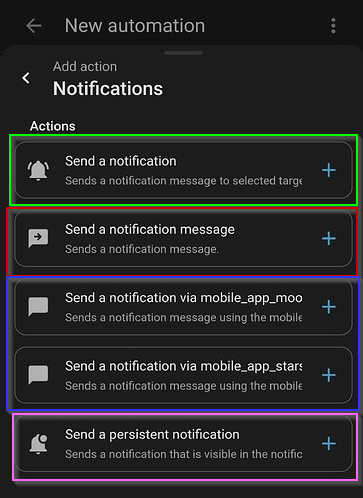
The first one (green) is the notify.notify action. I actually never used this one in the GUI. It’s a legacy action, which should probably be avoided. See the specific docs for more details
The second one is (red) notify.send_message. It supports notify entities which were added in the last year or so. They have also been added for the mobile app integration. It’s a modern action which can be used to target multiple notify entities in one go. Disadvantages are that not all integrations already provide notify entities, and that it only supports title and message, no further data like attachments, custom icons, actionable buttons etc.
Then you have the notify actions from the mobile app. These are now still needed when you want to send an attachment with your notification, or other data like mentioned in the previous bullet point.
The last one (pink) is to send a persistent notification which is shown in the HA interface in the notification bar ( icon)
In the past, before the notify entities were added, integrations all provided their own notify actions. Each action had their own settings and way of working. There was (and sill is) an option to create a notify group in YAML which combines these actions in one group so you can easily target all of them. This notify group then creates it’s own action. This is also what @joshward9182 shows in his screenshot.
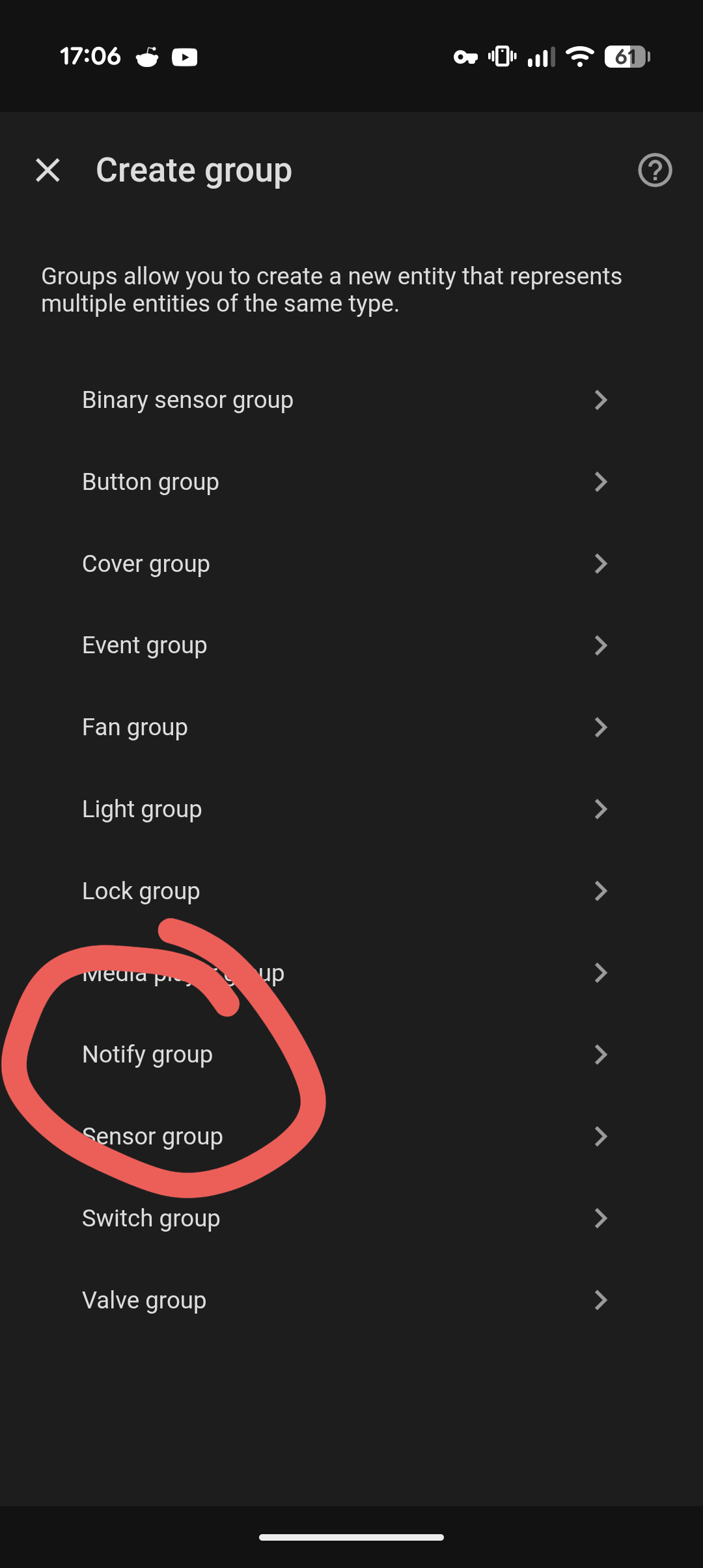
It is also possible to create a notify group in the GUI, and this can be used for the more modern notify entities, but not for the actions.
The notify entites were added to make it easier to send notifications, and in a way they do, but as we now have a mixed approach with both entities and actions it has made it more complicated.
For the future I expect that the integration specific notify actions will be deprecated, and notify.notify as well. So from your the screenshot above that would leave the red one to target notify entities and maybe the pink one for persistent notifications.
Then you can use the notify.send_message action to send simple notifications with only title and message, which can also target a group of notify entities.
For the more advanced notifications you need to use integration specific actions, but they will use the intergration domain. e.g. smtp.send_message for e-mails using the SMTP integration, and telegram_bot.send_message for Telegram messages to integrated telegram bots.
Such an action is still missing for the mobile app integration, I hope it will be added in the near future as it would make it a lot easier to create blueprints for the more advanced messages sent using the mobile app integration.
Anyway, I guess this proves that notifying people is still hard, and needs improvement
Exactly! I can always eventually figure it out, I like to think I’m a smart guy. And I can appreciate that supporting complex advanced notification behavior requires a sophisticated UI.
But I think most people starting out would be much happier with just one “notify” ability, with only one text box, and by default it goes literally everywhere. Five seconds to configure for 80% of the benefit.
It seems like, though it would have caused a huge breaking change at the time, the situation has only been made worse by allowing the Mobile App to continue to use the notify service domain instead of switching to it’s own domain for complex notifications like SMTP, Telegram, etc. That, at least, would have made the delineation between simple and complex types apparent.
And really… the same goes for Persistent notifications. IIRC, the persistent_notification entities were removed more than 2 years ago. So, now they are essentially just a simple notification which should be handled by notify.send_message… but, for some reason they still add two services to the list.
I voted for this as well, but I have created a blueprint script to solve it. Which means it is doable. The downside of this script is that templating does not support listing of the services of a device, so find/replace is the way, but it works!
In the last release I added People to the Other group in the trigger and condition pickers. You can now target a person directly, not just floors, areas, devices and entities. Before that, people ended up under Unassigned, because hardly anyone assigns a person to an area.
Actions don’t have this yet. People still aren’t a top-level choice there. I’ve been working on a mockup that brings notify.send_message to the front, with a redesigned UI for configuring it. The goal is that anyone can send a notification without digging through the docs or asking an AI to write the YAML.
It will need some changes in core before it can ship, but I’d love your feedback on the direction first:


 icon)


