Zwave multicast is awesome, however it can be difficult to use. I’m not sure how many people actually use it. It took me quite some time to generate a script that turns on/off lights and switches at the exact same time. The script requires a ton of upkeep because you have to be a wizard in Jinja and you need to understand zwave endpoints.
It would be great if there were 2 services that handled this for us.
zwave.multicast_on
zwave.multicast_off
In its first round, it would simply be an on off service that handles basic command class on/off values.
Zwave under the hood knows all the information required to make this work, so they should handle the binning and multicasting.
I envision the multicast on/off would bin all command classes together first, then bin endpoints second to minimize the number of mutlicast calls. We’d only need to support command class 38 (lights) and 37 (switches) first because this pretty much covers all on/off style actions in zwave.
The on service would accept a brightness value or nothing and properly pass it to each command class. 38 would get the brightness value translated to a range of 0 to 99, and 37 would be greater than 0 is True and 0 is False.
I currently have a script that handles this, however it heavily relies on labels and a config that matches under the hood values in zwave. It can be seen here
I think it’s supposed to. Or was last. Time I spoke with Fresh about it (I have a bank of 6 windows on the front of the house that (should) use it. Rn it’s not because one of the blinds joined improperly and is not using the same security level as the other 5… Apparently that breaks it. As soon as I fix that I’m back to trying this again.
But of course that one blind is 16 feet in the air and needs a ladder to reach the button…
Yes, this should account for covers. I remember someone requesting to add this to my script and we did pretty easily. I’m pretty sure they use command class 38 (same as light) for the tilt. I could be wrong. Either way, it would be great if there was a one stop stop for on/off open/close operations using zwave multicast.
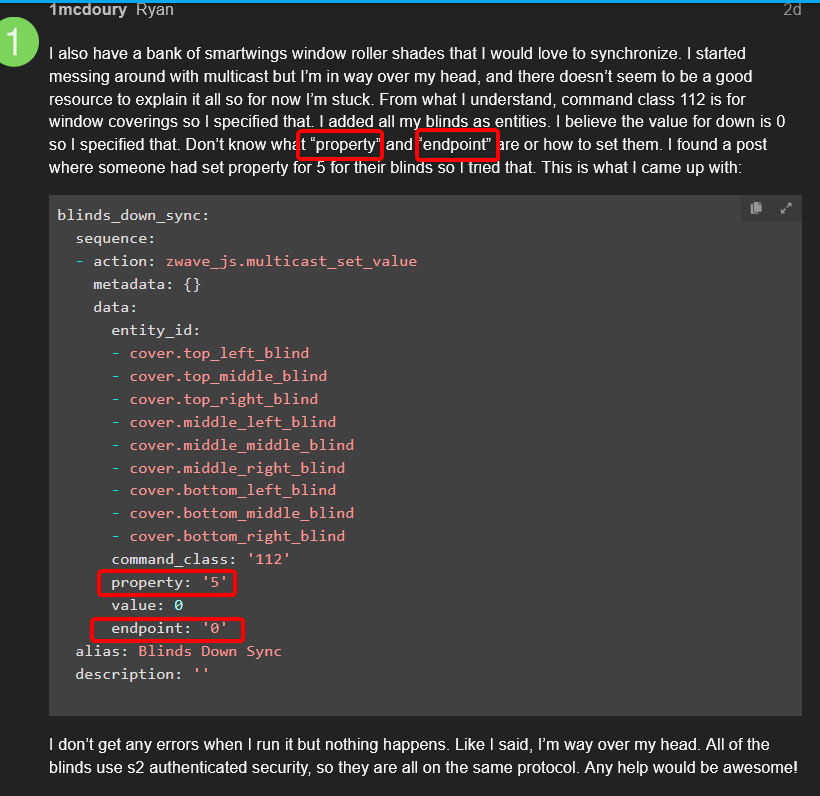
I also have a bank of smartwings window roller shades that I would love to synchronize. I started messing around with multicast but I’m in way over my head, and there doesn’t seem to be a good resource to explain it all so for now I’m stuck. From what I understand, command class 112 is for window coverings so I specified that. I added all my blinds as entities. I believe the value for down is 0 so I specified that. Don’t know what “property” and “endpoint” are or how to set them. I found a post where someone had set property for 5 for their blinds so I tried that. This is what I came up with:
I don’t get any errors when I run it but nothing happens. Like I said, I’m way over my head. All of the blinds use s2 authenticated security, so they are all on the same protocol. Any help would be awesome!
You can only get property and endpoint information from the device in question by looking at it’s diagnostics. Either in ZJS UI, Download Diagnostics from the device (then find it), or if you just know it.
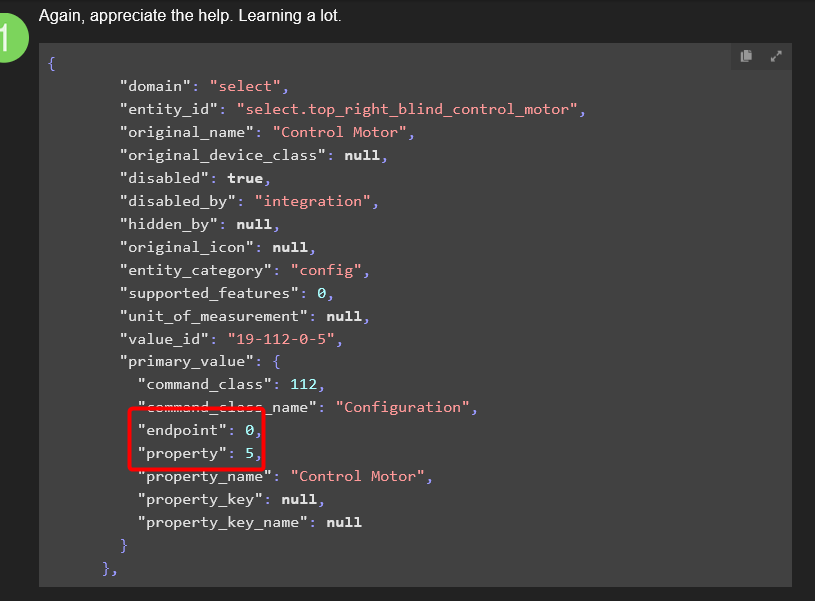
Thanks for the help. I downloaded the diagnostics to see if I could get any further as you suggested. Not exactly sure what I’m looking at but this seems like it might be the correct place to look?
It looks like my original shot in the dark on property and endpoint might have been correct according to this? If so I’m not sure why it isn’t working.
Could it be a different entity that I need to specify? Looking through the diagnostics I’m not sure any others make sense.
Ok. Got that done. Ran the script and nothing happened. But I may have noticed another problem. In my script I call out the cover entity. The diagnostic I sent was for the select control motor entity. Here is the entity for cover in the diagnostics.
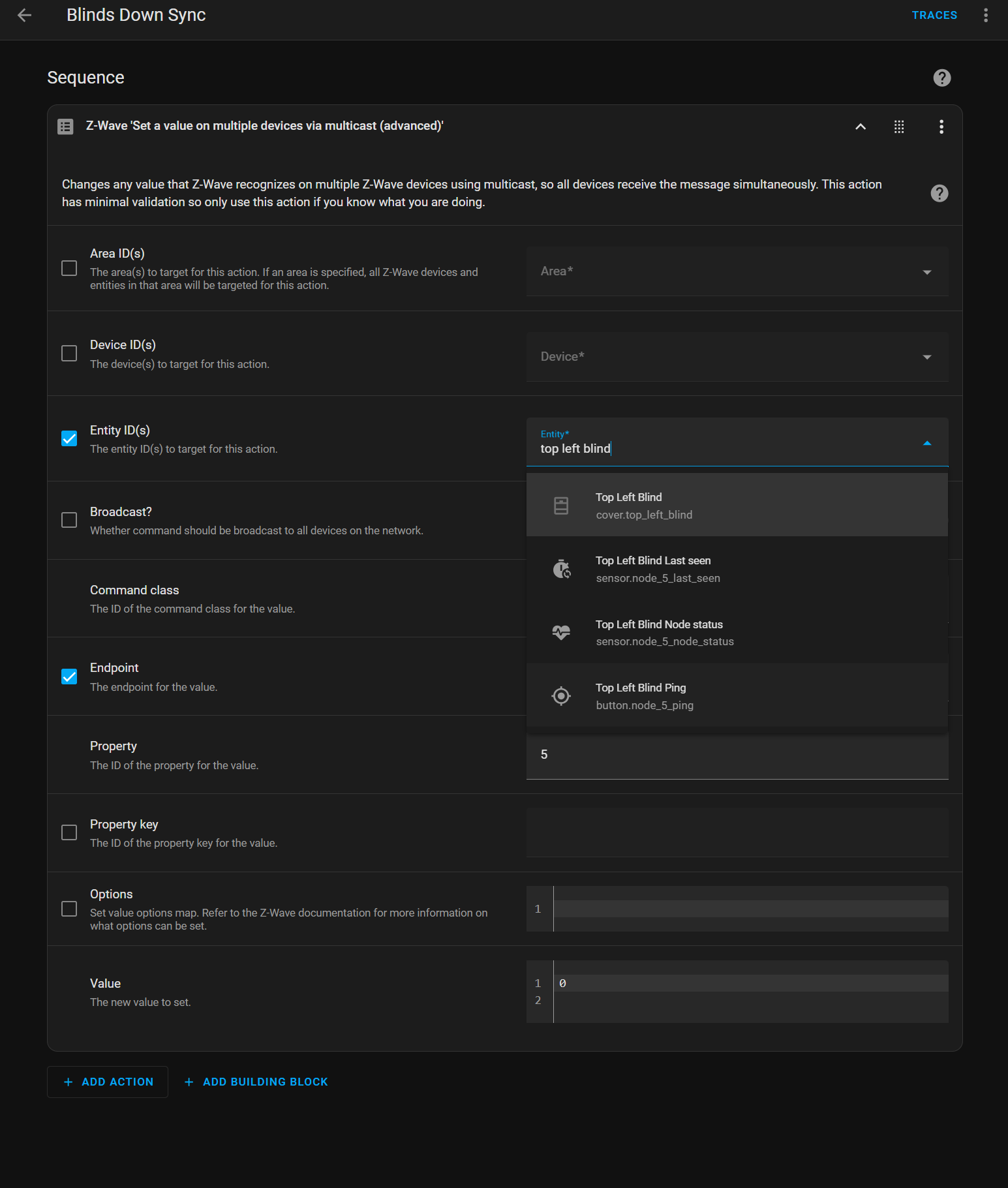
No dice. No errors but blinds don’t move. After I tried it I went into the ui to see if the select entities popped up when I started typing them but nothing starts to autofill. The cover entity does autofill so HA does see the cover but not select. Diagnostics show the select entity as disabled by integration so that may be why?
The cover entity from diagnostics has a command class of 38 and is a “Multilevel Switch.” I would try to change the command class to 38 but I don’t know what I would put in for the propery. It says “currentValue” in the diagnostics.
All the service does is run a function against the node with the supplied information. The node is generated from the list of entity ids. So you just need to use a known entity_id that can link to the node.
So if I’m understanding correctly I can use any of these to link to the node? I have all of the blinds in an area. Could I specify the area instead? Would that make it simpler? Not sure what to try from here.
Success! Kind of… The script works but the blinds aren’t as synchronized as I would have hoped. To get them working I changed the command class to multi-level switch (38) from cover (112). I changed property to targetValue instead of 5. Here is the working code:
It seems like they are a little more in sync than they were without multicast, but the difference probably wasn’t worth the effort. I’ll still change my automation to use the script to open and close, but I’m a bit dissapointed in the result.
Thanks for the help. Hope someone finds this if they are having the same issues as me.