I’ll give your image approach a try, that seems to be loading OK right now. Thanks!

Glad you got it working. Looks good.
I’ve rewritten a section of puppet to provide 1-bit (binary) BMP files, taking the images from 1mb down to 48k!
Hopefully the PR is picked up, as it makes my C3 Xiao actually usable. Also, it seems to solve many of the dithering artifact issues (especially if you invert the colors then invert them again on application).
You can test my puppet revision locally, code is here. And here is my config:
online_image:
  - id: dashboard_image
    format: BMP
    type: binary
    buffer_size: 30000
    url: HA-URL/DASHBOARD/?device=seeed-reterminal-e1002&format=bmp&lang=en-GB&bmp_mode=binary
    update_interval: 30s
    on_download_finished:
      - delay: 0ms
      - component.update: main_display

spi:
  clk_pin: GPIO8
  mosi_pin: GPIO10

display:
  - platform: waveshare_epaper
    id: main_display
    cs_pin: GPIO3
    dc_pin: GPIO5
    busy_pin:
      number: GPIO4
      inverted: true
    reset_pin: GPIO2
    model: 7.50inv2
    update_interval: never
    lambda: |-
      it.image(0, 0, id(dashboard_image));
Nice. I’ll have to give it a try. Thanks.
John
Why do you need 1 minute refreshes ? I would expect a refresh takes a second?
Within that minute I expect it to refresh several times. Or do I misunderstand somethings?
I got a reTerminal E1002 Color eink display and redid some of my dashboard (I’ll post it in a new thread). I ported some of those changes to the XIAO 7.5" BW and also changed it so that it goes to sleep after the refreshing the display (waits 30 seconds). Below is the new YAML for both.
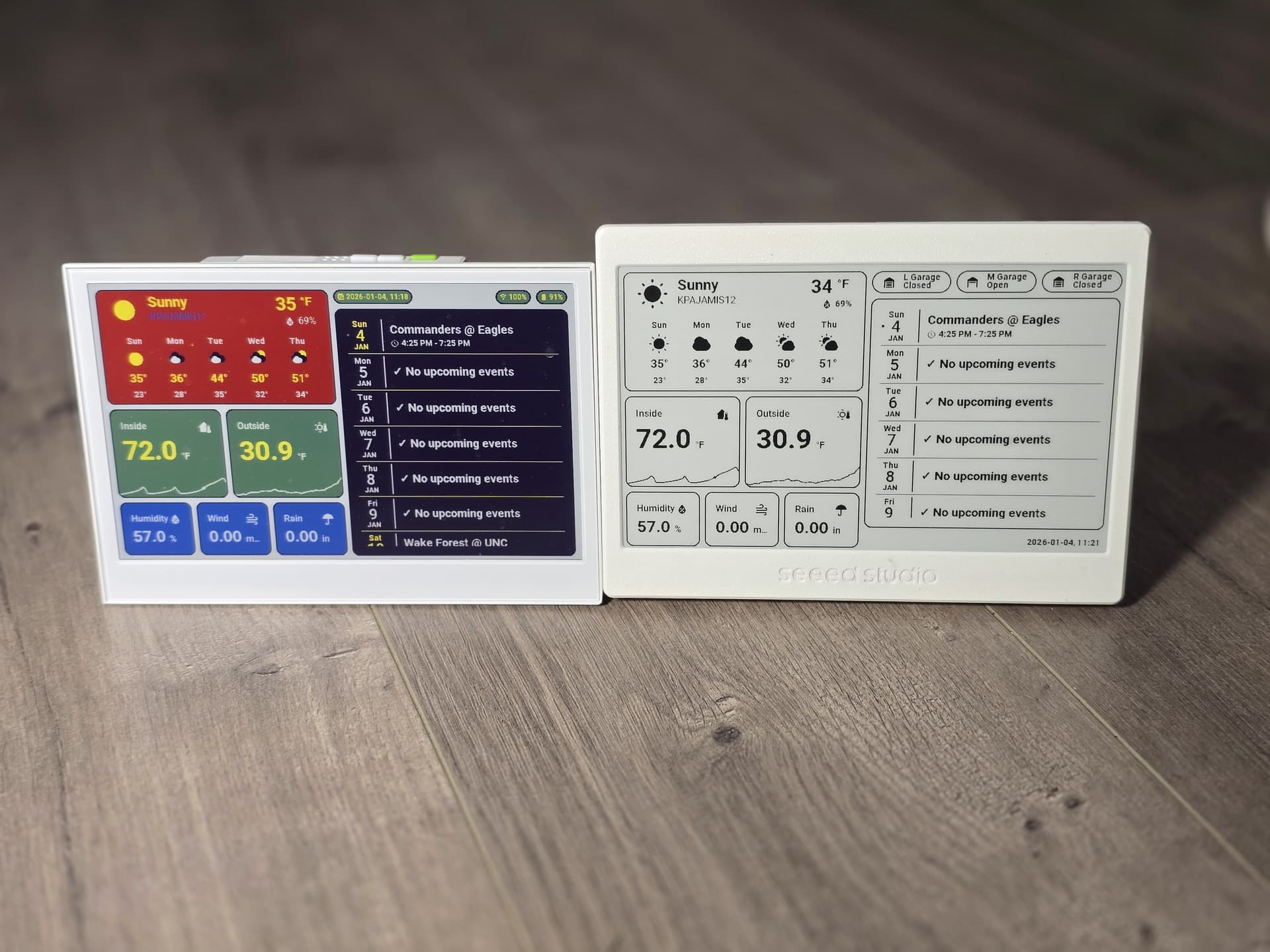
ESPHome Builder YAML
esphome:
  name: "xiao75epaperpanel"
  friendly_name: BWeInkDisplay
  on_boot:
    - priority: -100
      then:
        - logger.log: "*** Device woke up from deep sleep ***"
        - delay: 1s
        - logger.log: "*** Starting application ***"

esp32:
  board: esp32-c3-devkitm-1
  framework:
#    type: arduino
    type: esp-idf
# Enable logging
logger:

# Enable Home Assistant API
api:
  encryption:
    key: "<Your API Key>"
  on_client_connected:
    - logger.log:
        format: "*** Client %s connected to API with IP %s ***"
        args: ["client_info.c_str()", "client_address.c_str()"]

ota:
  - platform: esphome
    password: "<Your OTA Password>"

wifi:
  ssid: !secret wifi_ssid
  password: !secret wifi_password
  min_auth_mode: WPA2
  on_connect:
    then:
      - lambda: |-
          id(wifi_status) = 1;
      - logger.log: "*** WiFi Connected Successfully! ***"
      - delay: 1s
      - component.update: dashboard_image
  on_disconnect:
    then:
      - lambda: |-
          id(wifi_status) = 0;
      - logger.log: "*** WiFi Disconnected ***"
  ap:
    ssid: "BWeInkDisplayFallbackHotspot"
    password: "<Your Fall Back PW>"


captive_portal:

globals:
  - id: wifi_status
    type: int
    restore_value: no
    initial_value: "0"
  - id: recorded_display_refresh
    type: int
    restore_value: yes
    initial_value: '0'

# Here is deep sleep part
deep_sleep:
  id: deep_sleep_1
  run_duration: 120min  # Device wake up and run 60s (enough to pull data and update) - This shouldn't execute
  sleep_duration: 30min  # deep sleep for 30m

http_request:
  verify_ssl: false
  timeout: 20s
  watchdog_timeout: 25s

online_image:
  - id: dashboard_image
    format: BMP
    type: BINARY
    buffer_size: 48000
    url: http://192.168.1.101:10000/dashboard-robin/display-bw?viewport=800x480&eink=2&invert&format=bmp #change this link to your screenshot link
#    update_interval: 20s #Not needed now
    on_download_finished:
      - component.update: main_display
      - delay: 30s  #Change to the delay you want
      - deep_sleep.enter: deep_sleep_1
    on_error:
      - delay: 30s
      - deep_sleep.enter: deep_sleep_1

spi:
  clk_pin: GPIO8
  mosi_pin: GPIO10

display:
  - platform: waveshare_epaper
    id: main_display
    cs_pin: GPIO3
    dc_pin: GPIO5
    busy_pin:
      number: GPIO4
      inverted: true
    reset_pin: GPIO2
    model: 7.50inv2
    update_interval: never
    lambda: |-
      it.image(0, 0, id(dashboard_image));

time:
  - platform: homeassistant
    id: homeassistant_time

sensor:
  - platform: wifi_signal # Reports the WiFi signal strength/RSSI in dB
    update_interval: 60s
    name: "WiFi Signal dB"
    id: wifi_signal_db
    entity_category: "diagnostic"
  - platform: copy # Reports the WiFi signal strength in %
    source_id: wifi_signal_db
    name: "WiFi Signal Percent"
    id: wifi_signal_percent
    filters:
      - lambda: return min(max(2 * (x + 100.0), 0.0), 100.0);
    unit_of_measurement: "Signal %"
    entity_category: "diagnostic"
  - platform: uptime
    update_interval: 60s
    name: Uptime
  - platform: internal_temperature
    update_interval: 60s
    name: "Internal Temperature"
  - platform: template
    update_interval: 60s
    name: "Display Last Update"
    device_class: timestamp
    entity_category: "diagnostic"
    id: display_last_update
    lambda: 'return id(homeassistant_time).now().timestamp;'
  - platform: template
    name: "Display Refresh Count"
    accuracy_decimals: 0
    unit_of_measurement: "Refreshes"
    state_class: "total_increasing"
    entity_category: "diagnostic"
    lambda: 'return id(recorded_display_refresh) += 1;'
Dashboard YAML
type: masonry
path: display-bw
title: Display-BW
cards:
- type: vertical-stack
cards:
- show_current: true
show_forecast: true
type: weather-forecast
entity: weather.kpajamis12
forecast_type: daily
secondary_info_attribute: humidity
card_mod:
style: |
:host {
--weather-icon-clear-night: url("/local/community/weather-card-pics/icons8-moon-and-stars-100.png");
--weather-icon-cloudy: url("/local/community/weather-card-pics/icons8-cloud-100.png");
--weather-icon-fog: url("/local/community/weather-card-pics/icons8-fog-100.png");
--weather-icon-lightning: url("/local/community/weather-card-pics/icons8-cloud-lightning-100.png");
--weather-icon-lightning-rainy: url("/local/community/weather-card-pics/icons8-stormy-weather-100.png");
--weather-icon-partlycloudy: url("/local/community/weather-card-pics/icons8-partly-cloudy-day-100.png");
--weather-icon-pouring: url("/local/community/weather-card-pics/icons8-torrential-rain-100.png");
--weather-icon-rainy: url("/local/community/weather-card-pics/icons8-rain-100.png");
--weather-icon-hail: url("/local/community/weather-card-pics/icons8-snow-storm-100.png");
--weather-icon-snowy: url("/local/community/weather-card-pics/icons8-snow-100.png");
--weather-icon-snowy-rainy: url("/local/community/weather-card-pics/icons8-snow-100.png");
--weather-icon-sunny: url("/local/community/weather-card-pics/icons8-sun-100.png");
--weather-icon-windy: url("/local/community/weather-card-pics/icons8-wind-100.png");
--weather-icon-windy-variant: url("/local/community/weather-card-pics/icons8-wind-100.png");
--weather-icon-exceptional: url("/local/community/weather-card-pics/icons8-rainbow-100.png");
}
ha-card {
border: 2px solid black;
padding: 5px !important;
background: white;
}
.name-state .name {
color: black;
font-size: 16px;
}
.name-state .state {
color: black;
font-weight: bold;
font-size: 10px;
}
.temp-attribute .temp {
color: black;
font-weight: bold;
font-size: 30px !important;
}
.temp-attribute .temp span {
color: black;
font-weight: bold;
font-size: 20px !important;
}
.temp-attribute .attribute {
color: black;
font-weight: bold;
}
.forecast .temp {
color: black;
}
.forecast .templow {
color: black;
font-weight: bold;
font-size: 14px;
}
.forecast div {
font-weight: bold;
color: black;
}
ha-card div.forecast div.temp {
font-size: 14pt;
}
- type: horizontal-stack
cards:
- graph: line
type: sensor
detail: 2
entity: sensor.home_thermostat_air_temperature
name: Inside
icon: mdi:home-thermometer
hours_to_show: 12
card_mod:
style: |
.header .icon {
color: black;
}
ha-card {
border: 2px solid black;
--primary-text-color: black;
font-weight: bold;
--secondary-text-color: black;
background: white;
--accent-color: black;
--ha-font-size-3xl: 46px;
}
- graph: line
type: sensor
detail: 2
name: Outside
icon: mdi:sun-thermometer-outline
hours_to_show: 12
entity: sensor.back_deck_temp_temperature
card_mod:
style: |
.header .icon {
color: black;
}
ha-card {
border: 2px solid black;
--primary-text-color: black;
font-weight: bold;
--secondary-text-color: black;
background: white;
--accent-color: black;
--ha-font-size-3xl: 46px;
}
- type: horizontal-stack
cards:
- graph: none
type: sensor
detail: 2
icon: ""
hours_to_show: 12
entity: sensor.back_deck_temp_humidity
name: Humidity
card_mod:
style: |
.header .icon {
color: black;
}
ha-card {
border: 2px solid black;
--primary-text-color: black;
font-weight: bold;
--secondary-text-color: black;
background: white;
--accent-color: black;
}
- graph: none
type: sensor
detail: 2
entity: sensor.topwindspeedhr
name: Wind
icon: mdi:weather-windy
hours_to_show: 12
card_mod:
style: |
.header .icon {
color: black;
}
ha-card {
border: 2px solid black;
--primary-text-color: black;
font-weight: bold;
--secondary-text-color: black;
background: white;
--accent-color: black;
}
- graph: none
type: sensor
detail: 2
name: Rain
icon: ""
hours_to_show: 24
entity: sensor.kpajamis12_precipitation_today
card_mod:
style: |
.header .icon {
color: black;
}
ha-card {
border: 2px solid black;
--secondary-text-color: black;
font-weight: bold;
--primary-text-color: black;
background: white;
--accent-color: black;
}
- type: vertical-stack
cards:
- type: horizontal-stack
cards:
- type: custom:mod-card
card:
type: custom:mushroom-template-badge
content: "{{states('cover.ratgdov25i_1bdf3a_door') | capitalize }}"
icon: |
{% if is_state('cover.ratgdov25i_1bdf3a_door', 'closed') %}
mdi:garage
{% else %}
mdi:garage-open
{% endif %}
color: black
entity: cover.ratgdov25i_1bdf3a_door
label: L Garage
tap_action:
action: more-info
card_mod:
style:
mushroom-template-badge:
$: |
.badge {
--divider-color: black;
--ha-card-border-width: 2px;
--mdc-icon-size: 28px !important;
.info {
.label {
font-size: 14px;
font-weight: bold;
--secondary-text-color: black;
}
.content {
font-size: 14px;
font-weight: bold;
}
}
.: |
ha-card {
background: none;
border: none;
}
- type: custom:mod-card
card:
type: custom:mushroom-template-badge
content: "{{states('cover.ratgdov25i_1ba3c0_door') | capitalize }}"
icon: |
{% if is_state('cover.ratgdov25i_1ba3c0_door', 'closed') %}
mdi:garage
{% else %}
mdi:garage-open
{% endif %}
color: black
entity: cover.ratgdov25i_1ba3c0_door
label: M Garage
tap_action:
action: more-info
card_mod:
style:
mushroom-template-badge:
$: |
.badge {
--divider-color: black;
--ha-card-border-width: 2px;
--mdc-icon-size: 28px !important;
.info {
.label {
font-size: 14px;
font-weight: bold;
--secondary-text-color: black;
}
.content {
font-size: 14px;
font-weight: bold;
}
}
.: |
ha-card {
background: none;
border: none;
}
- type: custom:mod-card
card:
type: custom:mushroom-template-badge
content: "{{states('cover.ratgdov25i_1ba3c8_door') | capitalize }}"
icon: |
{% if is_state('cover.ratgdov25i_1ba3c8_door', 'closed') %}
mdi:garage
{% else %}
mdi:garage-open
{% endif %}
color: black
entity: cover.ratgdov25i_1ba3c8_door
label: R Garage
tap_action:
action: more-info
card_mod:
style:
mushroom-template-badge:
$: |
.badge {
--divider-color: black;
--ha-card-border-width: 2px;
--mdc-icon-size: 28px !important;
.info {
.label {
font-size: 14px;
font-weight: bold;
--secondary-text-color: black;
}
.content {
font-size: 14px;
font-weight: bold;
}
}
.: |
ha-card {
background: none;
border: none;
}
- entities:
- entity: calendar.birthdays
show_time: true
color: black
accent_color: black
- entity: calendar.philadelphia_phillies
show_time: true
color: black
accent_color: black
- entity: calendar.carolina_panthers
show_time: true
color: black
accent_color: black
- entity: calendar.holidays_in_united_states
show_time: true
split_multiday_events: false
color: black
accent_color: black
- entity: calendar.north_carolina_tar_heels_men_s_basketball
show_time: true
color: black
accent_color: black
- entity: calendar.philadelphia_eagles
show_time: true
color: black
accent_color: black
- entity: calendar.john_w_waters_gmail_com
show_time: true
color: black
accent_color: black
days_to_show: 7
show_empty_days: true
filter_duplicates: true
title: ""
title_color: ""
background_color: white
accent_color: black
day_spacing: 4px
event_spacing: 2px
height: 350px
day_separator_width: 1px
day_separator_color: black
today_indicator: dot
today_indicator_color: black
weekday_color: black
day_color: black
month_color: black
weekend_weekday_color: black
weekend_day_color: black
weekend_month_color: black
today_weekday_color: ""
today_day_color: ""
today_month_color: ""
show_past_events: true
event_font_size: 20px
event_color: black
empty_day_color: black
time_font_size: 14px
time_color: black
show_location: false
weather:
position: none
date:
show_conditions: true
show_high_temp: true
show_low_temp: false
icon_size: 14px
font_size: 12px
color: black
event:
show_conditions: true
show_temp: true
icon_size: 14px
font_size: 12px
color: black
entity: weather.kpajamis12
type: custom:calendar-card-pro
card_mod:
style: |
ha-card {
border: 2px solid black;
font-weight: bold !important;
}
.day-table.today .past-event .event-content {
opacity: 1;
}
.day-table.today .event-title {
font-weight: bold !important;
}
.day-table.tomorrow .event-title {
font-weight: bold !important;
}
.day-table.future-day .event-title {
font-weight: bold !important;
}
div.time {
font-weight: bold !important;
}
- type: heading
badges:
- type: entity
show_state: true
show_icon: false
entity: sensor.date_time
color: black
heading_style: title
card_mod:
style:
.badges hui-entity-heading-badge $: |
state-display {
color: black;
font-size: 14;
font-weight: bold;
}
badges: []
It makes it easier to update the device wirelessly. Less than 30 seconds and you’ll probably not have enough time. You can still do it via USB though, so maybe not an issue for some.
My old code did do 2 refreshes in that minute. The new code does does 1 refresh and waits 30 secs. The refresh only takes a few seconds on the B&W display. The color display takes a lot longer (sometimes 30 seconds).
You’ll have to play with what timing work best for your device/environment.
Thanks for the new yaml, works like a charm. I’ve lowered the wait time, and just added in an input boolean in HA that all my battery esp displays look out for which prevents deep sleep, that should allow for easier software updates. Maybe I can automate software updates based on it being out of deep sleep to reduce the time it’s awake. Still looking into it.
I have couple of questions regarding the battery - what battery is used there, is it replaceable and/or rechargeable?
If battery that comes with the device is not rechargeable, then what rechargeable batteries exist? Also, is there a way to run devices from USB power? If so, what does it require?
The XIAO 7.5" is basically a kit that comes preassembled. You can take it apart and replace anything. The battery is rechargeable and uses a USB-C cable to charge it. You can also run the device using the USB-C cable instead of on battery.
At this point, I’d go with the E1001 instead of this device. It has more features and is better made. It also cost close to the same.
Hey there, I wrote a custom driver to handle Puppet with full grayscale. It also supports a custom python server that serves an images directory.
Check it out here: GitHub - GraffJosh/largeEink: Xiao 7.5" display custom grayscale driver for displaying BMP.