I recently retrofitted a heavy-duty commercial mortise lock for my condo. My HOA has strict rules and absolutely will not let me change the exterior hardware. I had to maintain the original oil-rubbed bronze lever and keep the door looking entirely "dumb" from the hallway. I picked up a Yale / Accentra nexTouch NTM617 Pushbutton Mortise off eBay for about $250, added a Z-Wave USB stick, and it now works flawlessly locally in Home Assistant! I believe the original lock was: standard Entry or Storeroom function lock (which Yale officially catalogs as the 8820).
The biggest difference I immediately noticed after the swap was how much easier the new, corrosion-free lock is to open and close. Sometimes using the mechanical key is admittedly faster. I am keeping the keypad in case the HOA changes its mind later and allows me to drill the exterior holes for it.
Identifying the Original Lock & Why a Full Retrofit was Required
My original lock was a standard Entry function mortise (Yale/Accentra catalog 8820). It had:
- Stop-works (toggle buttons) on the faceplate.
- A deadbolt and interior thumbturn.
- Interconnected locking: Throwing the deadbolt automatically tripped the toggle to lock the outside lever.
- Single-motion egress: Pushing the inside handle instantly retracted both the deadbolt and latchbolt simultaneously.
I thought about just using a smart deadbolt actuator like an August or a Yale Assure, but the problem with commercial mortise locks is the interconnected mechanics. If you throw the deadbolt, the internal mechanism automatically trips the toggle and locks the outside handle anyway, so you can't truly separate lever access from the deadbolt status. Furthermore, to meet fire code, you absolutely must maintain that 'single-motion egress' panic feature. Upgrading the entire cassette to the nexTouch was the only way to get Z-Wave while natively maintaining life-safety egress.
Compatible Yale / Accentra Upgrade Models
To replicate this and keep the deadbolt/egress features, you need a nexTouch mortise ending in 7 or 8 with a Z-Wave module (-ZW2 or -ZW3). (Note: Do not buy models ending in 2, like 612/622, as they are latchbolt-only).
- Pushbutton Keypad: Yale NTM617 or Accentra NTM618
- Touchscreen Keypad: Yale NTM627 or Accentra NTM628
Top is the original and bottom the 617:
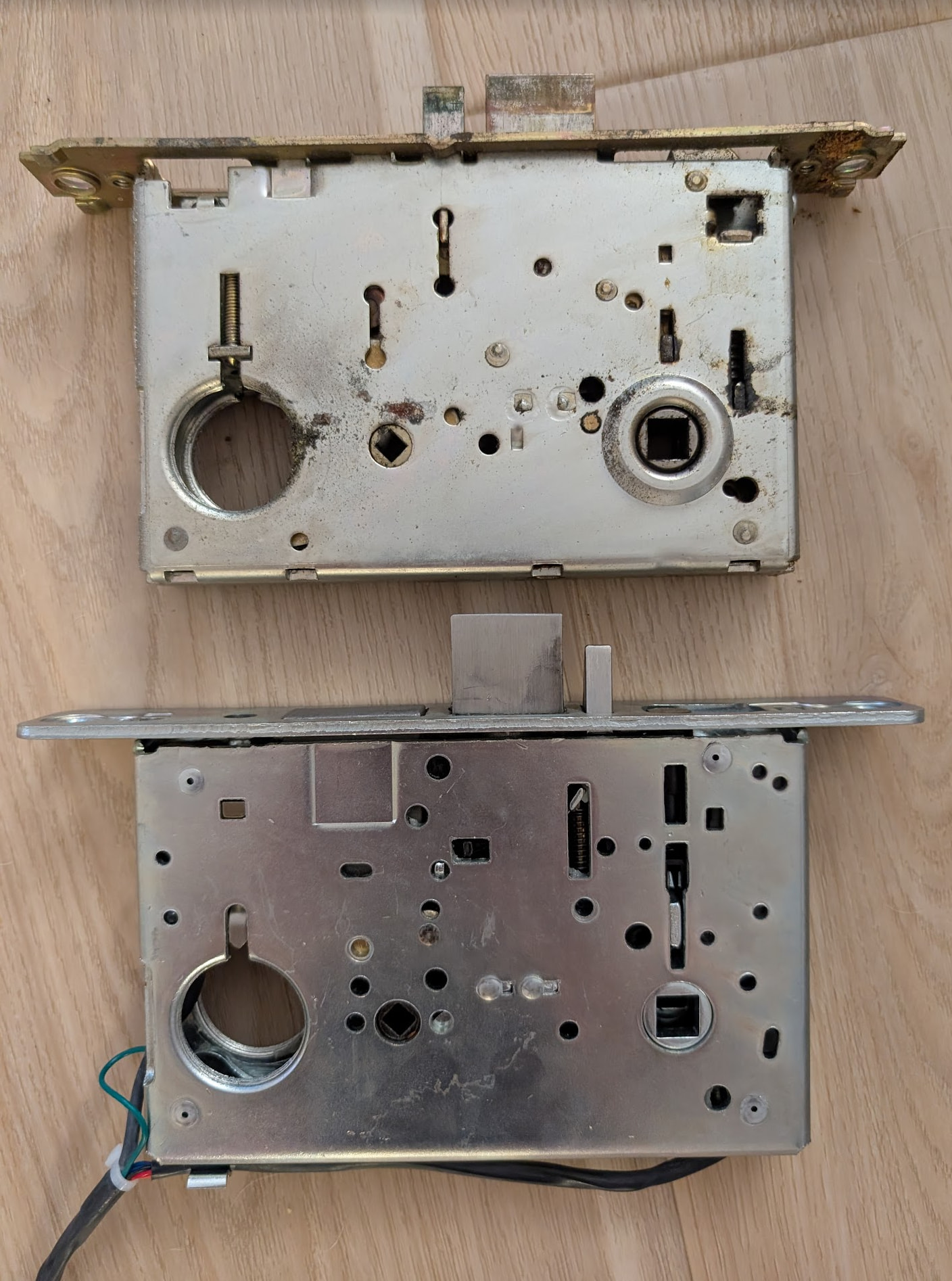
Original interior
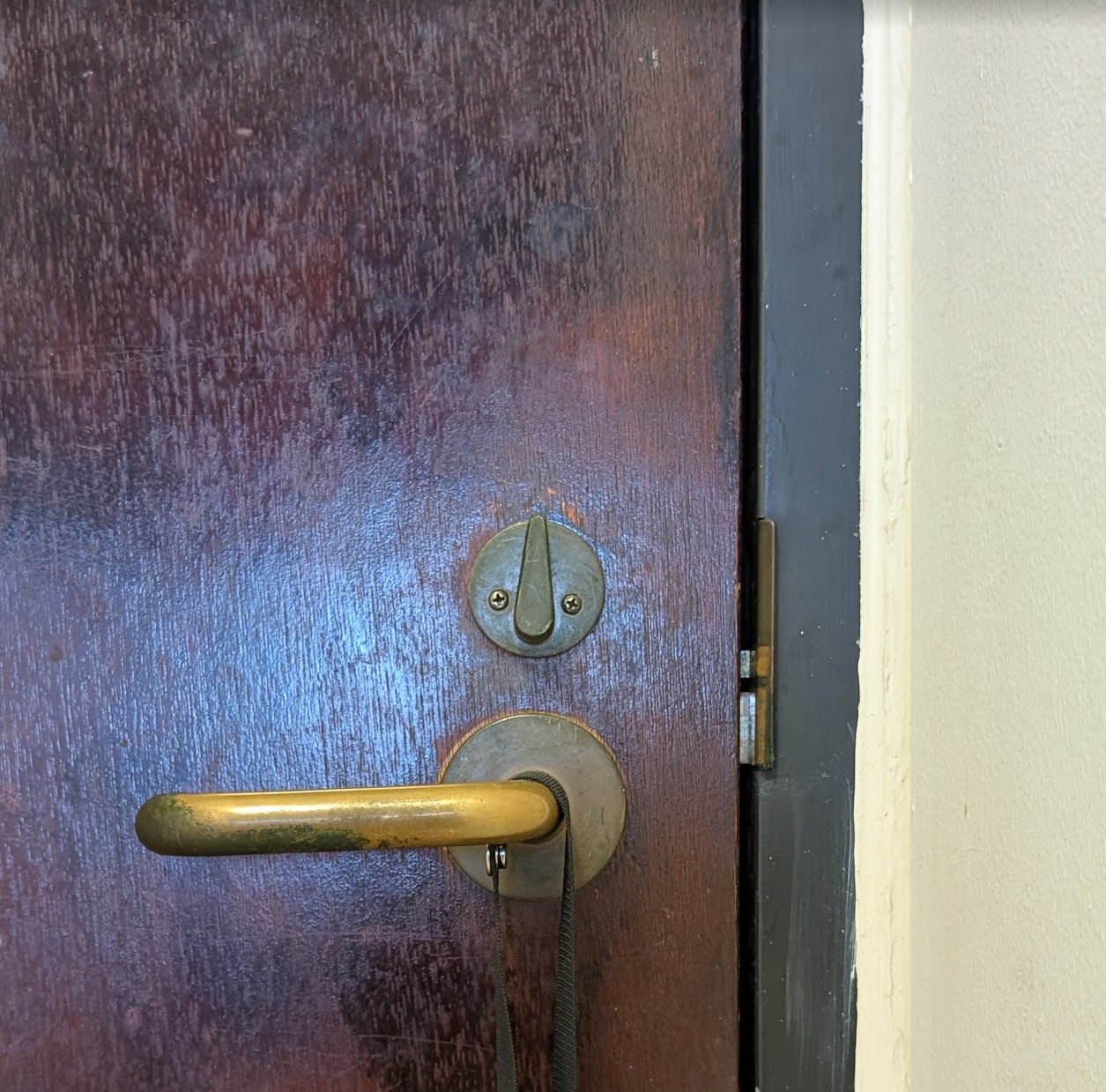
New 617 interior:
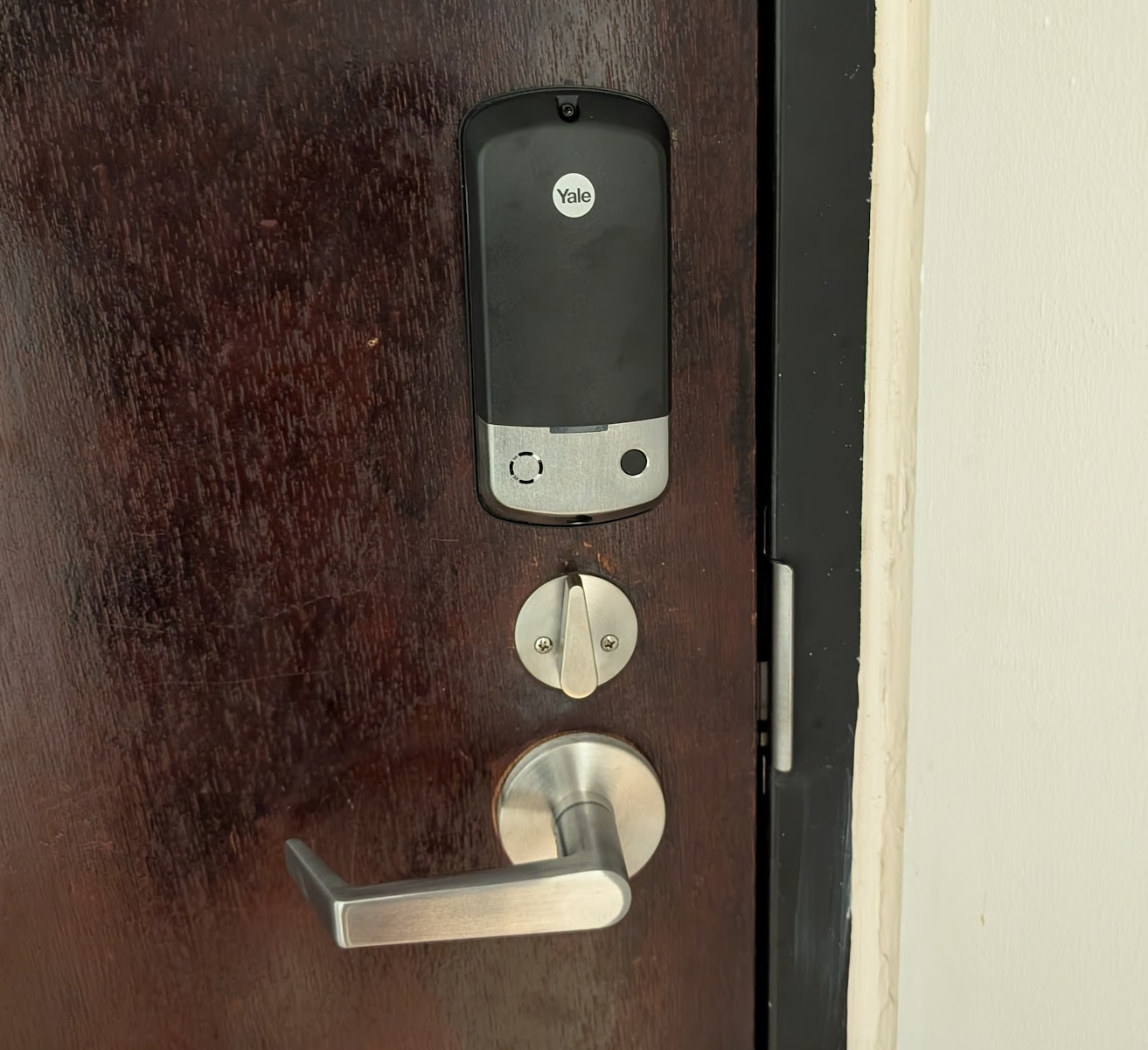
The "Headless" Install
The mortise footprint of the old Yale 8820 and the new nexTouch are nearly identical.
- I set up a master PIN on my workbench using the keypad, then simply didn't install the keypad on the door.
- I reused my original exterior handle/rosette. Everything on the exterior looks identical to the 1980s original.
- I drilled one single hole in the door to route the data cable from the mortise cassette to the interior battery/radio box.
Gotcha (Strike Plate & Armor): The 617 cassette adds a built-in door-open sensor via the mechanical auxiliary plunger. The cutouts on the new strike and armor front are slightly different to accommodate it. I couldn't reuse my old bronze plates without Dremeling them, so I just installed the new nickel-finished plates. It's not a big deal and the strike plate was exactly the same size as the old one so just undo the two screws holding the old one and put the new one on.
Custom UI Dashboard Card
To visualize the door sensor, lock state, timed/manual mode, and battery level cleanly on my dashboard, I built a custom button card. It dynamically changes color and icon based on the door state and shows the exact timestamp of the last time the door was opened or closed.

A quick tap performs a timed unlock using the helper-defined delay (say 30 seconds), and Home Assistant immediately relocks once the door is opened. A long press performs a manual unlock that stays unlocked until you tap the button again.

Click to expand Custom Button Card YAML
type: horizontal-stack
cards:
  - type: custom:button-card
    entity: binary_sensor.front_door
    show_icon: false
    show_name: false
    show_state: false
    tap_action:
      action: more-info
      entity: binary_sensor.front_door
    styles:
      card:
        - height: 68px
        - border-radius: 22px
        - padding: 0
        - background: rgba(255,255,255,0.06)
        - border: 1px solid rgba(255,255,255,0.1)
        - box-shadow: none
      grid:
        - grid-template-areas: "\"door\""
    custom_fields:
      door: |
        [[[
          const open = states['binary_sensor.front_door']?.state === 'on';
          const changed = states['binary_sensor.front_door']?.last_changed;

          const icon = open ? 'mdi:door-open' : 'mdi:door';
          const color = open ? '#f44336' : 'white';

          let last = '';
          if (changed) {
            const d = new Date(changed);
            last = d.toLocaleTimeString([], {
              hour: 'numeric',
              minute: '2-digit'
            });
          }

          return `
            <div style="
              height:68px;
              display:flex;
              align-items:center;
              justify-content:center;
              color:${color};
            ">
              <div style="
                display:flex;
                flex-direction:column;
                align-items:center;
                justify-content:center;
                gap:0px;
                line-height:1;
              ">
                <ha-icon icon="${icon}" style="color:${color};--mdc-icon-size:34px;"></ha-icon>
                <div style="
                  font-size:11px;
                  font-weight:1000;
                  color:white;
                  white-space:nowrap;
                  line-height:1;
                  margin-top:1px;
                ">
                  ${open ? 'Door Open' : 'Door Closed'}
                </div>
                <div style="
                  font-size:9px;
                  font-weight:800;
                  color:rgba(255,255,255,0.65);
                  white-space:nowrap;
                  line-height:1;
                  margin-top:3px;
                ">
                  ${last}
                </div>
              </div>
            </div>
          `;
        ]]]

  - type: custom:button-card
    entity: lock.front_door
    show_name: false
    show_icon: false
    show_state: false
    triggers_update:
      - lock.front_door
      - input_boolean.front_door_manual_unlock_mode
      - input_number.front_door_timed_relock_seconds
    tap_action:
      action: call-service
      service: script.front_door_button_tap
    hold_action:
      action: call-service
      service: script.front_door_manual_unlock
    styles:
      card:
        - height: 68px
        - border-radius: 22px
        - padding: 0
        - background: rgba(255,255,255,0.06)
        - border: 1px solid rgba(255,255,255,0.16)
        - box-shadow: none
      grid:
        - grid-template-areas: "\"lockbtn\""
        - grid-template-columns: 1fr
        - grid-template-rows: 68px
      custom_fields:
        lockbtn:
          - width: 100%
          - height: 68px
          - display: flex
          - align-items: center
          - justify-content: center
    custom_fields:
      lockbtn: |
        [[[
          const st = states['lock.front_door']?.state;
          const unlocked = st === 'unlocked' || st === 'unlocking';
          const manual = states['input_boolean.front_door_manual_unlock_mode']?.state === 'on';

          const delayRaw = states['input_number.front_door_timed_relock_seconds']?.state;
          const delay = Number(delayRaw);
          const delayText = Number.isFinite(delay) ? `${delay.toFixed(0)}s` : 'Timed';

          const icon = unlocked || manual ? 'mdi:lock-open-variant' : 'mdi:lock';
          const color = unlocked || manual ? '#f44336' : 'white';

          let text = `Unlock ${delayText}`;

          if (manual) {
            text = 'Manual Lock';
          } else if (unlocked) {
            text = 'Timed Lock';
          }

          return `
            <div style="
              height:68px;
              width:100%;
              display:flex;
              align-items:center;
              justify-content:center;
            ">
              <div style="
                display:flex;
                flex-direction:column;
                align-items:center;
                justify-content:center;
                gap:1px;
                line-height:1;
              ">
                <ha-icon icon="${icon}" style="color:${color};--mdc-icon-size:36px;"></ha-icon>
                <div style="
                  font-size:11px;
                  font-weight:1000;
                  color:white;
                  white-space:nowrap;
                  line-height:1;
                  margin-top:1px;
                ">
                  ${text}
                </div>
              </div>
            </div>
          `;
        ]]]

  - type: custom:button-card
    entity: sensor.front_door_battery_level
    show_name: false
    show_icon: false
    show_state: false
    tap_action:
      action: more-info
    extra_styles: |
      @keyframes battery_flash_red {
        0%, 100% {
          opacity: 1;
          filter: drop-shadow(0 0 0 rgba(244,67,54,0));
        }
        50% {
          opacity: .25;
          filter: drop-shadow(0 0 12px rgba(244,67,54,1));
        }
      }
    styles:
      card:
        - height: 68px
        - border-radius: 22px
        - padding: 0
        - background: rgba(255,255,255,0.08)
        - border: 1px solid rgba(255,255,255,0.16)
        - box-shadow: none
      grid:
        - grid-template-areas: "\"battery\""
      custom_fields:
        battery:
          - animation: |
              [[[
                const p = Number(states['sensor.front_door_battery_level']?.state);
                return Number.isFinite(p) && p <= 25
                  ? 'battery_flash_red .85s ease-in-out infinite'
                  : 'none';
              ]]]
    custom_fields:
      battery: |
        [[[
          const raw = states['sensor.front_door_battery_level']?.state;
          const p = Number(raw);

          let icon = 'mdi:battery-unknown';

          if (Number.isFinite(p)) {
            if (p >= 95) {
              icon = 'mdi:battery';
            } else if (p <= 5) {
              icon = 'mdi:battery-outline';
            } else {
              let level = Math.round(p / 10) * 10;
              if (level > 90) level = 90;
              if (level < 10) level = 10;
              icon = `mdi:battery-${level}`;
            }
          }

          const color =
            !Number.isFinite(p) ? 'var(--secondary-text-color)'
            : p <= 25 ? '#f44336'
            : p < 50 ? '#ff9800'
            : '#4caf50';

          const text = Number.isFinite(p) ? `${p.toFixed(1)}%` : '—';

          return `
            <div style="
              height:68px;
              display:flex;
              align-items:center;
              justify-content:center;
              color:${color};
            ">
              <div style="
                display:flex;
                flex-direction:column;
                align-items:center;
                justify-content:center;
                gap:0px;
                line-height:1;
              ">
                <ha-icon icon="${icon}" style="--mdc-icon-size:36px;"></ha-icon>
                <div style="
                  font-size:11px;
                  font-weight:1000;
                  white-space:nowrap;
                  line-height:1;
                  margin-top:1px;
                ">
                  ${text}
                </div>
              </div>
            </div>
          `;
        ]]]
Scripts YAML
Originally I was changing the lock’s auto-relock configuration as part of the unlock flow, but that adds Z-Wave delay. I wanted the normal unlock and lock actions to feel as instant as possible, so the final version keeps the lock pre-configured for timed relock most of the time. A normal tap only turns off the manual-unlock helper and sends lock.unlock. The Z-Wave configuration writes only happen when entering or exiting manual mode, or when explicitly restoring the timed relock setting. The quick-tap unlock delay is controlled by the input_number.front_door_timed_relock_seconds helper.
Click to expand Lock Control Scripts YAML
# ----------------------------------------------------------------
# Front Door Helpers
# ----------------------------------------------------------------
input_number:
  front_door_timed_relock_seconds:
    name: Front Door Timed Relock Seconds
    min: 1
    max: 180
    step: 1
    mode: box
    unit_of_measurement: seconds
    icon: mdi:timer-lock

input_boolean:
  front_door_manual_unlock_mode:
    name: Front Door Manual Unlock Mode
    icon: mdi:lock-open-variant
# ----------------------------------------------------------------
# Front Door Lock
# ----------------------------------------------------------------
front_door_timed_unlock:
  alias: Front Door Timed Unlock
  mode: restart
  sequence:
    # Normal fast path.
    # Assumes the lock is already configured for built-in timed relock.
    - action: input_boolean.turn_off
      target:
        entity_id: input_boolean.front_door_manual_unlock_mode

    - action: lock.unlock
      target:
        entity_id: lock.front_door


front_door_manual_unlock:
  alias: Front Door Manual Unlock
  mode: restart
  sequence:
    # Long press/manual unlock.
    # Disable the lock's built-in relock before unlocking.
    - action: input_boolean.turn_on
      target:
        entity_id: input_boolean.front_door_manual_unlock_mode

    - action: zwave_js.set_config_parameter
      target:
        entity_id: lock.front_door
      data:
        endpoint: 0
        parameter: 2
        value_size: 1
        value_format: 1
        value: 0

    - action: lock.unlock
      target:
        entity_id: lock.front_door


front_door_lock_now:
  alias: Front Door Lock Now
  mode: restart
  sequence:
    - variables:
        was_manual: "{{ is_state('input_boolean.front_door_manual_unlock_mode', 'on') }}"
        timed_relock_seconds: "{{ states('input_number.front_door_timed_relock_seconds') | int(30) }}"

    # Send lock command immediately.
    - action: lock.lock
      target:
        entity_id: lock.front_door

    # Prevent brief UI flash from Manual Lock to Timed Lock.
    - wait_template: >
        {{ is_state('lock.front_door', 'locked') }}
      timeout:
        seconds: 5
      continue_on_timeout: true

    - action: input_boolean.turn_off
      target:
        entity_id: input_boolean.front_door_manual_unlock_mode

    # Only restore the timed relock if we were ending manual mode.
    - choose:
        - conditions:
            - condition: template
              value_template: "{{ was_manual }}"
          sequence:
            - action: zwave_js.set_config_parameter
              target:
                entity_id: lock.front_door
              data:
                endpoint: 0
                parameter: 3
                value_size: 1
                value_format: 1
                value: "{{ timed_relock_seconds }}"

            - action: zwave_js.set_config_parameter
              target:
                entity_id: lock.front_door
              data:
                endpoint: 0
                parameter: 2
                value_size: 1
                value_format: 1
                value: 255


front_door_restore_timed_relock:
  alias: Front Door Restore Timed Relock
  mode: restart
  sequence:
    - variables:
        timed_relock_seconds: "{{ states('input_number.front_door_timed_relock_seconds') | int(30) }}"

    # Manual safety reset.
    - action: zwave_js.set_config_parameter
      target:
        entity_id: lock.front_door
      data:
        endpoint: 0
        parameter: 3
        value_size: 1
        value_format: 1
        value: "{{ timed_relock_seconds }}"

    - action: zwave_js.set_config_parameter
      target:
        entity_id: lock.front_door
      data:
        endpoint: 0
        parameter: 2
        value_size: 1
        value_format: 1
        value: 255

    - action: input_boolean.turn_off
      target:
        entity_id: input_boolean.front_door_manual_unlock_mode


front_door_button_tap:
  alias: Front Door Button Tap
  mode: restart
  sequence:
    - choose:
        # Manual mode wins.
        - conditions:
            - condition: state
              entity_id: input_boolean.front_door_manual_unlock_mode
              state: "on"
          sequence:
            - action: script.front_door_lock_now

        # If unlocked, tap locks.
        - conditions:
            - condition: template
              value_template: >
                {{ states('lock.front_door') in ['unlocked', 'unlocking'] }}
          sequence:
            - action: script.front_door_lock_now

      # If locked and not manual, tap does fast timed unlock.
      default:
        - action: script.front_door_timed_unlock
Automations YAML
The automations handle the background behavior around the scripts. One automation sends an open-too-long notification, one restores timed relock if the lock is physically locked while manual mode is active, and one immediately sends lock.lock when the door opens in timed mode. That last automation creates the “relock after opening” behavior in Home Assistant, while still allowing manual mode to bypass it and leave the lock unlocked.
Click to expand Lock Control Automations YAML
# ----------------------------------------------------------------
# Front Door - Open Too Long Warning
# ----------------------------------------------------------------
- id: front_door_open_too_long_warning
  alias: "Front Door - Open Too Long Warning"
  description: "Notify when the front door has been open for more than 5 minutes"
  mode: single

  triggers:
    - trigger: state
      entity_id: binary_sensor.front_door
      to: "on"
      for: "00:05:00"

  actions:
    - action: persistent_notification.create
      data:
        title: "Front Door Open"
        message: "The front door has been open for more than 5 minutes."
        notification_id: front_door_open_too_long

    # Replace these notify services with your own mobile app notify entities.
    - action: notify.mobile_app_phone_1
      data:
        title: "🚪 Front Door Open"
        message: "The front door has been open for more than 5 minutes."
        data:
          ttl: 0
          priority: high

    - action: notify.mobile_app_phone_2
      data:
        title: "🚪 Front Door Open"
        message: "The front door has been open for more than 5 minutes."
        data:
          ttl: 0
          priority: high


# ----------------------------------------------------------------
# Front Door - Restore Timed Relock After Physical Manual Lock
# ----------------------------------------------------------------
- id: front_door_restore_timed_relock_after_physical_lock
  alias: "Front Door - Restore Timed Relock After Physical Lock"
  mode: restart

  triggers:
    - trigger: state
      entity_id: lock.front_door
      to: locked

  conditions:
    - condition: state
      entity_id: input_boolean.front_door_manual_unlock_mode
      state: "on"

  actions:
    - variables:
        timed_relock_seconds: "{{ states('input_number.front_door_timed_relock_seconds') | int(30) }}"

    # The door was locked outside the HA lock_now script while manual mode was active.
    # Restore the lock's built-in timed relock behavior.
    - action: zwave_js.set_config_parameter
      target:
        entity_id: lock.front_door
      data:
        endpoint: 0
        parameter: 3
        value_size: 1
        value_format: 1
        value: "{{ timed_relock_seconds }}"

    - action: zwave_js.set_config_parameter
      target:
        entity_id: lock.front_door
      data:
        endpoint: 0
        parameter: 2
        value_size: 1
        value_format: 1
        value: 255

    - action: input_boolean.turn_off
      target:
        entity_id: input_boolean.front_door_manual_unlock_mode


# ----------------------------------------------------------------
# Front Door - Lock Immediately When Opened in Timed Mode
# ----------------------------------------------------------------
- id: front_door_lock_immediately_when_opened_in_timed_mode
  alias: "Front Door - Lock Immediately When Opened in Timed Mode"
  mode: restart
  triggers:
    - trigger: state
      entity_id: binary_sensor.front_door
      to: "on"

    - trigger: state
      entity_id: lock.front_door
      to: "unlocked"

    - trigger: state
      entity_id: lock.front_door
      to: "unlocking"

  conditions:
    - condition: state
      entity_id: input_boolean.front_door_manual_unlock_mode
      state: "off"

    - condition: state
      entity_id: binary_sensor.front_door
      state: "on"

    - condition: template
      value_template: >
        {{ states('lock.front_door') in ['unlocked', 'unlocking'] }}

  actions:
    - action: lock.lock
      target:
        entity_id: lock.front_door
Z-Wave Lock Control Parameters
These are the Z-Wave configuration parameters I used with Home Assistant’s zwave_js.set_config_parameter action. The best matching reference I found is:
https://manual.zwave.eu/backend/make.php?cert=ZC10-22067094&lang=en&sku=NTM617-ZW2
Note: this reference is for the NTM617-ZW2, while my module/firmware is a ZW3. It matches the parameter layout I was able to see/use in Home Assistant. Also, some controllers may display 255 as -1 depending on signed vs unsigned formatting. In Z-Wave JS, my lock accepted 255 for Auto Relock On.
| Parameter | Setting Name | The Fix / Value to Send |
|---|---|---|
| 1 | Audio Mode / Chime | 3 = Silent (Note: 1=High, 2=Low) |
| 2 | Auto Relock | 255 = On (Note: 0=Off) |
| 3 | Auto Relock Time | 10 to 127 (Seconds) |
| 13 | Lock Status LED | 0 = Off, 255 = On |
Other Parameters Listed in the Manual, Not Tried
| Parameter | Setting Name | Size | Values / Notes |
|---|---|---|---|
| 4 | Wrong Code Entry Limit | 1 byte | 3 to 10, default 5 |
| 5 | Language | 1 byte | 1 = English, 2 = Spanish, 3 = French |
| 7 | Shutdown Time After Wrong Code Entries | 1 byte | 10 to 127 seconds, default 60 |
| 8 | Operating Mode | 1 byte | 0 = Normal, 1 = Vacation / keypad lockout, 2 = Privacy / keypad locked with RF unlock functional, 3 = Passage / permanently unlocked |
| 11 | One Touch Locking | 1 byte | 0 = Off, 255 = On |
| 12 | Privacy Button | 1 byte | 0 = Off, 255 = On |
| 15 | Reset to Factory Defaults | 1 byte | 0 = Off, 1 = execute factory reset. Be careful with this one. |
| 16 | Escape Return Mode | 1 byte | 0 = Off, 127 = On |
| 18 | Door Propped Timer | 1 byte | Value represents seconds × 10; 0 disables the door-propped alarm |
| 19 | DPS Alarm | 1 byte | 0 = Off, 255 = On |
| 20 | Deadbolt Installed | 1 byte | 0 = No deadbolt, 255 = Deadbolt installed |
| 21 | Eco Mode | 1 byte | 0 = Off, 255 = On |
| 22 | Privacy Mode with Deadbolt | 1 byte | 0 = Off, 255 = On; extending the deadbolt can put the lock into Privacy Mode if enabled |
| 23 | Lock Body Alarms Mask | 1 byte | Bitmask. 0 = no sensor alarms, 255 = all sensor alarms. Source says bit 0 = DPS alarm, bit 1 = deadbolt alarm, bit 2 = lever-rotated alarm |