Your device requires a Thread border router

I am setting up my Home Assistant for devices using Matter over Thread.

  • Installation method Home Assistant OS
  • Core 2026.6.1
  • Supervisor 2026.05.1
  • Operating System 17.3
  • Frontend 20260527.4

Home Assistant (HA) is hosted in Virtual Machine on my UGREEN NAS and is accessible.

Virtual machine was setup using this virtual disk (https://github.com/home-assistant/operating-system/releases/download/17.3/haos_ova-17.3.qcow2.xz)

ZBT-2 is connected to UGREEN NAS and is showing up in HA.

Using HA on android phone.

For some reason I am unable to add IKEA matter devices to it.

To me it seems like Matter Addon service does not know how to communicate to my OTBR.

I have "Set Thread credentials" manually via UI to Active dataset TLVs (is that ok?)

If I "Send credentials" from my Android Home Assistant, it says I don't have any credentials to send.

How to diagnose this? Any suggestions?

Thank you very much!

Matter

Matter addon is shown and is reporting "Online" status (Otherwise I do not see AddOns in left navigation)

{
  "home_assistant": {
    "arch": "x86_64",
    "dev": false,
    "docker": true,
    "hassio": true,
    "installation_type": "Home Assistant OS",
    "os_name": "Linux",
    "os_version": "6.12.85-haos",
    "python_version": "3.14.5",
    "timezone": "Europe/Belgrade",
    "version": "2026.6.1",
    "virtualenv": false,
    "container_arch": "amd64",
    "supervisor": "2026.05.1",
    "host_os": "Home Assistant OS 17.3",
    "docker_version": "29.3.1",
    "chassis": "vm",
    "run_as_root": true
  },
  "custom_components": {},
  "integration_manifest": {
    "domain": "matter",
    "name": "Matter",
    "after_dependencies": [
      "bluetooth",
      "hassio"
    ],
    "codeowners": [
      "home-assistant/matter"
    ],
    "config_flow": true,
    "dependencies": [
      "websocket_api"
    ],
    "documentation": "https://www.home-assistant.io/integrations/matter",
    "integration_type": "hub",
    "iot_class": "local_push",
    "requirements": [
      "matter-python-client==0.7.1",
      "matter-ble-proxy==0.7.1"
    ],
    "zeroconf": [
      "_matter._tcp.local.",
      "_matterc._udp.local."
    ],
    "is_built_in": true,
    "overwrites_built_in": false
  },
  "setup_times": {
    "null": {
      "setup": 0.001601418000063859
    },
    "01KTHGEWQAPW9ZY0DM3YQVA9AP": {
      "wait_import_platforms": -0.00012393599899951369,
      "config_entry_setup": 0.01632594300463097
    }
  },
  "data": {
    "server": {
      "info": {
        "fabric_id": 2,
        "compressed_fabric_id": 13776322074381142841,
        "schema_version": 11,
        "min_supported_schema_version": 9,
        "sdk_version": "2025.7.0",
        "wifi_credentials_set": false,
        "thread_credentials_set": true,
        "bluetooth_enabled": false,
        "wifi_ssid": null,
        "ble_proxy_enabled": false
      },
      "nodes": [],
      "events": []
    }
  },
  "issues": []
}

Thread (OTBR)

Network name: ha-thread-1174
Channel: 15
Dataset ID: 01KTH8BRHBDR62PX61WS6T4ZFD
PAN ID: 1174
Extended PAN ID: 4c7b484ddcc4d227
OTBR URL: http://core-openthread-border-router:8081
Active dataset TLVs: xxxxxxx

When I try to download diagnostics it reports 404

Looks like there’s a problem with this site

The server at 192.168.0.44:8123 sent back an error: 404 Not Found
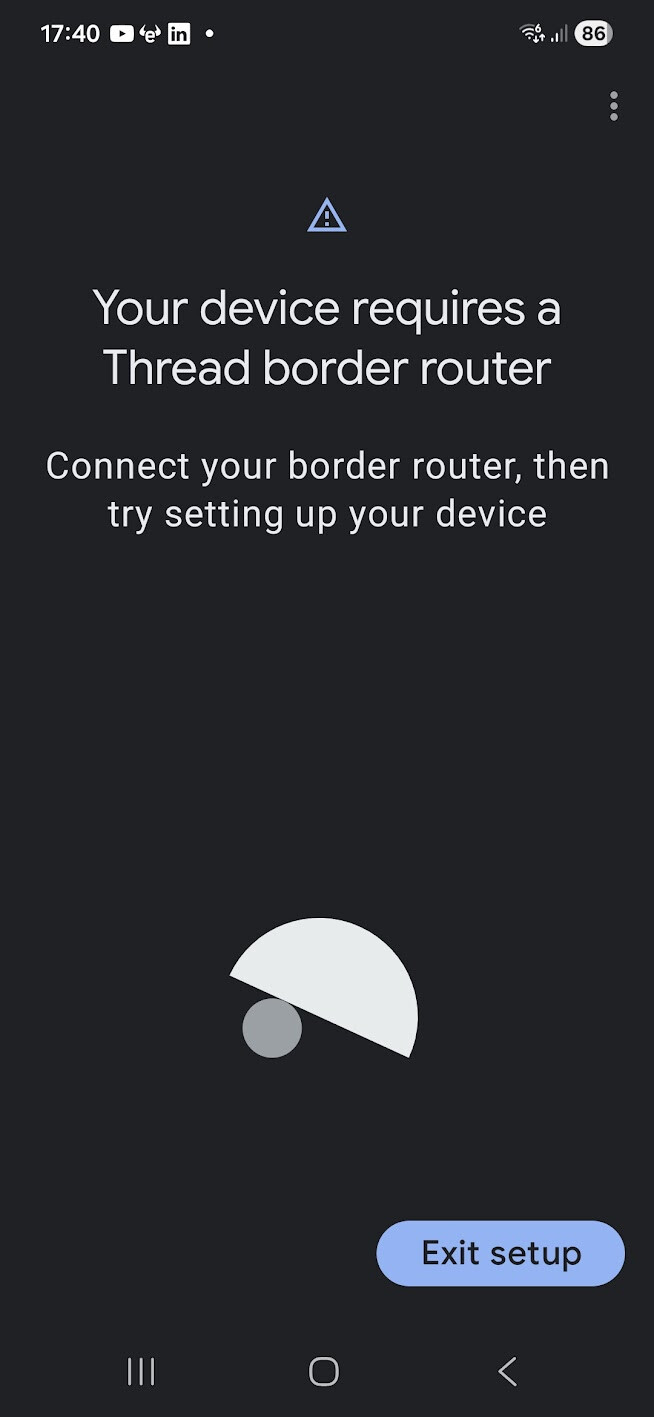
Adding device Fails

There is a step many miss or misunderstand and that is copying the credentials from HA to the phone.

On the phone...

  • Open the Companion app
  • Open the settings menu
  • Select Companion app
  • Select Troubleshooting (Look from the bottom to find it fast)
  • Click Sync Thread credentials
4 Likes

Wow. Not exactly obvious setup.

I've managed to connect my first IKEA sensor!

You rock!

Thank you dear sir,
Tom

1 Like

Mine (iOS) doesn't have a Troubleshooting menu. There's "Debugging", but it doesn't have "Sync Thread credentials". It does have "Thread", which has "Apple Keychain", which has "Transfer to Home Assistant". Is that... the same?

Are you on the phone and in the companion app?

I am not familiar with the iPhone app, but it should say copy from HA and not the other way around.

Thanks. This helped me.
My app was trying to connect my device to the wrong (deleted) thread network.

I have more than 100 zigbee devices.
and now tried matter over thread too see how it worked.
It has been anything but user friendly.

Matter and Thread use the newest and future-proof technology, which requires some new knowledge, but it is the future, so you will eventually have to deal with it in some way or another.
If it where not in relation to Matter it would be in relation to something else.

Speaking from the perspective of an interested external observer who has read through a number of threads in this forum: in general, it doesn’t seem as though people are reluctant or unhappy to learn new concepts as regards Matter and its configuration. However, there does appear to be a great deal of frustration with how that configuration (and attendant troubleshooting) is accomplished.

Speaking now from the perspective of someone who has been fighting with Matter over the past couple of weeks just to get a single device to pair, the frustration is more than understandable.

Matter doesn’t do things in the same way as Zigbee, Z-Wave, or other protocols. That’s to be expected, and people coming to it from experience with other protocols generally seem to both understand and accept this. But that doesn’t change the fact that at this point in time and with the tools available, it’s fundamentally a much greater pain in the arse to troubleshoot in comparison to those other protocols. Wave of the future or not doesn’t matter when making it work can be a total uphill battle with poor insight into the process of what’s going wrong and Zigbee devices are still cheap and widely-available.

So does that mean that it’s OK for Matter to be difficult to use and/or troubleshoot because potential alternatives could as bad or worse?

I’ll admit to being slightly flippant in asking that, but only slightly. If the prevailing wisdom is that usability (which includes troubleshooting, documentation, and community or commerical support) doesn’t matter, then that’s a really bad indicator for the future direction of HA in general.

1 Like

Matter just use IPv6, but it is in fact a network protocol and your network interface card also use it.
The uphill battle is often not with Matter, but with IPv6 and also mDNS.
It is not Matter, but people lacking knowledge of networking protocols and their choice to run a complex network setup at the same time.

1 Like

Being perfectly straightforward: that is an extremely condescending view to apply to people who may be having issues with getting Matter up and running. As someone who falls into that category, it’s really disappointing to have to encounter, and creates an unnecessary division between participants in trying to resolve issues.

You don’t know my or any other random person’s technical background. It’s possible to have extensive networking experience and still not be able to get Matter up and running in a way that isn’t an uphill battle.

Sure, people can (and do) attempt to use Matter in network configurations that it’s not designed to support. Obviously it won’t work in those configurations, and it’s good to make sure that they aren’t trying to pound the square peg into the round hole. But defaulting to what is essentially the idea that Matter and the end-user interface around it are blameless is a very blinkered way of approaching those situations.

1 Like

How does that statement have anything to do about how user friendly the setup is?
I say in my comment that i’m trying it to see how it works and you are here subtly calling me unwilling to learn. how do you even come to this conclusion?

It is not user friendly if you have to go to the troubleshooting page and sync your credentials yourself. While the ha server is telling me that the credentials it displays are being “used for android and ios credentials”.
Why are these not automatically synced and if there is some to not do this automatically.
Why is there no info on that thread page that tells the user might need to manually sync the credentials.

side-note:
“Future-proof technology” does not exist.
I remember holding my first usb stick 512MB and thinking I’ll never need more.
Today i walk around with 512GB in my pocket and running out off space.

I think what Thomas ment was it is future proof for the manufactures which are actually owning “your” matter device. They hold the cryptographic keys for your device - only they can change, extend or repair the software on their your device.

So yes: Matter might be the future proof (not ownable) technology which will be pushed forward by Google, LG, Samsung, Apple and other big players which don’t do evil

Wally, You saved my phone, my laptop, my new ZBT-2 and the window!
Thank you.

1 Like