The Honeywell T6 Pro is a piece of garbage that lobotomizes itself if connected to a Z-Wave controller. Is there a decent Z-Wave thermostat that doesn’t do this?
The GoControl GC-TBZ48 has worked great for me. Not fancy, but rock solid.
I thought the T6 Pro was wifi, not Z-Wave? Do you know if it’s supported by the Honeywell Total Connect Comfort Integration? It uses the cloud, which I’d prefer to not use, but it hasn’t had any issues with my VisionPro 8000 (TH8321WF1001) thermostat for the year that I’ve had it.
Don’t know if it works with the HTCC integ, trying to have a local only thermostat that is HA controllable, and thus does not have a wifi chip at all.
Do you know if it gives you the option to control when it calls for the second stage of the heater?
Almost every IOT device has a WiFi chip in it. Usually an ESP device which in most cases you can flash with ESPHome and make it completely local.
I only have a single stage heater so don’t have any experience with that. But here is a link to the user manual: https://m.media-amazon.com/images/I/B1TPSXvmvlS.pdf
Uhh, what? ZigBee and Z-Wave devices do not have the technical capability to connect to standard wifi internet. They do not have ESP8266 chips.
Asking for Z-Wave (or ZigBee, I guess) thermostats that do not have wifi ability.
Mine works flawlessly over zwave. What kind of issues are you seeing?
What controller are you using?
It works, but with less functionality than if I didn’t connect it to Z-Wave.
Are you saying that if connected to zwave the programming on the unit no longer works?
Curious as I’m looking for a zwave t-stat right now and this model was on the top of my list.

Why not just use home Assistant to control the thermostat on a schedule you want?
Thermostats should work the same if HA goes down. All of my lights do. Most thermostats do.
Agreed. I didn’t see anyone else complain of this when I was just looking for a new thermostat. Glad I happened across this thread.
After looking a bit more it looks like when you include it to the zwave network it will turn off the schedule by default. BUT you can turn it back on. Look at page 12 of the manual. Still not sure it will do what I’d expect it to, but you can try since you already have it!
We have a cheaper version of these honeywell units and I don’t find them to be very intuitive to use.
Just hard to find a Zwave plus unit. Don’t want zigbee and don’t want wifi.
I have a T6 z-wave thermostat. I can verify that it is connected to Z-wave, and Home Assistant. And the thermostat is running its own schedule independent of Home Assistant.
I agree that the manual is confusing. I also concede that the Nest thermostat has a more modern appearance, and also has some desirable features that the T6 does not have.
But if you want local control, the T6 does the job.
@marc0 Can you please explain how you have your T6 zwave running on its own schedule while being included in your zwave network? I have configured mine to run on a 5-2 schedule but the only scheduling options it gives are Wake Time, Home Temp, and Sleep Time and Temp. There is no option to set times for being home or away. I could set the schedule via Home Assistant but would rather have the thermostat run its own schedule independently. Thanks for any help you can offer!
I just got this same thermostat and I can’t even find a way to set home/away schedule when not in Z-Wave mode. Seems like it’s not included. My old thermostat had more features, aside from z-wave, lol. What did you end up doing with this?
I’m a bit confused. Isn’t the entire point of the T6 to control it from Home Assistant – not to remotely program the T6’s schedule?
In my case I use HA to manage the schedule (unlimited schedules) – but HA also knows when to adjust the temp when nobody is home (my away mode). And HA knows when a door or window is open and adjusts the temp. And I have it consider the daily forecast and adjust how much to heat in the morning. HA also adjusts it based on different room temps during the day. And it also knows when I’m heading home and starts the heat before I arrive.
It’s not that sophisticated of a set up, but it does a lot more than a thermostat could do on its own. And, yes, probably could do all of that with an ESP32, but it’s nice to have a normal looking thermostat that can be manually adjusted, too.
If my HA server fails the thermostat just remains in the last setting. Just like my lights, and everything else HA runs. My z-wave network is probably more reiable than my 20 year old furnace.
When in Z-wave mode if you go to the configure option on the z-wave device in home assistant and edit “Parameter 1 - Schedule Type”, change it from “No schedule on thermostat” to any of the other options and you will now be able to see the scheduling options on device in the menu settings.
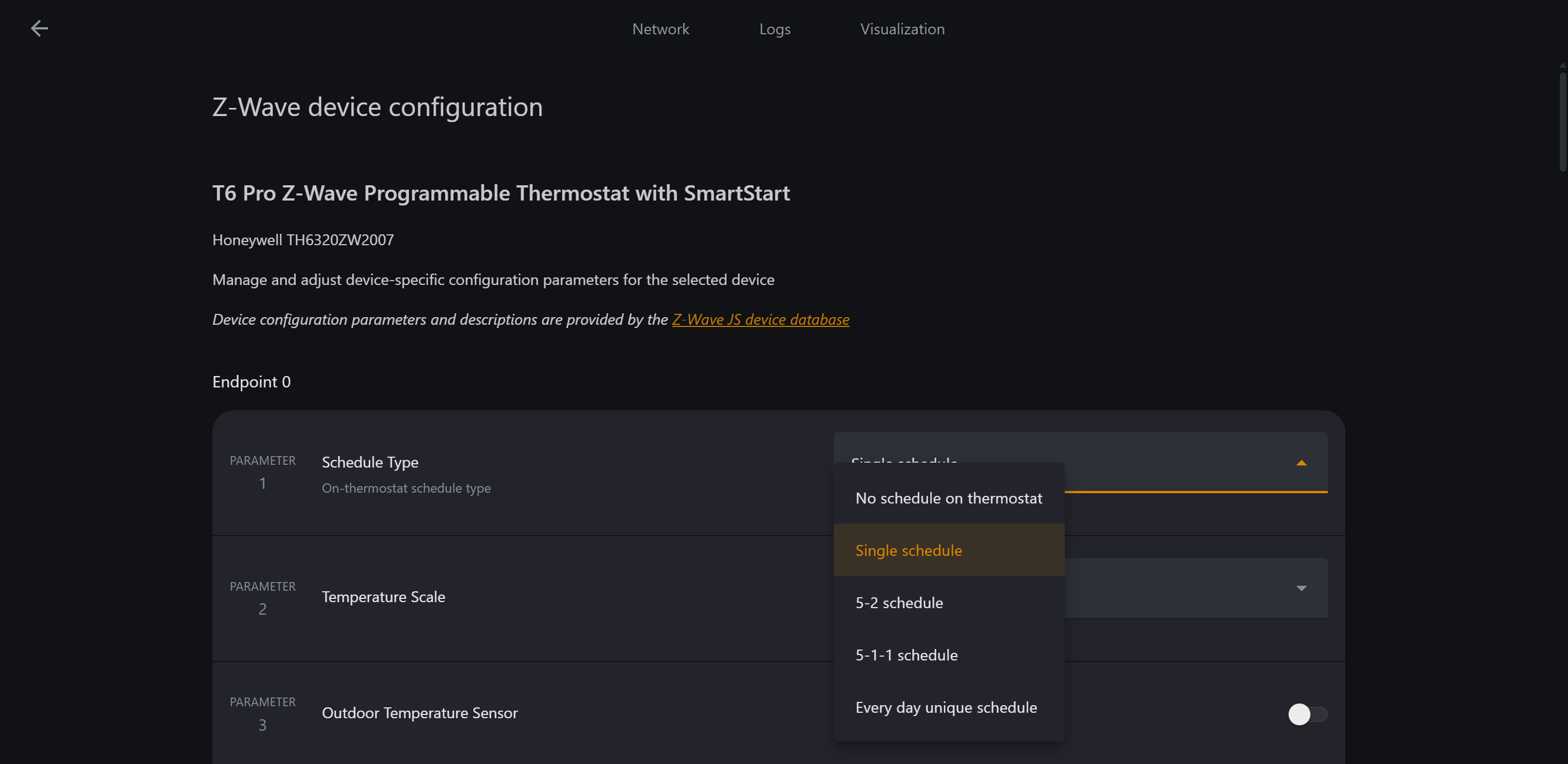
When not in Z-wave mode the schedule settings should just be available in the menu settings provided you turned it on during setup. If not you can turn it on by entering the setup menu again by holding Menu for 5 seconds, then you’ll be able to enable the schedule options again.
Hope this helps.