Zigbee2MQTT rotary knobs expose only raw MQTT events, which makes flexible and reusable configuration in Home Assistant unnecessarily complex. I built a blueprint that turns those low-level events into configurable gestures via the UI and reliably filters noisy “tail” events, and I’m happy enough with the result to share it with the community.
Assign your own actions to Zigbee2MQTT rotary-knob gestures in Home Assistant. Supports Command/Event modes and includes noise filtering for false “tail” events.
Works with many Zigbee2MQTT rotary knobs (brands such as Moes, Girier, and others — mostly AliExpress-sold models)
Bind gestures to any HA actions or scripts, with optional helper parameters (gesture, step_size, rate, etc.)
Supports both Command and Event operation modes (typically switched using a triple-click on most knobs)
Noise filtering for accidental “tail” events (e.g., unwanted rotation after hold+rotate, or a single click triggered after rotation)
Allows visual customization of native low-level event mappings if your knob uses different payload values
Supports configuring automation mode and maximum concurrent runs
Debug output available via notifications or logs
Core idea of this blueprint — assign actions to gestures instead of handling raw MQTT events.
I’ve exactly the same tuya knob and have installed/followed your documentation but have a couple of questions in regards to setting up for controlling a group of rgb downlights in a room:
Can you supply an example automation showing use of the blueprint and configurations?
What is the purpose between command/event mode? Do you need to specify actions on both?
Main idea for this blueprint is using it in scripts, it is base for making your solutions and also tested noise filtration. Later I will show examples and maybe new updated set of blueprints that used for my needs.
Command/Event mode is feature of moes knob. They made it on hardware level - when you tripple press the knob you got mode switch and from this moment the same gestures will called another way. For example in event mode you will got “rotate_right” event, in command mode you will got “brightness_step_up”. My blueprint normalizes this and your final script will always got “rotate_right” gesture.
About your question - you can use only hook script and not specify actions at all.
I get the script usage but having trouble getting the dimming, and even the on/off working consistently. Given you have the same hardware device I just wanted to see how you have implemented all of the blueprint functions into home assistant actions.
Main idea of this blueprint is routing. I did not added concrete actions in it because:
In this case it will have more than one responsibility.
It will become very big due to additional functionality.
If you for example manage your lights and want to manage it via knobs and also physical switches, you need to repeat logics in different automations.
Instead of this you have one router and one script with logics for concrete light devices. You add your light script to router and got ability to manage it via knob.
How to setup:
Create your ligics script: Settings → Automations and scenes → Scripts → Create script → Create new script → ⋮ → Edit in YAML
You can use my raw sample that I gave you earlier, just change light device to yours.
Setup blueprint (I think you already had done this, I mean change mqtt topic by adding your device friendly name). And choose your new script from previous step as hook script.
Also you can add your device without additional scripts if you bind it to events. E.g. single click - light turn on. But as I understand this does not works for you? Can you please turn on debug notification and check that you got events from knob?
Ok. Now I understand what you have done. You utilise the hook script rather than direct actions in the automation script. Not sure of the operational difference but I will give that a go.
In regards to how I currently have it setup though, it’s not that it didn’t work at all, it was just hit and miss - unreliable. The dimming was janky and even the on/off action I would need to press the button multiple times for it to work.
How do you have your automation/blueprint setup for this hook script? Meaning the mode - single, restart, queued etc. ?
Thank you for understanding, but I think I confused you. Maybe for your scenario you don 't need additional hook script and actions are enough. Also you need queue mode. OR: you can use hook script and use not only gesture but also step_size as multiplier to make results of rotation more predictable. But please keep in mind that this parameter not always exist, so you need to use something like brightness*1*step_size
Problem is that you have older version of HA. I updated the code to support your version. Please, try now. Maybe if it will not works you will need to re-import blueprint again. Let me know if it helps
First of all, tnx for the script, most is working just perfect. I’m just missing one option. It would be nice to be able to change color temp of a light incrementally with x % steps, just like it’s possible for the brightness. Is this somehow possible?
Just a raw idea : i think you could make a helper variable that you increase and decrease.
And the different values correspond to a colour of the Rainbow?
I get a regular “fault message” of the status change of the button changing from scene to event - even if I do not even touch it. it does not matter in its function. can I just suppress this?
 Zigbee2MQTT rotary knobs expose only raw MQTT events, which makes flexible and reusable configuration in Home Assistant unnecessarily complex.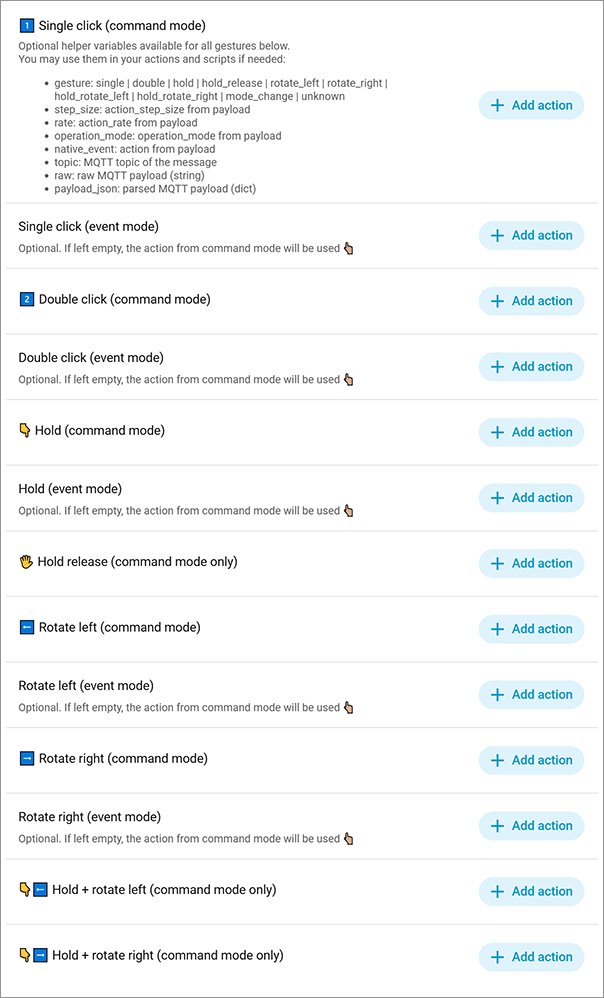

 Please, check official documentation, a lot of usefull details here
 Some additional screenshots:
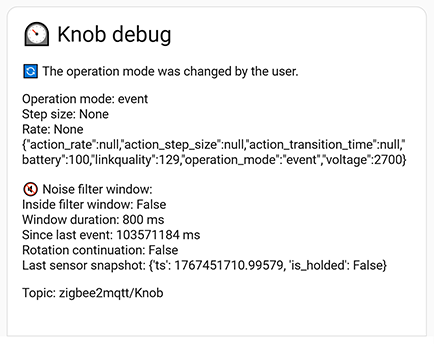
 Hook script


