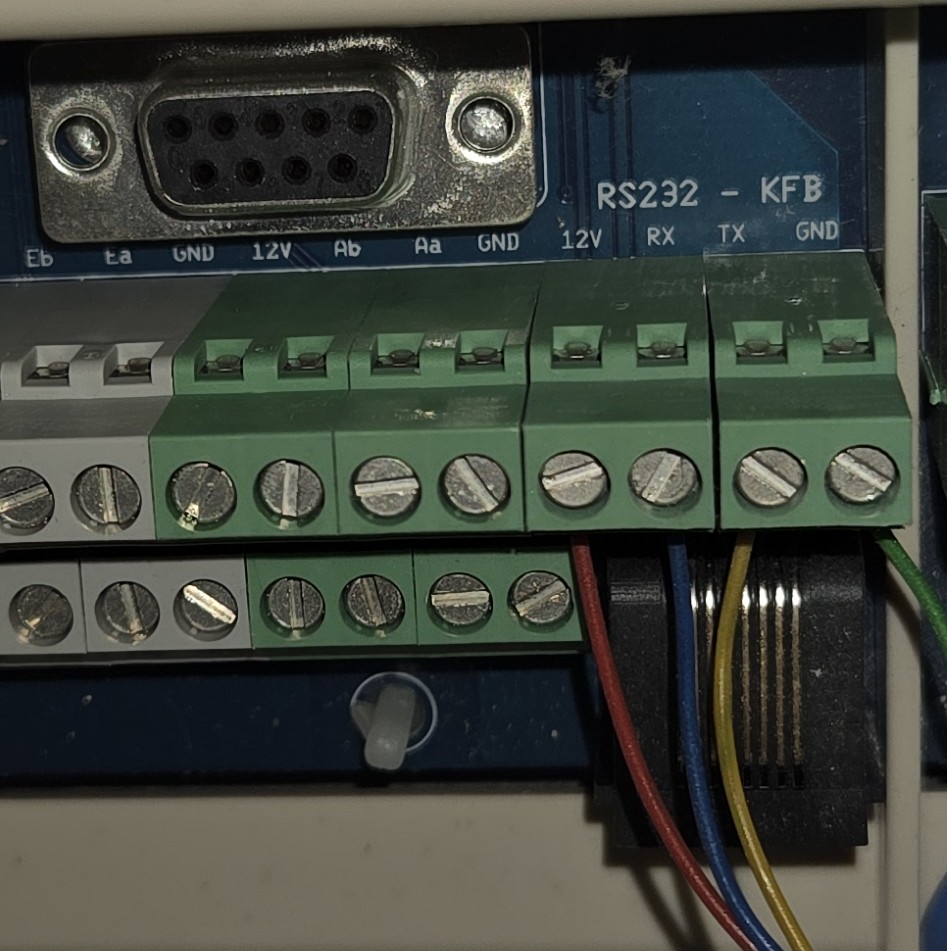
please use a multimeter to measure +12V to ground
measure the ground pin as well by measuring resistance (to chassis, or some other clear ground point)
the other two is RX and TX, if you mix those up it doesnt do damage
do not randomly try something as you might fry either the external board or the mainboard when trying this 12V output on the wrong pins of the ESP8266.
(RS232 and RJ45 also available but not in use.)
I plan to disconnect the CC ease and connect a PI (preferably the Zero W I have lying around) with a USB TTL Adapter to the cable terminals, so I wouldn’t need to use the RS232 or RJ45 socket adapters.
I’m sorry but I can’t recommend any adapter as I was using RS232 PCI-E card in my NAS. According to my knowledge TTL is not the type you are looking for, you need the RS232 protocol type. You can read a bit here:
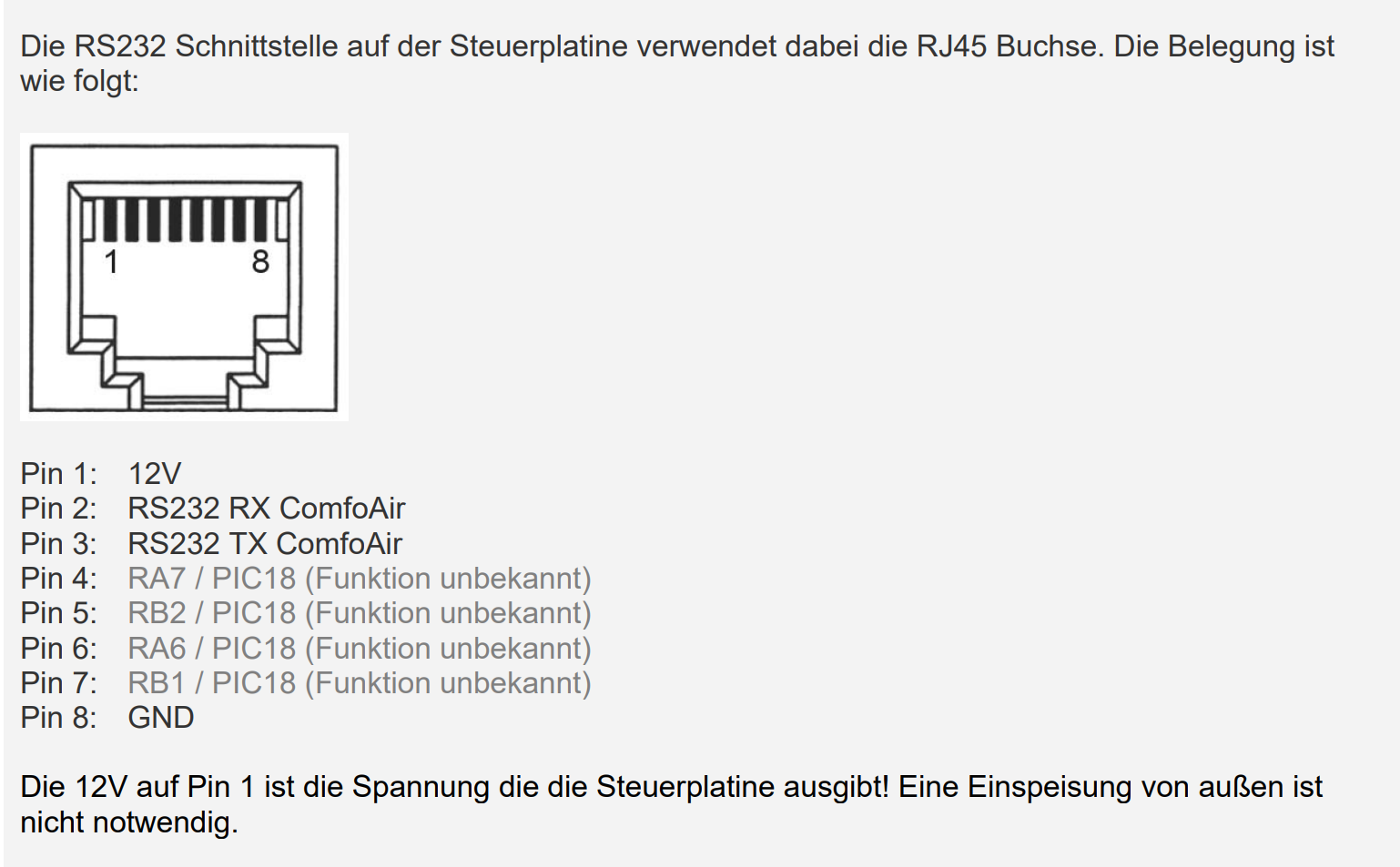
Warning: the most notable difference is the voltage. Comfoair operates at 12V:
The minimum and maximum voltages of RS-232 signals are +/-13V, while TTL signals are 0 to 3.3V/5V.
Anyway based on my experience I would go for a RS232 - Ethernet (or Wifi) adapter and deploy the python script in Docker. Depending on a selected adapter you can also power it from 12V in the comfoair directly so no additional power adapters or cables would be required. Some of those devices are also quite small so you could even try to fit them inside the comfoair box.
This Docker Wiki is listing a few devices which have been successfully tested. I’m using the wifi one since a few months and it is super reliable.
Ok, so I forget about TTL and we have proof that I am a complete novice in this matter.
So the RS232 converter reads and writes data from the RS232 interface and provides it via an IP entity to the local network? And the PI uses python to provide it to MQTT for HA?
The reason I am asking is that I understood from this explanation that the RS232 is directly connected to the PI via USB, no WiFi or Ethernet, only the PI exposed the Mqtt to the LAN.
I run HAOS on a Futro S920 thin client, which has a RS232 port. Is there a way I can simply connect the comfoair to this port and make use of it directly? I have no docker or proxmox experience or possibility.
I also run Pi hole on a dedicated PI 3, can I use this for the python functionality on top of Pi hole?
Or would a separate, dedicated PI be necessary for the python part?
Yes, that’s correct. But you don’t need a dedicated RPi for that. If you have rs232 on you HA RPi and it is nearby your comfoair unit you can deploy the python script on HAOS directly. There is a dedicated wiki for that option:
I’m just not an expert in HAOS as I don’t use it - that wiki was prepared by someone else - source of this wiki is in the following discussion.
Thank you!
The pals in that discussion seem to use an PI 4 or an X86 with a USB adapter. My S920 with built in RS232 on HAOS x86-64 is a slightly different scenario. I can only hope that the RS232 data is somehow exposed to the HAOS so the script can access it. Will give it a try, have to find a suitable cable first. So far I haven’t used the command line in the thin client since I installed HAOS, only GUI configurations.
When connecting the Comfoair directly to the RS232 port of my HAOS x86-64 Thin client Futro S920, which cables/pins do I have to connect:TX/RX, GND, and not 12V as this would only be needed to power the CC Ease or a RS232 to USB converter? This would mean that I cannot simply buy a RS232 cable with two DB9 plugs for the connection, but have to get rid of the 12V pin in order no to fry my thin client’s RS232 port?
Would try to use a DB9 on my thin client and the green terminals on the Comfoair, but still I need to know which pins to use.
Thank you, I see the pinout. My question is: Are RX, TX and GND sufficient for the data connection to the thin client’s RS232 port? I don’t think I should connect the 12V from the Comfoair to the thin client as well, this is probably only needed to power the CC ease and can do harm to my thin client’s RS232 port.
how did you get it running? i have the same problem as you did, its empty, nothing shows up in the card,
i verified all the entities by hand and they are set properly
ah, interesting, i believed we both used the same TimWeyand/lovelace-comfoair, thx tho
in the meantime I was able to get it working with this config for anyone looking for one
I read through this thread during the last days, now changed my plan from using my thin client’s internal RS232 to following Dapolux guide, using a dedicated PI Zero W (which I already have) with a USB/RS232 adapter (already ordered, should arrive in the next days), plus Micro USB to USB OTG Adapter for connecting USB/RS232 to the Zero.
Dapolux guide is from January 2021… is it still up to date?
I would use Pi OS lite (latest bookworm version, 32 bit) on my Zero W, headless setup, then work through the guide… or do I have to change anything due to changes in the scripts after 2021?
Hi there,
so I’m trying to get my Zehnder comfoair 350 luxe into HA.
I bought a device recommended in this thread/linked project (Waveshare RS232/485 TO Wifi ETH) and connected it to the device via the RS232 port of the system.
As mentioned in the thread above, I also disconnected the control unit previously connected to the board via RS232.
Unfortunately, I am currently failing to follow the instructions for the Waveshare device and how to set it up. I can connect it to my network via wifi, but I can’t get it connected via Ethernet. I also can’t connect to the device with the Docker container.
I guess I haven’t quite figured out how the device works. My naive thought was that I can simply connect the device to the Zehnder, integrate it into the network and then get a server accessible via TCP, which is then queried by the Docker container and transmits the results to Homeassistant via Mosquitto Broker.
All the examples above seem to use some devices translating the signals to USB and connected to HA directly or a raspberry Pi.
I thought the Waveshare device to be able to act on it’s own?
I want to avoid an extra raspberry pi and my HA server is too far away from zehnder to connect it.
Which instructions are you following? Have a look here:
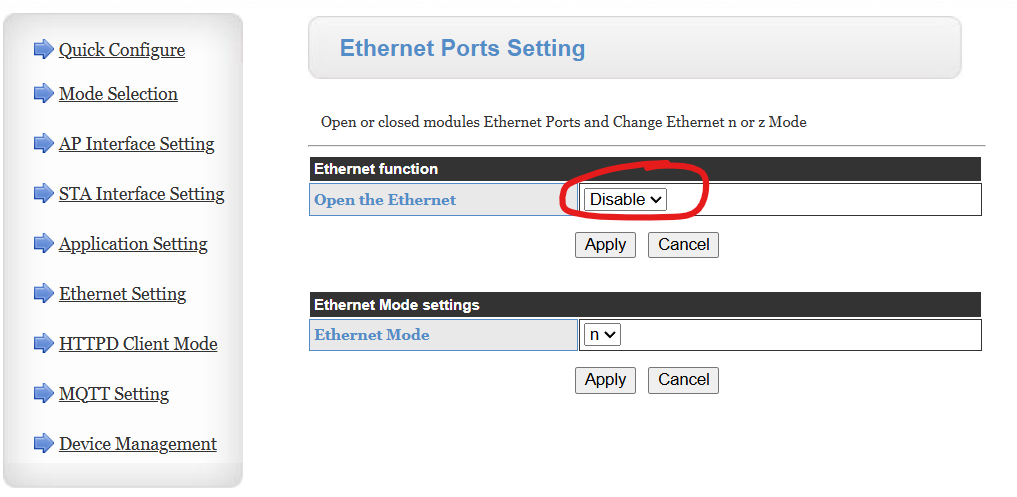
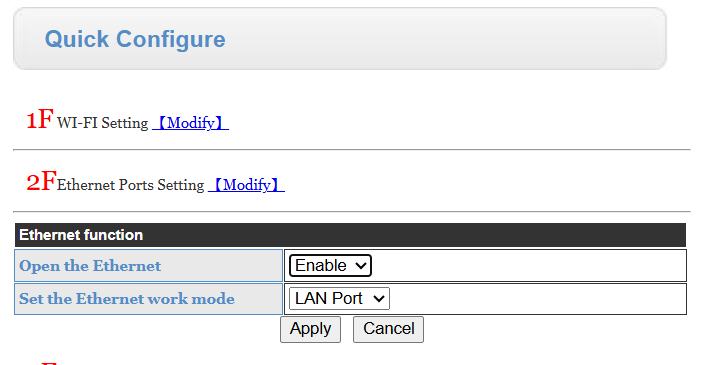
For the ethernet connection. If you can connect it to wifi, go to the web page of the device (its IP address) and you can configure the connectivity there. It might be that you have to enable the ethernet port first. I have it disabled but I don’t remember if it was disabled by default:
I ment the instructions for the waveshare device, as I am not able to get it connected to ethernet. I tried what you suggested (enable ethernet) but it doesn’t get an IP assigned by my DHCP. I can’t find how to set static IP for ethernet.
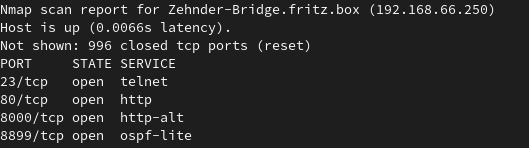
But even without that, following the instructions of the docker container, if connectes to Wifi, I can’t connect to any service of the waveshare device. Open ports are only 23, 80 and 8000. So I presume, some service on waveshare device it not yet enabled?
So how do you configure the wifi connection of the waveshare device? Does it connect to the wifi and does it respond to ping?
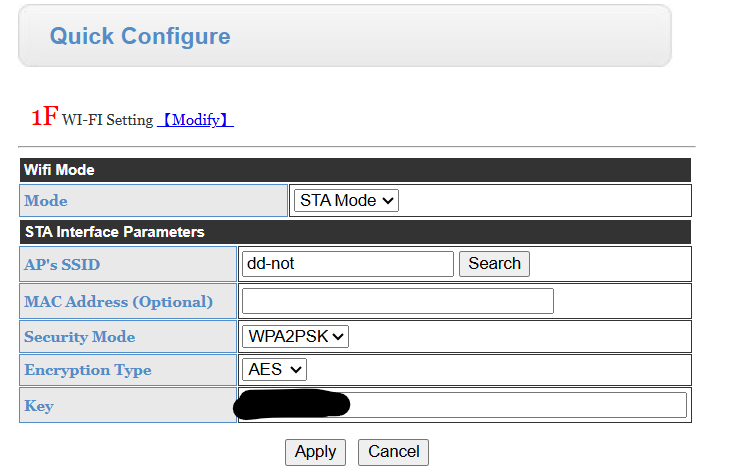
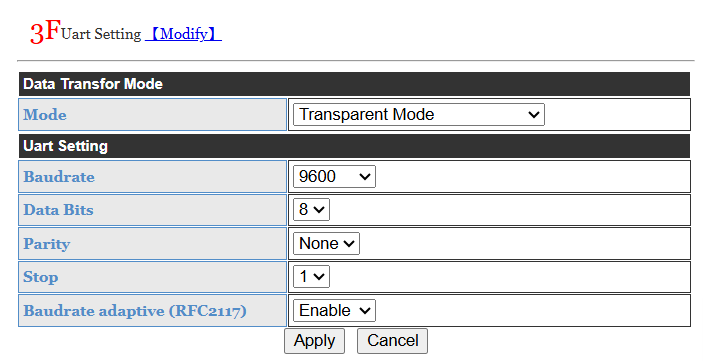
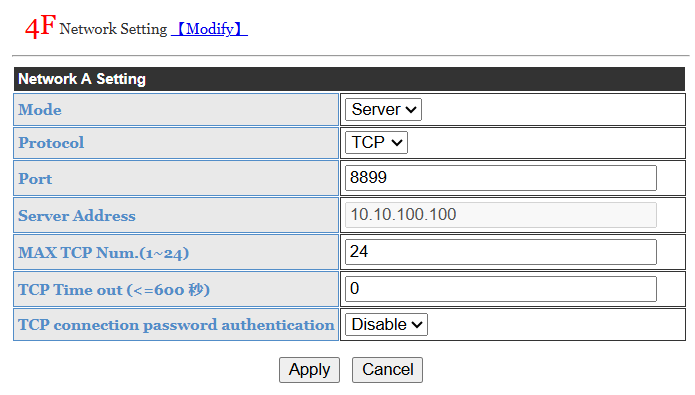
If it connects to the network open its web page (device’s ip address) in a browser:
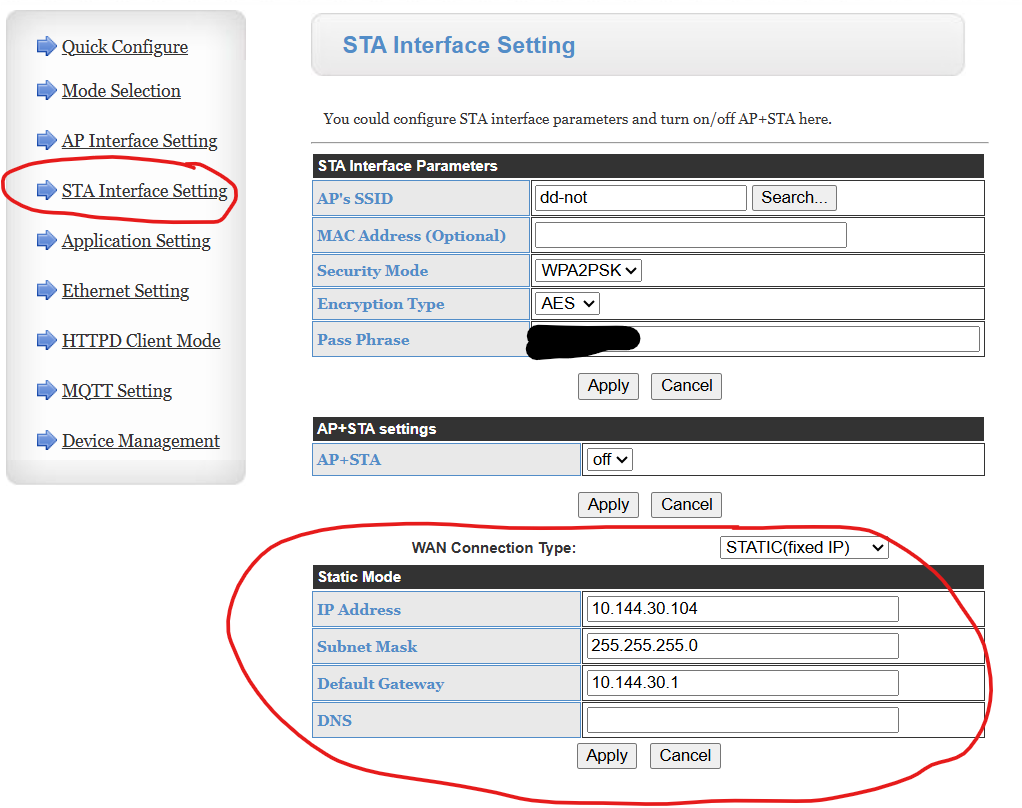
Regarding the static IP, there is only one place to set it up and I’m not sure if it will apply to ethernet connection as well. Worst case you can just set static lease on your router.
Below works for me but I’m using wifi only.
It is quite hard to try to help you if you are not posting any configuration from docker or screenshots from your device config. I’ll stop here unless you share what exactly you have configured so far.
You’re right, it’s not easy to help, if no config is shown. But I was so completely lost with the waveshare device, that I thought it wouldn’t help to show screenshots of the “default” configs.
Your screenshots helped and I resetted the device and configured it accordingly (I omitted the ethernet setup for now, to see, if I can get it to work on Wifi).
So, what I did is almost a copy of what you showed me (can’t add all screenshots, as a new user I’m only allowed to embed one, which follows).
After rebooting I saw a new port open on waveshare device:
And started it. Unfortunately, it still doesn’t connect to the Waveshare device:
hassioaddon-comfoair350    | create serial device over ethernet with socat for ip 192.168.66.250:8899
hassioaddon-comfoair350    | 2025/08/08 12:47:34 socat[9] N PTY is /dev/pts/0
hassioaddon-comfoair350    | 2025/08/08 12:47:34 socat[9] N opening connection to AF=2 192.168.66.250:8899
hassioaddon-comfoair350    | 2025/08/08 12:49:49 socat[9] E connect(7, AF=2 192.168.66.250:8899, 16): Connection timed out
hassioaddon-comfoair350    | 2025/08/08 12:49:49 socat[9] N exit(1)
hassioaddon-comfoair350    | create serial device over ethernet with socat for ip 192.168.66.250:8899
hassioaddon-comfoair350    | 2025/08/08 12:49:50 socat[9] N PTY is /dev/pts/0
hassioaddon-comfoair350    | 2025/08/08 12:49:50 socat[9] N opening connection to AF=2 192.168.66.250:8899
The port is open however:
> telnet 192.168.66.250 8899
Trying 192.168.66.250...
Connected to 192.168.66.250.
Escape character is '^]'.
There seems to be something missing still?
Edit: .249 is the IP of my homeassistant, .250 the one for the waveshare device it obtained from my DHCP server on connecting to my WiFi.
I’m personally using adorobis/hacomfoairmqtt:latest image as it contains the latest version of python script (and works very well for me).
Looks like it times out when trying to open the connection. So to troubleshoot: can you try to run a docker container in an interactive mode and see if you can create the virtual serial port from command line?
You can do the following commands from your host command line:
root@0ba0bef89ed9:/# 2025/08/08 14:18:39 socat[417] N PTY is /dev/pts/1
2025/08/08 14:18:39 socat[417] N opening connection to AF=2 10.144.30.104:8899
2025/08/08 14:18:39 socat[417] N successfully connected from local address AF=2 172.17.0.2:51262
2025/08/08 14:18:39 socat[417] N starting data transfer loop with FDs [5,5] and [7,7]
If you’ll still get a timeout/exit instead I would investigate your docker setup.