I’m on my second zigbee switch remote to control the lights in my family room.
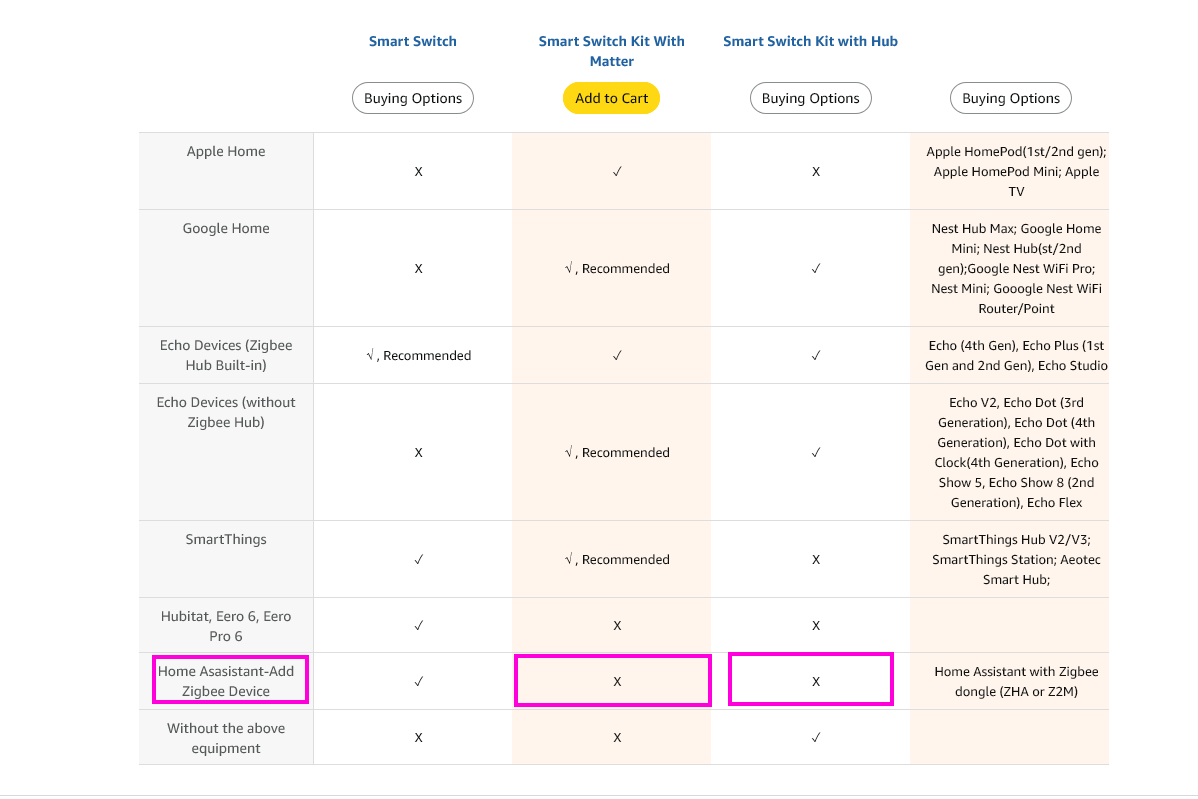
I got a Third Reality ZigBee hub, which shows up in Home assistant as “Matter Zigbee Bridge”, and it connects all my 3rd reality zigbee smart switches.
I’ve added another brands multi switch remote, (since 3rd reality only has a single switch remote [why!?!?!?]) it sees the switch in the 3rd reality installer android app, and sees the 4 on off switches associated with it.
Pressing the buttons doesn’t change anything in the status of the 4 'OnOff Switch’s in the 3R-installer app, and when I look at them in Home Assistant It shows only 3 switches, and they don’t do anything nor react to any button presses from the remote.
I’m still really new to all this so I may just be missing something simple, but any input would be appreciated. I just need a multi switch remote that will work reliably with the smart plugs for my lights.
So… I take it you are bridging these devices into Home Assistant (HA) using Matter?
Also, since you’re using Third Reality’s hub and app as your base gateway, it’s quite common to come across edge-case quirks where features, entities, and attributes can be missing when bridging devices into other ecosystems (HA, Alexa, Google, etc.)
Here’s my initial advice, as I’ve been down this road. The more you use HA, the easier it becomes to use, you will like HA more, and eventually end up making that your base gateway for all things smart home. With this in mind, I recommend investing in a zigbee coordinator (like the older ZBT-1 or the newer ZBT-2 or even any of the Sonoff dongle variants) that you can use directly with HA and build your zigbee network using HA, either using ZHA or Z2M. The developers working on HA and with HA pour their hearts and souls to squeeze every bit of usefulness from a smart device, providing maximum control.
Aside from that, regarding your current issue, it’s strange that you’re not seeing any action based on button presses. I would try re-pairing the device, first. Sometimes hiccups can happen during the pairing process.
First lets check your remote is working. Go to Devices & Services and find your remote. Is there an entity like this on that page?
Buttons aren’t switches. They have an action entity that reports events like single press, double press, etc… You can use these events to control your switches with an automation.
Honestly I had no idea this was even an option. I was under the assumption that HA only coordinated the different protocols and their hubs.
That said, I chose the one I did since it’s doesn’t connect directly to the HA PC, since my HA is installed as a VM, so it being a logical connection makes it all easier…
I did try re-adding it, and the 3r App finds the same “OnOff Switch”. If I add it I get the same 4 OnOff Switches listed in that app.
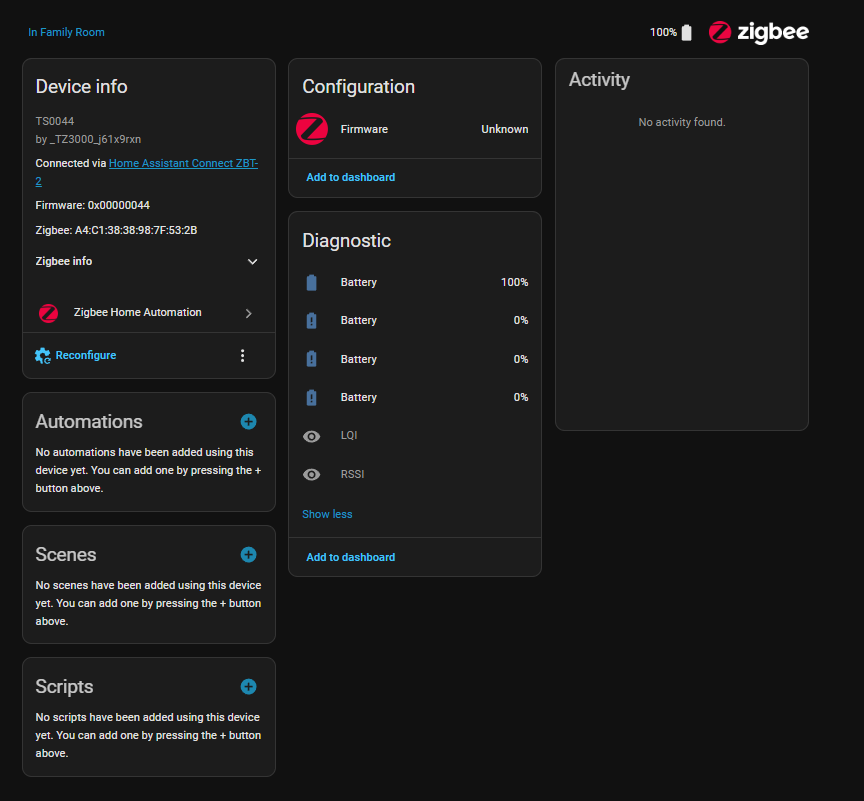
When I look in HA agian, It shows the OnOff Switch Device, and does list it as having 12 entities.
Those entities are 4 Battery status, 4 OnOff Switch and 4 “Powerp-on behavior on startup” entities.
If I look at the properties page I see the attached. No actions listed as you mention and as Tom pictured below.
The remote is showing up as the 4 on /off switches I mentioned and pictured. And it is listed as compatible with home assistant.
Are you saying that the 3R ‘zigby hub’ is the problem? That would make a lot of sense given that all it has really connected successfully is the 3r Smart outlet switches. I have to use their app to add devices, and then as we’ve seen here, they don’t necessarily work!
Is there a straight Zigbee hub or device I can use directly in HA that ISN’T usb? Again since it’s a VM it’s easier if it connects to a hub that is on the network.
SMLIGHT makes a zigbee dongle that connects via POE ethernet. If you don’t have POE (power over ethernet) capability, then you’ll need to get something like a network switch that has it baked in. Actually, looking at the model in particular, you can power it via USB-C. You’ve got options, lol
Take your pick from any of the Network or Hybrid options listed below. Bear in mind this is for Zigbee2MQTT, since the ZHA docs show a smaller list with mostly USB devices. Most of these should still work in ZHA, but double check before purchasing:
I’d personally recommend the Tube’sZB one, but you might be stuck with tariffs or duties depending on your location.
The SMLight ones have pretty good feedback here (depending on model), have a simpler user interface and are generally cheaper & more available. Again, search around these forums for reviews & compatibility with ZHA.
Note, you NEVER, EVER have to buy a manufacturer’s hub. Just buy the appropriate dongle for each protocol and Home Assistant is the hub. (Coordinator, actually).
As I note I’m still very new to HA, and I currently have 3R Plugs (and a 3R zigbee / matter hub), Yolink temp sensors for my freezers, and motion sensors for the driveway and front door (and the yolink speaker hub for them and ‘notifications’). And the Zigbee Remote that I’m trying to integrate as well.
I had thought that the point of HA was to coordinate the different manufactures hardware hubs and then devices, but it sounds like you’re saying HA can manage the manufactures protocols directly instead, and thereby control the devices directly?
My whole point in ‘waiting for’ HA to get into home automation was that I’m not interested in anyone knowing what is going on in my home, so keeping EVERYTING within HA would absolutely be my preference however that can be achieved.
Is this by using HA branded hardware to connect the devices as Matt mentioned above? If so would that include the Yolink devices?
Thanks, and thanks for any further insight you can offer!
With a supported coordinator and Z2M / ZHA running in HA you usually don’t need a manufacturers hub.
You are right in saying that HA can coordinate different hubs into a single pane of glass, but in that case you also have a separate Zigbee network per hub, which can lead to fragmented, competing Zigbee networks with less device support than for example one big Zigbee2MQTT network. Each hub does not talk to the other, so you don’t get meshing between hubs.
If you already have a hub that supports the devices you are using there is nothing wrong in starting out with that, and rather replace that with Z2M or ZHA down the line when you get devices the proprietary hub does not support.
Thanks! I did pickup a ZBT-2 to use, connected it and when I restart and HA sees it, but when I try to add it reports that it couldn’t flash the firmware.
Is that because it’s a VM? I was surprised to see VMware and the VM itself recognized it so was hopeful it would work, but if I need to move HA to physical hardware to get it working, I’m happy to as I’ve got a bunch of used client Dell PCs lying around.
Doesn’t look like it was as I built a PC into a new HA server, restored and tried to install the ZBT-2 and this time it did get through the whole flash process (showed 100% where the VM didn’t show any progress) and then told me flash failed. I’ll start a new post for this since it’s a different subject…
OK, got the ZBT-2 installed and functioning and added the ZigBee remote and still doesn’t work or give me any indication what to do to make it work…? It just shows the battery level for each of the on off switches, no switching capability.
Any ideas?
Press the buttons on the remote. You should see single, long & double press events for each button happening in the Activity section in your screenshot above.
Remember that this is a remote and not an actual switch. You won’t see any switches to control on the device page, but you can listen to the events caused by the buttons being pressed to automate on it.
PS - you can disable the bottom 3 battery entities. Somehow the switch created 4 battery entities instead of just 1.
GREAT info, thanks! I did that and saw it and then added an automation with a test plug and found how to trigger it! Also found the ‘entities’ page for it and got the other batteries disabled!
At this point, I’m thinking through getting rid of the 3R ‘zigbee hub’, since that requires their app (and an account) to manage. Figure I can re-add the plugs connected to the ZBT-2 and update the automations etc they’re already in.