Zigbee2MQTT fails to connect to SMLIGHT SLZB-06P7

I’ve been running Zigbee2MQTT on Home Assistant OS (Raspberry Pi 5, Zigbee2MQTT add-on, Mosquitto add-on).
Coordinator: SMLIGHT SLZB-06P7

  • SLZB-OS firmware: v2.9.8
  • Zigbee radio firmware: 20240315

It worked fine for months. Since the recent SMLIGHT firmware, Zigbee2MQTT fails to start and I get:

Error: SRSP - SYS - ping after 6000ms
Failed to connect to the adapter
  • ZHA is not installed.
  • The SLZB is reachable: nc 192.168.178.94 6638 → open.
  • MQTT broker is working fine, other integrations publish normally. In MQTT Explorer I still see retained Zigbee2MQTT topics, but zigbee2mqtt/bridge/state stays offline.

Config:

data_path: /config/zigbee2mqtt
socat:
  enabled: false
  master: pty,raw,echo=0,link=/tmp/ttyZ2M,mode=777
  slave: tcp-listen:8485,keepalive,nodelay,reuseaddr,keepidle=1,keepintvl=1,keepcnt=5
  options: "-d -d"
  log: false
mqtt:
  server: mqtt://core-mosquitto:1883
  user: MyUser
  password: MyPass123
serial:
  port: tcp://192.168.178.94:6638
  baudrate: 115200
  adapter: zstack
  disable_led: false
advanced:
  transmit_power: 20

Has anyone else run into this with the SLZB-06P7 after recent firmware?
Should I keep using direct TCP, or is switching to socat the only stable option?

Can you connect to the SMLight UI with the device’s IP?

Yes, the SMLight UI is reachable.

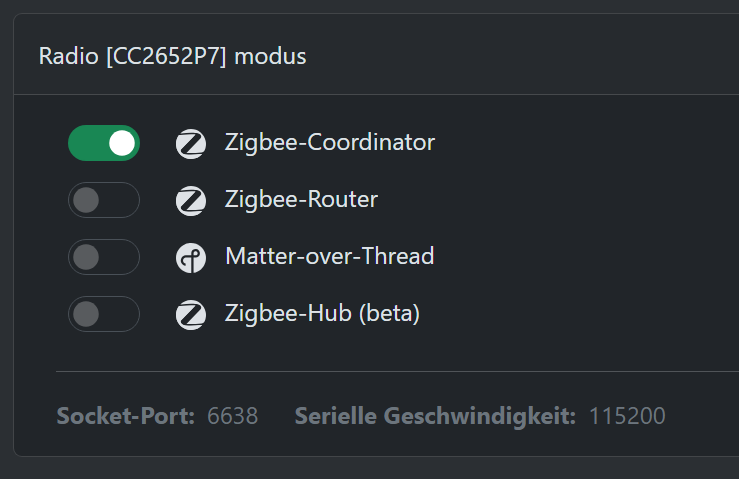
Verify the mode is coordinator and the connection is still WiFi or ethernet.

Can you post a larger portion of your Z2M log showing before and after the error?

The connection is still over LAN:
image

The mode is coordinator:

These are the only logs that I have left:

[11:40:08] INFO: Preparing to start...
[11:40:08] INFO: Socat not enabled
[11:40:08] INFO: Starting Zigbee2MQTT...
Starting Zigbee2MQTT without watchdog.
[2025-08-26 11:40:29] error: 	z2m: Error while starting zigbee-herdsman
[2025-08-26 11:40:29] error: 	z2m: Failed to start zigbee-herdsman
[2025-08-26 11:40:29] error: 	z2m: Check https://www.zigbee2mqtt.io/guide/installation/20_zigbee2mqtt-fails-to-start_crashes-runtime.html for possible solutions
[2025-08-26 11:40:29] error: 	z2m: Exiting...
[2025-08-26 11:40:29] error: 	z2m: Error: Failed to connect to the adapter (Error: SRSP - SYS - ping after 6000ms)
    at ZStackAdapter.start (/app/node_modules/.pnpm/[email protected]/node_modules/zigbee-herdsman/src/adapter/z-stack/adapter/zStackAdapter.ts:114:27)
    at Controller.start (/app/node_modules/.pnpm/[email protected]/node_modules/zigbee-herdsman/src/controller/controller.ts:134:29)
    at Zigbee.start (/app/lib/zigbee.ts:67:27)
    at Controller.start (/app/lib/controller.ts:101:13)
    at start (/app/index.js:149:5)

Z2M is failing immediately with no attempt to open the port to connect. What version of Z2M are you using?

I would expect this :arrow_down:
Opening TCP socket with 192.168.xx.xx:6638

Try a full reboot, not just a restart.

I have auto updates on. My current version is: 2.6.0-1

I just fully rebooted my Raspberry Pi, but still getting the same error.

I am experiencing the exact same thing. Very strange.

[00:37:47] INFO: Preparing to start...
[00:37:47] INFO: Socat not enabled
[00:37:47] INFO: Starting Zigbee2MQTT...
Starting Zigbee2MQTT without watchdog.
[2025-08-27 00:38:07] error: 	z2m: Error while starting zigbee-herdsman
[2025-08-27 00:38:07] error: 	z2m: Failed to start zigbee-herdsman
[2025-08-27 00:38:07] error: 	z2m: Check https://www.zigbee2mqtt.io/guide/installation/20_zigbee2mqtt-fails-to-start_crashes-runtime.html for possible solutions
[2025-08-27 00:38:07] error: 	z2m: Exiting...
[2025-08-27 00:38:07] error: 	z2m: Error: Failed to connect to the adapter (Error: SRSP - SYS - ping after 6000ms)
    at ZStackAdapter.start (/app/node_modules/.pnpm/[email protected]/node_modules/zigbee-herdsman/src/adapter/z-stack/adapter/zStackAdapter.ts:114:27)
    at Controller.start (/app/node_modules/.pnpm/[email protected]/node_modules/zigbee-herdsman/src/controller/controller.ts:134:29)
    at Zigbee.start (/app/lib/zigbee.ts:67:27)
    at Controller.start (/app/lib/controller.ts:101:13)
    at start (/app/index.js:149:5)```

After reflashing the firmware to 20240710, setting the whitelist on the webui of the adapter, rebooting and than disabling the whitelist again, I can report that the connection did work again. Also I rebooted the adapter and HA. Not sure what steps actually made the connection work again.

I am just experiencing the same exactly thing.
My coordinator stopped working in one the the HA version upgrades and I can not make my coordinator start working again

I change the fimrware and went back from v3.0.8 to v2.8.7 just to see if that works.