Click the badge to import this Blueprint: Zigbee2MQTT - Tuya 4-Button Switch (MQTT Device Trigger) Blueprint moved to github. The blueprint filename has changed if you used a privious version of this blueprint see here how to avoid having to rewrite your automation manually after switching the blueprint.
Alternate Blueprint Zigbee2MQTT - Tuya 4-Button Switch (MQTT Subscribe Any - Filters Multiple Devices)
Here is an alternate blueprint if you want to automate multiple devices (of the same type) in with the same actions maintaining a single automation.
If the buttons are mostly doing the same thing but you want to introuduce minor variation you could do something like this.
Change Log:
11/01/2025
New blueprint created using MQTT device triggers to avoid triggering unnecessarily the atuomation when any action is fired by mqtt devices.
Added an alternate blueprint that handle multiple buttons allowing control of many buttons within the same automation. (Using the method where the automation triggers for any mqtt device action)
05/01/2025
Changed blueprint to use MQTT Topic Triggers instead of the HA sensor entity which no longer exist. (Please reselect the Device Entity in your Automations after updating the blueprint)
Corrected the orientation description of button 1 - 4 since it wasn’t correct to start with.
Yes I’ve already changed a similar blueprint here to use MQQT topic triggers instead of devices sensors, which no longer exist. I’ll fix this in a few hours.
Here is a version which does not rely on receiving MQTT messages directly but instead uses the new event triggers. The thing I dislike about the current version with MQTT messages is that the automation triggers on ANY ‘action’ message and only afterwards filters it via a condition.
The changes to the 2024 version of this blueprint are minimal:
For the switch input I set
          domain:
            - event
and for the command variable
  - variables:
      command: >
        {% if trigger.to_state.attributes.button is defined %}
        {{ trigger.to_state.attributes.button }}_{{trigger.to_state.attributes.event_type }}
        {% else %}
        {{ trigger.to_state.attributes.event_type }}
        {% endif %}
This is a bit more complicated than necessary because currently the event reporting from Z2M is inconsistent. Short and double presses are reported as event_type: 1_single while for long presses the payload is split into parts:
event_type: hold
button: '1'
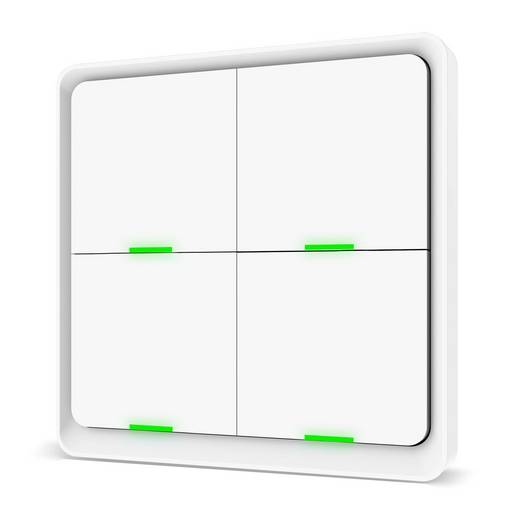
I did not copy the button descriptions from the 2025 version, because they are wrong for my devices. Perhaps there are two versions with different button layouts.
blueprint:
  name: Zigbee2MQTT - Tuya 4-Button Scene Switch (rdeangel_mod, events)
  description: Automate your Tuya 4-Button Scene Switch via Zigbee2MQTT. This requires Settings -> Home Assistant integration -> Home Assistant experimental event entities to be enabled in Zigbee2MQTT.
  domain: automation
  input:
    mode:
      name: Automation Modes
      description: https://www.home-assistant.io/docs/automation/modes/
      default: parallel
      selector:
        select:
          mode: dropdown
          options:
            - single
            - restart
            - queued
            - parallel
          multiple: false
          sort: false
          custom_value: false
    switch:
      name: Tuya 4-Button Scene Switch
      description: Tuya 4-Button Scene Switch to use
      selector:
        entity:
          integration: mqtt
          domain:
            - event
          multiple: false
    button_one_short_press:
      name: Single Press - Button 1
      description: Action to run on button 1 (lower-left) single press
      default: []
      selector:
        action: {}
    button_one_double_press:
      name: Double Press - Button 1
      description: Action to run on button 1 (lower-left) double press
      default: []
      selector:
        action: {}
    button_one_long_press:
      name: Long Press - Button 1
      description: Action to run on button 1 (lower-left) long press
      default: []
      selector:
        action: {}
    button_two_short_press:
      name: Single Press - Button 2
      description: Action to run on button 2 (lower-right) single press
      default: []
      selector:
        action: {}
    button_two_double_press:
      name: Double Press - Button 2
      description: Action to run on button 2 (lower-right) double press
      default: []
      selector:
        action: {}
    button_two_long_press:
      name: Long Press - Button 2
      description: Action to run on button 2 (lower-right) long press
      default: []
      selector:
        action: {}
    button_three_short_press:
      name: Single Press - Button 3
      description: Action to run on button 3 (upper-right) single press
      default: []
      selector:
        action: {}
    button_three_double_press:
      name: Double Press - Button 3
      description: Action to run on button 3 (upper-right) double press
      default: []
      selector:
        action: {}
    button_three_long_press:
      name: Long Press - Button 3
      description: Action to run on button 3 (upper-right) long press
      default: []
      selector:
        action: {}
    button_four_short_press:
      name: Single Press - Button 4
      description: Action to run on button 4 (upper-left) single press
      default: []
      selector:
        action: {}
    button_four_double_press:
      name: Double Press - Button 4
      description: Action to run on button 4 (upper-left) double press
      default: []
      selector:
        action: {}
    button_four_long_press:
      name: Long Press - Button 4
      description: Action to run on button 4 (upper-left) long press
      default: []
      selector:
        action: {}
  source_url: https://community.home-assistant.io/t/zigbee2mqtt-tuya-4-button-scene-switch-ts0044-rdeangel-mod/663302
mode: !input mode
max_exceeded: silent
trigger:
  - platform: state
    entity_id: !input switch
action:
  - variables:
      command: >
        {% if trigger.to_state.attributes.button is defined %}
        {{ trigger.to_state.attributes.button }}_{{trigger.to_state.attributes.event_type }}
        {% else %}
        {{ trigger.to_state.attributes.event_type }}
        {% endif %}
  - choose:
      - conditions:
          - "{{ command == '1_single' }}"
        sequence: !input button_one_short_press
      - conditions:
          - "{{ command == '2_single' }}"
        sequence: !input button_two_short_press
      - conditions:
          - "{{ command == '3_single' }}"
        sequence: !input button_three_short_press
      - conditions:
          - "{{ command == '4_single' }}"
        sequence: !input button_four_short_press
      - conditions:
          - "{{ command == '1_double' }}"
        sequence: !input button_one_double_press
      - conditions:
          - "{{ command == '2_double' }}"
        sequence: !input button_two_double_press
      - conditions:
          - "{{ command == '3_double' }}"
        sequence: !input button_three_double_press
      - conditions:
          - "{{ command == '4_double' }}"
        sequence: !input button_four_double_press
      - conditions:
          - "{{ command == '1_hold' }}"
        sequence: !input button_one_long_press
      - conditions:
          - "{{ command == '2_hold' }}"
        sequence: !input button_two_long_press
      - conditions:
          - "{{ command == '3_hold' }}"
        sequence: !input button_three_long_press
      - conditions:
          - "{{ command == '4_hold' }}"
        sequence: !input button_four_long_press
Totally right, I was hesitant posting it to start with for this very same reason, but I thought let me get something out there for now.
I had to right my wrong so I’m posting a new one which follows the official way of doing things and it’s pretty much what Panopilian posted in the original post.
Zigbee2MQTT - Tuya 4-Button Switch (MQTT Device Trigger) - rdeangel SROLL UP TO IMPORT BLUEPRINT I suggest anyone using my last automation to use this one instead
This one uses the MQTT device trigger instead and will only trigger for manually defined device mqtt actions, which is much better.
What I dislike about this one is the manual definition of all the triggers (very long) but there is no way around that (from what I can tell) as the triggers are loaded when the blueprints loads (not when the automation loads) so they need to be manually defined within the blueprint (at least for now).
What I still couldn’t resolve, is to efficiently allow for multiple devices of the same type to be controlled by a single automation.
For this purpose I’m reposting the same automation I originally posted before with multiple inputs (which again has the issue of getting triggered with any mqtt device actions). You can use it if you don’t mind the trigger happy behaviour.
PLEASE DON’T USE THIS ONE IF YOU JUST NEED THE AUTOMATION TO BE TRIGGERED BY A SINGLE DEVICE, USE THE ONE ABOVE: Zigbee2MQTT - Tuya 4-Button Switch (MQTT Subscribe Any - Filters Multiple Devices) SROLL UP TO IMPORT BLUEPRINT
I’ll also update the links at the top of the post in a minute.
FYI, these new blueprints have a different filename, but instead of redifining your automations manually (which get wiped when you switch the blueprint in your automation) you can just import the blueprint, then go to your automation, click edit yaml at the top right and change:


 TO IMPORT BLUEPRINT

