Zigbee2MQTT with two coordinators: devices work in Z2M UI but not from Home Assistant entities

I’m running Home Assistant with Zigbee2MQTT and I’m having trouble with a dual-coordinator setup that I can’t figure out after several days of troubleshooting.

My setup:

  • Two Sonoff Zigbee USB sticks (Zigbee network with a slave coordinator)
  • The main coordinator is plugged directly into an Intel NUC running Home Assistant
  • A second coordinator is located in my garage, connected to a Raspberry Pi 3, because the garage is too far away and I don’t have repeaters in between
  • Each coordinator runs its own Zigbee2MQTT instance
  • Both instances connect to the same MQTT broker and are integrated into Home Assistant

At the Zigbee2MQTT level, everything looks correct:

  • Devices join successfully on both networks
  • From each Zigbee2MQTT web UI I can control devices normally (switch lights on/off, etc.)
  • Devices remain stable and reachable from Zigbee2MQTT

However, the problem appears inside Home Assistant.

When Zigbee2MQTT creates entities in Home Assistant, those entities often do not control the real devices.
For example, a Zigbee switch works perfectly when toggled from the Zigbee2MQTT UI, but the corresponding entity inside Home Assistant does nothing.

Something important I noticed: in the past, right after pairing a device, the Home Assistant entity would work. After a few days, it would stop working, even though Zigbee2MQTT still controlled the device normally. The only workaround was re-pairing the device. But then I would have to recreate buttons and automations all the time.

I’m not sure if that behavior is still happening, but since I didn’t change my configuration, I suspect it might.

At this point I’m trying to understand what I should check to investigate this properly.

There is also a UI confusion issue with the two Zigbee2MQTT instances.

After installing both, I now have two Zigbee2MQTT entries in the Home Assistant sidebar. When I open either one, the interface looks very similar and appears to show the same device list. But behavior differs:

  • Some devices only respond when controlled from one instance
  • Others only respond from the other instance
  • It’s difficult to clearly identify which device belongs to which coordinator

So I’m trying to understand whether this is expected behavior when running two Zigbee2MQTT instances, or if it indicates a configuration problem (for example overlapping topics, discovery conflicts, or UI caching).

I just want to achieve a stable setup where Home Assistant entities reliably control devices on both Zigbee networks, without needing to re-pair devices periodically.

Could you guys please help me out with that?

Thank you!
Just make sure they are on different channels, that the IEEE number used by the coordinators are different, and you have different PAN ID’s and Network Keyc.

My guess you were using one stick, migrated it to another stick, and that would mean you have 2 sticks with the same IEEE ID, which will not work. That’s the stupid trick they pull to migrate a stick so easily. Give the new stick the old sticks ID and it takes over. It also means the 2 cannot operate any where near each other again.

1 Like

Quick update with more findings from my dual-coordinator Zigbee2MQTT setup.

I confirmed that both coordinators have the exact same IEEE address. The Zigbee channels are different, but the IEEE is identical on both sticks.

I was able to check PAN ID and Network Key for the newer (garage) instance via its configuration.yaml, but I have not yet located the configuration files for the original coordinator. When accessing Home Assistant via Samba, I only see the folder for the more recent Zigbee2MQTT instance. The first one seems to be stored inside the add-on internal storage, and I haven’t found its configuration.yaml to compare PAN/network key yet.

Another important observation:

Zigbee2MQTT UI works fine for both networks Devices respond normally when controlled directly from the Zigbee2MQTT web UI If I send MQTT commands manually (publish), devices also respond correctly However, the entities created in Home Assistant do not control the real devices.

So the issue seems specific to the Home Assistant integration layer rather than Zigbee communication itself.

Additionally, when I open the logs of both Zigbee2MQTT instances, I repeatedly see:

Not connected to MQTT server

This appears intermittently on both coordinators, even though MQTT publishing still works when done manually.

At this point I can confirm:

IEEE address → identical on both coordinators Channels → different PAN ID / Network Key → verified only for one instance so far Zigbee control → works via Zigbee2MQTT UI and manual MQTT publish Home Assistant entities → become unresponsive over time Zigbee2MQTT logs → both instances sometimes report not being connected to MQTT

Does the identical IEEE alone explain this behavior?
And could the intermittent MQTT disconnect messages be related to running two Zigbee2MQTT instances against the same broker?

Any guidance on how to properly validate and separate both coordinators’ identities (and configs) would be greatly appreciated.

Think of the IEEE number like a WIFI MAC address.
HA be like, Hey IEEE: xxxDaryll go do this.
Then it gets a response from xxxDaryll and his other brother xxxDaryll ‘OK’ .
Chaos ensues.
The devices talking to either one only know about their xxxDaryll, so they are fine.

Are the base_topics unique to each z2m instance?

I don’t think HA actually sees the ieee via z2m (could be wrong), but unless all devices on each network are truly 100% out of range of the other, there could be glitches on the zigbee side.

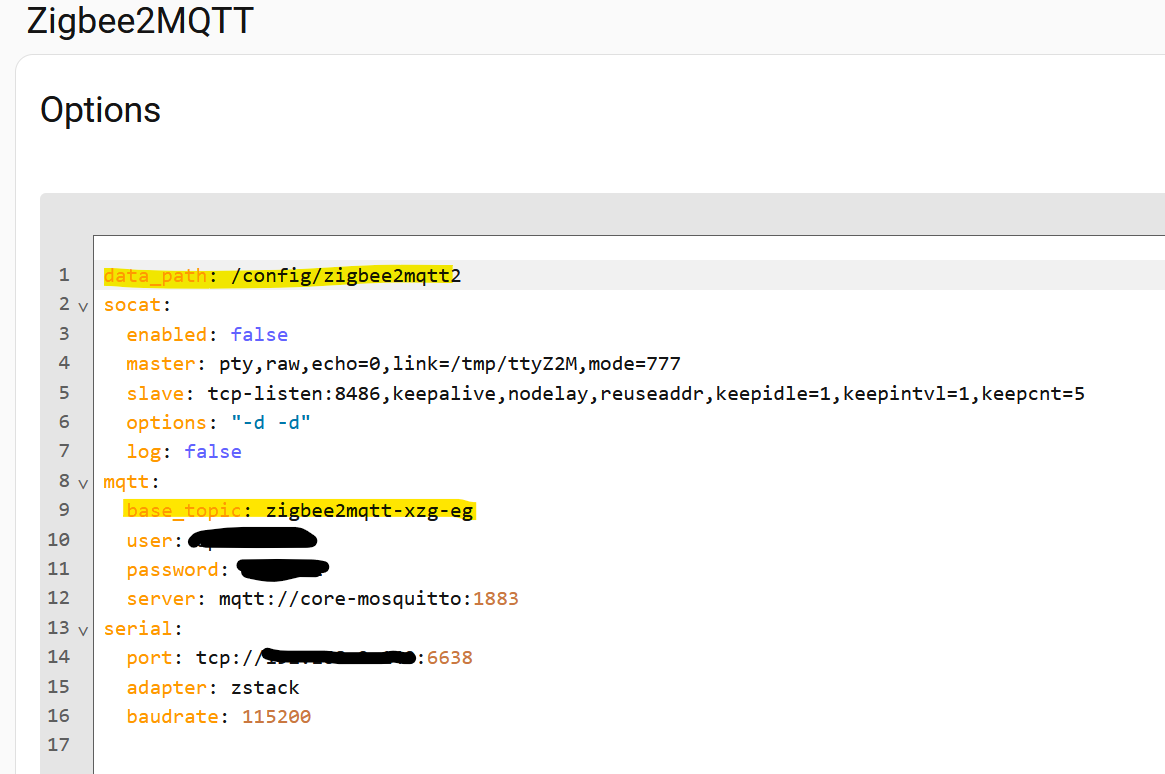
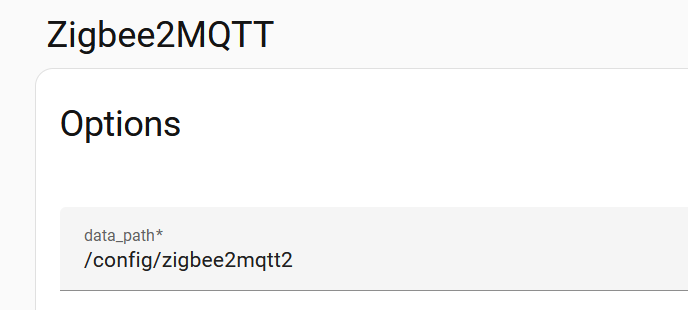
Apparently everything is working now. I noticed not only the IEEE number were the same but even the config folder had the same directory. Now that I made sure those settings are not the same, there is no conflict anymore.

I did not only change the path:

but also the base-topic in the editor:

1 Like

You are absolutely right. I did the same. The problem was that, since the config folder had the same address on both instances I could only see one configuration.yaml. and then I could not change some of these settings.

I had to make sure the folder addresses were different on order to do that!

Now it works like a charm. I still have to re set the devices on the other instace of Z2M but I think it will work normally.

Yes, I faced the same problem with the path. No tutorial or so had this in their todo.

Works very well for me, after all the changes.

I had the problem, that my mesh grew too big (over 100 devices, ca. 50% powered). There was often a big delay in actions to battery powered endpoints, even with the big mesh.

After splitting it in 2 smaller pieces with different channels every thing worked well, again.

A controller for cellar and lower parts of the house and one controller for the upper part. Both a seperate mesh on seperate channels.