If the switch has a weak signal, then a blueprint updating it often could be knocking it off network. I would disable the blueprint and see if it stays online or put in it back in mesh mode with a plug to repeat between the controller and Zen35.
thx for chiming in!
Yeah, signal strength was what I was originally thinking, but that’s not it. The zen35 is 4 feet away from the zwave controller. I’ve even changed over from a 700 series controller to the ZWA-2 antenna just to be sure. I also replaced the ZEN35 with a new one and while better, it’s already dropped off the network again.
Something about the ZEN35 is behaving weirdly for me, just can’t figure out what it could be. I’ve already started logging on zwave-js-ui to see if I can trace the issue better.
I am having the same issues with my ZEN35 (dimmer version). It seems very temperamental and will lock up the zwave network while it is trying to recover if the scene buttons are pressed to quickly. I also have two of the ZEN32’s (non-dimmer) and they don’t have the lockup issues. I have 57 devices on my zwave network and there are no signal strength issues. Originally, I had a Inovelli Red Dimmer Switch (LZW31-SN) that I replaced with the ZEN35, and it had no issues. Hopefully a firmware update will fix the device at some point.
Thx. Yeah, that’s what I was wondering too. Just a guess, but I’m wondering if the switch is crashing from too much activity?
I don’t use the physical buttons a lot, but I do have some automations that are sending somewhat frequent z-wave commands.
For now, I’ve disabled some z-wave reporting on the ZEN35 and it seems more stable. Its gone from several z-wave drops per day to a couple of drops per week.
@rwalker , I might have found a bug in how LED states are handled at night. But before I dive into the explanation of what I’m experiencing, I want to say thank you for all the hard work you’ve put in to building out the feature set in this blueprint. I really appreciate it!
At night the entity status LED gets ‘stuck’ in the on state.
My configuration:
A range of nighttime hours has been defined and nighttime brightness set to ‘No change’.
Off behavior for button x - On during daytime / color blue
On behavior for button x - Always on / color red
During the day it all works as intended, the LED colors accurately track the on/off state of the entity. When the entity is on the LED is red, and when the entity is off the LED is blue.
The problem:
As expected, when the night time-range is reached blue LEDs turn off leaving only red LEDs indicating the entities that are in the on state. However, when an entity changes to the off state, the Zen35 red LED remains illuminated instead of being shut off; this is the problem.
Night - entity state changed from on (red LED illuminated) to off - LED remains red instead of shutting off
The rest of the entity state monitoring and LED behavior works as expected
Day - entity state on - red
Day - entity state off - blue
At transition from day to night - entity state on - red
At transition from day to night - entity state off - LED off
–|
It looks like it might be the conditional logic at line 970
And based on your comment, “# Make sure we got a valid state and check if we are set to 99 and schedule set and in nighttime - if so we don’t do anything”, your code seems to be working as you intended. Looks like my intended functionality differs from you had in mind.
I’m going to test something like this to see if it works.
- if:
        - condition: template
          # FIX: Allow execution even if night + state 99
          value_template: '{{ condition.state != ''None'' }}'
        then:
          sequence:
            - parallel:
              # turn LED on
              - service: zwave_js.set_config_parameter
                data:
                  parameter: '{{ parameter.toggle }}'
                  # FIX: If state is 99 (Daytime on) AND it is night, send 2 (Always Off). Else send 3 (Always On).
                  value: >
                    {% if condition.state == '99' %}
                      {{ '2' if schedule_set and in_nighttime else '3' }}
                    {% else %}
                      {{ condition.state }}
                    {% endif %}
The updated if logic seems to work. There’s also a similar condition that exists at Home Assistant start up. I have not changed anything there because I’d like to hear @rwalker feedback before moving forward. If these changes are going to be integrated into the official Blueprint, I wait and not make my own personal branch.
If you would please give me an merge request so I can test to make sure it doesn’t cause any other issue (it looks good to me).
I made the changes directly in Home Assistant, editing files in-place. I don’t have any Github experience unfortunately. I’m sure I can figure it out in time but, it might take a while.
@rwalker created a PR here: Fix nighttime LED behavior when entity state changes by ngurney · Pull Request #10 · rwalker777/Zen32-HA-Blueprint · GitHub (also updated readme)
Thanks for your findings, @HANovice, helped a lot!
2 Likes
Looks good with my testing, so updated version to 2025.12.0 and merged.
Thanks!
1 Like
Appreciate you stepping in and getting it done! I spent some time in VSCode and GitHub but found the learning curve to be steeper than anticipated.
Thanks!
1 Like
Hello all
Huge thanks to @rwalker for this blueprint. Makes things so much easier to setup. I was wondering if anyone had some info or something I need to change to have the large button 5 light to turn off with the smaller leds at night. I notice it will always remain on at night.
Thanks in advance
By default the LED of the big button tracks the relay. What do you want the behavior to be?
Hello @rwalker. I currently have my relay turned off. I use this to control the light in my ceiling fan or in another Zen32 I have it control a Govee patio light. Is it possible the light would still turn on and off with the time of night light. Basicly how the smaller buttons will all follow that on and off for day and night
If you have the relay control disabled, then it should work. My guess is you have a Z-Wave setting incorrect. Double check those and if you are still having issues, post them here I can tell you what to change.
I have checked all settings and not seeing anything that would cause this to not work. All buttons are setup the same way but the larger main button light will never go out. Here are my settings:
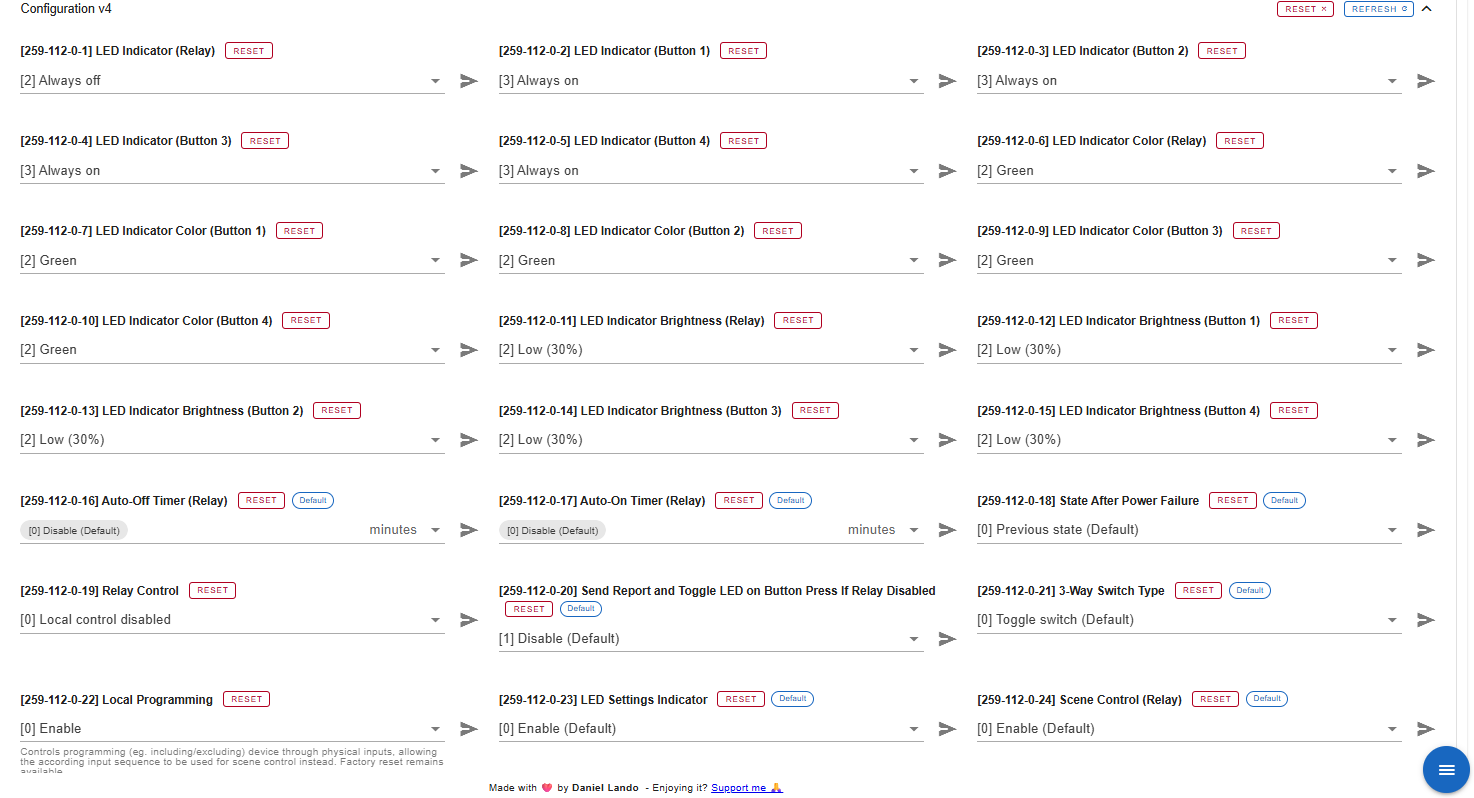
Try setting option 20 to enabled. I assume you have updated firmware? Latest is v2.40 (was a bug a long time ago that caused your issue).
1 Like
That was it. Option 20 changed to Enabled. My Zen32 is on the current 3.20.1 firmware.
Thanks for the help @rwalker
@rwalker thanks for making this blueprint!
It really helped me set up my controllers fast. I pulled an all nighter, added a few features and refactored some of the repeated lines to make it a bit more maintainable.
I wanted to be able to track if automations were enabled or not, override the colors at night (these things are BRIGHT!) and most importantly optionally override the trigger for nighttime mode using a toggle or sensor for dynamic night mode times.
I just made a pull request. Let me know what you think! feat: add advanced night mode options, additonal LED synchronization - modular code refactor by TheZackCodec · Pull Request #11 · rwalker777/Zen32-HA-Blueprint · GitHub
1 Like
Let me review and make sure it doesn’t affect current settings.