I have two zwave controllers running on raspberry pi’s, split between parts of the house. One of them failed today, the SD card is completely unreadable.
I have rebuilt it on a new card, installing the software/dockers, and have it running. When it started it found the controller and has all the current nodes identified, and is … well, doing something.
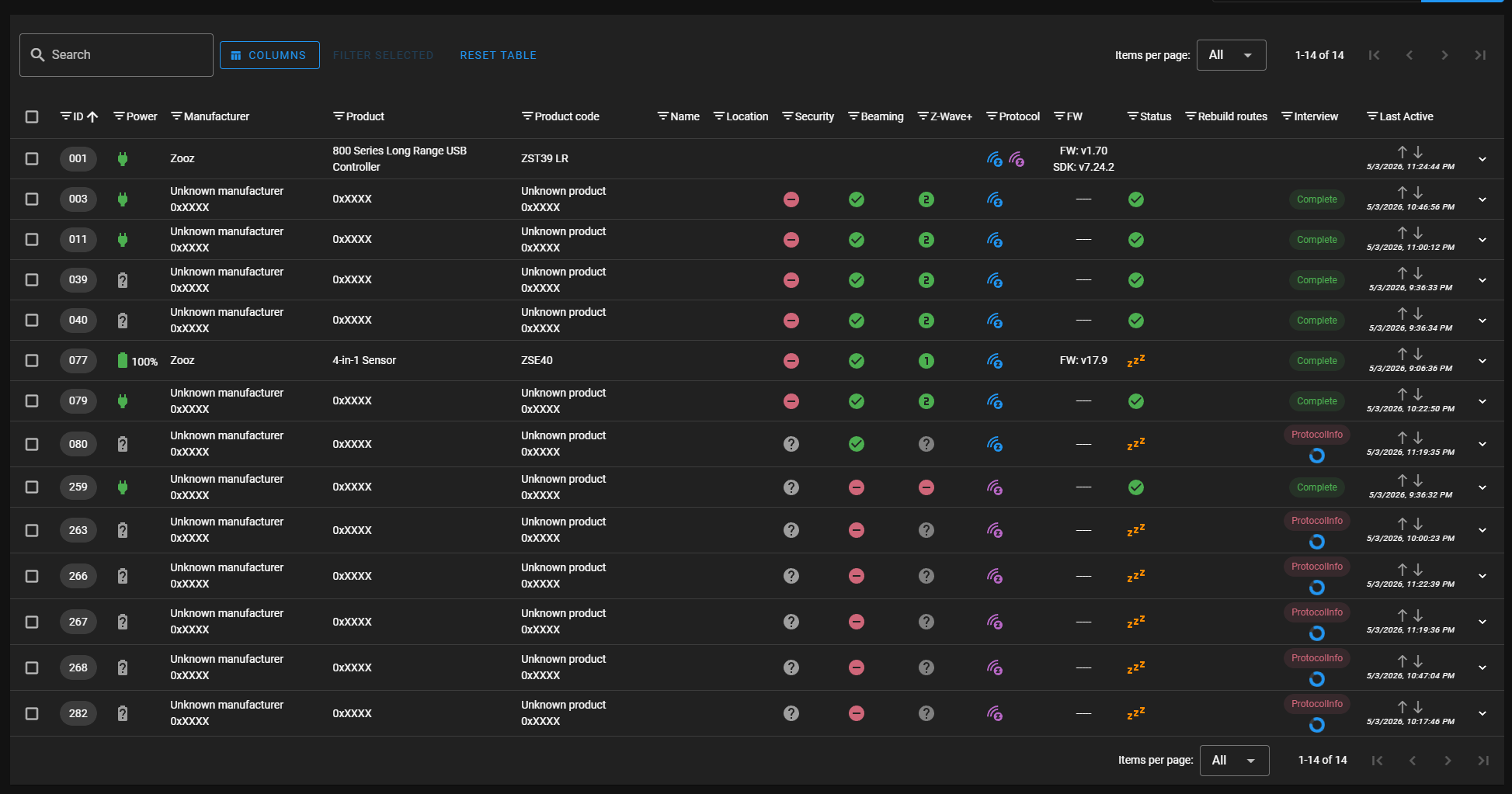
It is connected to Home Assistant, but almost everything shows not available. Some devices show their name, some show “Node 3” and similar. I could rename them but I do not see why they are unavailable. Some of the unavailable ones are mains powered, not battery.
Do I need to just give this more time?
I had the zwave software backing up, but it was of course backing up to the sdcard (at least I assume that’s where it went). I think that’s just backing up the controller’s nvram anyway.
Keys?
When I rebuilt it, I generated new keys. I’m guessing that was wrong. Are they keys anywhere in Home Assistant to access and put back into the config?
Note node 259 is an LR node, it shows a ? for security, but shows “complete”. It’s mains powered (and a light dimmer).
is there anyway to recover these without disassociating each, and re-adding, and then setting up all the entities names and automations and… oh please tell me I don’t have to do all that again… ?
I guess to answer my own question, I can find no way to recover this since I did not have them recorded anywhere but on the SD card. Was hoping they were in HA somewhere, but apparently not.
So spending almost a day excluding, adding, and renaming entities. Could not get ‘replace’ to work, which would save all the HA maintenance.
I tried all of that. It’s like they were there, but HA would not talk to them. Some were in the process of interviews (waking them did not fix it), but some had completed interview but were still just showing as NODE_3 (etc) in HA with every entity unavailable. Indeed, until I re-added them despite re-interviewing most did not show manufacturer, type, etc.
The communication protocol (this is a guess) must allow it to see the node, but not talk to it without the S2 key.
They came right back up when I excluded and included them (but I had to redo HA’s entries).
I’ve got them all back but one, which is a 0-10v zooz dimmer that’s up in the ceiling in an electric box. I wish there was a “cycle power 5 times” or something similar to get it to go into exclude/include mode. BUt I’m going to need the DSK from it also, I think.
This does beg the question whether I can just record the keys generated in the GUI of zwave2mqttjs and is that adequate for a recovery. Though I don’t want to recreate this mess just to find out (but I will write them down, and then promptly forget where I put them) .
network is stored on the controller (usb stick). zwavejsui holds the keys and association data (detailed device file or whatever).
moving stick is enough to move the network but it still needs to communicate with the device to know what it is and what it does. zwavejsui should do this and store it. The keys are needed as some devices are looking for secure connection.
I would think you should have been OK with execption being locks, motion detectors and other devices using S2 and S1 (i think S0 is no security so not this). But if you lost the keys those are lost and need remove and readd. I’ve never had to do this so I cannot confirm real world result of this but maybe one day i do a quick test in docker.
EDIT
S1 is not a thing and S0 and S2 both need keys.
no key no work
maybe put sd in another device and try really really hard to read that key. if its only 10 devices its just easier to remove and readd probably
Exactly. It also appears a lot of the long range devices defaulted to S2 (or I wasn’t smart enough to choose more wisely). I have a bunch of zooz temp/humidity LR ones, and I had to do each of those (and they are now S2 again).
I also had some really old zooz 4-in-1 that are not LR and not authenticated, and they appear to have worked without remove/re-add.
Honeywell non-LR Thermostats are also S2 apparently. That was the biggest issue, my house’s HVAC stopped working entirely (as HA controls it) until I got them back in, PLUS got the DHT’s back in as it uses lots of DHT sensors all around the house.
A big mess.
()#$@#* Raspberry Pi SD cards. And it was a purpose bought Sandisk, not some knockoff.
➜  config ls zwave_backup
backup_remote_zwave.sh  id_zwave_backup.pub     last_rsync_main
front                   known_hosts             main
gate                    last_rsync_front        ssh_config
id_zwave_backup         last_rsync_gate

➜  config ls zwave_backup/main
d20ebe47.jsonl           d20ebe47.values.jsonl    settings.json
d20ebe47.metadata.jsonl  nodes.json               users.json
shell script
➜  config cat zwave_backup/backup_remote_zwave.sh
#!/usr/bin/env bash
# Script to rsync from remote zui devices.
#
TOKEN="eyJhbGciOiJIUzI1NiIsInR5cCI6IkpXVCJ9.eyJpc3MiOiIzZmNjNTliYjg1ZjM0M2JiOGJiMjc4YWY2MTk4MzIyNCIayGqwxTc2NzMwMDgwMiwiZXhwIjoyMDgyNjYwODAyfQ.syaVZFXJM0W2HFIySrHbTGX4D0k2ff2XTSlh4OPv-4o"

if ! command -v rsync >/dev/null; then
    echo "rsync not installed. Installing...."
    apk add rsync
fi


CWD=$( cd -- "$( dirname -- "${BASH_SOURCE[0]}" )" &> /dev/null && pwd )


TARGET="$1"
if [[ -z "TARGET" ]]; then
  echo "Must provide target as defined in the $CWD/ssh_config file" >&2
  exit 1
fi

SRCDIR="$2"
if [[ -z "$SRCDIR" ]]; then
  echo "Must provide the source directory pointing to the store directory on remote host '$TARGET'" >&2
  exit 1
fi


SSH="ssh -v -4 \
  -F $CWD/ssh_config \
  -i $CWD/id_zwave_backup \
  -o UserKnownHostsFile=$CWD/known_hosts"


rsync -tv  \
  -e "$SSH" \
  --include="*/" \
  --include="*.json" \
  --exclude="*/" \
  $TARGET:$SRCDIR/* \
  $CWD/$TARGET &> $CWD/last_rsync_${TARGET}

exit_status=$?
echo "Exited with $exit_status at $(date)" >> $CWD/last_rsync_${TARGET}

if [ $exit_status -ne 0 ]; then
   echo "rsync failed to $TARGET. See $CWD/last_rsync." >&2
   exit $exit_status
fi


NOW=$(date +"%Y-%m-%dT%H:%M:%S%z")
curl -s \
  -X POST -H "Authorization: Bearer $TOKEN" \
  -H "Content-Type: application/json" \
  -d '{"state": "'$NOW'", "attributes": {"backup_source": "'$TARGET:$SRCDIR'", "friendly_name": "Last '$TARGET' backup"}}' \
  http://localhost:8123/api/states/sensor.zwave_last_backup_from_$TARGET>/dev/null

echo "rsync backup of '$TARGET' done at $(date)."
The ssh_config file just has Hostname and User for each zui machine.
Make sure you backup your nvm too – might need to alter the rsync above.
And then add your public key to .ssh/authorized_keys on each zui machine. You can add a “rsync” command to limit what that key can do, but I didn’t bother.