100% on board with your comment. Current HA administrators must have amnesia!
1 Like
It may be a bit hyperbolic but it is not false. I don’t want other people to design dashboards for me, let me remove them. Completely.
17 Likes
There’s work being done on those fyi
2 Likes
Let me be clear, the designing only happens if you open and use it. So it’s literally just a button on a list that you’re upset about. That’s what I mean by false.
If you don’t use it, it’s doing nothing.
1 Like
2 Likes
It’s annoying me. 
19 Likes
Talking about automatic dashboards and ignoring the (subjectively) annoying “Overview” default dashboard that we can now finally zap away from ever being seen (except as one futher point in the dashboard list)? Yay!
1 Like
I got a good chuckle 
1 Like
This update seems to have broken a lot for me with no indication of why or how. When I go to settings->Add-Ons now I am presented with a solid white page that never loads or does anything. Logs show the add-ons still running, but the few that have interfaces if I try to connect to them I’m shown the same solid white page. HACS being one of the notable broken items. Even though all the HACS components are still running…
1 Like
That seems like a caching problem. Have you tried to clear the browser cache (or front end cache if you are using the app)?
1 Like
I did. Funny enough when I ran “ha supervisor repair” from the console and then rebooted the host all the new tabs disappeared from the left side and everything started working again. I had to look at the version information to make sure I hadn’t booted into a snapshot or something.
Who wouldn’t want a Zigbee device that doubles as a toilet paper holder?
3 Likes
Question on ‘Home’ Dashboard; I’m reading this in the announcement…
The **Home** dashboard can now be found in the dashboard list (still not visible by default),
I already have a dashboard named “Home”… is this going to cause a problem that I need to handle prior to updating HA?
thx
Pretty sure all user-created dashboards are required to have a dash in the URL, to prevent aliasing with system-generated dashboards, which are all single barewords.
So check the URL of your dashboard, it’s probably something like dashboard-home, in which case there will be no problem.
2 Likes
What’s the YAML to add the sidebar to another dashboard?
1 Like
Pretty disappointed that we are at the end of the year and still haven’t seen any movement towards this:
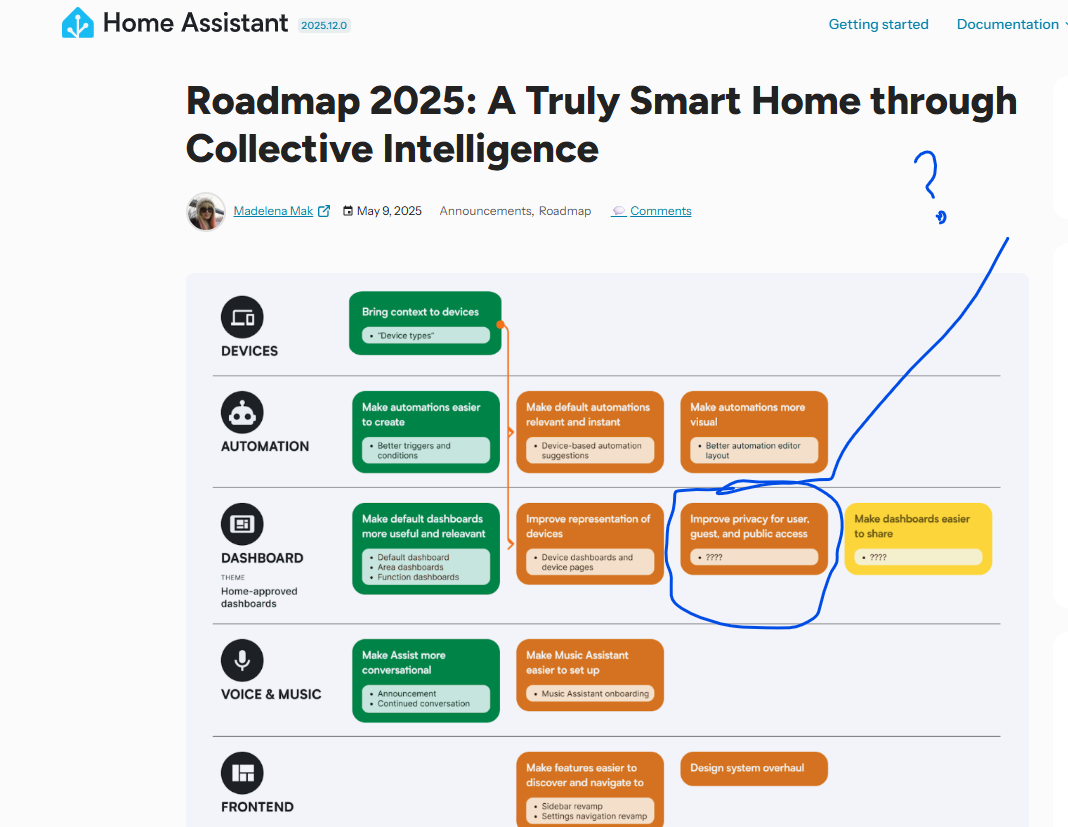
…yet we have snow falling across a dashboard for those that live in the top half of the planet…
12 Likes
thank you, it does have a dash (-). I was not aware 
I’m see these new errors from my sensors.yaml file:
Configuration errors
Error loading /config/configuration.yaml: while parsing a block collection
  in "/config/sensors.yaml", line 8, column 1
expected <block end>, but found '?'
  in "/config/sensors.yaml", line 40, column 1
from this yaml beginning at line 8:
- platform: time_date
  display_options:
    - 'time'
    - 'date'
and at line 40:
template:
- sensor:
  - unit_of_measurement: meters
    default_entity_id: sensor.ssk_iphone_accuracy
    name: gryphon GPS Accuracy
    state: '{{ state_attr(''device_tracker.gryphon_ios'', ''gps_accuracy'') }}'
I have several “- platform” sensors defined.
am I the only one annoyed with the deprecation of the CUPS integration??
6 Likes
Hello to everyone.
I believe I see a mistake on the live Power Graph calculation regarding the total consumption when the grid is disconnected and I consume from the inverter, I get a negative consumption graph and I don’t return power to the grid.
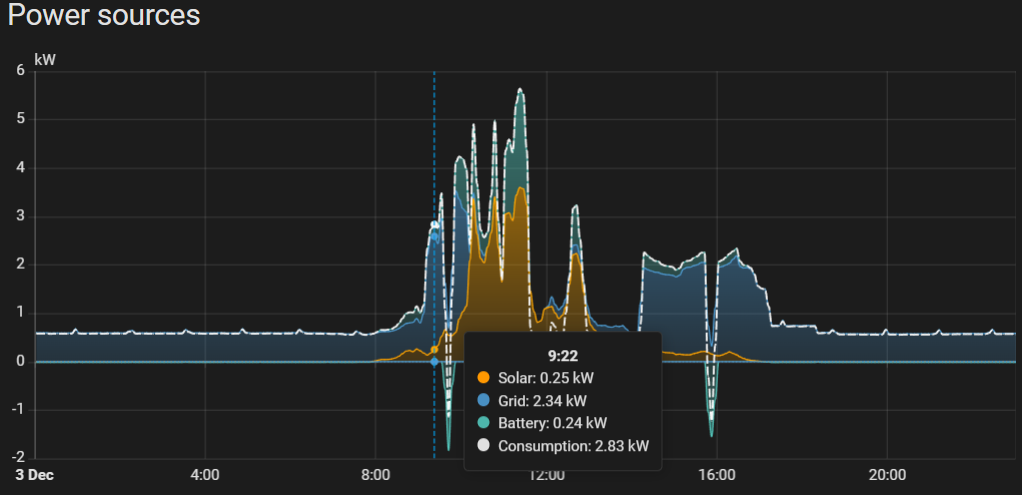
Here we have correctly:
ESS 1 (means solar goes to battery directly and I consume from the grid directly)
Grid is 2.34KW and Consumption shows 2.34KW
Solar production 0.25KW goes directly to the battery 0.24KW for charging and we are good.
Now here is the problem.
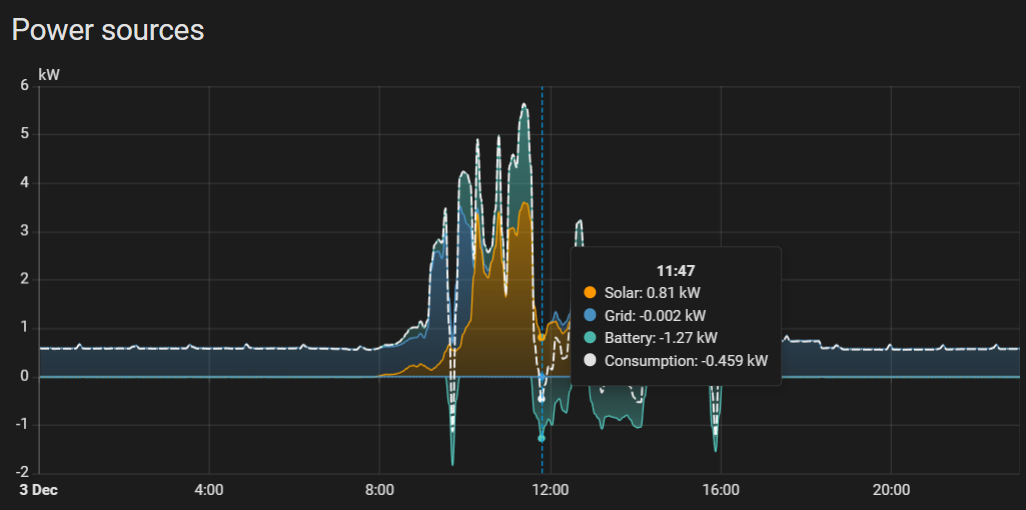
I have switched to inverter only. And I dont return power to the grid.
Grid is 0.002kW (basically disconnected the sensor is measuring thin air)
I consume 1.27kW from the battery and 0.81kW from the solar
therefore the Consumption should be 2.08kW.
The Battery power entity goes from positive for charging to negative for discharging and that has to be addressed.
I understand the actual house energy consumption from the inverter on the energy dashboard is coming from a calculation. That sould also be calculated here in a similar fashion.
Thanks and sorry for my scientific English I did my best.
1 Like