To add to the decimal place chat…

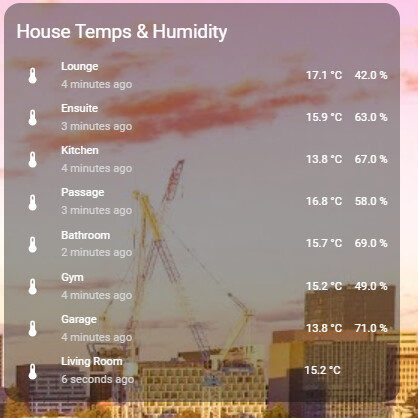
It’s not a templated entity, and when clicking on it from this dashboard card:
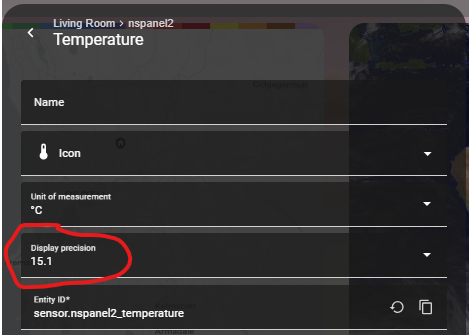
So how do I then get it to show how it should? (and used to before the 2025.7 HA update)
To add to the decimal place chat…
It’s not a templated entity, and when clicking on it from this dashboard card:
So how do I then get it to show how it should? (and used to before the 2025.7 HA update)
What card type is it?
It’s a combo of stuff:
type: entities
entities:
  - entity: sensor.lounge_multisensor_air_temperature
    type: custom:multiple-entity-row
    secondary_info: last-changed
    entities:
      - entity: sensor.lounge_multisensor_air_temperature
        name: false
      - entity: sensor.lounge_multisensor_humidity
        name: false
    name: Lounge
    show_state: false
  - entity: sensor.ensuite_ms6_air_temperature
    type: custom:multiple-entity-row
    secondary_info: last-changed
    entities:
      - entity: sensor.ensuite_ms6_air_temperature
        name: false
      - entity: sensor.ensuite_ms6_humidity
        name: false
    name: Ensuite
    show_state: false
  - entity: sensor.kitchen_ms6_air_temperature
    type: custom:multiple-entity-row
    secondary_info: last-changed
    entities:
      - entity: sensor.kitchen_ms6_air_temperature
        name: false
      - entity: sensor.kitchen_ms6_humidity
        name: false
    name: Kitchen
    show_state: false
  - entity: sensor.passage_ms6_south_air_temperature
    type: custom:multiple-entity-row
    secondary_info: last-changed
    entities:
      - entity: sensor.passage_ms6_south_air_temperature
        name: false
      - entity: sensor.passage_ms6_south_humidity
        name: false
    name: Passage
    show_state: false
  - entity: sensor.bathroom_ms6_air_temperature
    type: custom:multiple-entity-row
    secondary_info: last-changed
    entities:
      - entity: sensor.bathroom_ms6_air_temperature
        name: false
      - entity: sensor.bathroom_ms6_humidity
        name: false
    name: Bathroom
    show_state: false
  - entity: sensor.gym_multisensor_air_temperature
    type: custom:multiple-entity-row
    secondary_info: last-changed
    entities:
      - entity: sensor.gym_multisensor_air_temperature
        name: false
      - entity: sensor.gym_multisensor_humidity
        name: false
    name: Gym
    show_state: false
  - entity: sensor.garage_multisensor_air_temperature_2
    type: custom:multiple-entity-row
    secondary_info: last-changed
    entities:
      - entity: sensor.garage_multisensor_air_temperature_2
        name: false
      - entity: sensor.garage_multisensor_humidity_2
        name: false
    name: Garage
    show_state: false
  - entity: sensor.nspanel2_temperature
    type: custom:multiple-entity-row
    secondary_info: last-changed
    entities:
      - entity: sensor.nspanel2_temperature
        name: false
      - entity: input_text.text
        name: false
        styles:
          width: 43px
          text-align: right
    show_state: false
    name: Living Room
title: House Temps & Humidity
show_header_toggle: false
The one showing crazy is the:
entity: sensor.nspanel2_temperature
There’s a workaround here:
Annoying that this has become an issue that needs fixing on a per-card basis…
at least this was an easy fix… for one dashboard at a time.
Thanks Tom!
As most people probably like to know how to do it: Seems like one can use a filter too: Sensor Component — ESPHome
I still haven’t found the solution yet.
the filter option does not work and I don’t know how to use lambda to round the value, can’t find how online.
not sure if lambda will work in my case tho.
I use an esp device for controlling my ventilation using an external component called comfoair.
it exposes all sensors and controls for my ventilation.
the sensor for the ventilation speed uses a value (0-1-2-3), but HA makes it 0.0-1.0-2.0-3.0 and I’m not able to drop the decimal.
the only way so far is to duplicate the sensor with a template to round it.
I use this value in cards, automations and calculations.
Doesn’t work in ESPHome when using the API readings like here
Nope, round filter doesn’t work (tested!), all values are still with 12 decimals, only last digits are mainly zeroes or 99999 or similar.
filters:
  - lambda: return round(x*10)/10;
seems to work.
Lambda uses pure c++
c++ round() can only round to integers, therefore the *10 and /10 for one decimal place.
It sounds like this should be a number entity, not a sensor entity. Do you have an action associated with it that sets the speed?
no idea, wer i thought to see the correct temperature, now it has 13 decimal places again.
Is this an esphome error then?
esphome log:
Got Temperature=21.4°C, Sending state 21.40000 °C with 1 decimals of accuracy
dev tools / template: 21.3999996185303
setting the speed is done with an action climate.set_fan_mode to change the fan mode to low, medium or high, not with 1, 2 or 3.
only reading the speed is done with a number.
Is there a reason you aren’t making an enum sensor then with off, low, medium, and high?
I did try some things in my esp yaml, but never got it working properly.
also, looks like this external component isn’t the same as a regular sensor?
can’t add lambda to it for example.
but my knowledge is also limited unfortunately.
Create a separate post with your configuration and I’ll attempt to help.
thx, I made a new topic for this.
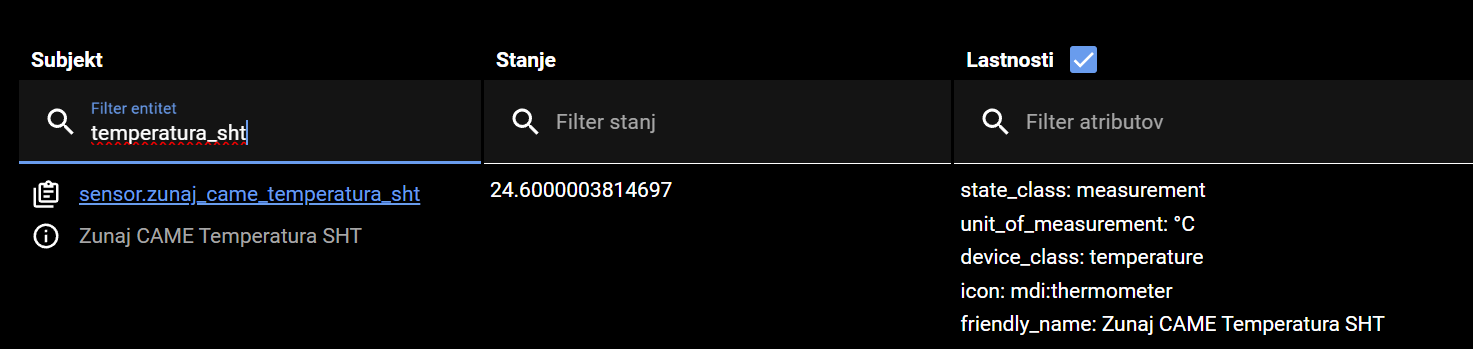
Nope… esphome says: “sending state 24.6000 °C with 1 decimals of accuray”
while in developer tools i get this:
God only knows where HA got that “3814697” 
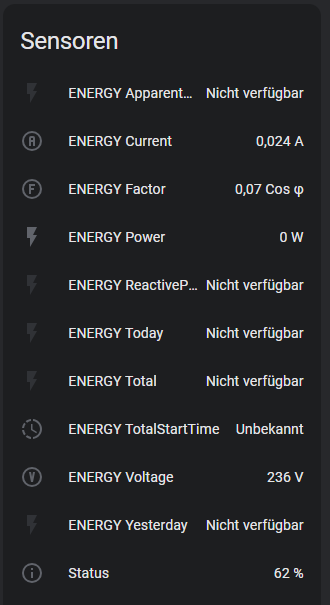
I updated to version 2025.7.1 today (from 2025.6.3) and since then all Tasmota smart sockets are missing numerous energy consumption entities. It’s the same entities that are always missing. The data is still available via MQTT Explorer. It is solely due to HA or the MQTT integration.
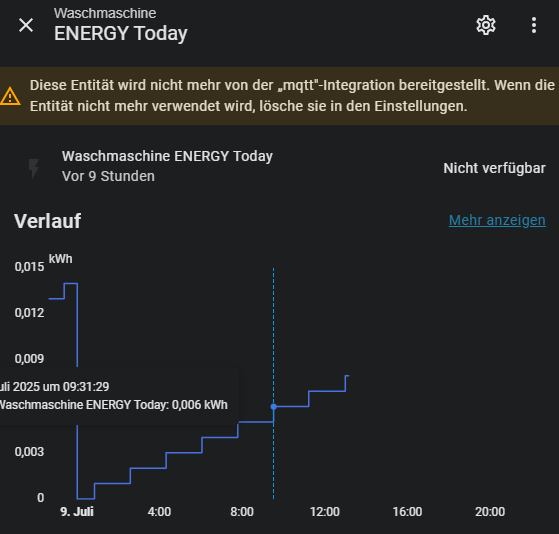
Message says: “This entity is no longer provided by the “mqtt” integration. If the entity is no longer used, delete it in the settings.”
Any ideas on how to get the entities active again?
Did I miss something in the release notes that we need to update zwavejs UI to a minimum newer version when updating HA from 2025.6.3 to 2025.7.1?
usually that stuff is in the release notes (so I can update zwavejs before HA) but when I updated a test install of HA I got a notification that my zwavejs UI needs updated. so it kind of surprised me.