Attempting to address this here: Bump pysilero-vad to 3.1.0 by synesthesiam · Pull Request #160554 · home-assistant/core · GitHub
At least when using Z2M, the Zigbee protocol entry should not show an error.
Not sure if the reason is, that I switched from ZHA to Z2M not too long time ago - but sill:
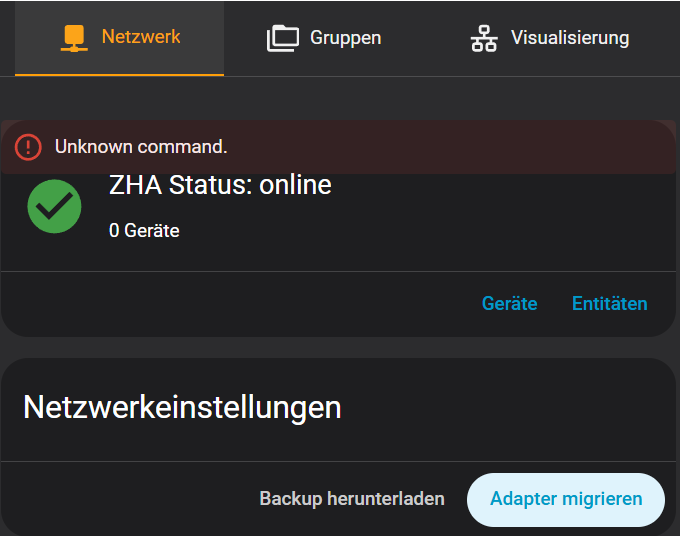
Did you disable or delete the ZHA integration?
Same here, I reverted to 2025.12.5 and things went back to normal. Home Assistant is completely unreachable a few seconds after boot with 2026.1! No errors in the logs either. Very strange!
You should really look into using the new Sections dashboard view type. Much easier to manage than vertical and horizontal stacks. You can drag and drop to position things.
Bug in Alarmo Version 1.10.13 and 2026.1
No dropdown selections at sensors, nofifications and actions.
Thats a Custom Integration so will need to be reported on it’s Github repo, not here.
1 Like
Yes, agree 100%. The summary tab is pointless, an option to turn it off would be good. Also, the Power tab is not very useful as a flow and displays completely different on different devices. Not a good way to represent that data. Looking “cool” does not make it useful. A graph like “individual devices total” on the energy tab would be 100% better.
No cloud account required - just go to https://my.home-assistant.io/ and enter your local/internal URL for HA. It saves the URL locally in your browser, and provides a redirect service - when you access https://my.home-assistant.io/* it redirects to http://homeassistant.local/ (or whatever you’ve named your local instance).
Since OAUTH is handled via browser redirects, that provides a “public” URL that will end up making your browser pass the OAUTH strings back to your local instance.
2 Likes
The companion app on my phone updated already to v2026 but I still didn’t manage to update my core. Since that, my phone won’t change the ringer state through the “command_ringer_mode” command, it just displays the message and does nothing with the ringer mode. Was there any breaking change how android (and/or ios) commands work? Did I miss something? Is it going to work after I upgrade my core as well? Had anyone else noticed this error?
I just wish they would fix the “brand new target picker” back in 2025.11
We have lost
- Making it harder to select entities by choosing Area → Device → Entity. This was done by using the expand <> button in the past and then you could just remove the entities your didn’t want.
- The colour identifiers (orange, blue, green, or grey) were also removed.
- Then entities shown is not correct as it reports 0 sometimes.
- …
Yes, I have reported it and requested it back but nothing happens.
Blacky 
Well, my joy was sadly not long-term… after appr. half an hour old version became acting the same, too. So i dug further and started the “process of elimination”… and after another few hours of tinkering through proxmox, synology, router… it seems that this is causing … asus router firewall… ??? When i turned it off it started to work like a charm. Turn it back on - same lag again.
Firewall was always turned on - from router’s purchase, so, i don’t have a clue what’s suddenly wrong. I guess i’ll have to “crash” router to factory defaults and re-configure it again, hoping for the best…
First , happy new year and best wishes NabuCasa, OpenHome foundation and community
Thanks for this beautiful release !
It might be already mention: Consider adding Matter (UI of the add-on) into the new section like you already put thread network.
What about the network discovery which usefull like you put bluetooth discovery ?
What about voice assist debug which is under the three dot in voice assistant ?
Or possibly create a debug section ?
1 Like
I am so excited for this update however after updating i could not use hacs and it is freez on loading integration
What could went wrong
Niels Faber can’t confirm this issue, this is caused by changes on the side of HA.
You have a similar problem with TTS, where on some media players the message is played twice.
I assumed it would be fixed in the January release, but unfortunately it wasn’t.
The problem is reported here
I was just amused a bit by the new security tab.
It lists my washing machine and my dishwasher as security items because they have door sensors 
Where I can change that? And how can I manually add security features, e.g. lights?
P.S.: The linked page does not exist: https://www.home-assistant.io/dashboards/home/
3 Likes
So far there seems no way to remove “items” which Devs has decided to auto-add.
As this is “The year of Dashboard” i assume there will be (hopefully) rapid changes to these complete idiotic auto-added dashboards
Click the 3dots(edit-dashboard) choose Add-entities … thats it
EDIT: Sorry, just noticed, it’s only on “Home” you find the 3 dots, lights/security/Climate … Nope
4 Likes
Not sure why you would assume that when no one is even looking at it: