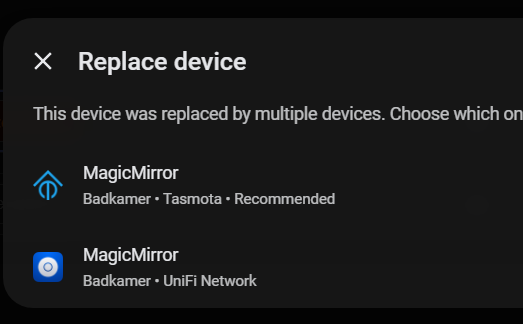
@petro Brought back one of the broken automations from my backup:
Spook flagged
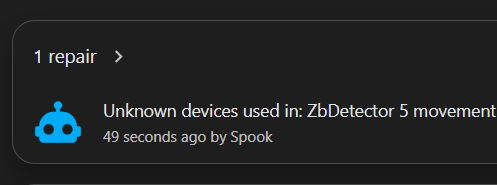
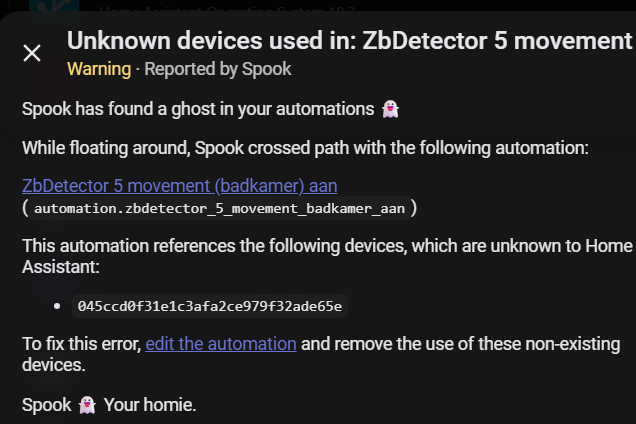
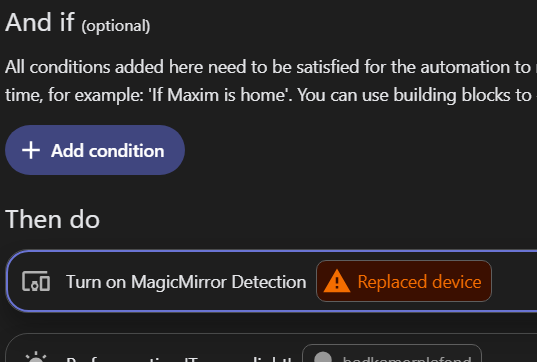
“Replaced device” in automation editor
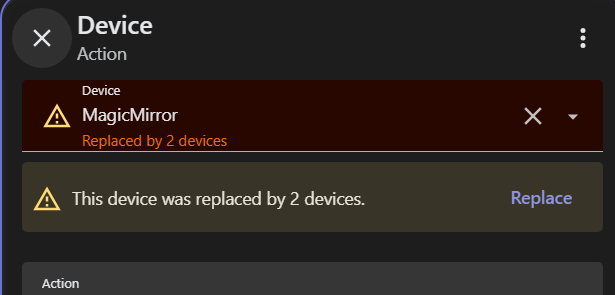
The split device: Tasmota and Unifi
@petro Brought back one of the broken automations from my backup:
Spook flagged
“Replaced device” in automation editor
The split device: Tasmota and Unifi
Right, see my post above. That’s the spook repair which is wrong
on that spinner, I wasnt aware of the option, but there is also this
not sure which spinner that would be, but sounds interesting
Well consider me partly corrected then as I’ve realised a few of these were based on custom integrations. That’s fair then, and I retract some of my little tantrum earlier and apologise for flinging blame at the wrong feet. 
However, the template sensors from my ESPHome and the blueprints pointing to some Shellys should not have changed entity IDs and detached from the correct entity - those are all “core” non HACS integration based. Any ideas there?
@harryfine - I use the MindrustUK HACS heatmiser integration which did suffer from this - GitHub - MindrustUK/Heatmiser-for-home-assistant: Heatmiser Neo-Hub / Neostat support for home-assistant.io · GitHub
Do you have any proof of this happening? It’s impossible for that to happen with the template integration from every aspect (yaml, UI, with or without unique_id). I can’t speak for the other integrations. Are you sure the entity_id changed? What did they change from, and what did they change to? And what does it’s configuration look like?
EDIT: I should clarify, it’s possible for your entity_id to change with a yaml configuration that does not have a unique_id. When you perform a reload template integration from the yaml page in tools, your entity_id will append a _2 (or 3 … etc) for each reload.
No, other than my word that several template sensors which were “linked” to devices, broke and unlinked themselves post update, as I had to sit there and fix all 30 of them.
When I opened the template sensor up, it could no longer find the old entity ID (the long string rather than the human readable type.name_of_sensor entity name) - but the entity was still there - seemingly under a new number.
I’m afraid I did not capture logs etc as I was more focussed on getting the sensors up and running again as they drive a bunch of automations for climate control / Shelly i4 driver wall buttons used to control the house with physical buttons etc.
A very basic example was a blueprint automation I have that allows me to select a Shelly i4 gen3, and then just populate what I want to happen upon a button being pressed once, twice or three times. I have a few of these around the house along with some Shelly 2PMs set up to do that as well using a similar blueprint on momentary switches. They all “lost” the Shelly entity that they were supposed to be linked to.
Happy to share something from the logs if you could tell me what I’m looking for and if its still there?
That would have shown up as 30 repairs, as mentioned in the post above. Your entity_id’s will not change in that instance. Only device linking needed an update.
What do you mean “Long string”. Template entities have always had human readable entity_id’s that are coerced from the name of the entity.
You’d have to share the blueprint. They may fall under the event_type blurb in the post above.
Correct, it did show up as 30 repairs. 30 unexpected repairs during an update. Are you saying that this bit of the announcement is what you think happened:
When you update, any devices that were merged this way are separated automatically, and their entities move to the right device for you. Most people will not notice a thing. In the rarer cases where a device was set up through more than one integration, you might see it appear twice, once per integration, and Home Assistant may raise a repair to let you know.
So the devices were split up with two new entityIDs, and the blueprint / template didn’t re-attach itself to either of them? I’ll accept that the Shellys and ESPHome devices probably were previously under the Shelly/ESPHome and the Unifi integration in my setup - its just surprising that neither successor entity picked up the same entity ID if that is the case resulting in a de-link - maybe that’s as intended though so it doesn’t link to the “wrong” one as the system has no way to tell which is the “right” one?
RE: “Long String” - in the blueprint / template UI, when home assistant loses the entity it was previously linked to, it just shows the previous entity_ID # - the long string of numbers in the UI, it doesn’t show the previously linked sensor.name_of_sensor entry in the drop down box. As I said above, this is the same behaviour in the blueprint that lost the device it was supposed to be automating, the same as the template sensor “link to device” UI.
I’m curious why you keep telling me about spinners?
Bottom line - Is 2026.8 safe if I don’t use device_id anywhere? (All of my automations are in YAML).
You’re mixing up device names and entity_id’s. They are not the same thing. Secondly, you cannot attach a device to a template entity through a blueprint. So I’m not sure what you are seeing. Please read my post above, there are 2 types of repairs. 1 repair for template helpers that were added through the UI. 1 repair that is wrong and should be ignored, provided by the custom integration spook.
Please take screenshots. Blueprints and template UI are 100% separate. These are not the same thing.
Also, the long string of numbers you’re referring to is not the entity_id. That is a UUID for devices. They are not the same thing. Entity_ids always have the format sensor.my_humidity_sensor or something simliar. I.e. Human readable identifier for an entity, not a device.
It’s safe if you do or don’t use them. There is a lot of misinformation and confusion in this thread. Largely due to the custom integration spook producing a large number of incorrect repairs. Repairs that can be ignored.
I thought that was the case because releases are usually pretty well thrashed about in beta. Any new issues are usually addressed in .1 pretty quickly.
Thanks - I’m not mixing them up actually - these two items just present the same issue and have the same view in the UI when the entity they are each separately attached to, disappears because it shows just a vanished UUID that can’t be found. I’m also not "attaching a device to a template through a blueprint" I am talking about two distinct issues which both arose from the fact that UUIDs seemed to have changed for devices in my setup (despite there being no changes to devices before and after the update):
Two distinct issues, yet issues which present and are as a result of the same UUID vanishing trick for different devices:
(1) Attaching a device to a blueprint (this dropdown showed a random UUID upon reboot post update and I had to remember and pick the right one):
and separately
(2) Attaching a device to a template (this dropdown showed a random UUID upon reboot post update and I had to remember and pick the right one
The two UIs showed the same issue. Ok I used the wrong terminology to refer to entity_id vs UUID (though I think it still was clear what I was talking about) - the point still stands that the UI only showed the UUID, which is not human readable, so when trying to re-attach either of the blueprint or the template to a device that had vanished inside home assistant after the update (despite there being no devices changing) - I was presented with a string of unhelpful numbers in the dialogue box. I also still do not understand why the UUID would have changed.
This seems like a potential issue, I recommend writing up an issue on github
This would have shown as a repair and would have walked you through the change. That dropdown is also gone now. Attaching devices is handled through options, so you were looking at a stale UI. I.e. You should refresh your page.
Right, but when people are trying to help you, it gets confusing when you aren’t using the correct terminology. Not to mention entity_id is a widely used term in HA, and when you make a claim that it’s “changing”, you’re scaring people. The entity id did not change for any entity, your device_id changed, which is what the blog post said could happen (1 new device with a new ID, the old device with the old ID).
I took those screenshots from the latest version of home assistant on a freshly hard re-loaded page on v 2026.8.1 after I’d fixed both - so there’s no “stale UI” here?
The repair did not “walk me through the change”. It just baulked and said the device was no longer there and that I needed to relink it. It still doesn’t change the fact that both of these drop downs defaulted to showing a UUID in there with no information about what that UUID used to be. I don’t mind having to re-link things, but I had nothing to help me remember what that used to be linked to other than a UUID string of numbers.
I still don’t know why the UUID of a device would have changed in this update - it doesn’t mention that anywhere in the announcement that a UUID would change. I also don’t see why a template or a blueprint would link to a UUID rather than an entity_id?
Are you referring to this single line in announcement - an annoucement that also doesn’t say “UUID” anywhere in there, and refers only to automations, not templates or blueprints (which I know are just a form of automation):
The only things that might need a second look are automations that point to a device by its ID directly, or the occasional unusual setup.
The irony that on a post all about making changes for “user friendliness” and trying to help open the platform up to less tech savvy people and I get told off for not using the right terminology despite explaining what I was talking about (type.name of thing, vs 1235465843524). Particularly when the announcement post also doesn’t use the “right” terminology.
I only raised my original point because I’d experienced a user hostile update that I wasn’t expecting and I wanted to flag it to others.
When you originally made the change and looked at your template entity, you likely only looked at the entity page, which is where device used to be. It’s now in options, if you didn’t refresh your browser, it would have appeared in both places. One of them being unusable. I can’t say that happened to you explicitly, however that’s what it sounds like if it were displaying a device_id.
Anyways, it seems your mad again and I really don’t have any interesting in helping anymore because of that.
Is that new this release? If so then wow, that’s pretty horrible.
I haven’t seen that before that I’ve noticed. But I typically don’t reload from the yaml reload button for template entities.
I guess now I will have to edit every template entity I’ve ever created in YAML (which is all of them since that’s all I use and might possibly number in the hundreds) to add a unique_id so HA doesn’t rename all of my entity_id’s.
I really wish HA would stop trying so hard to become “user-friendly” that it starts actually becoming “user-unfriendly”.

Something changed in 2026.8 (or perhaps 2026.8.1). I have a small dedicated touchscreen kiosk that displays the same default dashboard I use on my laptop, iPad and iPhone. It was designed with three columns to show me the most relevant items.
I think the kiosk resolution is 1080x600 px.
After this release, only two wide columns are displayed. The third column is now nested below the other two. This really ruins the functionality of the kiosk dashboard, and it’s also less attractive.
Does anyone know why this happened, and if it can be corrected? Right now I have resorted to a separate dedicated two-column dashboard just for the kiosk, but it is not my preferred approach.
Nope, that’s always been the case without a unique id. It’s how old school yaml work when reloading