Thanks for telling this, that might explain my “mysteries” of some “trailing” _2 and _3 

Yep, a restart will fix it too.
And for clarification, this is how all yaml entities work that don’t have a unique_id with reloading. Any integration that’s yaml based, offers a reload, and does not have a unique_id, will duplicate entities each reload until you restart the system.
Had my fingera crossed .8.2 would fix it… guess not.
I actually just reload in the UI a few times, normally i just “restart” and take a pee or another cup of coffee  … stretching my legs
But i noticed a few entities, and just renamed them, didn’t know a restart would fix it , either way ( Guess i just sticks to restarts ) 
You propably updated at 15:24:02
I have been wondering why that happened yesterday - now I know.
Did you know that “issue” does NOT stand for Integrated Spaghetti System Ultra Elephant?
A reply on the git issue said to try turning off “preload camera”. So i did. Then i updated to .8.2. CPU is normal now on .8.2.
Seems the culprit is the camera streams.
Tom… try it and see if that works for you too.
Guys with CPU issues, check your camera settings, seems the preload is causing high CPU…

Hi Home Assistant Team,
I would like to share some practical feedback regarding the recent change where “Developer Tools” was renamed to “Tools” and moved into the settings menu.
As a beginner myself, I understand the goal to simplify the UI for new users. However, in daily practice, this change actually creates a massive barrier for people like me:
- Outdated Documentation: Every single tutorial, forum post, video, and guide on the internet refers to “Developer Tools” (or “Entwicklerwerkzeuge” in German) and instructs users to look for it in the sidebar. I searched everywhere and could not find a single guide that accurately described the new location.
- Discoverability: When experiencing an issue—like fixing a long-term statistics outlier—I try to follow these online guides but can no longer find the section. Since the term “Developer Tools” is completely gone, even searching for the old name via the Quick Bar (shortcut “c”) does not lead to the new “Tools” menu. As a beginner, this makes troubleshooting incredibly frustrating and confusing.
Suggestion for improvement:
Could you please add the old terms (like “Developer Tools”, “Statistiken”, “Entwicklerwerkzeuge”) as hidden keywords or aliases to the global search / Quick Bar? This way, when a user searches for the terms found in older tutorials, Home Assistant can automatically guide them to the correct new “Tools” section.
Thank you for your amazing work on the UI, but keeping backward compatibility for search terms would greatly help the community and beginners alike.
Best regards,
John
13 Likes
I find a lot of changes are.
Many end up full arsed eventually
3 Likes
and unfortunately many don’t. we all just find workarounds.
1 Like
Hi, can someone help please. I have been using the android tv integration for a while. Suddenly I am unable to launch apps using the play_media action. I have a google streamer and recently, the deep links from the streamer have started working again (the continue watching section on the tv stopped for ages). I am not sure if the Home Assistant is supposed to populate a list of apps but the adb integration is still working. I would use that but the chromecast tv 4k stopped working with this integration after a google firmware update ages ago. Thanks for any help.
PS: I have also tried rolling back to a previous backup I created a few months back and it still doesn’t work
I don’t have any streaming cameras.
Ok then… Its not JUST the “preload stream” then… dang. Thought we figured it out. That seemed to fix my issue, but the issue is open for a fix, so hopefully…
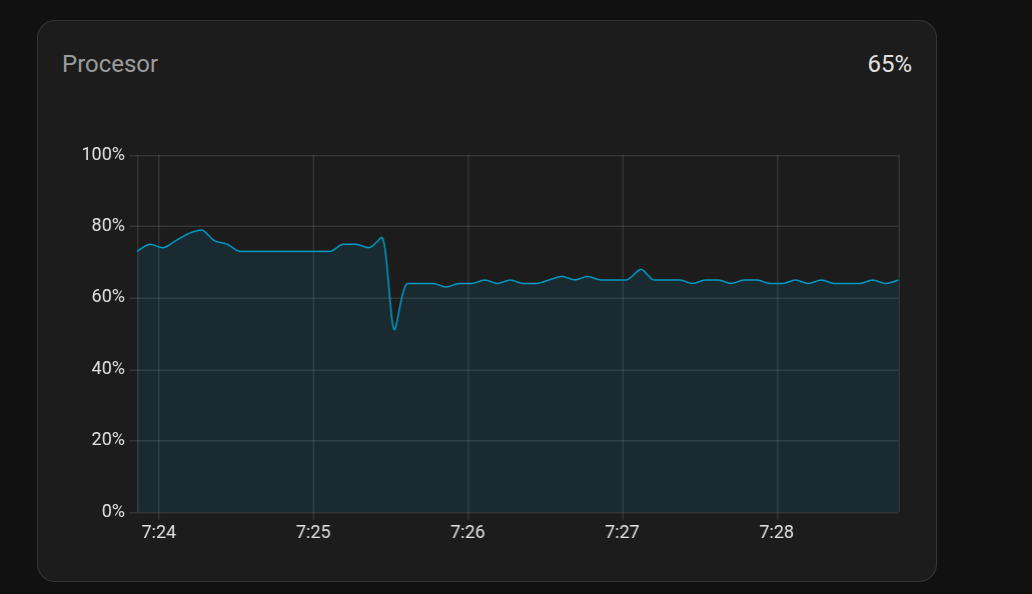
After reading this thread for several weeks I finally plucked up courage to do the upgrade yesterday. It was painless. Complained about http: section in config but everything else worked. CPU usage went down slightly. I have been using HA for less than a year so I guess I avoided many of the disappointments others have reported.
How did you do that, per camera in the UI or per camera in the integration?
I added “preload_stream: false” to all my picture-glance cards and restarted HA but no change. Haven’t found a way to do it in the Unifi Protect settings (if needed).