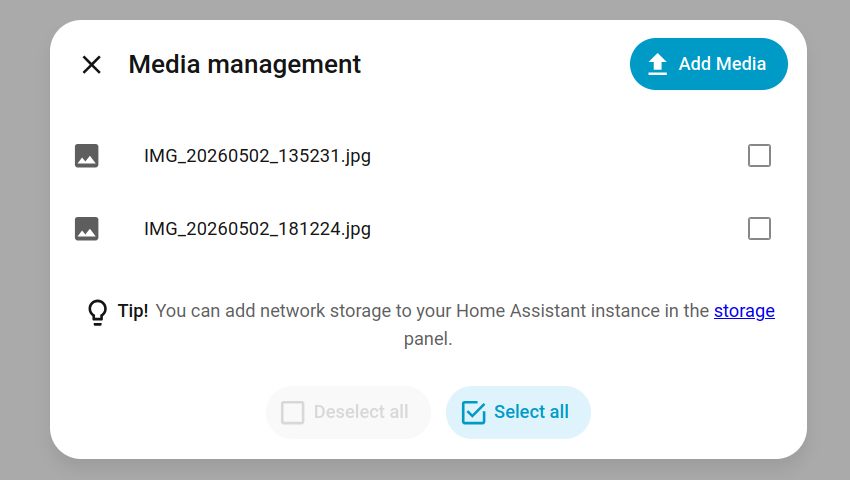
I’d like to put this “Add Media” button onto my dashboard - using to to upload photos for Wallpanel, but want to make it easier for my wife
Is there any way I can do this?
I’d like to put this “Add Media” button onto my dashboard - using to to upload photos for Wallpanel, but want to make it easier for my wife
Is there any way I can do this?
What’s the problem you are trying to solve? And don’t mean add that button, I mean what do you want to do with the media you add?
I want my wife to easily be able to upload photos to the home assistant media folder from the (or a) app, without having to navigate the media folders
An alternative would be to have it available in the share menu on android, but figured the above is easier!
Okay - been playing with Claude on this and got a rough solution
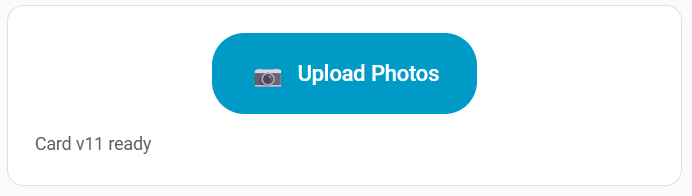
I built a small custom Lovelace card. It POSTs directly to HA’s /api/media_source/local_source/upload endpoint, which is the same endpoint the built-in Add Media dialog uses.
Setup:
Save the JS below as /config/www/upload-card.js
Add it as a resource: Settings, Dashboards, three-dot menu, Resources, Add Resource. URL /local/upload-card.js, type JavaScript Module.
Hard refresh your browser (Ctrl+F5)
Add to your dashboard:
type: custom:upload-card
label: Upload Photos
icon: 📷
target_path: media-source://media_source/local/.
The target folder must already exist. Adjust the path for subfolders, e.g. media-source://media_source/local/family-photos/. (note the trailing dot, that’s important).
The card:
javascript
class UploadCard extends HTMLElement {
  setConfig(config) {
    this.config = config || {};
    this._render();
  }

  set hass(hass) {
    this._hass = hass;
  }

  _render() {
    if (this._rendered) return;
    this._rendered = true;

    const buttonLabel = this.config.label || 'Upload Photo';
    const buttonIcon = this.config.icon || '📷';
    const targetPath = this.config.target_path || 'media-source://media_source/local/.';

    this.innerHTML = `
      <ha-card>
        <div style="padding: 20px; text-align: center;">
          <label id="uploadLabel" style="
            position: relative;
            display: inline-flex;
            align-items: center;
            gap: 8px;
            background: var(--primary-color, #03a9f4);
            color: var(--text-primary-color, white);
            padding: 14px 28px;
            border-radius: 24px;
            font-size: 16px;
            font-weight: 500;
            cursor: pointer;
            overflow: hidden;
          ">
            <span style="font-size: 20px;">${buttonIcon}</span>
            <span>${buttonLabel}</span>
          </label>
          <div id="status" style="
            margin-top: 12px;
            min-height: 20px;
            font-size: 13px;
            color: var(--secondary-text-color);
            word-break: break-word;
          ">Ready</div>
        </div>
      </ha-card>
    `;

    this._uploadLabel = this.querySelector('#uploadLabel');
    this._status = this.querySelector('#status');
    this._targetPath = targetPath;

    this._attachInputHandler();
  }

  _attachInputHandler() {
    const oldInput = this.querySelector('#fileInput');
    if (oldInput) oldInput.remove();

    const newInput = document.createElement('input');
    newInput.type = 'file';
    newInput.id = 'fileInput';
    newInput.accept = 'image/*';
    newInput.setAttribute('capture', 'environment');
    newInput.style.cssText = `
      position: absolute; top: 0; left: 0;
      width: 100%; height: 100%;
      opacity: 0; cursor: pointer; font-size: 0;
    `;
    newInput.addEventListener('change', (e) => this._handleFiles(e));
    this._uploadLabel.appendChild(newInput);
  }

  _setStatus(msg, color) {
    this._status.textContent = msg;
    this._status.style.color = color || 'var(--secondary-text-color)';
  }

  _getToken() {
    let token = this._hass?.auth?.data?.access_token;
    if (token) return token;
    return this._hass?.connection?.options?.auth?.data?.access_token;
  }

  async _handleFiles(e) {
    const files = Array.from(e.target.files || []);
    if (files.length === 0) {
      this._attachInputHandler();
      return;
    }

    const token = this._getToken();
    if (!token) {
      this._setStatus('Auth missing - reload the page', 'var(--error-color, red)');
      this._attachInputHandler();
      return;
    }

    const file = files[0];
    this._setStatus(`Uploading ${file.name}...`);

    const formData = new FormData();
    formData.append('media_content_id', this._targetPath);
    formData.append('file', file);

    try {
      const response = await fetch('/api/media_source/local_source/upload', {
        method: 'POST',
        headers: { 'Authorization': `Bearer ${token}` },
        body: formData
      });

      if (response.ok) {
        this._setStatus(`✓ Uploaded ${file.name}`, 'var(--success-color, green)');
      } else {
        const errText = await response.text();
        if (response.status === 401) {
          this._setStatus('Auth expired - force-close app and reopen', 'var(--error-color, red)');
        } else {
          this._setStatus(`✗ HTTP ${response.status}: ${errText.substring(0, 60)}`, 'var(--error-color, red)');
        }
      }
    } catch (err) {
      this._setStatus(`✗ ${err.message || err}`, 'var(--error-color, red)');
    }

    this._attachInputHandler();

    setTimeout(() => {
      if (this._status.textContent.startsWith('✓')) {
        this._setStatus('Ready');
      }
    }, 4000);
  }

  getCardSize() {
    return 2;
  }
}

customElements.define('upload-card', UploadCard);

window.customCards = window.customCards || [];
window.customCards.push({
  type: 'upload-card',
  name: 'Photo Upload Card',
  description: 'Upload photos directly to HA media folder',
  preview: false
});
A few gotchas I hit along the way that are baked into this version:
The hidden file input pattern (display: none) doesn’t fire change events reliably in mobile webviews. The card uses an opacity-zero input overlaid on a styled label instead, which is much more reliable.
Single file at a time only. I tried multiple but it broke the picker entirely on MIUI (and possibly other Android skins). Removing multiple and using capture="environment" got it working consistently.
After each upload, the file input element is destroyed and recreated. Sounds extreme but without it, MIUI’s webview wouldn’t fire change events on subsequent uploads.
Works on desktop browsers and the Android companion app. Haven’t tested iOS but no reason it shouldn’t work.
Limitations:
Hope this is useful to someone. Happy to take suggestions for improvements.
EDIT: Okay - this only works on my phone, not my wife’s so clearly some auth issues going on…
EDIT2: Needs to be Admin