ApexCharts card - A highly customizable graph card

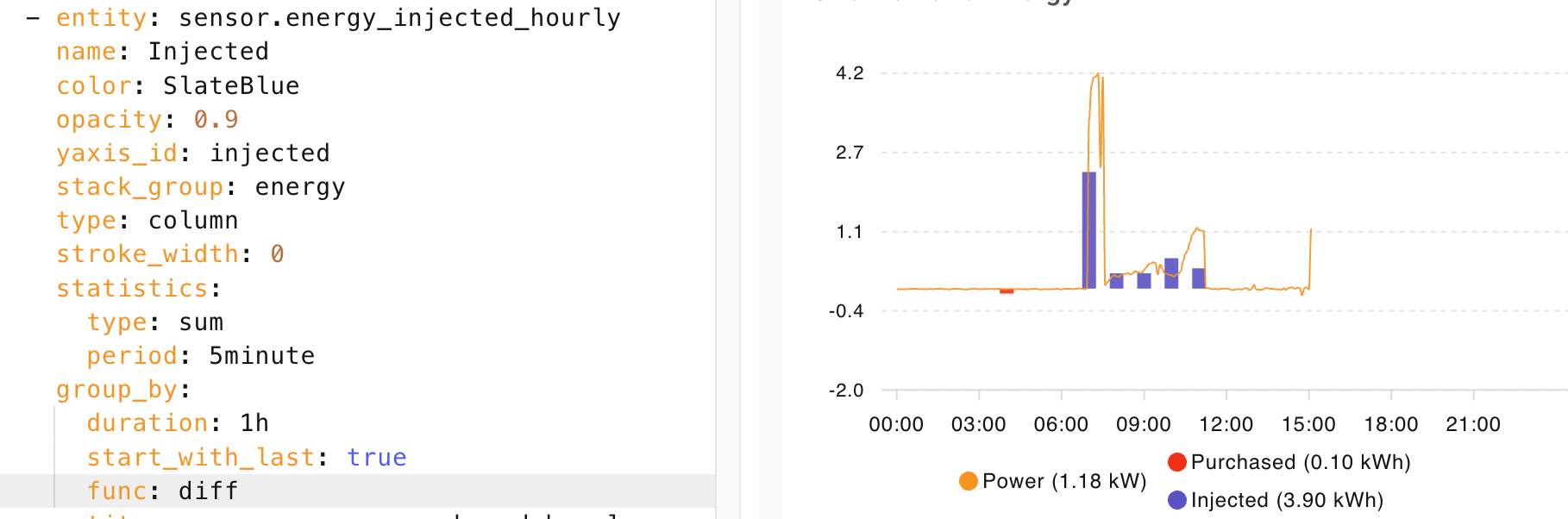
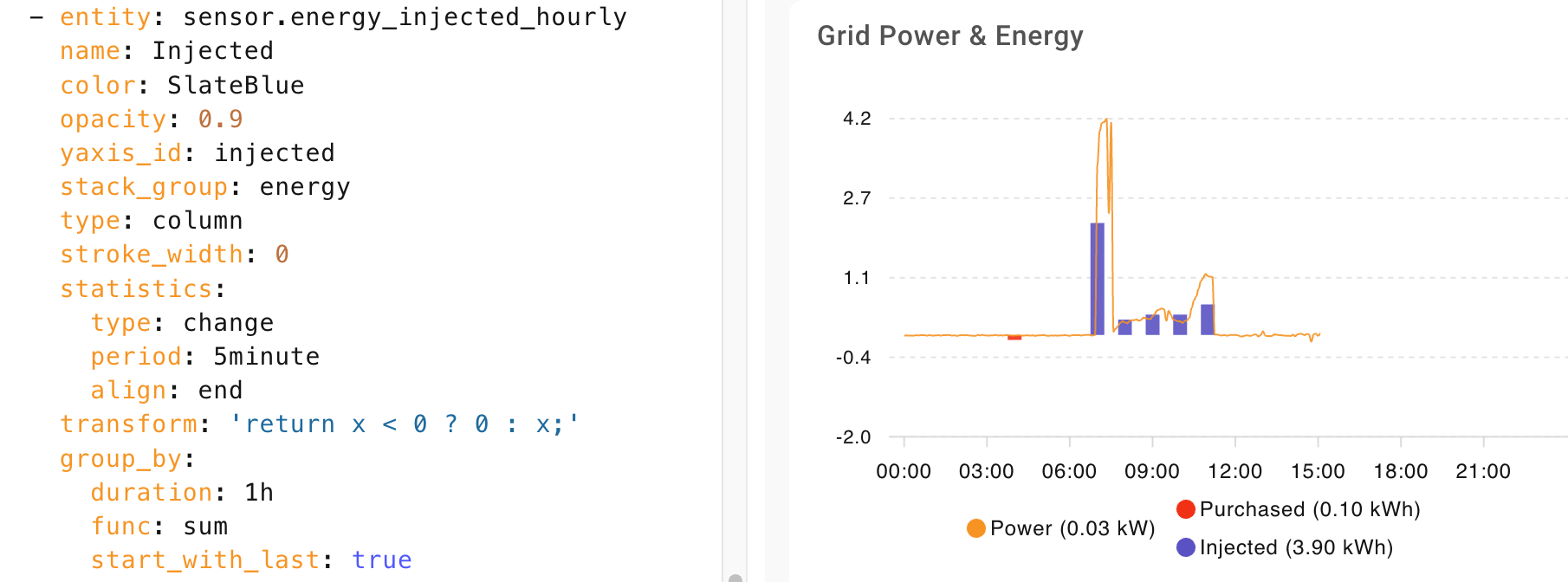
Your settings leads my graph to displaying incorrect results.

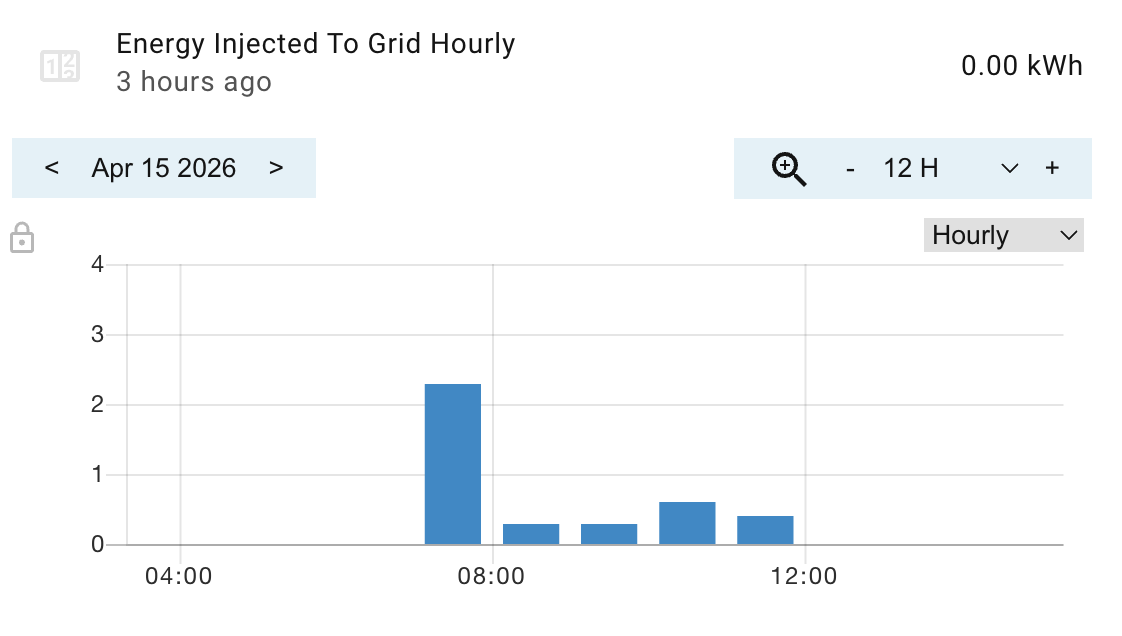
Here is the reference:

With settings listed by me in the previous post (taken from the linked article), it calculates values for periods correctly

My assumption is, that the SUM has to be calculated by statistics part. Then diff calculates difference between periods (duration).

Interesting. When I have time and some current rain data displayed in the graph, I will experiment a bit more. But I am pretty sure my rain graphs are displaying correctly.

I am also having issues getting my chart full width, I have also tried editing the number of columns with no change, would you be able to check my code please (also a relative newbie at all this)?
@higgy_de and @clairec707 By all means paste your code.

I just added a new chart in sections view to double check my instructions

  1. Ensure you add the chart in a new section
  2. Click the edit pencil top right when hovering over the section. From there select how many sections wide it should be.

  1. Add the following code to your Apex chart.
  • grid_options: adjusts width.
  • height: adjust height. Make sure if you place this under apex_config: as shown. ensure the same indentation as below.
grid_options:
  columns: 48
  rows: auto
apex_config:
  chart:
    height: 150px

Thanks I’ll check this in the morning.

1 Like

thats fixed it, many thanks :slight_smile:

1 Like

I am pleased to hear.

Hi there, first of all, thanks for good job … I was long for that kind of graph to show historical data on my mower on the “same graph”, superposing Data reported in both Percentage and “On / OFF” status :

what would be the best way (I assume this is possible) to show on top of the “Battery %” and “Signal dbm”, the “Error” (No Error or error present), “Charging” (Charging or Not Charging), and “Festive mode” (Festif or Not festif) on top of those % graphs ?
On top is it possible to show the label over time like “Online” or “Not Online” ?

P.S. on the card, I would like to keep this 3 levels On / OFF status bars on top of each other, is it possible - something like this :

Many thanks !!!

@higgy_de
If you are still interested.
A:
Just put this at the top of the yaml underneath the “type”:

grid_options:
  columns: full

B:
Instead of the text in the “Now” marker I put in the current price
first add a variable with your current price sensor (example is my sensor). at the top there are already some variables.

  v_price: states['sensor.dresden_aktueller_strompreis'].state

then in the “now” section put your variable into the label section, see example

 now:
    show: true
    color: "#ff0000"
    label: ${v_price}

at the end this should look like this:

Hope that helps…

Tried all, but nothing works to just disable the time popup and detail popup, but have the cursor move over to the data point light up working.
It is all or nothing.
with:

apex_config:
  tooltip:
    enabled: false

All:

Nothing:

Apex charts is dead, outdated and unreliable.
Use statistics graph chart card, which has a lot of functionality from apex charts, is way more reliable and the author of it is really, really, really on fire with this and get’s bugs fixed in less than a week (mostly) and features implemented in the same time.

Give it a go…
Apexcharts was dead and abandoned a long time ago by it’s developer and has lot’s of bugs, is unreliable and haven’t got new features in months.

Hello
I augment the apex charts with a template config card. Sometimes the chart stops refreshing.
While it seems that the problem disappears once I remove the template config card, I cannot be sure if there is no coincidence and the real issue is on apex chart card.

At the end, it’s the apex chart that raises an unhandled error. Though I reported it also in config template card thread.

Can you advise any way to workaround or a way of debugging to find out why it is happening?

apexcharts-card.js?hacstag=331701152223:1 Uncaught (in promise) Error: Element not found
    at apexcharts-card.js?hacstag=331701152223:1:1466595
    at new Promise (<anonymous>)
    at e.value (apexcharts-card.js?hacstag=331701152223:1:1449766)
    at Gc._initialLoad (apexcharts-card.js?hacstag=331701152223:1023:2575)
apexcharts-card.js?hacstag=331701152223:1 Uncaught (in promise) Error: Element not found
    at apexcharts-card.js?hacstag=331701152223:1:1466595
    at new Promise (<anonymous>)
    at e.value (apexcharts-card.js?hacstag=331701152223:1:1449766)
    at Gc._initialLoad (apexcharts-card.js?hacstag=331701152223:1023:2575)
apexcharts-card.js?hacstag=331701152223:1 Uncaught (in promise) Error: Element not found
    at apexcharts-card.js?hacstag=331701152223:1:1466595
    at new Promise (<anonymous>)
    at e.value (apexcharts-card.js?hacstag=331701152223:1:1449766)
    at Gc._initialLoad (apexcharts-card.js?hacstag=331701152223:1023:2575)
apexcharts-card.js?hacstag=331701152223:1 Uncaught (in promise) Error: Element not found
    at apexcharts-card.js?hacstag=331701152223:1:1466595
    at new Promise (<anonymous>)
    at e.value (apexcharts-card.js?hacstag=331701152223:1:1449766)
    at Gc._initialLoad (apexcharts-card.js?hacstag=331701152223:1023:2575)
apexcharts-card.js?hacstag=331701152223:1 Uncaught (in promise) TypeError: Cannot read properties of undefined (reading 'node')
    at e.value (apexcharts-card.js?hacstag=331701152223:1:1448588)
    at e.value (apexcharts-card.js?hacstag=331701152223:1:1448357)
    at apexcharts-card.js?hacstag=331701152223:1:1473538
    at new Promise (<anonymous>)
    at e.value (apexcharts-card.js?hacstag=331701152223:1:1473374)
    at apexcharts-card.js?hacstag=331701152223:1:1423429
    at Array.forEach (<anonymous>)
    at apexcharts-card.js?hacstag=331701152223:1:1422441
    at new Promise (<anonymous>)
    at e.value (apexcharts-card.js?hacstag=331701152223:1:1422296)
apexcharts-card.js?hacstag=331701152223:1 Uncaught (in promise) TypeError: Cannot read properties of undefined (reading 'node')
    at e.value (apexcharts-card.js?hacstag=331701152223:1:1448588)
    at e.value (apexcharts-card.js?hacstag=331701152223:1:1448357)
    at apexcharts-card.js?hacstag=331701152223:1:1473538
    at new Promise (<anonymous>)
    at e.value (apexcharts-card.js?hacstag=331701152223:1:1473374)
    at apexcharts-card.js?hacstag=331701152223:1:1423429
    at Array.forEach (<anonymous>)
    at apexcharts-card.js?hacstag=331701152223:1:1422441
    at new Promise (<anonymous>)
    at e.value (apexcharts-card.js?hacstag=331701152223:1:1422296)
apexcharts-card.js?hacstag=331701152223:1 Uncaught (in promise) TypeError: Cannot read properties of undefined (reading 'node')
    at e.value (apexcharts-card.js?hacstag=331701152223:1:1448588)
    at e.value (apexcharts-card.js?hacstag=331701152223:1:1448357)
    at apexcharts-card.js?hacstag=331701152223:1:1473538
    at new Promise (<anonymous>)
    at e.value (apexcharts-card.js?hacstag=331701152223:1:1473374)
    at apexcharts-card.js?hacstag=331701152223:1:1423429
    at Array.forEach (<anonymous>)
    at apexcharts-card.js?hacstag=331701152223:1:1422441
    at new Promise (<anonymous>)
    at e.value (apexcharts-card.js?hacstag=331701152223:1:1422296)
apexcharts-card.js?hacstag=331701152223:1 Uncaught (in promise) TypeError: Cannot read properties of undefined (reading 'node')
    at e.value (apexcharts-card.js?hacstag=331701152223:1:1448588)
    at e.value (apexcharts-card.js?hacstag=331701152223:1:1448357)
    at apexcharts-card.js?hacstag=331701152223:1:1473538
    at new Promise (<anonymous>)
    at e.value (apexcharts-card.js?hacstag=331701152223:1:1473374)
    at apexcharts-card.js?hacstag=331701152223:1:1423429
    at Array.forEach (<anonymous>)
    at apexcharts-card.js?hacstag=331701152223:1:1422441
    at new Promise (<anonymous>)
    at e.value (apexcharts-card.js?hacstag=331701152223:1:1422296)

type: custom:config-template-card
variables:
  startCharging: |
    (() => {
      const s = states['sensor.pv_ctrl_cheapest_hours']?.attributes?.data?.start;
      if (!s || s === 'unknown' || s === 'unavailable' || s === 'undefined') return new Date().setHours(0,0,0,0);
      return new Date(s).getTime();
    })()
  endCharging: |
    (() => {
      const s = states['sensor.pv_ctrl_cheapest_hours']?.attributes?.data?.end;
      if (!s || s === 'unknown' || s === 'unavailable' || s === 'undefined') return new Date().setHours(0,0,0,0);
      return new Date(s).getTime();
    })()
  startDischargingEvening: |
    (() => {
      const s = states['sensor.pv_ctrl_most_expensive_hours_evening']?.attributes?.data?.start;
      if (!s || s === 'unknown' || s === 'unavailable' || s === 'undefined') return new Date().setHours(0,0,0,0);
      return new Date(s).getTime();
    })()
  endDischargingEvening: |
    (() => {
      const s = states['sensor.pv_ctrl_most_expensive_hours_evening']?.attributes?.data?.end;
      if (!s || s === 'unknown' || s === 'unavailable' || s === 'undefined') return new Date().setHours(0,0,0,0);
      return new Date(s).getTime();
    })()
  startDischargingMorning: |
    (() => {
      const s = states['sensor.pv_ctrl_most_expensive_hours_morning']?.attributes?.data?.start;
      if (!s || s === 'unknown' || s === 'unavailable' || s === 'undefined') return new Date().setHours(0,0,0,0);
      return new Date(s).getTime();
    })()
  endDischargingMorning: |
    (() => {
      const s = states['sensor.pv_ctrl_most_expensive_hours_morning']?.attributes?.data?.end;
      if (!s || s === 'unknown' || s === 'unavailable' || s === 'undefined') return new Date().setHours(0,0,0,0);
      return new Date(s).getTime();
    })()
  min_export_price: |
    (() => { 
      const s =  states['input_number.pv_ctrl_min_export_price']?.state;
      if (!s || s === 'unknown' || s === 'unavailable' || s === 'undefined') return 0;
      return Number(s);
    })()  
entities:
  - sensor.pv_ctrl_cheapest_hours
  - sensor.pv_ctrl_most_expensive_hours_morning
  - sensor.pv_ctrl_most_expensive_hours_evening
  - input_number.pv_ctrl_min_export_price
card:
  type: custom:apexcharts-card
  update_interval: 1min
  header:
    show: true
    title: Electricity spot price
    show_states: true
    colorize_states: true
  graph_span: 48h
  span:
    start: day
  now:
    show: true
    label: Now
    color: "#448866"
  series:
    - entity: sensor.pv_ctrl_spot_electricity_prices
      name: Current spot price
      show:
        in_chart: false
        in_header: true
        name_in_header: true
    - entity: sensor.pv_ctrl_spot_electricity_prices
      name: Spot price
      type: line
      data_generator: |
        const src = hass.states['sensor.pv_ctrl_spot_electricity_prices'];
        if (!src || !src.attributes.data) return [];

        return src.attributes.data.map((item) => {
          return [
            new Date(item.time).getTime(),
            item.price
          ];
        });
      stroke_width: 1
      curve: stepline
      show:
        in_chart: true
        in_header: false
    - entity: sensor.sql_pv_earnings_today
      transform: return hass.states['sensor.sql_pv_earnings_today'].attributes.avoided;
      name: Avoided
      show:
        in_chart: false
        in_header: true
    - entity: sensor.sql_pv_earnings_today
      transform: return hass.states['sensor.sql_pv_earnings_today'].attributes.sold;
      name: Sold
      show:
        in_chart: false
        in_header: true
    - entity: sensor.sql_pv_earnings_today
      transform: return hass.states['sensor.sql_pv_earnings_today'].attributes.purchased;
      name: Purchased
      show:
        in_chart: false
        in_header: true
  apex_config:
    grid:
      borderColor: rgba(118,128,128, 0.2)
    xaxis:
      type: datetime
    annotations:
      xaxis:
        - x: EVAL:new Date().setHours(24,0,0,0)
          borderColor: "#888888"
          strokeDashArray: 1
          label:
            text: Tomorrow
            borderWidth: 0
            style:
              background: DimGrey
              color: white
              border: 0px
        - x: ${startDischargingMorning}
          x2: ${endDischargingMorning}
          fillColor: var(--purple-color)
          opacity: 0.2
        - x: ${startDischargingEvening}
          x2: ${endDischargingEvening}
          fillColor: var(--purple-color)
          opacity: 0.2
        - x: ${startCharging}
          x2: ${endCharging}
          fillColor: "#B3F7CA"
          opacity: 0.3
      yaxis:
        - "y": ${min_export_price}
          borderColor: "#00AA00"
          strokeDashArray: 4
          label:
            text: ${min_export_price + ' threshold'}
            borderWidth: 0
            style:
              background: DimGrey
              color: white