Yes exactly the same. Hope they found the issue (i can’t)
@Remco_van_Geel & @HappyCadaver
It looks like you may be running an unstable beta release that hasn’t been officially released yet. Issues like this are best reported in the beta forum, where they can be addressed before the stable release.
I’m currently running Home Assistant 2025.12.5 (stable), and the blueprint works as expected and responds very quickly.
As a general rule, I don’t update on ?.?.1 or ?.?.2 releases. I usually wait until around .3 or later before making changes or investigating issues.
I also don’t run beta versions… that’s simply a time constraint, and there are beta testers better suited to that stage of testing.
Blacky 
1 Like
Blacky, I wasn’t actually having an issue as I haven’t had to touch your amazing and rock solid blueprint since set up and I don’t create automations/scripts from the UI. I was just trying to point out to Remco_van_Geel that it’s not a Blacky’s blueprint problem, it was an early beta frontend performance problem (now resolved if I’m not mistaken).
You just keep doing you which you do so well  .
.
1 Like
Yeah, thanks for helping out… in fact, you helped me by providing the link to the beta, so thank you. I just tagged you in the conversation since you were part of it.
Thanks for your kind words, glad you like the blueprint and that you’re finding it useful.
Blacky
1 Like
 Watts your appliance up to, you’re always in the know from start to finish!


 New Features
- Notification URL - Opens a specific page or view in Home Assistant when the notification is tapped.
If you like this blueprint? Consider hitting the  button in the top post
If you like my blueprints, and would like to show your support or just say thank you? Click Here 
Enjoy
Blacky
2 Likes
Running the latest version 3.9 I did set up some service cycle counter helper variable to get reminded of some device cleaning and such. However, it seems that the service cycle counter does not count. I have definitely be running the device monitored a few times after that but the service cycle counter still says ‘0’. Any idea if I am missing something? Thanks!
Could you please provide us your YAML of the automation? This YAML code are the settings you have selected in the automation so I can help. To do this go into your automation, top right 3 dots, Edit in YAML, copy all the code, come back to the forum and in your reply at the top tool bar click on “</>” and paste code in there.
Blacky
Thanks for the reply, here’s one of the two automations YAML. I checked to be certain and the helper still is ‘0’ but I was running the device yesterday, so I am certain it does not increase its value.
alias: Verbrauch Waschmaschine
description: ""
use_blueprint:
  path: Blackshome/appliance-notifications.yaml
  input:
    power_sensor: sensor.steckdose_waschmaschine_electric_consumption_w
    start_appliance_power: 5
    running_dead_zone: 25
    end_appliance_power: 4
    end_time_delay: 4
    start_title: Washing Machine
    include_end_notify: enable_end_notify_options
    end_notify_device:
      - cbc561b2095a352f28d17c65a03e7abd
      - 16d3089032a9667c007b5eccda69437e
    end_message_title: 🥻👕👖👔 Waschmaschine fertig 👚🧦🩲🧣
    include_power_tracking: enable_power_tracking_and_cost
    end_message: Die Waschmaschine ist fertig!
    end_message_cost: "💸 Kosten: "
    end_message_kwh: "⚡ Verbrauch: "
    power_consumption_sensor: sensor.steckdose_waschmaschine_electric_consumption_kwh
    cost_per_kwh: input_number.strompreis
    include_time: time_enabled
    after_time: "07:00:00"
    before_time: "22:30:00"
    start_power_consumption: input_number.waschmaschine_power_tracking_start
    end_power_consumption: input_number.waschmaschine_power_tracking_end
    include_custom_actions:
      - enable_start_custom_actions
      - enable_end_custom_actions
    start_custom_actions:
      - metadata: {}
        data:
          value: 21
        target:
          entity_id: input_number.hauswirtschaftsraum_manual_comfort_temperature
        action: input_number.set_value
    end_custom_actions:
      - metadata: {}
        data:
          value: 18
        target:
          entity_id: input_number.hauswirtschaftsraum_manual_comfort_temperature
        action: input_number.set_value
    end_message_duration_tracking: "⌚ Laufzeit:"
    include_duration_tracking: enable_duration_tracking
    include_watchdog: enable_watchdog
    watchdog_timeframe:
      hours: 4
      minutes: 30
      seconds: 0
    watchdog_title: ⚠️ Waschmaschine Laufzeit
    watchdog_message: Waschmaschine läuft zu lange, bitte prüfen!
    start_notify_data:
      - high_priority
      - sticky
      - icon
    start_notify_tag: Waschmaschine
    end_notify_tag: waschmaschine
    end_notify_data:
      - high_priority
      - channel
      - icon
    service_reminder_cycles: 50
    service_reminder_end_message: ⚠️ Zeit für das Reinigungsprogramm der Waschmaschine
    service_reminder_counter_helper: counter.cycle_counter_service_reminder_waschmaschine
    watchdog_notify_device:
      - cbc561b2095a352f28d17c65a03e7abd
    watchdog_notify_data:
      - high_priority
      - sticky
      - icon
    include_device_tracker:
      - zone_end
    notify_zone: zone.home
    run_status_entity: input_select.status_waschmaschine
    run_status_start: Waschen
    run_status_watchdog: Fehler
    run_status_end: Ende
    run_status_end_attended: Standby
The helper (Cycle Counter Service Reminder Waschmaschine) is of the type counter, could this be the problem and it should be another type?
Thanks for your YAML.
You need to enable this option as currently it is disabled. You have 2 enable options to choose from, see below.
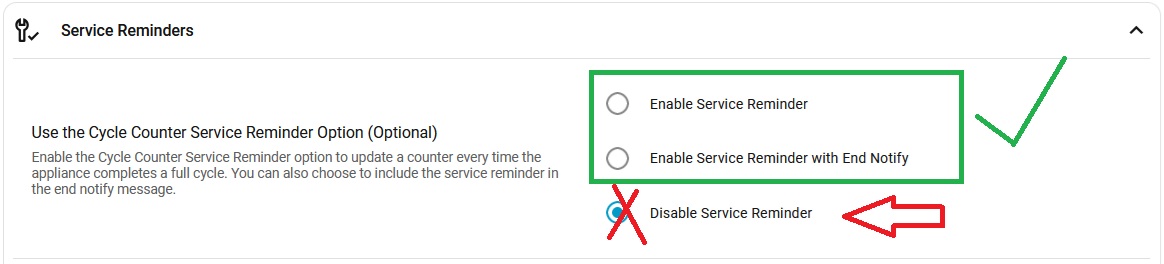
Blacky
Thank you for making this!
I noticed that the custom end action doesn’t repeat when end notifications are set to repeat, is there a way to change this? I use the custom actions to do custom alerts, such as through speakers.
Also, I’m using this for a washing machine. Due to the curvature of the door, I can’t use a door/window sensor but the automation requires a binary sensor. I’ve set up a physical button that is linked to a HA switch. When pressed the switch is set to On, and when this automation runs, the switch is set to Off and the switch has a helper binary sensor that the automation uses. Is there a simpler way to link a physical button to this automation?
Thanks for your response… I checked multiple times and had it enabled but somewhat there must have been a glitch or something. Sorry for bothering you for nothing. I checked another one (which I should have done first) and that one worked. Of course out of the 50:50 choice I choose the one where I somewhat screwed up or whatever caused me not having enabled this but for the other one… 
Sometimes all it needs is an outside view. Thanks a bunch for that! 
You need to build it into your custom end action. If you would like it to repeat then you need to build this, hence the name custom
Adding the button is about a simple as it gets. A door sensor is the best most reliable true signal to use. I use my motion sensor so when it is finnished an motion is detected in the laundry you know someone was in there to attend but it’s not as good as using a door sensor… it works for us.
Blacky
I’m a bit overwhelmed by the 933 messages in this thread, so haven’t ready everything. I installed the blueprint over the weekend and was successful in getting it working. One thing that I did that may not be necessary was use 5 minute average powers for my washer and drier to try to reduce the chance of false alarms. That has worked well for me with other power monitoring automatons and so far is working well with this blueprint.
It’s good that you got it working. I’ve been using this for years now and have never received a false positive just using the start and end power settings with a time delay.
My son has a new fancy washer and dryer, and his works perfectly too. I have a brand-new Bosch washer and an LG dryer, and I don’t use the built-in smart features because I find this works better every time.
Blacky
1 Like
I thought that if I set a custom action to do the custom action on a loop, it would continue even once the appliance has been attended to.
Does the Reminder Notification Entity being set to ‘on’ terminate the whole automation, including a custom action loop?
Not too familiar with this, I’ve built some basic automations with HA, but this is the first template I’ve used for doing something more complex.
My washer and drier have no “smart” features and I’m definitely not trying to be negative about the blueprint. It is working exactly as I had hoped! Thanks!
I have developed the blueprint so the built-in end options run in parallel with your custom actions.
Depending on what you create in your custom actions, they will continue running if you have configured them to do so. If the built-in reminder notification finishes, your custom actions can still be running independently.
The built-in repeat logic is completely separate from the custom actions. Think of it as two roads to the same destination: one road is the built-in actions, and the other is your custom actions. You control what happens on the custom-action road.
Blacky
100% no offense taken
Because you said it may not be necessary, I just wanted to share my insight to help. You may find that you don’t need the 5-minute average. The main thing is that it works for you, and I’m glad it’s working.
Blacky
If I want to send a voice notification once my washing is finished I can use Custom Actions - End. Right?
What is the best way repeat this custom action until some condition (I need to check if socket is off)?