You must add it at least once to Apple Home for auto discovery in HA to work later on…
Something is still blocking it… probably?
You must add it at least once to Apple Home for auto discovery in HA to work later on…
Something is still blocking it… probably?
Oh man! I feel so dumb. I was looking for a card in the apple home app to delete so it could be sent to HA but it was actually a hidden sensor in one of the little bubbles at the top of the apple home app!
Thanks for chatting with me!
Does anyone know why on occasion there is such a huge lag in response to automations? Is this normal for the FP2? I have my Aqara Hub in the next room and my wireless AP in the same room as the presence sensor so I don’t think it has anything to do with the signal. I read something on the Aqara site about a response within 30 seconds.
Well, standard sensor behavies a bit like PIR, it should activate instantly and deactivate after 60 secs. Zone sensors in conrart should activate and deactivate instantly. I noticed, that ocassionally I have problems with one of my FP2s that is located near stairways - apparently there is some cold air flow from upstairs that causes some interferences and once sensor is activate it hardly disactivate…
So, are your problems related to triggering automation on state change to on? If so, this is something I’ve never experienced…
I’ve been dealing with this since the beginning.
I had issues with Network Signal Strength for some reason, -74 to -85 (in the Aquara app). The sensor sitting next to the wifi router.
I resolved this now, for testing purposes with a wifi extender sitting 30cm from it and the signal strength now is -55. I confirmed with Aqara support it’s DBs.
But I still have occasional issues like @razzberry and @mirekmal mentioned.
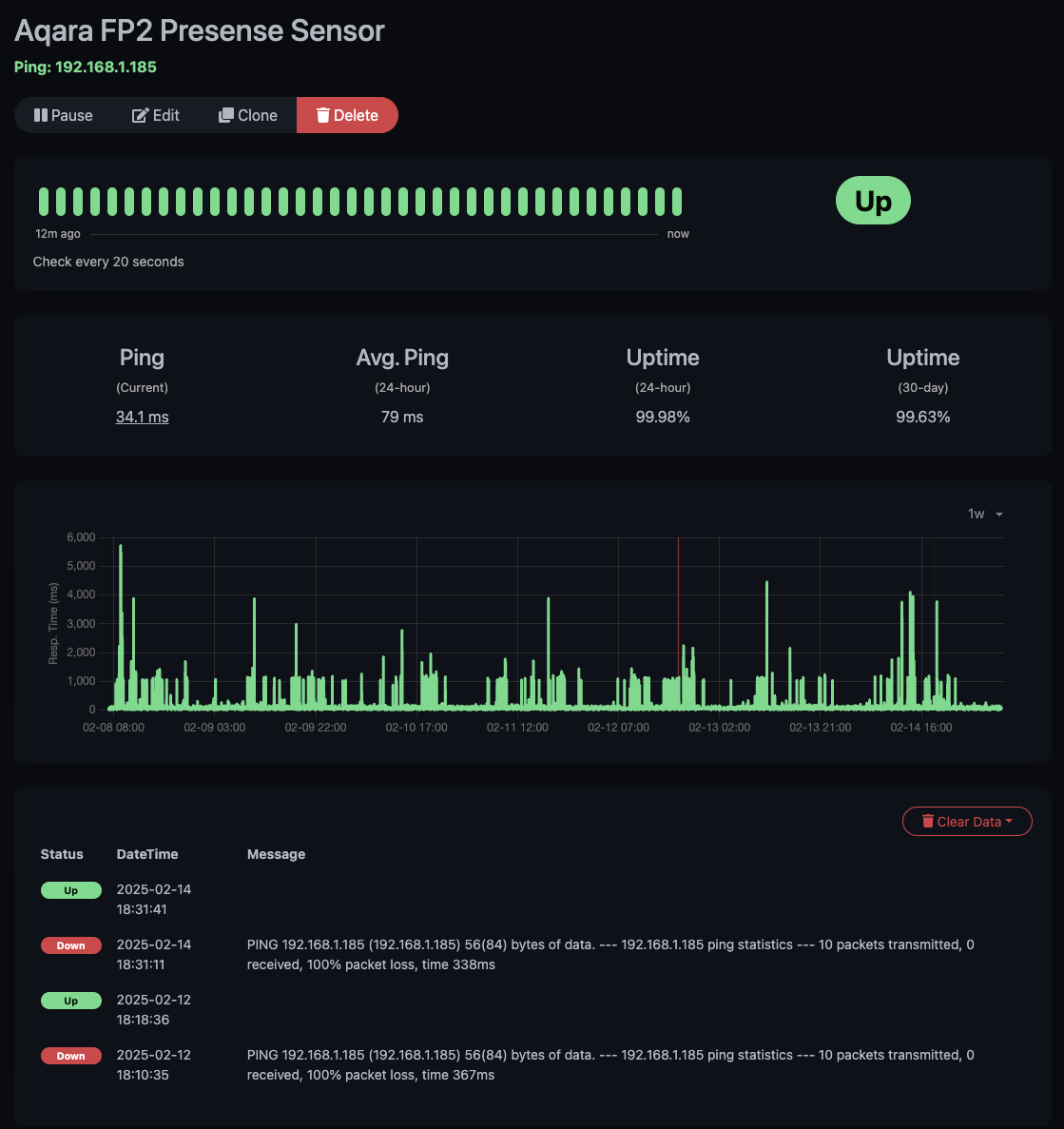
So I’ve added the Aqara FP2 to Kuma and ping it every 20 seconds… this are the results:
And that’s the problem… this is the 1 week overview graph… notice the gigantic ping replies? And it has complete packet loss from time to time inside 24 hours and that’s what is making it unreliable.
What I did for testing purposes, somebody was selling a Shelly Motion 2 sensor in our local HA FB group, I got it for 3 EURs… I’ve been testing it now since Wed, and so far it’s looking really good.
@susko, I think you set up your WiFi range extender wrong way. Placing it next to the device you want to extend the reach to is not helping at all, as it repeats signal from router that was already weak in this place. Ideal placement of range extender is somewhere in the middle of distance between router (or Access Point) and device you want to extend signal to. This way you get maximum possible signal between FP2 and extender as well as extender to router. Unstable connection and slow ping times in your case most likely are result of poor communication not to FP2 directly (where you have strong signal to repeater), but rather to range extender (can you check this?). As you already have UpTime Kuma, you can verify this by setting up the sensor for range extender itself.
i understand what you were trying to say, but the catch is elsewhere… the fp2 is 2.5m away from the wifi router but reporting weak signal.
i tried with a different wifi router, same thing.
that’s why i did the test with an extender, which is placed 30cm from the fp2, but still 2.5m from the wifi router, same as the fp2.
and for some reason this enables the wifi signal to be ok, but still the response times are silly long sometimes, but at least there are less drop outs.
if the shelly motion 2 will behave ok for a week, I’ll r place the fp2 with it
btw, did u try the functionality in the app where it learns (not with ai) and you tell it there’s no presence?
this is how i resolved the issue of the fp2 that it detected the air fryer turned on as presence.
Hm… I do not see such option in app. The only option I have is AI Learning. Eventually I can turn off AI Pe4rson Detection, but it does not change the way sensor learns presence. Where to find it?
I improved situation by adding interference zone sensor setup and now it works reasonably well.
So this is exactly the setup I use now…
Unfortunatelly, without interference zones setup, AI Learning was working for 1~2 days only and then needed to be repeated, as phantom presence started to be discovered exactly in the same spots.
I think it m ight be related somehow to recent FW update. Previously it was very stable 
Hi. I was having trouble with the state change automation, but it seems like its been working the last couple days, so as long as I dont touch it, maybe It’l be good! LOL
hello,
does it actually support detection of the Sleep?
thanks
Does anyone know if there should be special firewall rules to have the device detected by HA?
My HA is running in a VM on a Proxmox on 198.168.68.1/24 subnet whilst my Wifi is running on a seperate network (GL.iNet OpenWRT) on 192.168.8.1/24 range hence where my FP2 is connecting.
Are people still able to block these devices from the Internet? I recently set these up and they were working fine until I blocked the Internet, now HA can’t connect. I have the latest firmware.
Edit: Never mind, I resolved it.
I have two of FP2’s Ever since they added the AI crap to them they are almost useless. I’ve done all of the learning and what not, and it only seems to make them worse. I’m really upset that I purchased them.
Can anyone please tell me what I"m doing wrong. I have 4 FP2 sensors, and I can add them to aqara and via HomeKit, however the work around getting it to home assistant is null and void. I’ve tried resetting so many times, and adding It back to no avail. Clearly I’m missing something here. I’ve restarted my phone, the apps, the home assistant, the devices themselves. tried new devices was well. HA will not recognize these devices! I"m almost ready to just return them all to Amazon.
Sounds like you’re using an iPhone, correct? If so, when you add the FP2 to the Aqara app on your iPhone, it is automatically also added to your instance of Apple Home on your iPhone via the HomeKit protocol.
In order to add it to Home Assistant, you’ll need to
Hope that helps.
so what is the HomeKit controller? I have HomeKit Bridge and HomeKit device in HA, is there another integration I need. Thanks
Sorry about that. I think that was the old name for the HomeKit Device integration. I have updated the instructions above.