ASEKO ASIN AQUA Pool Tech - Data Stream Local TCP & API - Update 12 October 2025

UPDATE 2025-10-24!

A thread that started earlier when ASEKO Announced Changes to “Pool Live” and “Pool Remote” breaking the integration. Decide if you want to go local or use the new API or stay with the HA integration. Plenty of contributions and ideas in this thread

So far its only data READ and no WRITE or option to remote control.

UPDATE 2025-10-12! Aseko launch Public API

Currently, what I know, there is a working integration in Home Assistant (HA). I dont know if this is updated to work with the new Public API function.

In September 2025 Aseko launched their new Public API, a platform that opens up for third party applications like smart home automations. I hope this is a first step and will develop further to provide more data (if possible).

This first version seem to provide limited data as the example below:

statusValues: object
clFreeRequired: 680
clFreeRequiredUnit: "mV"
ph: 7.4
phRequired: 7.4
redox: 679
redoxRequired: 680
filtrationRunning: false
poolFlow: "BOTTOM"
waterFlowToProbes: true
waterTemperature: 28.3
statusMessages: array[0]

… however this can be more than enough values for most of us. So if you dont want to use a local solution this can be easier for some or a first step.

Create a Token (API Key) on your account login and get going.
Link to API documentation https://api.aseko.cloud/api/v1/docs

Link to Home Assistant Integration Documentation

Dear fellow users of the Aseko Pool Dosing System and Home Assistant! And the great creator of the Integration. (Thanks by the way for creating this integration for us.)

UPDATE 2025-10-24! Aseko LOCAL TCP Data Buffer

The stream of data is sent every 10 seconds to Asekos cloud server for you to access the data via apps and the web browser. However there is a way to get that data for local use. You can decide if you want to keep it local or share the data as normal. Aseko do expect that you should always share the data so you can get the best use of all their services.

@hopkins-tk have created the “ASEKO Local” that is a local integration so you dont have to be dependent on the cloud. It can be installed via HACS.
Here is a link to GitHub with instructions
https://github.com/hopkins-tk/home-assistant-aseko-local/tree/main

If you prefer to use Node-red
If you want to create your own functions there are a few good post in this thread to read. I am currently (Oct 2025) doing some updates and am trying to identify and find all the data from a Chlorine doser called ASIN AQUA NET and will share my findings. You will see that there are much of the work that ties into eachother.

Aseko Pool Technology have a variation of products to measure and monitor your pool water and control the chemistry. Automatic pool water treatment with chlorine, salt, floc and algaecide. They all have a common base when it comes to data and buffers, however there is a challenge as they do also have specific buffer offsets depending on what model you have.

Please scroll through the thread to read everyones contributions.

Here is a link to a post from marvin78

tipofthesowrd is using the Node-red Buffer parser node link here

JS-DE-Tech is showing and share the config link here

Here is a link to my on going work that is similar to marvins but trying to add som helpful data for Asin Aqua Net.

ASEKO UPDATE 10th SEPTEMBER 2024, 08:00 CET

This morning (European time) Aseko sent out the message:

  • Dear ASEKO app user, The update for the ASEKO POOL Live and POOL REMOTE apps will begin in one hour. During this time, the apps will be temporarily unavailable. We will notify you via email as soon as the update is finished and updated versions of applications are available on App Store and Google Play.
    Thank you for your understanding.

The Home Assistant Aseko Integration has gone Unavailable and has no contact to the cloud.

Will follow the development from this day and hope there won’t be any interruptions until they close down the old cloud servers. Or if this is actually the kill off on the integration until we have another solution.

Hmm, this is frustrating if there is no cloud API access for the foreseeable future, I only bought the Watersens system recently and one reason for picking it was that I could integrate with Home Assistant and build a pool dashboard!

I agree it is very frustrating. Perhaps we could request the developer to change this to a local integration? @milanmeu

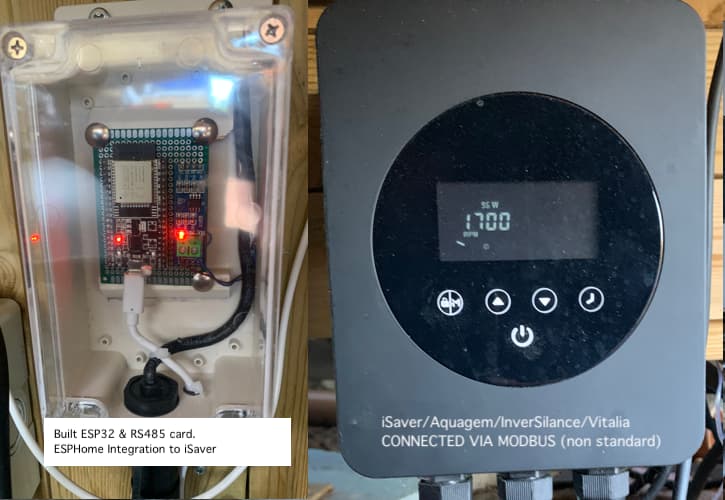
The ASIN Aseko unit in my house is just a serial to TCP converter. (Designated K5 in my DHCP).
I was able to change the IP address it sends the serial data stream to my Node-red server. (username / password is admin/admin)

It sends some datagrams that are unencrypted and are reverse engineered.
The TCP packets > 27 bytes all contain the same information and is updated once every second.

Most are int16 numbers

I.e.

  • first 4 bytes are the serial number
  • 2 bytes starting from byte 14 are the pH value
  • 2 bytes starting from byte 20 are the cholorine value in mV
  • 2 bytes starting from byte 25 are the water temperature in °C
  • etc.

The only hiccup I can see for a possible home assistant integration is that you need to accept a tcp connection from the device. I don’t know if the core developers allow this and that a user of this integration would need to change some parameters in his Aseko unit.

Wow, yes, good sleuthing. Yes, my unit is the same. I agree that is the easiest way and actually a local mode would be favourable rather than cloud based. Might even be possible to keep the cloud app working by forwarding the messages onto aseko, if that was desirable.

Most likely it would need some kind of server process that could act as a message forwarder, perhaps via MQTT protocol or modbus-over-tcp?

1 Like

@tipofthesowrd Frustrating is only the first name of it. I hate cloud solutions. So tired and done with it. All devices should be local at base and if anyone wants a cloud solution they should decided to use whatever is good for them.

How did you manage to change the IP address to where it sends the serial data-stream? Is there a more detailed guide on how to do what you have done?

Thanks

Hi there,

I have done some RS485 sniffing (Aseko has internal RS485 port as well) and you can find the RS485 datagram description ( i have found somewhere) below:

It looks that this is producer´s working document, the translation reflects the state of the document in 2020.

New external display:
the automate sends cca 1 x per 10 seconds data at speed 57600 bauds. The data consist in following bytes:
1th byte: 0ah
2th byte: type of automate lower 4 byte 0 - 3 bit

  • 0 bit ,1’ - Cl probe *
  • 1 bit ,1’ - Rx probe*
  • 2 bit ,1’ - without probe dose*
  • 3 bit ,1’ - without probe sanosil *
  • upper 4 byte 4 - 7 bit*
  • 4 bit ,1’ aqua NET*
  • 5 bit ,1’ salt*
  • 6 bit ,1’ home*
  • 7 bit ,1’ profi *

3rd byte: ph upper byte
4th byte: ph lower byte
*5th byte: Rx or Cl upper byte *
*6th byte: Rx or Cl lower byte *
7th byte: Rx or Cl upper byte
*8th byte: Rx or Cl lower byte *
9th byte: teplota upper byte
10th byte: teplota lower byte
11th byte: error_1 - 00h no error, >00h error
12-15. byte - serial number
16th byte 0xff hexa
17th byte required pH - 1 dec, place
18th byte required Cl or Rx - for Cl 1 dec. place, for Rx needs to be multiplied by 10
19th byte 0xff hexa
20th byte how many hours without filtration
21th byte hourly dosage ml/m3 per hour
22th byte states of pumps0 0.bit - pump pH, 1.bit - pump Cl
23th byte not for general use
24th byte display
25th byte not for general use
26th byte not for general use
27th byte: crc - aah xor 1th byte xor…xor 26th byte

every value sent as hexadecimal number
pH, Cl,temperature - sent with 2 digits
for measured values 0xff hexa - error value
the communication should look like this:
0A 41 03 CF 00 00 00 00 00 C0 00 00 00 00 01 00 46 00 19 05 03 08 FF 00 02 00 40

Unfortunatelly I haven’t found a way how to overwrite any parameters.
Maybe we could sniff datagrams when changing configuration at unit itself.
I am pretty sure it sends some datagrams, so we could reverse engineering the protocol itself.

I would preffer local communication as well.
Feel free to ask for any testing if needed.

That’s really helpful, thanks! I wonder how the app calculates the pH/chlorine consumption from this data?

I have done sniffing for one of RS485 ports, dedicated only for External Aseko Display (External Touch Display en - Aseko Pool Technology ) connection. There is no need for consumption data for the scenarion. we could try sniffing another RS485 port, as stated in the user manual (red marked one):

Using cheap RS485->TCP converter like elfin ew 11 we could create local TCP connection quite easily and it would not affect cloud connection using inbuilt Aseko K5 TCP converter.

This is just a question of navigating to the local IP address of your Aseko unit via a web browser, then it is quite easy to see where you would change ‘pool.aseko.com’ to a different daddress.

1 Like

Ah, I see. This is the Aseko Pool Controller you are using I think, rather than the dosing unit?

The information above seems to be correct. I quickly threw together a Node-Red to check the information. With the position of the serial number I quickly came up with the following:

My dosing unit connects to my node red:

The unit always sends two packets. One of 27 bytes, which corresponds with the datagram above, and one of 120 bytes.

With the serial number I was able to find out some information in the 120 bytes packet as well. Most is double information but I also found temperature in the 120 bytes packets. This is my buffer parsers for the 27 bytes packet

I have Asin Aqua Salt : ASIN AQUA Salt en - Aseko Pool Technology

@jmnemonicj Sorry have to edit my reply. Went through your posts and noticed that the image over the ports might be the controller and not the dosing unit?

However the dosing unit might also have an RS485 port. Or I’ll try your suggestion on picking up the data via the IP port into Node-Red.

It is very little info or blogs on this product online. I am very grateful that you are sharing your knowledge with us. BIG Thank you. I am getting to work ASAP. :smile:

Hi, Asin Aqua Salt is controller and dosing unit all in one, plz check: Changes to ASEKO Pool Live and API that will affect the current integration - #13 by jmnemonicj

The image I posted is internal diagram from user guide (Aseko - Files ), just for purpose we can make local serial RS485 connection for sniffing the comm protocol.

My first step…

Weird that I never thought that this Aseko device would have a web UI. :lying_face: never crossed my mind. Pretty stupid.
@tipofthesowrd Thanks for knocking on my head and bringing this option to my attention. Now it’s a completely new ballgame. :thinking:

(Device is Aseko, Asin Net)
First step, get the data flow into Home Assistant via Node-Red (creating MQTT sensors) to monitor the current data from the Aseko Asin sensors.

This is what I’ve done:
In the Aseko Web UI: Changed the Aseko Local IP settings from DHCP to a static IP (to keep all comms steady)
In the Aseko Web UI: Changed the Aseko setting for Serial Port “Remote Server Adds” to my HA server (with Node-Red) IP address.

In NODE-RED:
Screenshot 2024-09-11 at 15.02.12

In Node-red the “TCP-IN” Node is Listening to the default port 47524 (stream of Buffer). I am getting data almost every second.

Screenshot 2024-09-11 at 15.02.28

Tried to identify where the correct data is in the Buffer. First used what was posted but got the wrong data. Spent some time going through the Buffer to parse. So I am starting with the main sensors for my first version. This is what I found. (Only receiving the 120 bytes packet, haven’t seen 27… yet).

In my function node:

const buffer = msg.payload;
const serialNumber = buffer.readUInt32BE(0);
const pH = buffer.readUInt16BE(14) / 100.0;
const redox = buffer.readUInt16BE(16);
const temperature = buffer.readUInt16BE(25) / 10.0;

msg.payload = {
    serialNumber: serialNumber,
    pH: pH,
    redox: redox,
    temperature: temperature
};

Next I’ll try to see what else I can find.
Anyone that manage to identify the data in the Buffer… please share so we can create an overview table for everyone who wants to go down this route.

Prio now is to find and parse the state of water flow to the probes.

OLD POST. Better info if you visit a later post. LINK TO POST

From the Aseko Asin NET model. (If streams are different.)

Finding the data for Status of “Water Flow” to the probes.

My re-search and dig for the correct part to parse.
So how is it presented. As boolean or text. In the HA integration it turns up as “OK”. And the ASCII values are O=0x4F, K = 0x4B

If Boolean Flags? Looking at the offsets 6-9, 18-19, 22-23, etc. (Multiple occurrences of 0xFF) Could 255 be true as in Active?

or… Potential Text for Status (“OK”): Offsets 23-24 (0x50 0x58)**
The hex values 0x50 and 0x58 are not directly “OK” in ASCII (0x4F 0x4B for “OK”)

Anyone else having a thought?

> EDIT 15 SEP 2024
Haven’t figured out the “Water Flow”… need more time for that…

Listening to the streams coming out from the TCP port I got errors in Node-Red so I setup a switch to filter the different packages that seem to be sent out. Confirming what has been identified in previous posts in this thread there are different sizes on these packages.

  • First and most common 120. (Using, is where I get my data for the common sensors inc Redox. Works ok from what I can see without a deep dive into it.)
  • Second there is a 14
  • Third a 128 sized package
  • Then 106 sized starts to pop up
  • Later a 112 sized

So would be interesting what the different ones are containing and what function.

Hi All

In the link you will find a dump with several transfers via TCP. Unfortunately, I can neither recognize the serial number (110157093) nor pool values. Does anyone know how this is coded exactly? is the data processed in binary form? Thank you

Hi, adding my 2 cents, I found the following:
offset 20 might be Salinity * 10
offset 73 pool volume?
offset 74-75 startup delay in seconds? - in my case app shows 8 minutes, that’s 480 seconds, that’s 1 and 224 on 74-75

EDIT:
20 is definitely Salinity * 10
46-51 is date and time (YY MO DD HH MM SS)
the same data again on 86-91
68 Backwash every N days
69 Backwash starts at HH
70 Backwash starts at MM
71 Backwash takes N * 10 secs

1 Like

Hello everyone, there is information also here “Add support for ASIN AQUA Home after major update. · Issue #125657 · home-assistant/core · GitHub” and milanmeu is already on the subject. Have a nice evening.