Chatgpt? Or any of the other error-makers?
Probably, but hey, it got me there. The non-existing yaml parameters also did not do any harm. 
well they did actually, it would saved me and others helping out a lot of time not having to correct all that nonsense.
also, you mentioning you didnt know where they came from… we know better now
there is a reason those AI generated code are unwanted here.
1 Like
My apologies. But ChatGPT did solve my issue. The URL you are referring to is not mentioning that you are not allowed to use ChatGPT for yourself.
I agree, there were two elements (“limit = 1” and variant = “title”) that were put there by AI for no apparent reason. But there did not cause the problem, nor had any impact on the solution.
A larger part of the messy coding was caused by how you save “clean yaml” in HA, and HA tries to “optimize” it when you use HA UI.
But again. I really appreciate the help you provided me.
1 Like
You got lucky.
From what I have read … ChaptGPT training on HA is about 18 months behind. So, people often bring old code that does not work anymore in here and get kind of crappy with the free help
1 Like
You have to train it to not hallucinate. Also use good prompts with good examples. It is an accurate tool when the user knows what good looks like.
Thanks for that. I have never touched it.
But I have no intention on training people here how to use it and then how to do HA.
I am willing to bet that more people than not who use it for HA questions have NO clue on how to train it or, clearly, what ‘good’ looks like. Just saying.
1 Like
I completely agree. I manually learnt for three years, without that base knowledge Chat GPT would not be the excellent tool it is for myself.
Definitely need to avoid polluting the web with AI generated data.
It is not so much behind, just needs to be directed at the right sources.
It could be that statement is 18 months behind as well. Since mid 2024 ChatGPT has been able to augment core training with web access tools and can cite changes all the way up to the current beta (2025.11)
I’m not saying it makes it better, but I’ve had very reasonable responses from ChatGPT - Home Assistant Assistant in both Home Assistant and ESPHome.
Feel free to follow that link and ask it about its current knowledge of Home Assistant, and how it relates to its core training.
1 Like
let’s not continue that discussion here.
fact is it returned nonsense to the poster above, and that caused a waste of time of helpers involved, trying to find reasons for the auto-entities card not behaving as expected, or optimally.
Just leave AI at the door, as the title of the blog post states.
2 Likes
Hello everyone,
with reference to my post here 2025-9-features-for-tiles-and-automations-for-miles, I would like to try and debug my thermostat card.
Summary
type: custom:auto-entities
filter:
  include:
    - entity_id: sensor.erlangen_temperature
      options:
        name: " "
        card_mod:
          style:
            hui-generic-entity-row $: |
              .info.text-content {
                overflow: visible;
                margin-left: 0px;
                margin-right: 0px;
                text-align: center;
              }
              .text-content::before {
                content: "{{state_attr('sensor.erlangen_temperature','friendly_name').replace(' Temperature', '')}} ({{states('sensor.erlangen_temperature')}} °C | {{states('sensor.erlangen_humidity')}} %)";
                color: white;
              }
              .text-content::after {
                content: "  (≙ {{ (100*e**(17.625*(243.04*(log((states('sensor.erlangen_humidity')|float)/100)+(17.625*(states('sensor.erlangen_temperature')|float))/(243.04+(states('sensor.erlangen_temperature')|float))))/(17.625-(log((states('sensor.erlangen_humidity')|float)/100)+(17.625*(states('sensor.erlangen_temperature')|float))/(243.04+(states('sensor.erlangen_temperature')|float))))/(243.04+(243.04*(log((states('sensor.erlangen_humidity')|float)/100)+(17.625*(states('sensor.erlangen_temperature')|float))/(243.04+(states('sensor.erlangen_temperature')|float))))/(17.625-(log((states('sensor.erlangen_humidity')|float)/100)+(17.625*(states('sensor.erlangen_temperature')|float))/(243.04+(states('sensor.erlangen_temperature')|float))))))/e**(17.625*(states('sensor.xiaomi_living_room_temperature')|float)/(243.04+(states('sensor.xiaomi_living_room_temperature')|float))))|round(1) }} % at {{states('sensor.xiaomi_living_room_temperature')}} °C )";
                color: white;
                font-size: 0.8em;
              }
              .state {
                display: none;
              }
              .value {
                display: none;
              }
              state-badge {
                display: none;
              }
    - entity_id: climate.eq3_*
      sort:
        method: state
      options:
        type: custom:slider-entity-row
        min: 4.5
        max: 23
        step: 0.5
        hide_state: false
        name: " "
        card_mod:
          style:
            .: |
              .state {
                white-space: nowrap;
                display: inline-block;
              }
              .state::after {
                content: "({{states(config.entity.replace('climate.', 'sensor.').replace('_climate', '_valve'))}} %)";
                font-size: 0.9em;
                margin-left: 0px;
                margin-right: 0px;
              }
            hui-generic-entity-row $: |
              .info.text-content {
                overflow: visible;
                margin-left: 0px;
                margin-right: 0px;
              }
              .text-content::before {
                content: "{{state_attr(config.entity,'friendly_name').replace('eQ-3', '').replace(' Climate', '')}}";
              }
              .text-content::after {
                content: {% if state_attr(config.entity,'current_temperature') != none %} "({{state_attr(config.entity,'current_temperature')}} °C | {{state_attr(config.entity,'current_humidity')}} %)"{% endif %};
                font-size: 0.9em;
                #vertical-align: sub;
              }
    - entity_id: sensor.xiaomi_hallway_temperature
      options:
        icon: mdi:home-thermometer-outline
        name: " "
        card_mod:
          style:
            hui-generic-entity-row $: |
              .info.text-content {
                overflow: visible;
                margin-left: 0px;
                margin-right: 0px;
              }
              .text-content::before {
                content: "{{state_attr('sensor.xiaomi_hallway_temperature','friendly_name').replace('Xiaomi', '').replace(' Temperature', '')}} ";
                color: grey;
                font-style: italic !important;
              }
              .text-content::after {
                content: "({{states('sensor.xiaomi_hallway_temperature')}} °C | {{states('sensor.xiaomi_hallway_humidity')}} %) || {{states('sensor.xiaomi_hallway_dewpoint')}} °C)";
                font-size: 0.9em;
                color: grey;
                font-style: italic !important;
                #vertical-align: sub;
              }
              .state {
                display: none;
              }
              .value {
                display: none;
card:
  type: entities
  state_color: true
I switched all my dashboards to the new Sections style but I now have a card that is not properly rendered. Neither in browser nor Companion App.
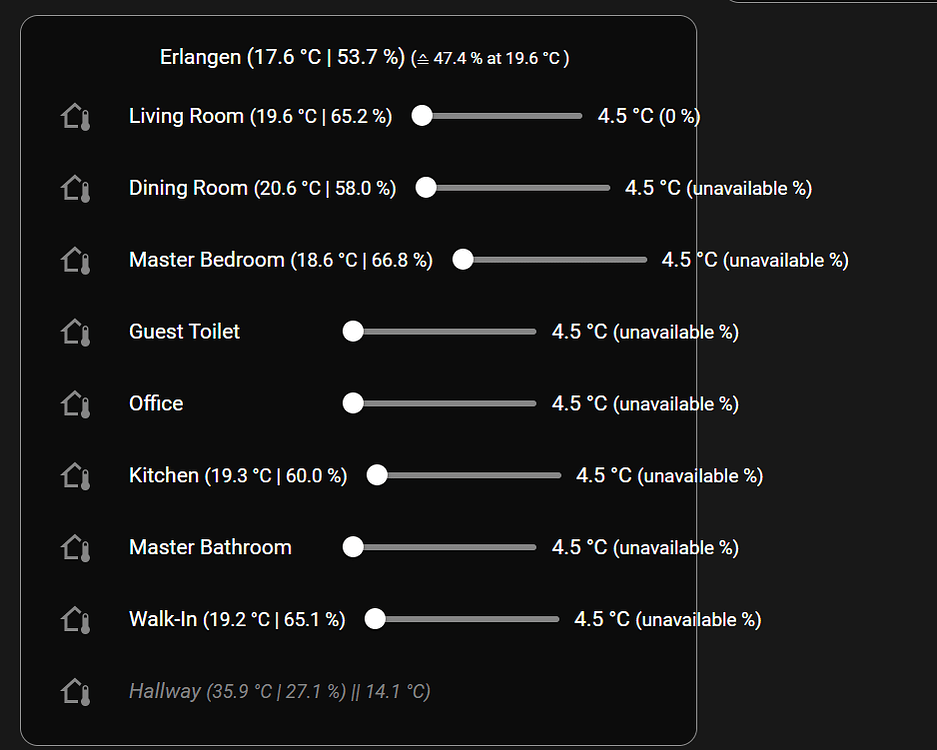
I am using a lot of card-mod in that card because I am trying to display a bunch of additional information from different sensors and combine all of it into one card that let’s me quickly see the actual temperature and humidity, valve position and target temperature.
I think the slider might be the main issue, but I am not sure.
Maybe better placed in card-mod, but not sure. I am happy to move away from card-mod if anybody thinks I can achieve (more or less) the same card layout without it.
Thank you for you input
Is there any way to sort based on a template value? For my security system, I want to sort on as_timestamp(state_attr(‘this.entity_id’, ‘last_tripped_time’)), because otherwise it will use the alphanumeric last_tripped_time timestamp which shows untripped sensors first. I want to sort the sensors by the order in which they were initially tripped.
You can use the template filter and provide the entities sorted.
I’m trying to use a tile card with auto entities and would like to change the background color of the tile depending on the state - how do I do that.
Here’s my code - which changes background colour for every tile card.
type: custom:auto-entities
show_empty: false
card:
  type: grid
  columns: 3
card_param: cards
filter:
  include:
    - area: Garden Room
      domain: switch
      options:
        type: tile
        features_position: bottom
        vertical: true
        state_content:
          - state
          - last_changed
        card_mod:
          style: |


            ha-tile-icon {
               --tile-color: #975102;}

            ha-card {
              --ha-card-background: #ffa500;

            }
  exclude:
    - entity_id: "*led*"
    - name: "*switch*"
    - name: "*lock*"
    - name: "*ADB*"
    - name: "*Power Strip*"
sort:
  method: state
  count: 3
  reverse: true
How can i use features for tile cards on template filters with auto entities?
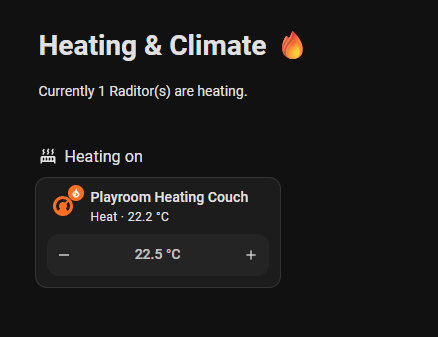
I’ve a filter set to filter all thermostats, which are currently heating. I’d like to display the ones, which are currently on, with the feature to set the target temperature:

like it is on the right side.
I tried but failed 
{% for x in states.climate -%}
  {%- if x.attributes.hvac_action == 'heating' -%}
    {{
      {
        'type': 'tile',
        'card_type': 'button',
        'vertical': 'true',
        'features': '',
        {'type': '- target-temperature'},
        'entity': x.entity_id,
        'name': area_name(x.entity_id) + " " + state_attr(x.entity_id, 'friendly_name')
      }
    }},
  {%- endif -%}
{%- endfor %}
No idea if this would work, but logically speaking, I believe features: is a list of key, value pairs, so try substituting the 2 lines above with this:
'features': [{'type': 'target-temperature'}],
If that doesn’t work, then I’ve no idea, sorry.
1 Like
when running into these yaml to json troubles, you can always try to jot your yaml into an online converter of repute, and see what it does
Or just add as a card onto any storage mode dashboard (better on the 1st view to find faster, or set a title like “xyz” and then use it for search) and then find this card in a corresponding json file in a “.storage” folder.
Hello.
I’m using a simple card code. It sorts automations by key name. For example: “Hallway Lighting (description 1)”, “Hallway Lighting (description 2)”, and so on.
type: custom:auto-entities
card:
  type: entities
  show_header_toggle: false
filter:
  include:
    - domain: automation
      name: /[Кк]ор/
      options:
        secondary_info: last-changed
  exclude: null
sort:
  method: name
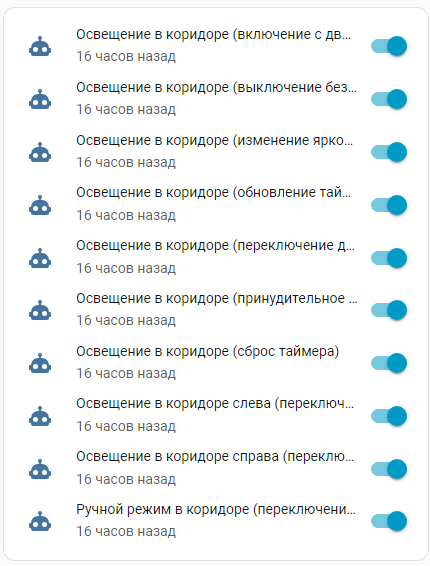
Is it possible to shorten the automation names so that instead of “Hallway Lighting (description 1)”, it’s “description 1”? That is, display the text in brackets. All automation names will be named “Room (description)”.