Use this as a starting point.
1 Like
Thanks. Code for my example:
type: custom:auto-entities
card:
  type: entities
  show_header_toggle: false
filter:
  template: |-
    {% for state in states.automation -%}
      {%- if state.name and state.name | regex_search('[Кк]ор') -%}
        {%- set matches = state.name | regex_findall('\\((.*?)\\)') -%}
        {%- if matches|length > 0 -%}
          {{
            {
              'entity': state.entity_id,
              'name': matches[0] | capitalize,
              'secondary_info': 'last-changed'
            }
          }},
        {%- endif -%}
      {%- endif -%}
    {%- endfor %}
sort:
  method: name
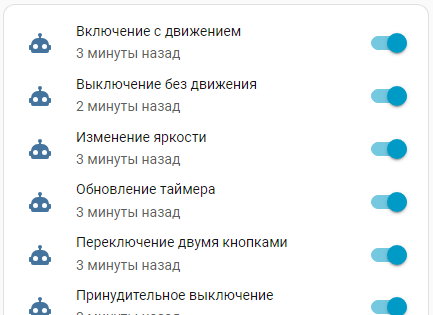
this is exactly what you might be looking for
eval_js is an advanced and undocumented option in auto-entities 
I use:
        - type: custom:auto-entities
          card:
            title: Eval_js test
            type: history-graph
            hours_to_show: 24
          filter:
            include:
              - options:
                  eval_js: true
                  name: "${ state.attributes.friendly_name.replace(/:? actueel$/, '').trim() }"
                entity_id: "*_actueel"
                integration: zwave_js
no need for complex for loops with that
2 Likes
Thanks. My code:
type: custom:auto-entities
card:
  type: entities
  show_header_toggle: false
filter:
  include:
    - entity_id: "automation.hallway_*"
      options:
        eval_js: true
        name: "${ ((state.attributes.friendly_name||'').split('(')[1]?.split(')')[0] || state.attributes.friendly_name).trim().replace(/^./, c => c.toUpperCase()) }"
        secondary_info: last-changed
  exclude:
    - entity_id: "automation.hallway_manual_mode"
sort:
  method: name
2 Likes
great you got that working.
always best to stay within the component as much as possible.
2 Likes
Hi guys.
If anyone wants to see the same result achieved above by many other users, below I’m sharing my examples.
The card is visually almost identical to others already created (I mostly copied the beautiful gradient from you guys above), but it differs in the use of custom-button-card.
The difference is that:
- instead of using auto-entities with entities inside it — a solution that necessarily requires card-mod
- I used auto-entities with custom-button-card inside — a solution that does not require card-mod and opens up the extensive configuration possibilities offered by custom-button-card
(the maximum value of the bars is 6000 because that’s the capacity of my electrical meter.)
Example 1 (auto-entities + entities + custom-button-card)
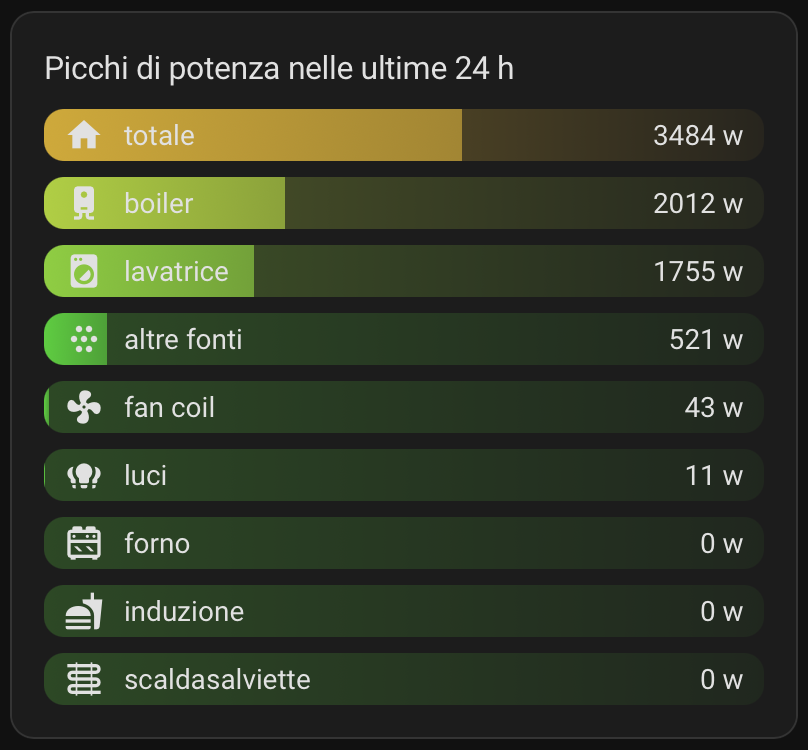
Code:
type: custom:auto-entities
card:
  type: entities
  title: Picchi di potenza nelle ultime 24 h
  card_mod:
    style:
      hui-sensor-entity-row: null
      .: |
        .card-header {
          font-size: 16px;
          padding-bottom: 12px;
        }
sort:
  method: state
  numeric: true
  reverse: true
filter:
  template: |-
    [
      {% for e in states %}
        {% if "sensor.teatrino_1_blu" in e.entity_id and "picco" in e.entity_id %}
          {# nome e icona #}
          {% set dizionario =
            {'nome':'boiler','icona':'mdi:water-boiler'} if 'boiler' in e.entity_id else
            {'nome':'fan coil','icona':'mdi:fan'} if 'fan_coil' in e.entity_id else
            {'nome':'forno','icona':'mdi:stove'} if 'forno' in e.entity_id else
            {'nome':'induzione','icona':'mdi:food'} if 'induzione' in e.entity_id else
            {'nome':'lavatrice','icona':'mdi:washing-machine'} if 'lavatrice' in e.entity_id else
            {'nome':'luci','icona':'mdi:lightbulb-group'} if 'luci' in e.entity_id else
            {'nome':'scaldasalviette','icona':'mdi:heating-coil'} if 'scaldasalviette' in e.entity_id else
            {'nome':'altre fonti','icona':'mdi:dots-hexagon'} if 'altre_fonti' in e.entity_id else
            {'nome':'totale','icona':'mdi:home'}
          %}
          {# valore #}
          {% set valore = states(e.entity_id) %}
          {% set valore = valore | int if is_number(valore) else 0 %}
          {# sfondo #}
          {% set val = states(e.entity_id) %}
          {% set val = val | float if is_number(val) else 0 %}
          {% set perc = (val/6000*100) | round(1) %}
          {% set perc = 0 if perc < 0 else perc %}
          {% set perc = 100 if perc > 100 else perc %}
          {% set rest = 100 - perc %}
          {% if perc <= 10 %}{% set bar = '51, 255, 0' %}
          {% elif perc <= 20 %}{% set bar = '102, 255, 0' %}
          {% elif perc <= 30 %}{% set bar = '153, 255, 0' %}
          {% elif perc <= 40 %}{% set bar = '204, 255, 0' %}
          {% elif perc <= 50 %}{% set bar = '255, 255, 0' %}
          {% elif perc <= 60 %}{% set bar = '255, 204, 0' %}
          {% elif perc <= 70 %}{% set bar = '255, 153, 0' %}
          {% elif perc <= 80 %}{% set bar = '255, 85, 0' %}
          {% elif perc <= 90 %}{% set bar = '255, 51, 0' %}
          {% else %} {% set bar = '255,0,0' %}
          {% endif %}
          {
            "type": "custom:button-card",
            "entity": "{{ e.entity_id }}",
            "icon": "{{ dizionario.icona }}",
            "name": "{{ dizionario.nome }}",
            "label": "{{ valore }} w",
            "show_label": "true",
            "tap_action": "none",
            "hold_action": "none",
            "double_tap_action": "none",
            "styles": {
              "card": [
                {
                  "border": "none",
                  "border-radius": "10px",
                  "padding-top": "3px",
                  "padding-bottom": "3px",
                  "padding-left": "10px",
                  "padding-right": "10px",
                  "font-size": "14px",
                  "background": "linear-gradient(to right, rgba({{bar}},0.8) 0%, rgba({{bar}},0.6) {{perc}}%,rgba({{bar}},0.2){{perc}}%, rgba({{bar}},0.05) 100%)"
                }
              ],
              "grid": [
                {
                  "grid-template-areas": "'i n . l'",
                  "grid-template-columns": "min-content min-content 1fr min-content",
                  "grid-template-rows": "min-content",
                  "column-gap": "10px"
                }
              ],
              "icon": [
                {
                  "width": "20px",
                  "height": "20px",
                  "color": "var(--primary-text-color)",
                  "transform": "translate(0px,0px)"
                }
              ],
            }
          }
          {% if not loop.last %},{% endif %}
        {% endif %}
      {% endfor %}
    ]
Example 2 (auto-entitities + vertical stack custom-button-card)
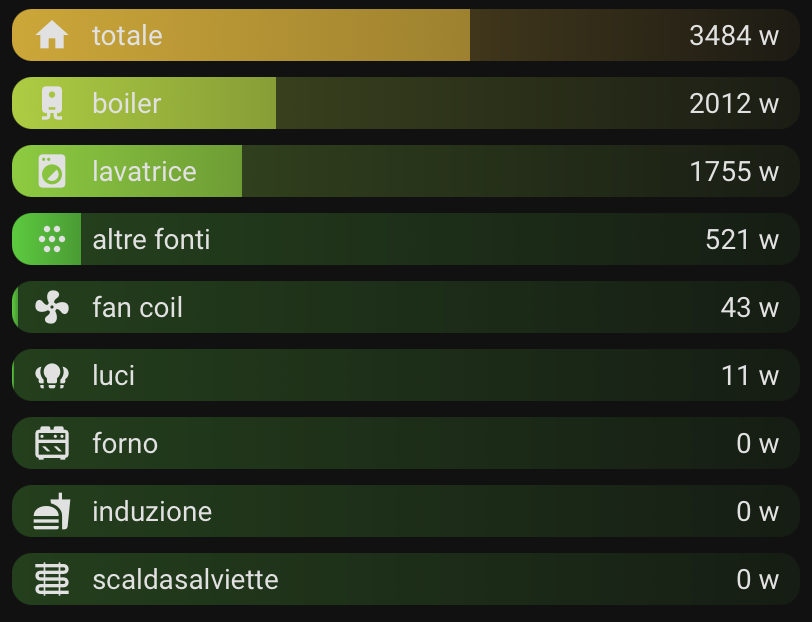
Code:
type: custom:auto-entities
card:
  type: vertical-stack
card_param: cards
sort:
  method: state
  numeric: true
  reverse: true
filter:
  template: |-
    [
      {% for e in states %}
        {% if "sensor.teatrino_1_blu" in e.entity_id and "picco" in e.entity_id %}
          {# nome e icona #}
          {% set dizionario =
            {'nome':'boiler','icona':'mdi:water-boiler'} if 'boiler' in e.entity_id else
            {'nome':'fan coil','icona':'mdi:fan'} if 'fan_coil' in e.entity_id else
            {'nome':'forno','icona':'mdi:stove'} if 'forno' in e.entity_id else
            {'nome':'induzione','icona':'mdi:food'} if 'induzione' in e.entity_id else
            {'nome':'lavatrice','icona':'mdi:washing-machine'} if 'lavatrice' in e.entity_id else
            {'nome':'luci','icona':'mdi:lightbulb-group'} if 'luci' in e.entity_id else
            {'nome':'scaldasalviette','icona':'mdi:heating-coil'} if 'scaldasalviette' in e.entity_id else
            {'nome':'altre fonti','icona':'mdi:dots-hexagon'} if 'altre_fonti' in e.entity_id else
            {'nome':'totale','icona':'mdi:home'}
          %}
          {# valore #}
          {% set valore = states(e.entity_id) %}
          {% set valore = valore | int if is_number(valore) else 0 %}
          {# sfondo #}
          {% set val = states(e.entity_id) %}
          {% set val = val | float if is_number(val) else 0 %}
          {% set perc = (val/6000*100) | round(1) %}
          {% set perc = 0 if perc < 0 else perc %}
          {% set perc = 100 if perc > 100 else perc %}
          {% set rest = 100 - perc %}
          {% if perc <= 10 %}{% set bar = '51, 255, 0' %}
          {% elif perc <= 20 %}{% set bar = '102, 255, 0' %}
          {% elif perc <= 30 %}{% set bar = '153, 255, 0' %}
          {% elif perc <= 40 %}{% set bar = '204, 255, 0' %}
          {% elif perc <= 50 %}{% set bar = '255, 255, 0' %}
          {% elif perc <= 60 %}{% set bar = '255, 204, 0' %}
          {% elif perc <= 70 %}{% set bar = '255, 153, 0' %}
          {% elif perc <= 80 %}{% set bar = '255, 85, 0' %}
          {% elif perc <= 90 %}{% set bar = '255, 51, 0' %}
          {% else %} {% set bar = '255,0,0' %}
          {% endif %}
          {
            "type": "custom:button-card",
            "entity": "{{ e.entity_id }}",
            "icon": "{{ dizionario.icona }}",
            "name": "{{ dizionario.nome }}",
            "label": "{{ valore }} w",
            "show_label": "true",
            "tap_action": "none",
            "hold_action": "none",
            "double_tap_action": "none",
            "styles": {
              "card": [
                {
                  "border": "none",
                  "border-radius": "10px",
                  "padding-top": "3px",
                  "padding-bottom": "3px",
                  "padding-left": "10px",
                  "padding-right": "10px",
                  "font-size": "14px",
                  "background": "linear-gradient(to right, rgba({{bar}},0.8) 0%, rgba({{bar}},0.6) {{perc}}%,rgba({{bar}},0.2){{perc}}%, rgba({{bar}},0.05) 100%)"
                }
              ],
              "grid": [
                {
                  "grid-template-areas": "'i n . l'",
                  "grid-template-columns": "min-content min-content 1fr min-content",
                  "grid-template-rows": "min-content",
                  "column-gap": "10px"
                }
              ],
              "icon": [
                {
                  "width": "20px",
                  "height": "20px",
                  "color": "var(--primary-text-color)",
                  "transform": "translate(0px,0px)"
                }
              ],
            }
          }
          {% if not loop.last %},{% endif %}
        {% endif %}
      {% endfor %}
    ]
Example 3 (auto-entities + grid + custom-button-card)
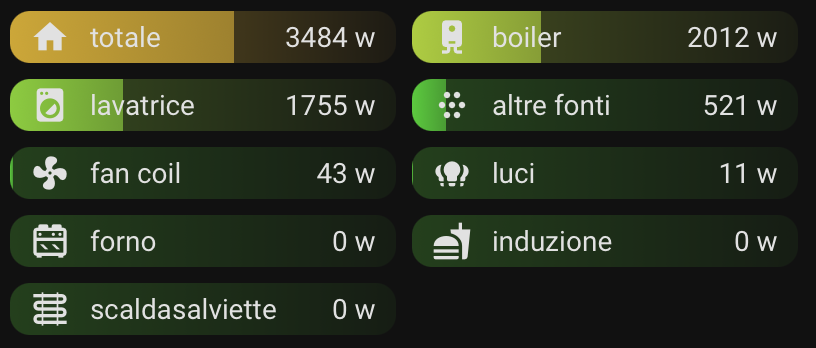
Code:
type: custom:auto-entities
card:
  type: grid
  columns: 2
  square: false
card_param: cards
sort:
  method: state
  numeric: true
  reverse: true
filter:
  template: |-
    [
      {% for e in states %}
        {% if "sensor.teatrino_1_blu" in e.entity_id and "picco" in e.entity_id %}
          {# nome e icona #}
          {% set dizionario =
            {'nome':'boiler','icona':'mdi:water-boiler'} if 'boiler' in e.entity_id else
            {'nome':'fan coil','icona':'mdi:fan'} if 'fan_coil' in e.entity_id else
            {'nome':'forno','icona':'mdi:stove'} if 'forno' in e.entity_id else
            {'nome':'induzione','icona':'mdi:food'} if 'induzione' in e.entity_id else
            {'nome':'lavatrice','icona':'mdi:washing-machine'} if 'lavatrice' in e.entity_id else
            {'nome':'luci','icona':'mdi:lightbulb-group'} if 'luci' in e.entity_id else
            {'nome':'scaldasalviette','icona':'mdi:heating-coil'} if 'scaldasalviette' in e.entity_id else
            {'nome':'altre fonti','icona':'mdi:dots-hexagon'} if 'altre_fonti' in e.entity_id else
            {'nome':'totale','icona':'mdi:home'}
          %}
          {# valore #}
          {% set valore = states(e.entity_id) %}
          {% set valore = valore | int if is_number(valore) else 0 %}
          {# sfondo #}
          {% set val = states(e.entity_id) %}
          {% set val = val | float if is_number(val) else 0 %}
          {% set perc = (val/6000*100) | round(1) %}
          {% set perc = 0 if perc < 0 else perc %}
          {% set perc = 100 if perc > 100 else perc %}
          {% set rest = 100 - perc %}
          {% if perc <= 10 %}{% set bar = '51, 255, 0' %}
          {% elif perc <= 20 %}{% set bar = '102, 255, 0' %}
          {% elif perc <= 30 %}{% set bar = '153, 255, 0' %}
          {% elif perc <= 40 %}{% set bar = '204, 255, 0' %}
          {% elif perc <= 50 %}{% set bar = '255, 255, 0' %}
          {% elif perc <= 60 %}{% set bar = '255, 204, 0' %}
          {% elif perc <= 70 %}{% set bar = '255, 153, 0' %}
          {% elif perc <= 80 %}{% set bar = '255, 85, 0' %}
          {% elif perc <= 90 %}{% set bar = '255, 51, 0' %}
          {% else %} {% set bar = '255,0,0' %}
          {% endif %}
          {
            "type": "custom:button-card",
            "entity": "{{ e.entity_id }}",
            "icon": "{{ dizionario.icona }}",
            "name": "{{ dizionario.nome }}",
            "label": "{{ valore }} w",
            "show_label": "true",
            "tap_action": "none",
            "hold_action": "none",
            "double_tap_action": "none",
            "styles": {
              "card": [
                {
                  "border": "none",
                  "border-radius": "10px",
                  "padding-top": "3px",
                  "padding-bottom": "3px",
                  "padding-left": "10px",
                  "padding-right": "10px",
                  "font-size": "14px",
                  "background": "linear-gradient(to right, rgba({{bar}},0.8) 0%, rgba({{bar}},0.6) {{perc}}%,rgba({{bar}},0.2){{perc}}%, rgba({{bar}},0.05) 100%)"
                }
              ],
              "grid": [
                {
                  "grid-template-areas": "'i n . l'",
                  "grid-template-columns": "min-content min-content 1fr min-content",
                  "grid-template-rows": "min-content",
                  "column-gap": "10px"
                }
              ],
              "icon": [
                {
                  "width": "20px",
                  "height": "20px",
                  "color": "var(--primary-text-color)",
                  "transform": "translate(0px,0px)"
                }
              ],
            }
          }
          {% if not loop.last %},{% endif %}
        {% endif %}
      {% endfor %}
    ]
3 Likes
did you check the post I did on the alternative to bar card?
Hi @Mariusthvdb ! Thanks for your message.
I read your post and you did a great job — it’s very nice and really well documented!
As for my solution, visually there’s nothing new compared to your example and the others.
In particular, before creating my cards I went through several posts in this thread and I widely took inspiration for the graphic part and I copied the gradient used as a background (which I only slightly modified) — I like it a lot! It probably comes from you, since I saw the same gradient in other posts I used as inspiration. So if the gradient and the graphic idea came from you, compliments and thank you! 
As I mentioned earlier, the only reason I decided to share my solution is not the visual part (there are several similar examples above), but what’s under the dashboard:
- I used auto-entities + custom-button-card ,
- instead of auto-entities + entities . And I generated multiple custom-button-cards not individually, but through a template.
So I thought my post could be useful — not for the graphic part (which is similar to examples already posted), but for anyone who feels limited by using entities (customizable only via card-mod) and wants to unlock all the possibilities of custom-button-card. After all, sharing is one of Home Assistant’s strengths, and I’ve benefited from it myself!
1 Like
sure, please keep sharing
this what were here for after all.
Yes, that was also mentioned before, I believe @VietNgoc even created a button-card configuration template at the point.
it should be around somewhere…
options galore.
1 Like
Does anybody else see incorreting sorting?
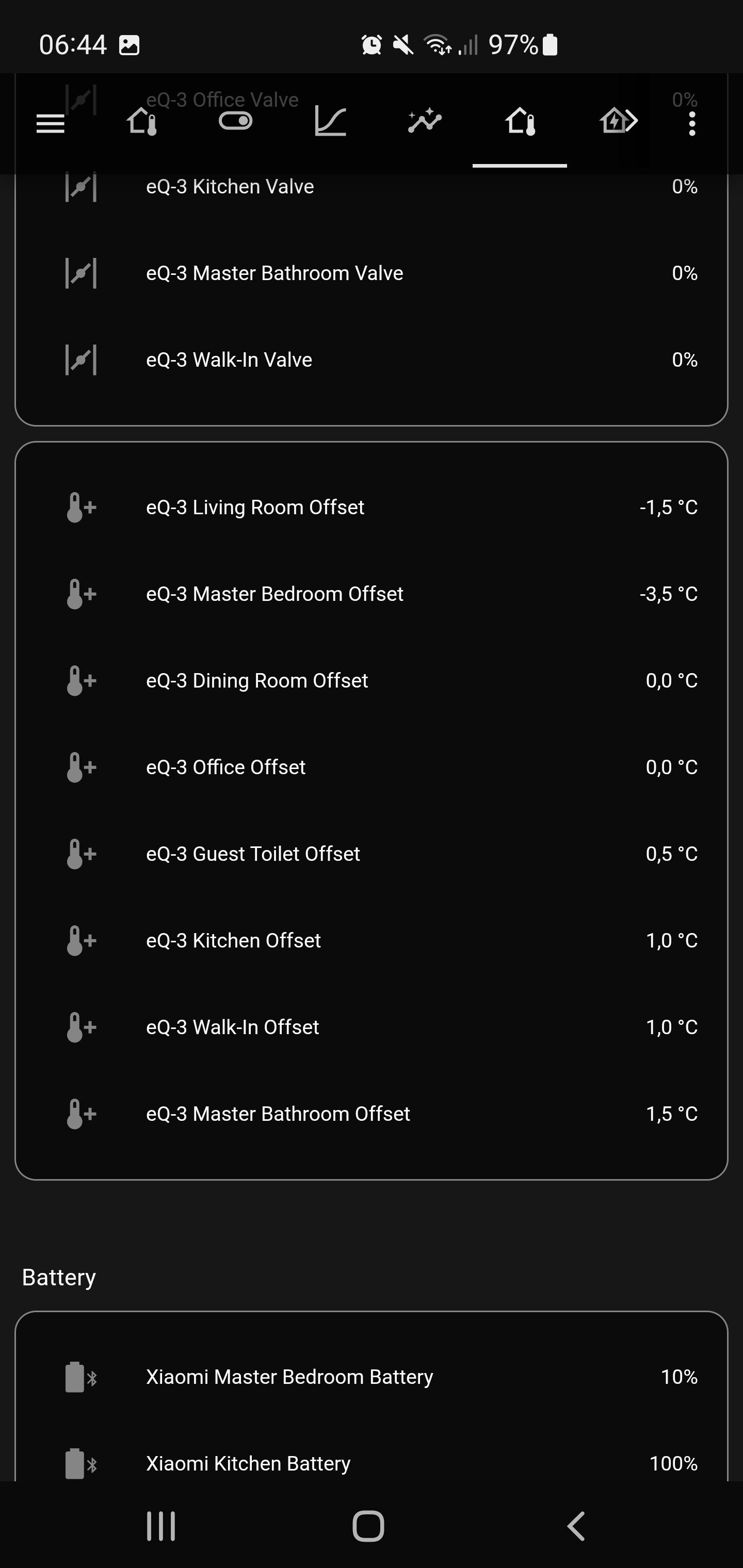
It looks like the negative sign is being identified for temperatures but then the sorting within the set of negative numbers ignores the fact that negative 3.5 is smaller than negative 1.5.
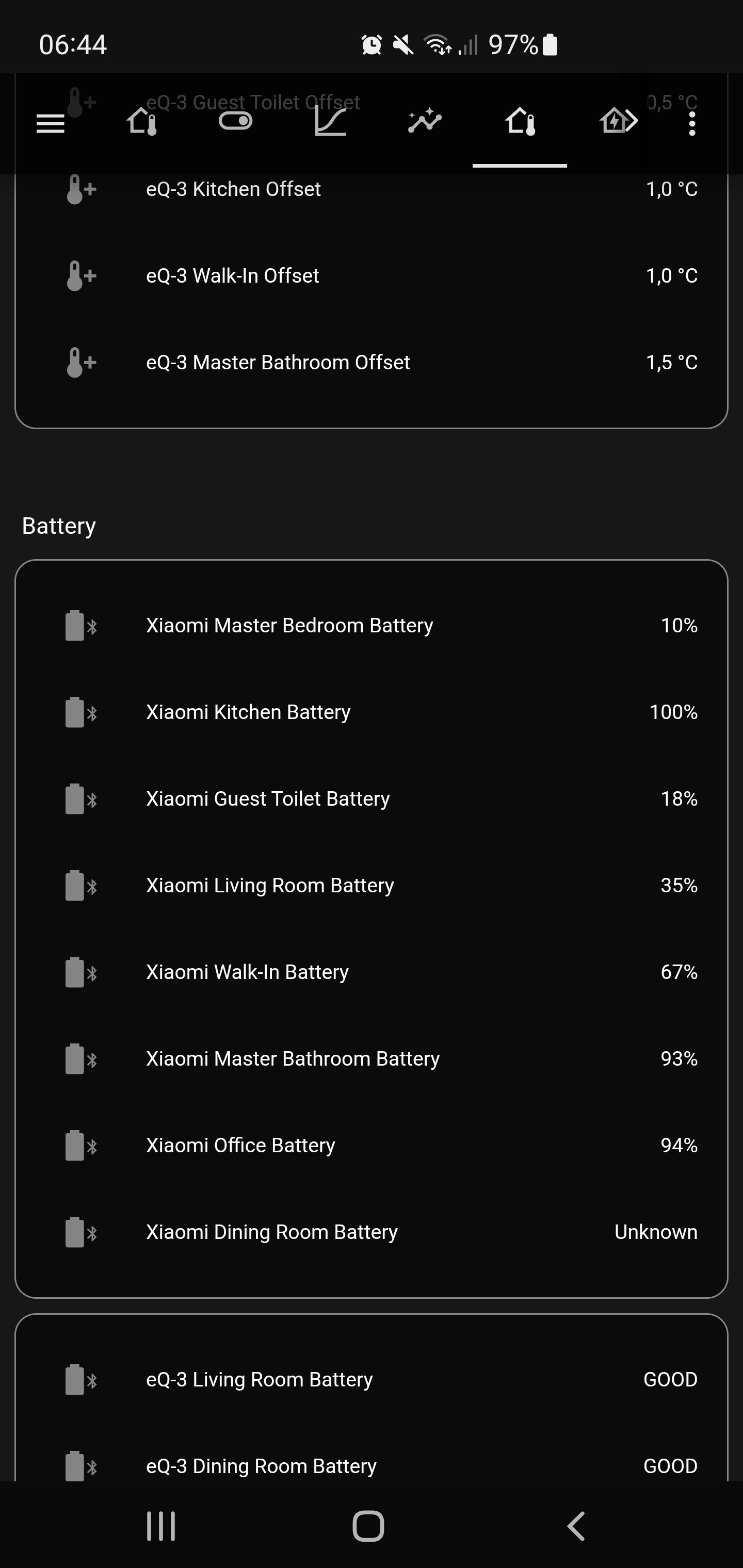
For percentages, the value is ignored and instead it is a text-sorting.
Hi All,
Apologies for the beginner question. I love the idea of this card and have configured if to filter for “battery” related entities. But I have this entity that is displaying an error and I don’t know how to find out which entity it is so I can exclude it:
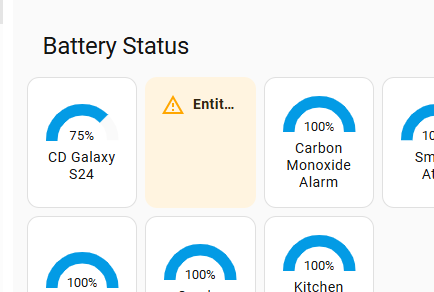
type: custom:auto-entities
card:
  type: grid
  title: Battery Status
  columns: 4
  square: false
card_param: cards
filter:
  template: |-
    {% for state in states.sensor -%}
      {%- if (state.entity_id | regex_match("sensor.*battery*", ignorecase=True)) -%}
        {{
          {
            'type' : "gauge",
            'entity' : state.entity_id,
            'name': state.attributes.friendly_name|regex_replace(find='(:|)(Batterie|)(Battery|)(level|numeric|)', replace='', ignorecase=True),
            'card_mod' : {
              'style': "ha-card > div {\n   font-size: 10px !important;\n}"
            },
            'options' : {
              'entities': [
                state.entity_id,
              ],
            }
          }
        }},
      {%- endif -%}
    {%- endfor %}
  exclude:
    - entity_id: sensor.total_battery_energy_charged
    - entity_id: sensor.total_battery_energy_discharged
    - entity_id: sensor.battery_power_charging
    - entity_id: sensor.battery_power_discharging
    - entity_id: sensor.system_monitor_battery_empty
    - entity_id: sensor.system_monitor_battery
    - entity_id: sensor.sm_s928b_battery_state
    - device_manufacturer: GivEnergy
    - device: SM-G998B
    - entity_id: binary_sensor.0x8c73dafffec862e9_battery_low
sort:
  method: attribute
  attribute: battery
  reverse: false
  numeric: true
grid_options:
  columns: full
I thought it was binary_sensor.0x8c73dafffec862e9_battery_low but excluding that doesn’t seem to have fixed it. I’m out of ideas now.
Thanks in advance!
CD
Copy the part {% for… all the way to {% endfor %} into the Developer tools > Templates
1 Like
Sorry for jumping in, but after looking through this thread and the repo I still cannot understand this.
Do you mean that it is now possible to display an attribute?
Entities card can display attributes.
(I’ve asked this on a picture-elements thread as well)
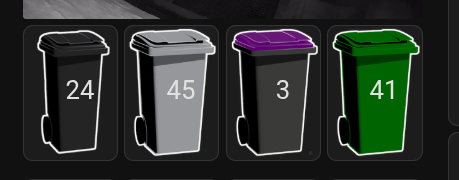
Does anyone know how to create an condtitionally ordered set of picture-elements cards in a grid?
Here’s the code that gets me this far with our 4 bins and the days left til they need putting out. I want the so that they are ordered with the soonest needing putting out on the left.
square: false
type: grid
cards:
  - type: picture-elements
    elements:
      - type: state-label
        style:
          left: 60%
          top: 50%
          transform: translate(-50%, -50%) scale(2.3, 2.3)
        entity: sensor.days_domestic_waste
    image:
      media_content_id: media-source://image_upload/f4f60aad3e43736b53332278b548b3f1
      media_content_type: image/png
      metadata:
        title: domestic-waste-bin-small.png
        thumbnail: /api/image/serve/f4f60aad3e43736b53332278b548b3f1/256x256
        media_class: image
        navigateIds:
          - {}
          - media_content_type: app
            media_content_id: media-source://image_upload
      style:
        transform: translate(-50%, -50%) scale(0.3, 0.3)
  - type: picture-elements
    elements:
      - type: state-label
        style:
          left: 60%
          top: 50%
          transform: translate(-50%, -50%) scale(2.3, 2.3)
        entity: sensor.days_recycling
    image:
      media_content_id: media-source://image_upload/88d6cc1e2d04bb7fa70f41a0e0d47d5a
      media_content_type: image/png
      metadata:
        title: mixed-recycling-bin-small.png
        thumbnail: /api/image/serve/88d6cc1e2d04bb7fa70f41a0e0d47d5a/256x256
        media_class: image
        navigateIds:
          - {}
          - media_content_type: app
            media_content_id: media-source://image_upload
  - type: picture-elements
    elements:
      - type: state-label
        style:
          left: 60%
          top: 50%
          transform: translate(-50%, -50%) scale(2.3, 2.3)
        entity: sensor.days_paper_waste
    image:
      media_content_id: media-source://image_upload/83128e80ab48057e218d4f0774981956
      media_content_type: image/png
      metadata:
        title: paper-and-card-bin-small.png
        thumbnail: /api/image/serve/83128e80ab48057e218d4f0774981956/256x256
        media_class: image
        navigateIds:
          - {}
          - media_content_type: app
            media_content_id: media-source://image_upload
  - type: picture-elements
    elements:
      - type: state-label
        style:
          left: 60%
          top: 50%
          transform: translate(-50%, -50%) scale(2.3, 2.3)
        entity: sensor.days_green_waste
    image:
      media_content_id: media-source://image_upload/13933f1f1e0a2809084a8855d5da4450
      media_content_type: image/png
      metadata:
        title: green-waste-bin-small.png
        thumbnail: /api/image/serve/13933f1f1e0a2809084a8855d5da4450/256x256
        media_class: image
        navigateIds:
          - {}
          - media_content_type: app
            media_content_id: media-source://image_upload
grid_options:
  columns: full
  rows: 3
columns: 4
1 Like
Thanks @thomasloven I have a page I’m always parked on for abnormal conditions, and I get alarms for when important temps go out of band, but I wanted a way to have a reminder to only show what’s still abnormal. Very nice work.
I’ve been having a lot of fun with auto-entities, but it was tricky to configure, so I thought I could share my examples. Thanks to everyone who has posted in this thread, meaning I could work it out.
Unavailable entities with batteries, as tile cards, with 'Area' added to secondary-info via card-mod and name as 'device'.
    type: custom:auto-entities
    card:
      type: vertical-stack
    filter:
      include:
        - options:
            type: tile
            name:
              type: device
            entity: this.entity_id
            card_mod:
              style:
                ha-tile-info$: |
                  .secondary:after {
                    visibility: visible;
                    content: " ⸱ {{ area_name(device_id('this.entity_id')) }}";
                  }
          attributes:
            device_class: battery
          state: unavailable
    card_param: cards
List of switches, as tiles, with a specific attribute (in this case Adaptive Lighting with Manual_Control populated), with a button provided by custom-features-card.
  type: custom:auto-entities
  card:
    type: vertical-stack
  filter:
    include:
      - attributes:
          manual_control: $$/[.+]/
        options:
          type: tile
          name:
            type: device
          hide_state: true
          features_position: inline
          features:
            - type: custom:service-call
              entries:
                - type: button
                  icon: mdi:autorenew
                  label: Reset
                  tap_action:
                    action: call-service
                    service: adaptive_lighting.set_manual_control
                    data:
                      entity_id: this.entity_id
                      manual_control: false
  card_param: cards
2 Likes
as a FYI, there’s a new fork of the great auto-entities original, with many if not all open issues fixed and more.
check 💡 auto-entities 2.0.0 available on new fork if you’re using the resource and need an actively maintained version.
5 Likes
I’m trying to use a template for my auto-entities, but I don’t see any errors, just nothing shows up:
        {% for state in states.input_datetime %}
          {% if 'input_datetime.camera_' in state.entity_id %}
            {% if (as_timestamp(now()) - as_timestamp(states(state.entity_id)) < 5*60) %}
              {% set COLOR = 'red' %}
            {% else %}
              {% set COLOR = 'default' %}
            {% endif %}
            {{
              {
                'entity': state.entity_id,
                'type': "custom:multiple-entity-row",
                'state': min((as_timestamp(now()) - as_timestamp(states(state.entity_id))) / 60 / 60, 999) | round(0) ~ "h " ~ ((as_timestamp(now()) - as_timestamp(states(state.entity_id))) / 60) | round(0) % 60 ~ "m",
                'icon': "mdi:motion-sensor",
                'color': COLOR,
                'tap_action': {
                  'action': "navigate",
                  'navigation_path': "/dashboard-cameras/" ~ state.entity_id.split('_')[2]
                }
              }
            }},
          {% endif %}
        {% endfor %}
Using a simple template like this, works:
    {% for E in ['input_datetime.camera_backgate_last_tripped'] %}
      {{ {'entity': E, 'type': "button" } }},
    {% endfor %}
Using this doesn’t work:
        {% for state in states.input_datetime %}
           {{ {'entity': state.entity_id, 'type': "button" } }},
        {% endfor %}
What am I doing wrong?
When using developer tools, the output looks something like this:
{'entity': 'input_datetime.camera_back_gate_last_tripped', 'type': 'custom:multiple-entity-row', 'state': '55h 52m', 'icon': 'mdi:motion-sensor', 'color': 'default', 'tap_action': {'action': 'navigate', 'navigation_path': '/dashboard-cameras/back'}},
{'entity': 'input_datetime.camera_doorbell_last_tripped', 'type': 'custom:multiple-entity-row', 'state': '9h 39m', 'icon': 'mdi:motion-sensor', 'color': 'default', 'tap_action': {'action': 'navigate', 'navigation_path': '/dashboard-cameras/doorbell'}},
{'entity': 'input_datetime.camera_driveway_last_tripped', 'type': 'custom:multiple-entity-row', 'state': '2h 35m', 'icon': 'mdi:motion-sensor', 'color': 'default', 'tap_action': {'action': 'navigate', 'navigation_path': '/dashboard-cameras/driveway'}},
{'entity': 'input_datetime.camera_garage_last_tripped', 'type': 'custom:multiple-entity-row', 'state': '2h 32m', 'icon': 'mdi:motion-sensor', 'color': 'default', 'tap_action': {'action': 'navigate', 'navigation_path': '/dashboard-cameras/garage'}},
{'entity': 'input_datetime.camera_hvac_last_tripped', 'type': 'custom:multiple-entity-row', 'state': '1h 40m', 'icon': 'mdi:motion-sensor', 'color': 'default', 'tap_action': {'action': 'navigate', 'navigation_path': '/dashboard-cameras/hvac'}},
{'entity': 'input_datetime.camera_side_gate_last_tripped', 'type': 'custom:multiple-entity-row', 'state': '93h 19m', 'icon': 'mdi:motion-sensor', 'color': 'default', 'tap_action': {'action': 'navigate', 'navigation_path': '/dashboard-cameras/side'}},
{'entity': 'input_datetime.camera_workshop_last_tripped', 'type': 'custom:multiple-entity-row', 'state': '123h 45m', 'icon': 'mdi:motion-sensor', 'color': 'default', 'tap_action': {'action': 'navigate', 'navigation_path': '/dashboard-cameras/workshop'}},
I’m trying to migrate from this filter, to a filter that has unique tap actions that navigates to each camera, rather than navigating to the camera overview. This would be way easier if the ‘navigation_path’ was a template rather than a string:
      include:
        - entity_id: input_datetime.camera_*
          options:
            type: custom:template-entity-row
            icon: mdi:motion-sensor
            state: >
              {{ min((as_timestamp(now()) -
              as_timestamp(states('this.entity_id'))) / 60 / 60, 999) | round(0)
              }}h

              {{ ((as_timestamp(now()) - as_timestamp(states('this.entity_id')))
              / 60) | round(0) % 60 }}m
            color: >-
              {% if (as_timestamp(now()) -
              as_timestamp(states('this.entity_id')) < 5*60) %}
                red
              {% else %}
                default
              {% endif %}
            tap_action:
              action: navigate
              navigation_path: /dashboard-cameras/overview