Am new to HA.
Have created an automation to turn lights on after motion detected on Blink camera.
Trigger event is registered by automation but Hue light does not turn on.
When actions run from automation set up lights turn on as expected.
Any idea what the issue is?
Not without seeing your automation (yaml) correctly formatted for the forum.
‘’’
type: motion
device_id: 11c64bb7f44bebc1b60252d5dec1eb27
entity_id: 8a9dcdb72a107dae11f52a6b1541a05d
domain: binary_sensor
trigger: device
type: turn_on
device_id: 1e1fd82f6e0dfdb6136d3b632e7b2c0e
entity_id: 3ab7ca49f8a3a4b130314222039b54e6
domain: light
brightness_pct: 100
delay:
hours: 0
minutes: 5
seconds: 0
milliseconds: 0
type: turn_off
device_id: 1e1fd82f6e0dfdb6136d3b632e7b2c0e
entity_id: 3ab7ca49f8a3a4b130314222039b54e6
domain: light
‘’’
Those are quotes not backticks. You can also use the </> button in the post toolbar to format your post. Sometimes it is under the cog icon on small screens.
However your automation does not have a triggers: or actions: section. Post the whole automation yaml.
Sorry am very new to this. Is this better?
alias: Back Garden motion sense - Back lights on
description: Backdoor Blink Camera motion sense triggers Back lights on for 5 min
triggers:
  - type: motion
    device_id: 11c64bb7f44bebc1b60252d5dec1eb27
    entity_id: 8a9dcdb72a107dae11f52a6b1541a05d
    domain: binary_sensor
    trigger: device
conditions: []
actions:
  - type: turn_on
    device_id: 1e1fd82f6e0dfdb6136d3b632e7b2c0e
    entity_id: 3ab7ca49f8a3a4b130314222039b54e6
    domain: light
    brightness_pct: 100
  - type: turn_on
    device_id: 58d00cf89297ab7c32cd61b0dd0eb949
    entity_id: b02eca1a527a2e9868f7db55269d8a6e
    domain: light
    brightness_pct: 100
  - delay:
      hours: 0
      minutes: 5
      seconds: 0
      milliseconds: 0
  - type: turn_off
    device_id: 1e1fd82f6e0dfdb6136d3b632e7b2c0e
    entity_id: 3ab7ca49f8a3a4b130314222039b54e6
    domain: light
  - type: turn_off
    device_id: 58d00cf89297ab7c32cd61b0dd0eb949
    entity_id: b02eca1a527a2e9868f7db55269d8a6e
    domain: light
mode: single
There is a better way to do this here: Motion activated lights automation
You should not wait in automations for too long. They can be interrupted by restarts or reloads.
Also try to avoid device automations, see: Why and how to avoid device_ids in automations and scripts
Thanks tried using the example code making the changes as suggested but get a parse error duplicate mapping key at the second instance of “trigger: state”.
alias: Motion Light
description: ""

trigger: state
entity_id: binary_sensor.front_door_motion # change this
to: 'on'
trigger: state
entity_id: binary_sensor.front_door_motion # change this
to: 'off'
for:
minutes: 5 # adjust as necessary
actions:
action: "light.turn_{{ trigger.to_state.state }}"
target:
entity_id: light.outside # change this
That’s because indentation is important in YAML, and you’re missing the triggers: key:
alias: Motion Light
description: ""
triggers:
  - trigger: state
    entity_id: binary_sensor.front_door_motion # change this
    to: 'on'
  - trigger: state
    entity_id: binary_sensor.front_door_motion # change this
    to: 'off'
    for:
      minutes: 5 # adjust as necessary
actions:
  - action: "light.turn_{{ trigger.to_state.state }}"
    target:
      entity_id: light.outside # change this
And if it’s still not working, post one of the traces. You can get to it on a specific automation via the settings menu. Also check your logs.
Worked so far then stopped
Triggered manually at 15 August 2025 at 12:10:45
Perform an action based on a template on Outside
Stopped because an error was encountered at 15 August 2025 at 12:10:45 (runtime: 0.00 seconds)
Error rendering service name template: UndefinedError: ‘dict object’ has no attribute ‘to_state’
When you run an automation manually, it’s not triggered automatically by anything in its triggers section and just executes as a script.
You can set (override) the state for an entity in your triggers section via the states tab under the dev tools, or just wait for it to trigger naturally.
OK so armed the camera to trigger the automation.
Triggered by the state of binary_sensor.front_door_motion at 15 August 2025 at 12:29:09
Perform an action based on a template on Outside
1 second later
(light.outside) turned on
Finished at 15 August 2025 at 12:29:09 (runtime: 0.09 seconds)
Everything appears to have actioned.
Trouble is the Hue lights did not turn on!
The trace says “(light.outside) turned on”. Did you change the light entity to match your Hue lights’ entity / entities?
actions:
  - action: "light.turn_{{ trigger.to_state.state }}"
    target:
      entity_id: light.outside # change this
-------------------------------^^^^^^^^^^^^^
Yes I think so how do I check?

Checked
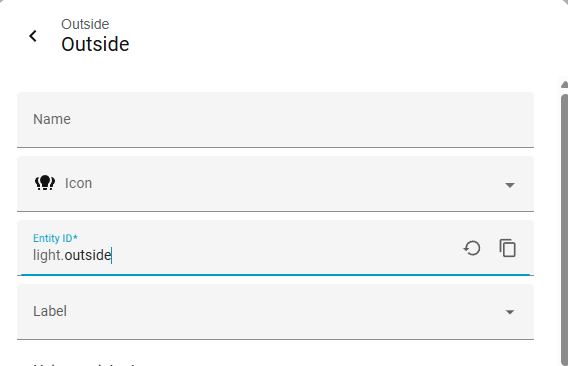
Latest code
alias: Motion Light - Back Garden
description: >-
  Use Back Garden Blink Camera for Motion Sense to Switch on outside lights and
  Off after 5min no motion
triggers:
  - trigger: state
    entity_id: binary_sensor.front_door_motion
    to: "on"
  - trigger: state
    entity_id: binary_sensor.front_door_motion
    to: "off"
    for:
      minutes: 5
actions:
  - action: light.turn_{{ trigger.to_state.state }}
    target:
      entity_id: light.outside
OK and can you turn that light on and off from the device page?
Yes tried that worked fine on and off.
So scratching my head all the components seem to work but not together.
Is light.outside the actual entity_id of your Hue lights?
Go to Developer Tools-> States and find light.outside in the list.
- If it exists then confirm it represents the Hue lights (click it and a pop-up will appear allowing you to control the lights).
- If it doesn’t exist then you need to replace
light.outsidein the automation with the actual entity_id.