ahh... ok, I thought debug woudl put it in the main flow - my mistake
this is what I got in the raw logs:
No issues found for search term 'backup'
2026-06-09 16:59:41.530 DEBUG (MainThread) [homeassistant.components.backup] Backup end notification
2026-06-09 16:59:43.943 DEBUG (MainThread) [homeassistant.components.backup] Received backup event: CreateBackupEvent(manager_state=<BackupManagerState.CREATE_BACKUP: 'create_backup'>, reason=None, stage=<CreateBackupStage.HOME_ASSISTANT: 'home_assistant'>, state=<CreateBackupState.IN_PROGRESS: 'in_progress'>)
2026-06-09 16:59:43.944 DEBUG (MainThread) [homeassistant.components.backup] Finished fetching backup data in 0.000 seconds (success: True)
2026-06-09 16:59:43.950 DEBUG (MainThread) [homeassistant.components.backup] Received backup event: CreateBackupEvent(manager_state=<BackupManagerState.CREATE_BACKUP: 'create_backup'>, reason=None, stage=<CreateBackupStage.HOME_ASSISTANT: 'home_assistant'>, state=<CreateBackupState.IN_PROGRESS: 'in_progress'>)
2026-06-09 16:59:43.950 DEBUG (MainThread) [homeassistant.components.backup] Finished fetching backup data in 0.000 seconds (success: True)
2026-06-09 16:59:44.023 DEBUG (MainThread) [homeassistant.components.backup] Received backup event: CreateBackupEvent(manager_state=<BackupManagerState.CREATE_BACKUP: 'create_backup'>, reason='upload_failed', stage=None, state=<CreateBackupState.FAILED: 'failed'>)
2026-06-09 16:59:44.024 DEBUG (MainThread) [homeassistant.components.backup] Finished fetching backup data in 0.000 seconds (success: True)
2026-06-09 16:59:44.025 DEBUG (MainThread) [homeassistant.components.backup] Backup state: create_backup -> idle
2026-06-09 16:59:44.025 DEBUG (MainThread) [homeassistant.components.backup] Received backup event: IdleEvent(manager_state=<BackupManagerState.IDLE: 'idle'>)
2026-06-09 16:59:44.025 DEBUG (MainThread) [homeassistant.components.backup] Finished fetching backup data in 0.000 seconds (success: True)
2026-06-09 16:59:44.030 ERROR (MainThread) [homeassistant.components.backup] Error creating backup: Backup failed: [{'type': 'HomeAssistantBackupError', 'message': "Can't backup Home Assistant Core config folder: Error adding /data/homeassistant/home-assistant_v2.db to tarfile: [Errno 5] I/O error (OSError)", 'stage': 'home_assistant', 'error_key': None, 'extra_fields': None}]
I am not seeing anything here, maybe someone else does.
I tried using the action to create a backup now and it also failed, sending me to the supervisor to see what it was it included for this and the others:
Supervisor
No issues found for search term 'backup'
2026-06-09 13:10:51.887 INFO (MainThread) [supervisor.resolution.checks.base] Run check for no_current_backup/system
2026-06-09 14:10:52.370 INFO (MainThread) [supervisor.resolution.checks.base] Run check for no_current_backup/system
2026-06-09 15:10:52.614 INFO (MainThread) [supervisor.resolution.checks.base] Run check for no_current_backup/system
2026-06-09 15:26:17.346 INFO (MainThread) [supervisor.backups.manager] Backup e81d1517 starting stage addon_repositories
2026-06-09 15:26:17.347 INFO (MainThread) [supervisor.backups.manager] Creating new partial backup with slug e81d1517
2026-06-09 15:26:17.408 INFO (MainThread) [supervisor.backups.manager] Backup e81d1517 starting stage home_assistant
2026-06-09 15:37:14.179 ERROR (SyncWorker_2) [supervisor.homeassistant.module] Can't backup Home Assistant Core config folder: Error adding /data/homeassistant/home-assistant_v2.db to tarfile: [Errno 5] I/O error (OSError)
2026-06-09 15:37:39.523 ERROR (MainThread) [supervisor.backups.manager] Backup e81d1517 error: Can't backup Home Assistant Core config folder: Error adding /data/homeassistant/home-assistant_v2.db to tarfile: [Errno 5] I/O error (OSError)
2026-06-09 16:10:52.955 INFO (MainThread) [supervisor.resolution.checks.base] Run check for no_current_backup/system
2026-06-09 16:48:36.942 INFO (MainThread) [supervisor.backups.manager] Backup 50de5f99 starting stage addon_repositories
2026-06-09 16:48:36.942 INFO (MainThread) [supervisor.backups.manager] Creating new partial backup with slug 50de5f99
2026-06-09 16:48:37.001 INFO (MainThread) [supervisor.backups.manager] Backup 50de5f99 starting stage home_assistant
2026-06-09 16:59:41.225 ERROR (SyncWorker_1) [supervisor.homeassistant.module] Can't backup Home Assistant Core config folder: Error adding /data/homeassistant/home-assistant_v2.db to tarfile: [Errno 5] I/O error (OSError)
2026-06-09 16:59:43.913 ERROR (MainThread) [supervisor.backups.manager] Backup 50de5f99 error: Can't backup Home Assistant Core config folder: Error adding /data/homeassistant/home-assistant_v2.db to tarfile: [Errno 5] I/O error (OSError)
2026-06-09 17:04:54.412 INFO (MainThread) [supervisor.backups.manager] Backup d307806b starting stage addon_repositories
2026-06-09 17:04:54.413 INFO (MainThread) [supervisor.backups.manager] Creating new full backup with slug d307806b
2026-06-09 17:04:54.419 INFO (MainThread) [supervisor.backups.manager] Backup d307806b starting stage home_assistant
2026-06-09 17:15:23.056 ERROR (SyncWorker_3) [supervisor.homeassistant.module] Can't backup Home Assistant Core config folder: Error adding /data/homeassistant/home-assistant_v2.db to tarfile: [Errno 5] I/O error (OSError)
2026-06-09 17:15:27.329 ERROR (MainThread) [supervisor.backups.manager] Backup d307806b error: Can't backup Home Assistant Core config folder: Error adding /data/homeassistant/home-assistant_v2.db to tarfile: [Errno 5] I/O error (OSError)
it says it can not backup the folder (as it has the entire time), I don't know maybe it is a permissions issue? - I have searched and not come up with anyone suggesting it, but it does kind of refer to this and I wonder if it could be a permissions issue?
otherwise when I search I have found only that possibly the current db may be corrupt :S .. but it seems to run fine from what I gather and searching, it seems everyone that has a corrupt db have much more serious issues where HA won't start.. not where it just randomly just stops backing up.
Tried with local backup ? , else check external device, free space and connection etc , i.e allowed file-size
And try to run the backup from the CLI !
In the CLI you find Help with --help , which works after each commands
And if you have already 3 ( or more ) huge autobackup in HA, Move them to another local storage, so HA don't get the idea to include these in the backup procedure
NOTE: Not that it's my concern , but 3.1 GB is fairly large ( I know others have much larger, but still )
Are you in control over what you Record and Backup ?, Or do you by "accident" have an integration/device which keeps a hold on the DB, by spewing datas into the DB
Also What is you Purge Settings ?
PS: You also seems to have forgotten to add "hassio" to the debug, as i described, or you just didn't show these, as you seems to just search ( Not really go through your logs ) ... in that case also included i.e "errors" as a search term, You might get a better overview of what's happen in your system
And as i previous told You get rid of ( delete ) .log.1 and log.old and
It seems you are frustrated, sorry, I am really trying to do my best with this, thanks for trying to help, it is appreciated. You can of course stop helping me if it is too frustrating. I will anyway try to continue and to answer the last questions as I really want to fix this.
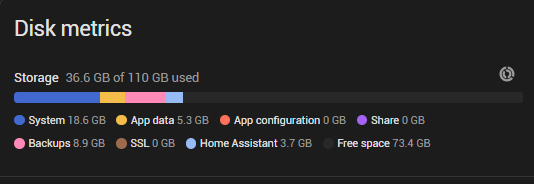
only running local backup now - it looks like I have loads of space as I showed previously, but here is more info:
tried to run only toward google, same thing, but I guess it has to cache the backup locally anyway(?). Also tried to run again using google drive backup - but it still fails.
what do you mean by allowed file-size? never heard of this as an issue, do you know where would one change / specify it? I am not finding it in google at the moment.
ran backup via CLI after reading a bit on defaults and seems my command should be ok and this is the output
[core-ssh config]$ ha backups new --log-level debug
2026/06/09 20:33:29 DEBUG Adding homedir to searchpath homedir=/root
2026/06/09 20:33:29 INFO No configfile found
2026/06/09 20:33:29 DEBUG Debug flags apiToken=b66091267ea067d2722e4f_redacted_c035133a3f2f7 cfgFile="" endpoint=supervisor logLevel=debug noProgress=false rawJSON=false
2026/06/09 20:33:29 DEBUG backups new args=[]
2026/06/09 20:33:29 DEBUG apps apps=[]
2026/06/09 20:33:29 DEBUG folders folders=[]
2026/06/09 20:33:29 DEBUG location location=[]
2026/06/09 20:33:29 DEBUG filename filename=""
2026/06/09 20:33:29 DEBUG [GenerateURI] base=supervisor section=backups command=new/full
⣾ Processing... 2026/06/09 20:33:29 DEBUG [GenerateURI] Result uri=http://supervisor/backups/new/full url=http://supervisor/backups/new/full url(string)=http://supervisor/backups/new/full
⣽ Processing... 2026/06/09 20:47:38 DEBUG Response statuscode=400 status="400 Bad Request" time=14m9.093469774s received-at=2026-06-09T20:47:38.356+02:00 headers="map[Content-Length:[189] Content-Type:[application/json; charset=utf-8] Date:[Tue, 09 Jun 2026 18:47:38 GMT] Server:[Python/3.14 aiohttp/3.13.5]]" request="&{Method:POST URL:http://supervisor/backups/new/full Proto:HTTP/1.1 ProtoMajor:1 ProtoMinor:1 Header:map[Accept:[application/json] Authorization:[Bearer b66091267_redacted_e3a43a33c7e59dc5452f7] User-Agent:[go-resty/2.17.2 (https://github.com/go-resty/resty)]] Body:{Reader:} GetBody:0x26a300 ContentLength:0 TransferEncoding:[] Close:false Host:supervisor Form:map[] PostForm:map[] MultipartForm:<nil> Trailer:map[] RemoteAddr: RequestURI: TLS:<nil> Cancel:<nil> Response:<nil> Pattern: ctx:{emptyCtx:{}} pat:<nil> matches:[] otherValues:map[]}" body="{\"result\":\"error\",\"message\":\"An error occurred while making backup, check job 'bc43c542d00f481a9626af7687fdbae0' or supervisor logs for details\",\"job_id\":\"bc43c542d00f481a9626af7687fdbae0\"}"
Processing... Done.

Error: An error occurred while making backup, check job 'bc43c542d00f481a9626af7687fdbae0' or supervisor logs for details
[core-ssh config]$
and as it says to check supervisor logs, here are the supervisor logs:
2026-06-09 20:33:29.268 INFO (MainThread) [supervisor.api.middleware.security] /backups/new/full access from core_ssh
2026-06-09 20:33:29.271 INFO (MainThread) [supervisor.backups.manager] Backup af47474a starting stage addon_repositories
2026-06-09 20:33:29.272 INFO (MainThread) [supervisor.backups.manager] Creating new full backup with slug af47474a
2026-06-09 20:33:29.278 INFO (MainThread) [supervisor.backups.manager] Backup af47474a starting stage home_assistant
2026-06-09 20:47:37.657 ERROR (SyncWorker_7) [supervisor.homeassistant.module] Can't backup Home Assistant Core config folder: Error adding /data/homeassistant/home-assistant_v2.db to tarfile: [Errno 5] I/O error (OSError)
2026-06-09 20:47:38.319 ERROR (MainThread) [supervisor.backups.manager] Backup af47474a error: Can't backup Home Assistant Core config folder: Error adding /data/homeassistant/home-assistant_v2.db to tarfile: [Errno 5] I/O error (OSError)
what I see in the logs that is different and understandable from CLI is :
2026/06/09 20:47:38 DEBUG Response statuscode=400 status="400 Bad Request"
but what follows is unclear - I looked up what could trigger that and what I found were suggestions for things I have checked - I have space, the processor is not going to 100%, nor memory. What is outstanding is if the db is corrupt - but i have no idea how to determine this. I am open to suggestions from anyone that may have some ideas and really would like to solve this.
I searched "error" in the logs afterwards and found nothing unusual that has existed for a long time. I did not include the hassio stuff, it did not seem applicable and no errors, but this is what i find just now in raw:
2026-06-09 20:56:36.299 DEBUG (MainThread) [homeassistant.components.hassio.coordinator] Finished fetching hassio data in 0.047 seconds (success: True)
2026-06-09 21:00:06.710 DEBUG (MainThread) [homeassistant.components.hassio.ingress] Ingress Websocket Connection Reset
2026-06-09 21:00:51.671 DEBUG (MainThread) [homeassistant.components.hassio.coordinator] Finished fetching hassio data in 0.099 seconds (success: True)
2026-06-09 21:01:40.634 DEBUG (MainThread) [homeassistant.components.hassio.coordinator] Finished fetching hassio data in 2.495 seconds (success: True)
appreciate the question about the recorder - I think we are in control of our recording - I would like to record more but have limited it.. probably could limit more if this is the issue. As for integration/devices - I don't know if something is spewing data, is there a way to see this? I really do not think I made any changes between working backups and non working and I was actually a bit behind on updates as I thought i had something stable and was reading that people are having quite serious issues so I let it go .. so I can not think of any changes between the backup working and not working nor from last update 2026.5.1 till about 1.5 weeks ago but I have now since the backup issue been updating. purge is set for 20.
I thought the old logs (>6mths) did not really matter (not a lot of data and no longer being used), I checked an old backup and they are not even included - but I have removed them now. Consider that the error already seems to have been narrowed down to adding the db to the tar file (backing up excluding the db works fine) which the logs explain (although not why).
Additionally I have also been reading about how to safely stop the db but it seems I have to fully stop ha, and while I am not on site which I believe I need to be in order to stop the db then. I have also been trying to find some clues as to how the backup is able to freeze the db, thinking maybe the backup is just not able to freeze the db now and that is why it can't copy - and that I can do the same to freeze it in order to copy it, i don't know maybe a sort of bin/sh at startup before the db is locked(?).
Download and install sqlite-browser for windows
With this you can run an integrity check on the db, thou im not sure it's corrupt
I have already described how you safely "stop core" in the CLI (direct on the Device), then yo can copy the DB ( You have lots of space in your HA struture to CP db-file to DB-file-copy, as Recorder is also stopped then start core again
This could be do to multiple causes
Are you running with default "encryption" on your backups ? , or without ?
Have you at any time Rebooted (not restarted) Your HA Device ? ( Sorry to ask, long "trailer" this one )
I Also noted that you run ssh(hopefully not from the integration in the same browser you "work from" ), and Not directly in the CLI physically on the Device( With a monitor and keyboard attached to your ha device ), which means you have another Device involved ( Same thing as when you do stuff/access ha via a Browser )
I Assume you have done the "precautions" i suggest, deleting/removing logs and backupfiles
Another thing is try to uninstall Google-Backup so you only have to focus on HA ( i mean that 1 of my "frustrations" i don't see or know what you do, or have done )
You could also clean up all your "Sessions/ Refreshtokens" under your Profile#Security, in the buttom
As im not aware of your routines, i don't know whether you use both your phone and another pc/laptop to perform various tasks, or you use 1 strict device only
Log out from all device, and clear the tokens(from the last you "work" from , as above ( not the long-term ) then reboot and , clear browser cache ALL/Everything, so you will have to login again and create a new Token/Session, then Try backup again
If it not work:
Connect a monitor and key board to you ha-device, You will see the CLI, Reboot again, then run the backup again, from the cli
This way you exclude any external devices and Browsers causing issues and you only have 1 Token
If your DB is not corrupt(which we don't know, and i don't think) , then still there could be some integration/device which hooks on to the DB, so the Recorder-Integration might have a lock on the DB-file ( thou i would have thought this would be reflected in the logs ...Again i don't see your logs , just what you deside to show
Month ?
Last but not least,after you done the "cleanup" above , you could also just try to restart in safe-mode(safe-mode) disable all your integrations/APPs, scripts/automations etc, and backup Manually, thou that wont fix the DB-file issue, and you will most likely end up in a "dead end" anyways
"dead-end==dump your DB, after you made a copy, then you can import "recovered data" from you copy ( If it opens in sqlit-browser that is )
I/O error would tend to indicate you have disk errors, and no backup to restore from. Yikes!
Any related errors showing on your welcome screen or other logs to confirm?
Is your database intact? The repack workaround will remedy that.
I am offsite at the moment, but I will try this when I am local to the HA as I understand that is needed.
we have sql integration sensors and they seem to work fine. I have tried to find ways to read the db in other ways, and it seems to read via the jupyter integration but I also tried the sqlite web which I have used before but it is erroring - some python function is apparently not found in sqlite3 but I am not finding any reports of it anywhere so far:
Traceback (most recent call last):
  File "/usr/lib/python3.12/site-packages/peewee.py", line 3352, in execute_sql
    cursor.execute(sql, params or ())
sqlite3.OperationalError: no such function: STDDEV_POP
logs continue in a long trace then it stops the sqlite web app - seems to be an issue in the app (i tried to reinstall it and it still errors) - but i honestly do not know.
no encryption. google backups had no encryption and failed - ha backups locally I removed encryption and am getting the same result and have stopped trying to backup remotely.
yes I have. It did not seem to do anything.
google backup
I had it stopped and not loaded on startup for about a week now, I uninstalled it and reran and got it seems the same result
20 days. it is in the config under "purge_keep_days" under
at site
I have not been able to be on site yet. I am not sure what you mean about 'excluding this "minor" information'. It would be great to be on site but right now I do not have even weekly physical access to the site where the server and everything is located - maybe this weekend I can be there. I was hoping to find a solution to copy the db without having to be there physically - if not then I will just try to make the copy next time I am there by stopping ha and copying it manually.
maybe worth noting that as I am offsite / remote, everytime I run a backup it loses connection as I presume it locks the instance and db. Also, worth noting, I have also gone through and stopped apps/integrations I found to be superfluous and tried again without a better result - but again, all of this has been working and without any updates I am aware of between it just stopped backing up.
automatic backup - partial!?
yesterday morning, as every morning now (as it has missed backups) it tries to make an automatic backup - apparently yesterday morning, ha succeeded to create some kind of backup although it was not full (ran only partial w/o db ) unfortunately I did NOT get the logs as they disappeared when I noticed with all the restarts and testing yesterday and I missed them as normally files are not created in /backup but this time something was created and it did not get listed in the backup GUI. To avoid this I am now running logs to files which i discovered how to run via this link 2025.11 removal of homeassistant.log, custom integration replacement
this is anyway the log from today, it says here there are 6 files, which again there are in /backups but not in the gui, but apparently they are not in the backup.json so I guess it maths - but a reason I missed that a file was actually created:
2026-06-10 04:24:58.146 INFO (MainThread) [supervisor.backups.manager] Found 6 backup files
2026-06-10 04:24:58.281 ERROR (MainThread) [supervisor.backups.backup] Can't read backup tarfile /data/backup/Automatic_backup_2026.6.0_2026-06-09_05.37_01273187.tar: "filename './backup.json' not found"
2026-06-10 04:24:58.332 ERROR (MainThread) [supervisor.backups.backup] Can't read backup tarfile /data/backup/Automatic_backup_2025.11.3_2025-12-04_13.42_39426684.tar: "filename './backup.json' not found"
2026-06-10 05:00:13.026 INFO (MainThread) [supervisor.backups.manager] Backup 551bc60e starting stage addon_repositories
2026-06-10 05:00:13.027 INFO (MainThread) [supervisor.backups.manager] Creating new partial backup with slug 551bc60e
2026-06-10 05:00:13.050 INFO (MainThread) [supervisor.backups.manager] Backup 551bc60e starting stage home_assistant
2026-06-10 05:00:20.626 INFO (MainThread) [supervisor.homeassistant.module] Backing up Home Assistant Core config folder
2026-06-10 05:11:52.688 ERROR (SyncWorker_0) [supervisor.homeassistant.module] Can't backup Home Assistant Core config folder: Error adding /data/homeassistant/home-assistant_v2.db to tarfile: [Errno 5] I/O error (OSError)
2026-06-10 05:11:55.088 ERROR (MainThread) [supervisor.backups.manager] Backup 551bc60e error: Can't backup Home Assistant Core config folder: Error adding /data/homeassistant/home-assistant_v2.db to tarfile: [Errno 5] I/O error (OSError)
safe mode - backup
I put the instance into safe mode and performed the backup which also did not work - the same result it seems:
even if it would be best to be on site it seems it is going to take longer than I will have in the immediate future so while I would like a single copy of the db to confirm it is ok and provide some piece of mind - if the db is ok I will still need to be able to continue getting db copies remotely as I work through this - with that in mind I found this recently and was considering giving it a go via jupyter
no idea if it could cause any issues as it is actively being used, but my hope is it will only affect the copy anyway. anyone know if this should be safe?
wow,an you say that now ..honestly ... as i said , i have no idea what you are doing, as you only show...and tell what you want
... Andnow you are just "stepping up" , i genuinely wonder what you are using your HA for, and how long you had HA , apparently you first "Discovered" the RAW log, when i asked you,
But seems now you have "sql integration sensors" and what ever ....pyscript and Jupyter running also ?
So im out , frankly fed up
Don't even bother to ask me anything, when you eventually get "On Site"
5 days wasted
I strongly encourage you to read the official Homeassistant, and about Your Integrations Documentation - Home Assistant ( The Native integrations Docs are just 2 step to the right of Documentation in the top )
Thanks for trying. As I said before you seem frustrated, I hope you are ok. I doubt you will read this but if you are open to feedback then hear me out - I honestly have really struggled to understand you, your instructions and critiques and I have really tried and see that unfortunately, we are constantly miscommunicating of which I own half. I believe I have answered your questions and tried to provide what you requested based on what I understood while testing and trying new things suggested and things brought about by reading the docs and searching. I have not tried to hide or not include you and I am sorry you feel that way, fed up and done - consider that this reaction to getting some info you apparently wanted, but as far as I can see, info you never asked for, which I unfortunately did not think was an issue or one would have asked for it, feels counterproductive.
thanks, you too, take care of yourself.
my next steps
prio - getting onsite to stop ha and copy db as both a backup and to check the db for errors
continue trying to find docs/info that can indicate that a db can be corrupt for backup and seemingly work fine - I have not found such an issue so far which I honestly find surprising.
explore other ways to check a db for consistency without being local
consider moving the instance to a new sdd, risks / pros / cons?
a -if db is not corrupt I suppose I need to look at how to run a backup in a way that I can hopefully achieve a more detailed error (than given by backup debug) that can maybe tell me what is the issue, eg do some github archaeology to see how exactly the backup copies the db and try to do this manually and locally I suppose.
b - if db is corrupt I suppose I need to figure out what caused it to avoid it happening again(?) and how to get a backup and if I can pull anything from the current working db (eg export data and reimport)
if anyone else has any other ideas or knows something about the points above, please let me know!


 ) unfortunately I did NOT get the logs as they disappeared when I noticed with all the restarts and testing yesterday and I missed them as normally files are not created in /backup but this time something was created and it did not get listed in the backup GUI. To avoid this I am now running logs to files which i discovered how to run via this link