I’m setting up a new build house. My son in law is an electrician. He runs HA in his home. I need help choosing which equipment. Specifically HA Green vs one of the other 2 available. A tablet to control the system. Lastly a voice command unit.
I’m sure I didn’t word things correctly. Thanks in advance for any help
Is any of the discussion posted here but a short time ago relevant to your needs?
Yes, I read this and much of what he is looking to do is the same for me. I’m looking for which HA unit is best, the voice command from HA vs getting an alexa or Google unit. And what is the best tablet to run the dashboard from
I bought a HA Green but switched to a laptop within the first month or so. I had an Amazon/Alexa ecosystem that I was dying to get rid of, and I wanted to try an LLM.
I had an old HP laptop that wasn’t being used and since it has a working battery, it’s like having an UPS for my setup… so that’s what I migrated to. lol I also have 3 HA Voice in my setup, but no other LLM at the moment.
You can use HA Green (or anything really,) if you’re not going to use LLM / Ai. If you think you’ll be using a lot of memory/RAM (such as a boatload of timers or time sensors running simultaneously lol), then you may want to consider an old laptop or PC. (You don’t need anything new or fancy to run it.) If you’re going to use an LLM / Ai, you’ll definitely need a decent video card for the VRAM.
Whatever you choose – if you do use a laptop or computer, note that you won’t be able to use that device as your dashboard; the device is basically going to be the brains/backend of your Home Assistant (HA) setup & will be collecting dust. lol If you have limited space, then the HA Green has a small footprint and would work for that purpose.
As for controlling everything connected to HA, you’ll have to install the companion app onto your phone and/or tablet to access HA. I recommend playing around with HA and learning it first, before setting up a permanent fixture.
(Down the road, if you do decide to use the tablet as a wall-mount HA dashboard and nothing else, then you’ll want to buy the “Fully Kiosk” app.)
Get A mini PC easyer to upgrade later as you system grows
I start with a 8gb and 80gb
now it has 16 and a 500ssd
nock on wood she has not let me down yet
2 Likes
Thanks! This is a good part of the info I needed. How has your experience with the HA voice?
+1
Mini PC or NUC
Dont use voice the house knows what to do.
I believe that a smart home should be seamless & intuitive; I shouldn’t have to bark commands at it to get it to do what I want. It should just know what to do & when to do it.
I’m also privacy-driven to the point where I jailbroke my kindle, degoogled/deMicrosoft/deEverything my other devices, and I try to stay away from social media & other accts or apps that are invasive or aren’t FOSS. Now that I’ve painted that picture for you…
I got rid of all my Alexas and I definitely wouldn’t use Google. HA Voice PE, for instance, works locally. You don’t need cloud access to get it to work, and you can run an LLM locally so all your data is yours alone.
If you’re not as privacy-driven, then you can easily use Alexa or Google as a Voice/LLM for your HA setup. There are other options out there besides the big names. Just know that any Voice device you use that isn’t a big name, will not respond as quickly… and that’s because they don’t connect to some server elsewhere and/or they don’t use some cloud setup for answers/responses etc.
My household members & guests feel self-conscious about voicing out commands. Our kids either don’t want a “parent-recommended” app installed (lol the HA companion app), or else they have too little space on their phones for anything besides games & pics. So my partner & I are the only ones who use the HA app. On top of that, I use my PC on the web (or remote access HA when I’m away from home).
So for me, HA Voice PE works the way I need it. Ever since I got rid of my 7 Alexas, I’ve actually had less need to use Voice for commands/automations… I mainly use it for announcements. I try to keep all of my automations as seamless as possible, so they require minimal (if any) input/interaction.
As an experiment – I did try an LLM with Voice PE and it worked pretty well… but since my laptop doesn’t have a dedicated video card (nor VRAM), my laptop CPU jumped to 110F! That’s a little toasty for the old laptop. lol
But I will say, LLM+Voice PE worked pretty well when I had it offloaded to my desktop PC, which does have a good graphics card/VRAM. Only prob with this setup is I turn off my PC when I’m not using it. So it’s possible to get Voice PE to work with an LLM locally, but you need a device that can handle all that processing power and heat generation… which is what I’m working on next. 
"Only two? Any mini PC like the Intel NUC will outperform the Green or Yellow in every metric. (And possibly cost less used).
The Green is good for a start, but once you start down this rabbit hole, you will quickly outgrow the Green or any Raspberry Pi.
On the build- You can’t have too much Ethernet. (Future Proofing). CAT6 is good, but in the typical home CAT5 is sufficient. One run from your server closet to the center of each main room for future WiFi Access Points (WAP). One run from the closet to the walls where you are likely to ever want a wired connection. Also one run to outside walls where you would maybe want a camera in the future. You don’t need to terminate any of them, just pigtail a few feet behind the sheetrock and document where the wires are. Best with photos before the sheetrock goes up. Also, maybe one run to the front door for a smart doorbell.
Note to electrician - NEVER staple Ethernet cable to the studs. Avoid using the same holes as Romex. Avoid bundling Ethernet wires with Romex.
1 Like
Thank you. The parts I understand make sense. I’m my phase one plan. Includes 4 motion sensors, and 11 relays I will want the voice ability for specific lights.
Please remember I have nowhere near the understanding of this of the newest person here.
I was expecting to need something like the Green to pull everything to the dashboard, plus something like a dedicated tablet to actually run the dashboard. Is this incorrect?
Broadly speaking, you are correct. If you know you’ll end up doing heavy stuff with your install, then replace the Green with a used small form factor PC. The tablet can stay because it’s handy & useful for dashboards 
No
HA is a server running web based software
You must have server to run the software. Green will do that. If budget allows a NUC or lesser priced or used PC may be long term better
To access the web app you can use phone, table, PC. Tablet is not required.
Neither did any of us when we started.
1 Like
To expand on what @tmjpugh said- something that is not clear in the top-level description of Home Assistant is that Home Assistant is a web server. You interface using any browser on your local network - on a separate computer. There are ways to do it all on one computer, but I can be pretty certain that setting up containers or virtual computers is probably beyond your current experience. (And I recommend against it even for experienced users. Why add a layer or two of additional learning curve and opportunity for something to go wrong?)
My server is in the basement under the stairs (I call this my server closet). It is exceedingly rare that I actually have to touch the server host computer. Keeping everything simple is how I measure my Home Assistant uptime in years.
I have an old laptop, and an old custom build pc. What minimum parameters would either of these need to run my system?
Also, recommendations for a thermostat to run with HA.
Thanks to all! Your educational replies are priceless!
Minimum requirements are in the docs. (I hate saying that because the documentation, while good, is badly indexed or organized).
The BIOS must be EUFI, 64-bit processor and 2 GB of RAM.
Thermostat - there are many, so there isn’t any single recommendation. I use Nest Learning thermostats here, but only, ONLY, because our local utility was selling them for $9 each. The problem with thermostats is that they are almost all cloud devices. Many of us old-timers (since I was using Home Assistant before Lovelace, I consider myself an old-timer) can recall cloud-based devices that became e-trash when the cloud stopped working. So as you read the comments here you will see an animosity to cloud devices.
1 Like
this part
zwave - amazing
matter- OK. Device dependent (I only buy matter bulbs)
zigbee - dont use but I sure its amazing
esphome -amazing, kinda DIY kinda plug and play but rock solid
i use Honeywell T6 zwave model
I used Trane unit in past but T6 is better
You are correct! I’m certainly being lazy and asking you folks. I will spend time today digging through the files here as well. I do appreciate you guys answering so many?'s
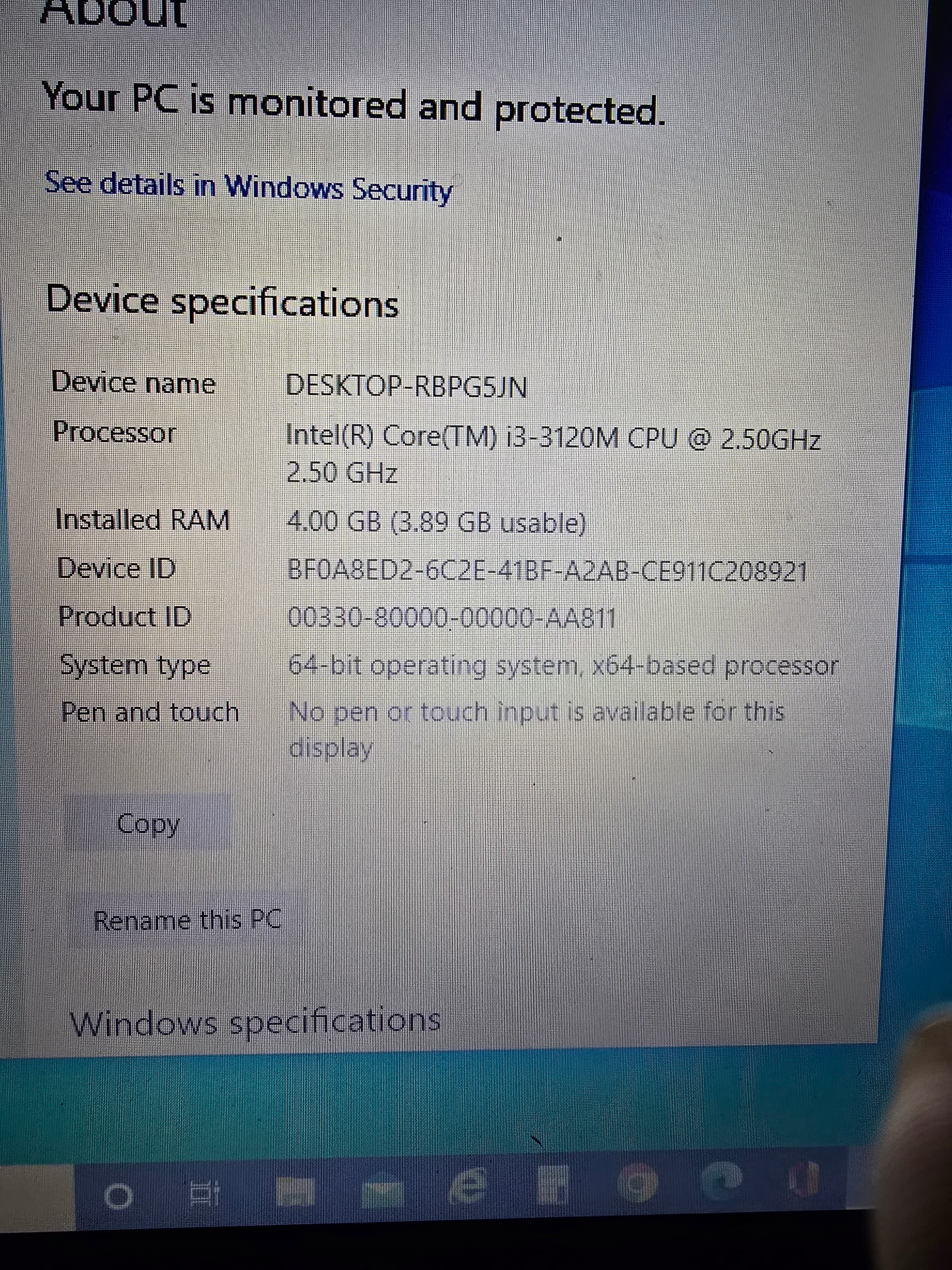
This is the old laptop to I have.
I was looking at the T-6 wifi vs Z-wave. I do have a Nest thermostat free from my power company new in the box. It might give me some time to upgrade later?
Now you just need to download and install HAOS
connect with ethernet. wifi not recommended for server