I am currently migrating my setup from Domoticz to Home Assistant. I am very new with Home Assistant; so I am not quite sure how everything works yet.
In Domoticz I had a DZVent script that runs every 5 minutes. When the humidity increases 3 degrees within that 5 minutes the fan turns on. Then everytime the script runs next (so the 5 minutes intervals), when the Humidity is higher then the earlier value, when it was turned on, it will be the new maximum value. Then, when the humidity is at is highest and the scripts runs again, if it is then 3 degrees lower it turns the fan off. Normally the fan runs between the 1 to 3 hours depending on the season.
So that is my point; I don’t want that the fan runs for hours; but it turns of at a specific thresshold. I have enabled the Generic Humidity helper with HA, but this seems to run against a manual set target; but I would like that this runs in a fully automated way. In the summer the humidity is much lower in the rooms then in the winter and there is never a good manual value for this.
I also had a Shelly 2PM in detached mode connected to it to this script, which also overrides this automated procedure.
Unfortunately YAML is more difficult for me then DZvents
Any tips how I can start to create such a script? Or does anybode knows what good methods are in HA with basically the same functionality ?
Create a sensor that averages all the humidity values in your house. Turn the bathroom fan on when the humidity there exceeds the average by a set amount. Turn it off when it gets closer to the average.
You can do all this in the UI with helpers and the automation editor. No YAML or jinja required (though it is easy to learn).
Ok; but this not fully automated. An average value could be different on a weekly base when you go to the winter period or summer period. Then you need to change the Target humidity manually…
OK; I am going to try it. I have installed ha-average from HACS; don’t know if it was build in in any way? But I see a value using this.
Now I need to create an automation that runs every 5 minutes. If the value then is 3 degrees higher I can turn on the fan. Only concern that I have now is when it will turn off. Normally I took a max value for that and calculate three degrees from that value. I am not sure yet how the average value calculates. Do you have any experience with that?
And with this I think I do not use the Generic Hygrostat anymore?
You trigger on the bathroom humidity exceeding the average humidity, then turn on the fan. There is no need to poll this every 5 minutes. It is state driven based on the humidity. Far more efficient. Same for the fan off automation.
FWIW, I figure my fan pulls air from the next room (or hall in my case), so I just compare the humidity between the bathroom and the hall. No point in running the fan if it’s not replacing the bath air with drier air.
I have a template sensor that is the difference of the bathroom humidity and the hall humidity, and my trigger is when the difference exceeds some value, and turns off when difference is below some value. I also have a timer to prevent it from running for a very long time.
I am not quite sure how to trigger it then? Can you share an example in this? In automation as a Trigger I cannot see an easy way to create this. Like I said; i am new in Home Assistant; but everytime I get a step closer how it is working
In a automation I created this (and one for off); but if can be done easier it ofcourse would be nice… I haven’t fully tested it yet:
alias: "Switch: Bathroom fan AAN"
description: ""
triggers:
  - trigger: time_pattern
    minutes: /1
conditions:
  - condition: template
    value_template: >
      {% set a = states('sensor.average_bathroom_temperature') | float(0) %} {%
      set b = states('sensor.badkamer_luchtvochtigheid') | float(0) %} {{ b - a
      > 3 }}
actions:
  - type: turn_on
    device_id: fd31143ccb6613bf39b8921e1874c7a0
    entity_id: acb4740825d5f534031fd15390e9444e
    domain: switch
mode: single
Thanks for the update and the better way to calculate. Yesterday the bathroom fan turned on; but only for twenty minutes. That is a little bit short. I will try to find out what a good value could be to turn it off.
I also changed it to use the state values. I didn’t know this; so great to learn it. Also I changed it to use it as a trigger and not to run the script every minute. Let’s find out tonight how this will work
I have two automations one to turn the fan on and one to turn it off; next step would be if I can create one automation that do both. I do not want to have multiple automations for the same action basically. Not quite sure how to do that yet; because I do not always understand the execution logic behind the YAML/automation code.
Domoticz dzvents is a script, that starts on the first line and goes down; so it is somewhat easier to understand the logic of things are executed line after line. I think HA is doing much the same; but in a different structure. If I have an example how this structure goes in this; I think I can continue on that. So if anyone can give me a little example how to start with this, that would be nice… Thanks!
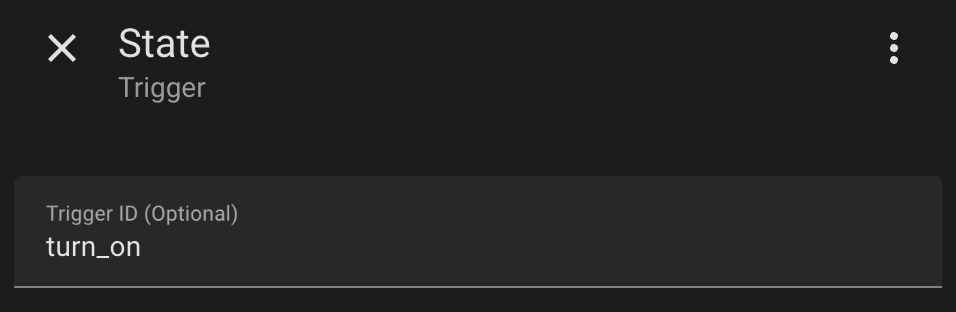
There’s a lot of posts on how to do that. There’s a couple of options. One is to use trigger IDs on the trigger. Here’s the first google result on using trigger IDs.
One of the nice things of the new automation editor is it now always shows the Trigger ID field:
Then you can use a choose condition and test the trigger_id.
All this just takes a little bit of practice. Create a couple of helpers like input_booleans and then an automation to play with. Use the automation’s Traces feature and get an idea of what the trigger object looks like because you can also use that to decide what to do inside your automation.
Almost anything you want to do or wonder about has been discusssed before. Just search…
Thanks; but that is a little bit the problem with this stuff. You need to see it sometimes in you’re example in order to fully understand it. Ofcourse I read allot of posts and chatgpt also helps; but then I don’t quite get the context of it…
I now have one on and one off script; that seems to work OK. I use a template as a trigger… This is the example for the on script; basically the same for the off script: