Not 100% sure this is in the right place, so please move if not.
What are some of the best and cheapest Floor Plan software you guys are using?
Ideally one time purchase and also with things like outdoor /Pools / Decks etc.
Thank
Not 100% sure this is in the right place, so please move if not.
What are some of the best and cheapest Floor Plan software you guys are using?
Ideally one time purchase and also with things like outdoor /Pools / Decks etc.
Thank
There were a rash of posts a couple of years ago on using floor plans for a UI, may be worth a search of those posts.
Good luck with the retarded forum search though 
I know but a lot of these posts are now outdated, and the software listed has become pretty commercialized and super expensive.
So far i’ve tried 2,
Just making sure I dont miss anything before hitting the go button on NCH.
How about a $3 option?
I use SweetHome 3D. It’s free.
Take a look at Floor 3D Card:
You can directly import 3D models built in SweetHome 3D, move them around, click on objects to turn them on, etc.
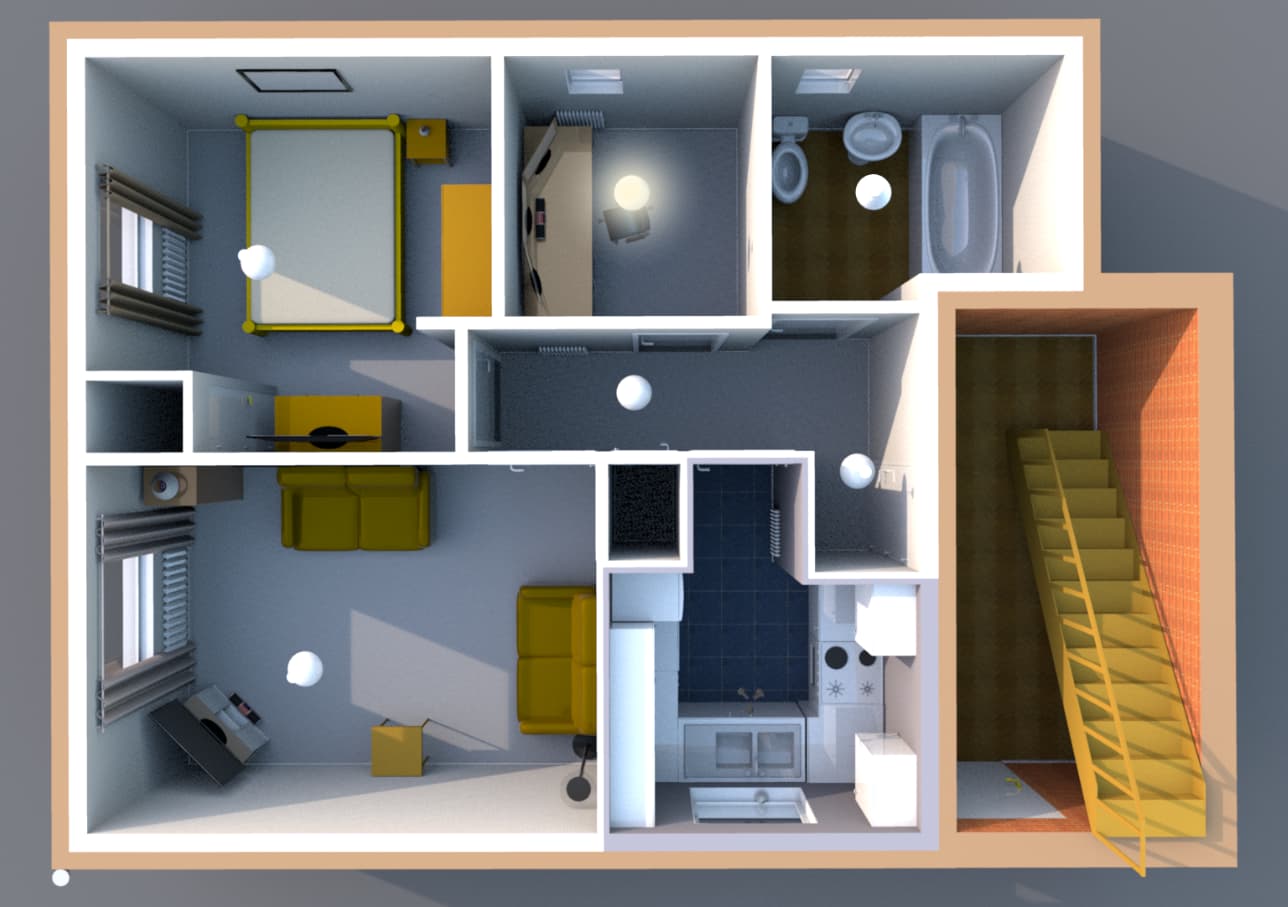
I know this is an old post, but I thought I’d mention how I did this. It was a lot of work but produced a great result. Basically I modelled my house layout in SketchUp (I’d use fusion360 if I were doing it again now). Then I found a bunch of textures and models online for free on various free game asset sites that just looked close to my stuff. The big boost was getting pictures of rugs I bought from the stores I bought from. Then I assembled those things plus lights in Unity (not sure I’d use this anymore). I placed a camera in the spot I wanted for my home dashboard, then I ran a small script that individually turns on each light and takes a screenshot. I then have a second script that generates alpha lighting images via the difference between the no light image and each light image. The result of all of this is 1 “all off” image and one alpha overlay for each light. Then I used the floorplan methods you’ll see elsewhere but overlayed and alpha blended the various images when each light was turned on. The result is excellent, but holy cow was it a lot of work. I’ve not maintained it at all, so as things change, it’s a huge pain to update anything. I’d love a better solution. Here’s a pic of the result:
So the main steps would be:
A WYSIWYG editor for 1-3 and 6 would be incredible. The rest can be automated. Though I’d say 3 and 6 are the main hassle in maintenance.
old post I know, but curious why you would use Fusion 360 vs some of the purpose built softwares (Sweet Home 3d, Floorplanner, etc)?
Honest answer is that I don’t know those tools. If they allow floor planning, object placement, texturing, dynamic light simulation, and programmatic generation of alpha light mask images, then they would be a fine replacement!
The latter requirement is why I ultimately went the route I did. At the time (and even now, I suppose), I wasn’t aware of another method of having the lighting change dynamically over the whole image without alpha masked images. You have to have 1 per light for that method which is 2 dozen images. If you change anything in the image you have to regenerate all of those masks. So doing it programmatically with Unity as the light simulation and any 3d modeling software for the objects was just shortest path for me.
Late to the party, but I used Sweet Home 3D, it’s free and pretty easy to use, I was able to take real world measurements (I had them from the original plans I downloaded free from local authority) and put into Sweat Home 3D. You’ll need to do a little playing around with 3D angle and time of day in SH3D to get the right look.
For the lights, I created it in Photoshop, you can use Photopea.com for a free version, or any other image program that can do transparency, it’s a circle in desired colour with a feathered edge and opacity reduced a bit. The image is 156 x 156 pixels.
You don’t need “2 dozen” images, you can do it with 3 images, the floorplan image, a 1 x 1 pixel transparent image and the illumination image for your lights. There you use the code to tell it where to place multi versions of the light illuminations over the top of the floorplan. The only time you need “2 dozen” images is if you want to do a day/night look, coz you need to dim/illuminate each room as their own layer. I’ve not got that to work how I want with the free time I’ve got. But it is possible, I’ve seen plenty of examples.
There are several videos on Youtube that used Sweet Home 3D that I followed, but can’t really remember now. But it doesn’t really matter what software you use to generate the image you want, as long as you can export it as png oe svg. It’s the coding part where the help is useful.
Here’s my example using Sweet Home 3D.