Hey @ejespinosa! As long as you’re on a version that’s support the API, C6.13+, then you’re good to go in that respect. So, C6.18 is fine. I have not done much with Home Assistant, in regards to Bluetooth. I’m thinking about buying an ESP32 and creating an example project that others can use or get an example from. I’ll let you know. In the meantime, if you have any specific questions about implementation I can help you out and @lampshade29 was kind enough to offer help as well.
Hey @xnarrefs and @n6ham! Unfortunately the API functionality is only available on C6.XX series boards. the C2.XX, C3.XX, and C4.XX series boards are feature locked. This means they will never receive new features. The C2.XX and C3.XX boards will never receive any updates, bug fixes or new features. One of the main reasons is the C4.XX boards uses a small PIC chip and they have no program space left. The new C6.XX boards were designed with a Nordic nRF52840 SoC and a Nordic FEM to greatly boost the Bluetooth range. If this is something your interested in, then I would call into our tech support team and ask them about upgrading to the new C6.XX board. Just mention this and they might work something out.
Hi James,
the API functionality is only available on C6.XX series boards. the C2.XX, C3.XX, and C4.XX series boards are feature locked
Does lack of API functionality limits ability to write the data, or makes impossible to read it too?
I’m a bit confused since @xnarrefs said:
I was able to develop a working solution in a simple python console app using a Bluetooth dongle
It sounded like he was able to pull and parse the data out of the old C2.18 board.
If that’s possible - that’s already better than nothing. At a very least I would be able to monitor the salt level, water use and detect when the board has hanged and won’t do anything (happened at least once).
Otherwise - I’ll certainly explore an opportunity of upgrading to a C6.XX board.
Hey! Correct, only the boards that have firmware versions of C6.XX (the latest boards) have that functionality. On the earlier versions, there’s only the advertising data, which contains very little data, that’s available without being authenticated. The advertising data just contains the valve type, firmware version, time, a few status bits, etc. and that’s it, no data. The password (the 4-digit password you can set via the BTPP menu option or via the app) has to be provided first. Unfortunately, the algorithm we use for that password is not publicly available for security reasons. That’s why the new C6.XX provides a unique API token, that bypasses the 4-digit authentication.
To answer you’re other question, I’m not sure how it’s possible. You would have to crack the authentication algorithm and then figure out what data is being sent. The new C6.XX boards use JSON payloads, so it’s more human readable. The earlier boards just send raw bytes, so that would have to be deciphered as well.
Now when you mentioned this - something had clicked.
The thing is - my board isn’t protected by a password.
When I bought the house - the previous owner told me to install the app and just connect with it with no code or password of any kind.
I was actually surprised, because anyone who want to walk around the neighborhood with the app open can scan for this kind of the devices and mess with the settigns
Is there a chance that the dat can be pulled if a code/password is simply not set? I.e. the whole auth stage bypassed
Hey @ejespinosa, just a heads up that I ordered some ESP-32 boards and they should show up tomorrow. I’ll work on the example in my spare time and when it’s done I’ll release it. I’ll keep you posted!
Hey @n6ham, it does have a password! They boards ship with a default password of 1234 and the Legacy View app also has this set so no password entry is required. It’s advised to change this though for better security. You can either change it from the app or the valve itself. To change it from the app, just click the “Change Password” from device options on the device list (click the 3 dots on the right hand side and select the change password option). That’s the easiest way. To do it form the valve it’s self, just hold both buttons until the options come up. Keep tapping the top button (menu / enter) until you see [BTPP] then stop. The display will alternate between [BTPP] and, in your case, [1234]. Tap the bottom button (set / change) and it will start editing the password. Keep pressing the bottom button to change the digit, then press the top button to go to the next digit, then the bottom button to change that one, and so on.
Thank you James, I will keep playing around with the Homeassistant and referencing back to Github
1 Like
Hey folks, sorry I’ve been quiet on this thread for awhile. I had this completely unrealistic expectation back in March that I’d somehow have free time to work on this after my wife and I had our first baby  … Well, however many months later, I’m slowly finding time!
Anyway, awesome to see the recent activity! I’ve started tinkering around with this over the past few days and am making some progress. @ejespinosa I’m also in the process of trying to put together an HA integration. I’ve successfully flashed an ESP32 with the esphome bluetooth proxy and got it connected to a dev instance of HA on my machine.
I’m still far from having an actual integration, but am proving that a) I can communicate with my water filter (I have a backwashing sediment filter), and b) the API guide that @JamesDougherty put together has been super helpful so far! I’m still working through the auth flow (configuration of the device in HA), but below are some logs I wrote from my integration showing the flow and decoded packets:
2026-02-13 22:48:24.855 DEBUG (MainThread) [homeassistant.components.chandler_systems.api] Found signature service with read char a725458c-bee2-4d2e-9555-edf5a8082303 and write char a725458c-bee3-4d2e-9555-edf5a8082303
2026-02-13 22:48:24.934 INFO (MainThread) [homeassistant.components.chandler_systems.api] Connected to Chandler Systems device E4:93:2F:59:C7:D9
2026-02-13 22:48:24.935 DEBUG (MainThread) [homeassistant.components.chandler_systems.api] Sending ID Status Packet (0xEA)
2026-02-13 22:48:25.032 DEBUG (MainThread) [homeassistant.components.chandler_systems.api] Received ack packet, waiting for initial data
2026-02-13 22:48:25.065 DEBUG (MainThread) [homeassistant.components.chandler_systems.api] [receive_handler] decoded JSON: {"dlc":37,"gmtx":244,"gmrx":244,"dlsa":2316629811,"dlsb":434317462,"dlf":618,"dlvt":4,"dli":0,"dlvs":3,"dlr":0}
2026-02-13 22:48:25.067 DEBUG (MainThread) [homeassistant.components.chandler_systems.api] [receive_handler] sending ACK for received packet
2026-02-13 22:48:25.068 DEBUG (MainThread) [homeassistant.components.chandler_systems.api] Received initial device data: {'dlc': 37, 'gmtx': 244, 'gmrx': 244, 'dlsa': 2316629811, 'dlsb': 434317462, 'dlf': 618, 'dlvt': 4, 'dli': 0, 'dlvs': 3, 'dlr': 0}
2026-02-13 22:48:25.069 DEBUG (MainThread) [homeassistant.components.chandler_systems.api] Sending Auth Token: c5b184f12ddf45119d86e82e3917bef8
2026-02-13 22:48:25.069 DEBUG (MainThread) [homeassistant.components.chandler_systems.api] Waiting for Auth Response
2026-02-13 22:48:25.248 DEBUG (MainThread) [homeassistant.components.chandler_systems.api] [receive_handler] decoded JSON: {"as":1}
2026-02-13 22:48:25.248 DEBUG (MainThread) [homeassistant.components.chandler_systems.api] [receive_handler] sending ACK for received packet
2026-02-13 22:48:25.249 DEBUG (MainThread) [homeassistant.components.chandler_systems.api] Received Auth Response: {'as': 1}
2026-02-13 22:48:25.249 ERROR (MainThread) [homeassistant.components.chandler_systems.api] Authentication failed: Device reported unauthorized
2026-02-13 22:48:25.249 ERROR (MainThread) [homeassistant.components.chandler_systems.config_flow] Unexpected error during validation: Flow aborted: Authentication failed with provided key
2026-02-13 22:48:26.368 DEBUG (MainThread) [homeassistant.components.chandler_systems.api] [receive_handler] got MARCO, sending POLO
2026-02-13 22:48:27.497 DEBUG (MainThread) [homeassistant.components.chandler_systems.api] [receive_handler] got MARCO, sending POLO
2026-02-13 22:48:28.601 DEBUG (MainThread) [homeassistant.components.chandler_systems.api] [receive_handler] got MARCO, sending POLO
2026-02-13 22:48:29.760 DEBUG (MainThread) [homeassistant.components.chandler_systems.api] [receive_handler] got MARCO, sending POLO
[...]
I need to figure out why I can’t get into an authenticated state, but @JamesDougherty maybe you can help me understand this part: if I don’t disconnect after auth fails, and just let the marco/polo keep-alive going, about ~20s later I get a JSON payload:
2026-02-13 22:48:37.342 DEBUG (MainThread) [homeassistant.components.chandler_systems.api] [receive_handler] got MARCO, sending POLO
2026-02-13 22:48:38.034 DEBUG (MainThread) [homeassistant.components.chandler_systems.api] [receive_handler] sending ACK for received packet
2026-02-13 22:48:38.345 DEBUG (MainThread) [homeassistant.components.chandler_systems.api] [receive_handler] decoded JSON: {"dh":15,"dm":45,"dwu":20025,"dwau":32087,"dpfd":827,"ddo":7,"dcdo":7,"drth":19,"drtt":1,"ggd":[19425,19625,19750,0,22325,20725,21675,22575,40450,23750,0,19700,40425,20300,19825,21200,20275,19000,20075,21150,21125,25725,26575,19000,19550,21075,19700,19725,20100,25050,21400,20525,19350,20425,19900,18875,19025,19350,20900,48425,56650,46575,64950,45825,26825,39725,20050,20875,22725,20100,21425,135825,0,19600,44150,19100,27525,22125,22800,22625,19725,700],"aspt":[1,10,2,5,0,0,0,0,0],"aspn":[1,0,0,0,0,0,0,0,0],"aspx":[1,99,99,99,99,99,99,99,99],"aspu":[0,1,1,1,1,1,1,1,1],"aspo":[49,8193,1,33,16896,0,0,0,0],"asd":7,"asr":7,"asnp":4,"shdo":323,"shdr":1,"shgs":20025,"shrc":132,"shgt":33326550,"shrr":132,"shgr":33326550}
2026-02-13 22:48:38.346 DEBUG (MainThread) [homeassistant.components.chandler_systems.api] [receive_handler] sending ACK for received packet
2026-02-13 22:48:39.497 DEBUG (MainThread) [homeassistant.components.chandler_systems.api] [receive_handler] got MARCO, sending POLO
I haven’t yet started to understand how to actually make requests to get data, and I’m not sure what API response is being sent here (it seems to include keys across multiple APIs?).
I also don’t know what bytes to be writing for each API that’s documented (I assume I’m just missing/misinterpreting something in the API guide, an enlightenment would be much appreciated :).
Also, just to be clear, I’m a total novice when it comes to bluetooth comms, and write virtually no python in my day job, so I’ve been leaning on claude to guide me through building this HA integration. @JamesDougherty, major kudos to you for the docs! Besides me defining how I want the code to flow, AI was able to do rather well interpreting the docs and producing sane stuff!
But hey, progress!!
1 Like
This may be related to the auth token/UUID format, but I regenerated the API token in the app a couple times, and now I got one that is working! I am running C6.18, but noticed that one of the keys generated was still short by one byte.
2026-02-16 16:34:16.600 INFO (MainThread) [homeassistant.components.chandler_systems.api] Authentication successful {'as': 2, 'dh': 9, 'dm': 30, 'dbl': 0, 'dwu': 19950, 'dwau': 32276, 'dpfd': 772, 'dwh': 0, 'ddo': 7, 'dcdo': 4, 'drth': 19, 'drtm': 0, 'drtr': 0, 'drtt': 1, 'dria': 0, 'drst': 0, 'dpe': 0, 'dpd': 0, 'dps': 0, 'drcp': 0, 'dtg': 0, 'dtgr': 0, 'dbtw': 0, 'dbth': 0, 'dbrt': 0, 'dbts': 0, 'dbtr': 0, 'ggd': [0, 22325, 20725, 21675, 22575, 40450, 23750, 0, 19700, 40425, 20300, 19825, 21200, 20275, 19000, 20075, 21150, 21125, 25725, 26575, 19000, 19550, 21075, 19700, 19725, 20100, 25050, 21400, 20525, 19350, 20425, 19900, 18875, 19025, 19350, 20900, 48425, 56650, 46575, 64950, 45825, 26825, 39725, 20050, 20875, 22725, 20100, 21425, 135825, 0, 19600, 44150, 19100, 27525, 22125, 22800, 22625, 19725, 700, 20025, 22200, 20675], 'aspt': [1, 10, 2, 5, 0, 0, 0, 0, 0], 'aspn': [1, 0, 0, 0, 0, 0, 0, 0, 0], 'aspx': [1, 99, 99, 99, 99, 99, 99, 99, 99], 'aspu': [0, 1, 1, 1, 1, 1, 1, 1, 1], 'aspo': [49, 8193, 1, 33, 16896, 0, 0, 0, 0]}
Now the only thing I’m not clear on is how to request data (vs waiting for writes to come to me). I’ll open a github issue to try to get an example
I responded to your issue on Github and didn’t see this (I just now got a notification). Anyway, I started working on the example project using the ESP32 and ran into this same issue. It will be fixed in the next firmware update, but here is what I found out. The tokens are just UUIDs that get generated. There was an issue previously with the tokens containing a 0x00 byte (null terminator) and that has been fixed. However, I noticed tokens are also being generated with a 0X2D byte. Looks like your token had that as well:
c5 b1 84 f1 2d df 45 11 9d 86 e8 2e 39 17 be f8
The ASCII code for 0x2D is a dash (‘-’) and dashes were being stripped out. Like I said, it will now accept dashes, but the fix won’t be available until the C6.19 firmware gets released. For now, if someone get’s a token that contain “2D”, just regenerate it.
If you have any further issues or questions, then please post them on Github. I get notifications much quicker.
Glad you’re making good progress! The screenshot you showed on Github is awesome. Also, on a side note, congrats on the baby! Enjoy every moment you can! Mine just turned 18 on 2/11 and it feels like just yesterday she was born, goes by way too quickly!
1 Like
Juifffffff (sweating) LOL. I am glad, I am not the only one who was running into the same issue. So it is not the ESP32 it is the Chandler software the issue. I can’t wait to get this issue resolved. Thank you for the feedback James!
Wanted to give folks an update on where I’m at with an HA integration: I’ve got general happy paths working!
auto-discovery of bluetooth device(s)
configuration of device with API key
overall comms protocol (auth flow, packet and payload decoding/parsing, crc validation, acks/nacks, etc)
automatic time syncing to the device (if it’s out of sync)
bluetooth connection strategy (currently: 60s polling, with a 10s idle timeout. so we’ll maintain an active connection and receive live updates so long as the valve is sending data at least every 10s)
some niceties like displaying valve type and series, serial, firmware version, etc
I’ll aim to package up this WIP as a custom component soon so anyone can start playing around and/or contributing. I do have intentions of getting this into the core HA repo so it can be more easily installed. A few notable things:
- I have exclusively tested this via the esphome bluetooth proxy on a dev instance of HA. Once I package it up into a custom component, I’ll install it on my real HA instance and see how it does
- I’m still working through some bluetooth connection interruptions. I’m seeing occasional logs where the bluetooth connection or client gets unexpectedly dropped/disconnected and it can leave the bluetooth connection on the valve in a borked state (no new connections can be made). You have to power cycle the valve to restore.
- I am currently taking some guesses on which entities are relevant based on the valve type (e.g., salt and aeration related info is not relevant to backwashing filters). James might help us out with a definitive mapping, otherwise we can crowd-source these over time.
Here’s some screenshots of the progress:
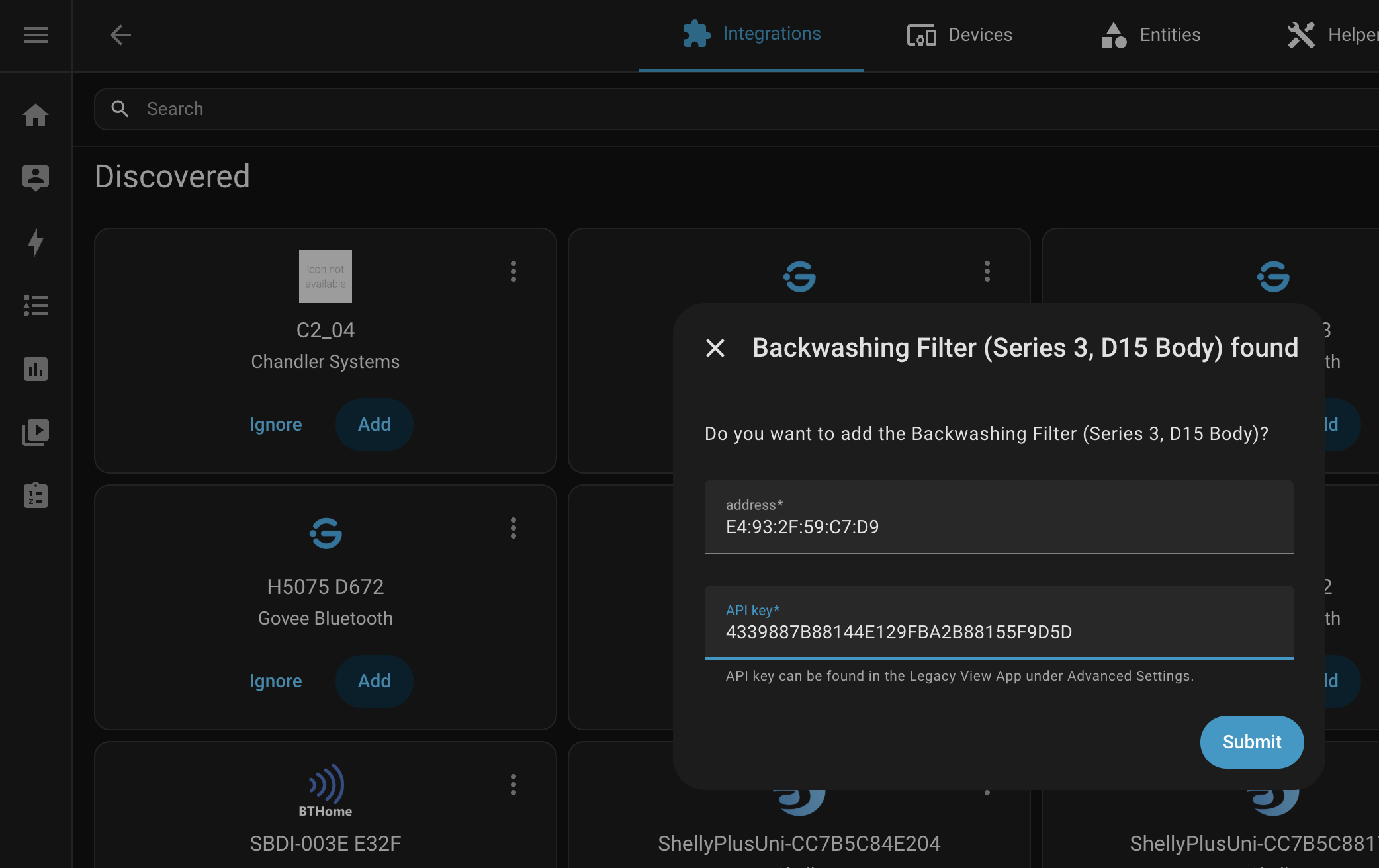

1 Like
Alright, I’ve packaged up my current HA integration as a custom component here: GitHub - toekneestuck/hass_chandler_systems: Custom component for Home Assistant to view and manage Chandler Systems devices
I’ve been running this on my HA instance over the weekend and it’s working reasonably well. There’s one thing to watch out for, and a few things to note:
The thing to watch out for:
I’m still seeing/experiencing random situations where the client and/or esp bluetooth adapter has a hiccup and causes a disconnect from the device. My anecdotal evidence is if this happens during the auth handshake (if the client sends the ID packet, but never sends the auth token), it leaves the device in an unrecoverable state and requires a power cycle to restore. My personal hack has been to plug the device power adapter into a smart plug so i can power cycle remotely 
Notes
- No logo yet, I apparently have to submit this to the HA brands repo
- There’s some sensors/data that aren’t returned in the initial response and thus either don’t reset to 0 or are marked unavailable/unknown in HA (e.g., present flow or regeneration active flag)
- There’s probably some tweaking to be done on the sensor definitions for some items (e.g., state class of total vs total increasing, etc)
- Probably also some work to do on categorizing the sensors based on valve type (I made educated guesses, along with some help from AI)
- Everything is read-only for now (besides time syncing)… I’ll work on adding state modifications next
Feel free to open issues or leave feedback here!
2 Likes
Thank you for sharing with the community! Greatly appreciated!
James, do you guys have a time frame for the release of version 6.19 firmware for the chandler valve?
Hey! No plans as of yet as there haven’t been any notable new features or bug fixes. Is there something in particular you’re looking for?
How do you install it?
I tried adding it as a custom repo in HACS, but it failed with <Integration toekneestuck/hass_chandler_systems> Repository structure for main is not compliant
I tried manually cloning it in config/custom_components - HA didn’t pick it up.
Can you add README.md with some basic instructions please?
I too ran into that same error when trying to install the repo through HACS.
I was able to get it to work by manually cloning the respository into /config/custom_components and performing a full system reboot.
For me the device goes into an unresponsive state within an hour of this integration being enabled. This stops all API comms for this custom integration and the legacy view app. Is this about on par with what you’re experiencing Tony?
2 Likes
Thank you for reporting this. Tony opened an issue regarding this here: https://github.com/ChandlerSystems/Signature-API-Guide/issues/7
I’ll look into this when I get a chance to see what I can do. For this, “if the client sends the ID packet, but never sends the auth token” I can simply add a timeout. Once the ID packet is received I can have it wait several seconds for the auth packet. If no auth packet is received, then it will timeout and disconnect cleanly.
As far as the other issue, the valve going unresponsive after a long period, I’ll have to try and reproduce that. I’m still working on my example integration, so perhaps as I’m working on that I will see this issue.
I know this doesn’t apply to this issue, but just make sure you’re sending ‘R’ before intentionally disconnecting. This allows it to cleanly disconnect.
Do you also need to add chandler_systems: into a configuration.yaml?
I tried that with no luck. Or maybe - my expectations are incorrect.
What should happen after after a full reboot? Should I see the new integration in the list of available integrations when trying to add new integration?
All the things I tried so far (after looking up at Creating your first integration | Home Assistant Developer Docs)
-
Cloned repo into
/config/custom_components, addedchandler_systems:into the configuration.yaml and rebooted. No errors in the log, no “Chandler…” integration in the dialog -
Thought maybe component’s folder name must correspond the name in manifest? Renamed ots folder from
hass_chandler_systemsinto justchandler_systems, rebooted - no luck -
Read " Creating your first integration" again, found a hint:
This example repository shows custom integrations that live in the <config_dir>/custom_components directory. These MUST have a version key in their manifest file. Core integrations live in the homeassistant/components directory, and do not need a version key. The architecture is the same in both cases.
There’s no version in Tony’s manifest. So I thought maybe it needs to be added into homeassistant/components. Tried. Still no luck
@toekneestuck could you please add a drafty instruction of how to install & configure your component? It doesn’t have to be perfect.