Bosch Thermostat II [+M] connection via Matter over Thread doesn't work

Hi everyone,

I’ve been trying for a while to connect my Bosch Thermostat II [+M] to my Home Assistant using Matter over Thread…
According to this guide, it should work relatively easy:

Unfortunately, I’m stuck at the “Connecting to device…” step shown on Smartphone.

My setup:

  • Home Assistant (everything up to date) on Raspberry Pi 5

  • Thread Border Router: SonOff ZBDongle-E (flashed and configured according to this guide:
    Modern Guide to Thread on a Sonoff Zigbee 3.0 USB Dongle Plus V2
    and connected to the Raspberry Pi via USB)

  • Android smartphone with the companion app

  • several Bosch Thermostat II [+M]

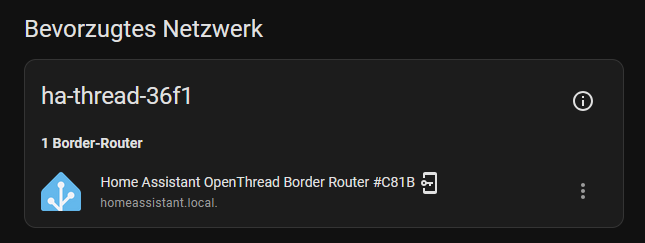
HA shows a working Border Router:

I can’t find any really helpful information in the log files…

Open Thread Border Router Log:
8d.11:05:48.511 [W] Nat64---------: incoming message is an IPv4 datagram but no NAT64 prefix configured, drop

Matter Server Log:
2026-03-05 19:38:09.529 (Dummy-2) CHIP_ERROR [chip.native.DIS] DNSSD packet parsing failed (for SRV records)
2026-03-05 19:38:09.529 (Dummy-2) CHIP_ERROR [chip.native.DIS] DNSSD packet parsing failed (for non-srv records)

I’ve already reconfigured the border router a few times and restarted Home Assistant afterwards… I’ve also tried connecting the thermostats countless times now – the connection process keeps failing :frowning:
I’m completely out of ideas and would be incredibly grateful for any help!

Best regards
Philipp
alias picknicker :cowboy_hat_face:

Maybe these troubleshooting tips might be helpful:

  • Commisioning is initialized through a bluetooth connection between your phone and the TRV. Make sure bluetooth is enabled on your phone and the phone is in close range
  • make sure, your phone’s Wifi connection and the TBR are connected within the same broadcast domain
  • afaik ipv6 network connectivity is a requirement for matter/thread. Unique-Local Address (ULA) Scope should be suffiicient
  • use avahi-browse to check, if the TBR service is exposed:
[I] michael@manjaro-xps13 ~> avahi-browse _meshcop._udp -rt
+ wlp58s0 IPv6 Wohnzimmer                                    _meshcop._udp        local
+ wlp58s0 IPv4 Wohnzimmer                                    _meshcop._udp        local
= wlp58s0 IPv6 Wohnzimmer                                    _meshcop._udp        local
hostname = [Wohnzimmer.local]
address = [192.168.100.22]
port = [49153]
txt = ["dn=DefaultDomain" "bb=\240\191" "sq=v" "pt=\2515\178o" "at=\000\000h\215\228+\000\001" "sb=\000\000\015\177" "vp=1" "dd=\234@\137\\=\163\000\155" "xa=\234@\137\\=\163\000\155" "tv=1.3.0" "xp=\131\250\244o\198\005N\164" "nn=MyHome1667939949" "mn=BorderRouter" "vn=Apple" "rv=1"]
= wlp58s0 IPv4 Wohnzimmer                                    _meshcop._udp        local
hostname = [Wohnzimmer.local]
address = [192.168.100.22]
port = [49153]
txt = ["dn=DefaultDomain" "bb=\240\191" "sq=v" "pt=\2515\178o" "at=\000\000h\215\228+\000\001" "sb=\000\000\015\177" "vp=1" "dd=\234@\137\\=\163\000\155" "xa=\234@\137\\=\163\000\155" "tv=1.3.0" "xp=\131\250\244o\198\005N\164" "nn=MyHome1667939949" "mn=BorderRouter" "vn=Apple" "rv=1"]

I am not using Matter (Thread) for this Bosch thermostat (even it is a Matter version). My entire network is based on the ZigBee and I prefer to stay with ZigBee.
Hence I have switched this device to the ZigBee mode as described there (Bosch Heizkörper-Thermostat II [+M] von Matter (Thread) zu Zigbee umstellen - Thing King - Technik & DIY - sorry, it is in German), and them have created the pairing code ad it is described on these pages:
Bosch BTH-RA control via MQTT | Zigbee2MQTT
and in this video (second part, sorry, it is in German): https://www.youtube.com/watch?v=C_-vkz_yoK8
Because this is a Matter device the QR code is no longer helpful, hence you would need to make the pairing code manually.
Then is works like a charm.

Having experience with 4 different type of Thermostat devices I find this one would be the best, and I am in the process of replacing my remaining Aqara Thermostats by Bosch now.

My setup seats on top of zigbee2mqtt, and the same dongle is used: SONOFF ZBDongle-P.