Cable Modem Monitor - Track Your Internet Signal Quality in Home Assistant

I built a Home Assistant integration to monitor cable modem signal quality and channel statistics.

What it does

Tracks the key metrics that determine cable modem performance:

  • Power levels (dBmV) for each channel
  • Signal-to-Noise Ratio (SNR in dB)
  • Frequency and error counts
  • Both downstream and upstream channels
  • Historical data to spot trends

Why it’s useful

Having visibility into signal quality helps identify problems before they become outages. It’s also useful when calling your ISP

  • you can reference actual signal metrics instead of just saying “the internet is slow.”

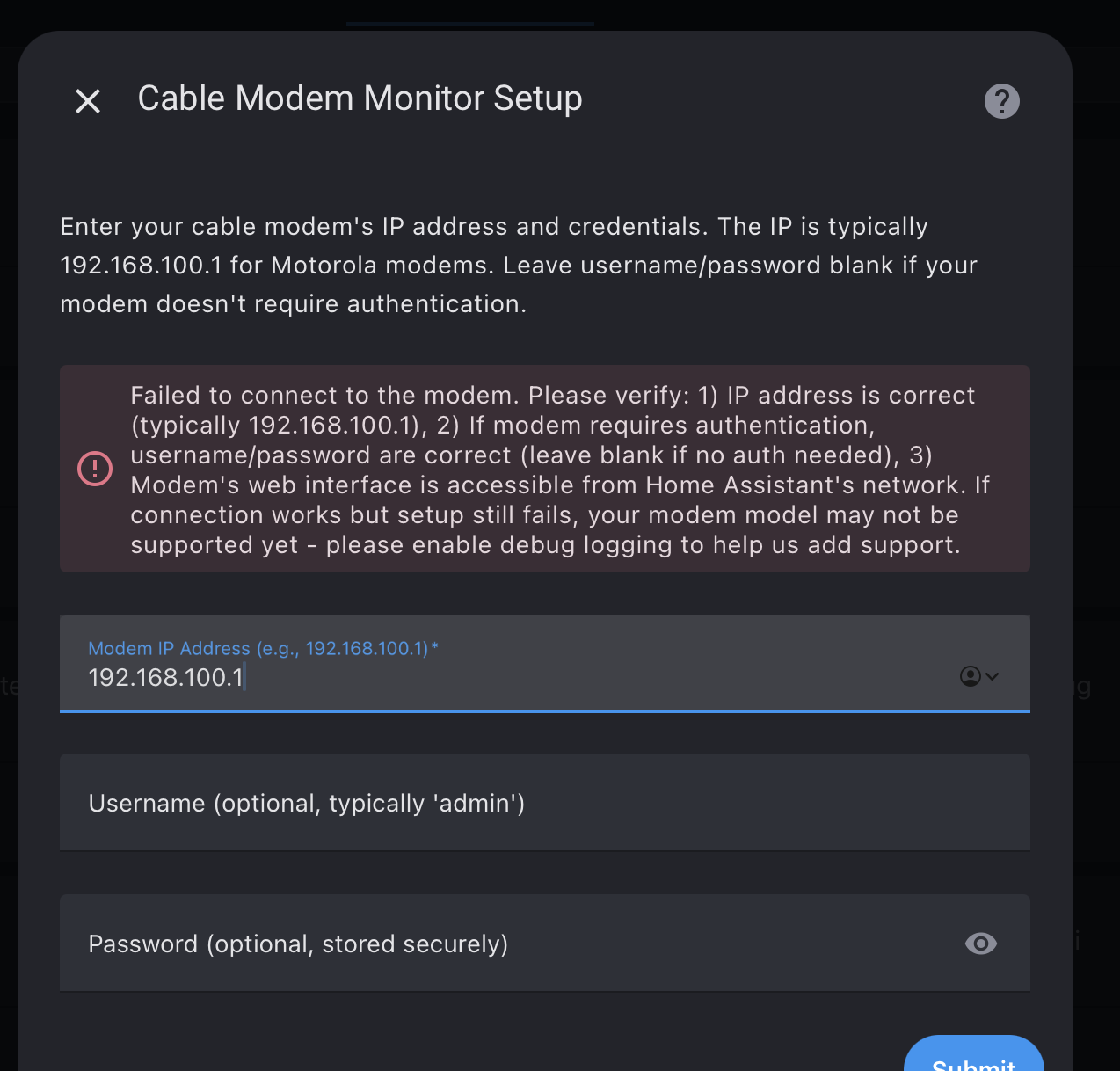
Screenshot

Dashboard view showing all key metrics:

Features

  • UI-based configuration (no YAML required)
  • Per-channel monitoring
  • Historical tracking with graphs
  • Automation support for alerts
  • Device controls (restart modem, clear history)
  • 100% local - no cloud services

Installation

Available via HACS as a custom repository:

  1. HACS → Integrations → Three dots → Custom repositories
  2. Add: https://github.com/kwschulz/cable_modem_monitor
  3. Category: Integration
  4. Search for “Cable Modem Monitor” and install
  5. Restart Home Assistant
  6. Add integration via Settings → Devices & Services

Manual installation instructions are in the GitHub README (search “kwschulz cable_modem_monitor” on GitHub).

Supported Hardware

Tested with:

  • Motorola MB series cable modems
  • Arris cable modems

Should work with most cable modems that have a web interface showing channel data.

Project Info

Find the integration on GitHub by searching for “kwschulz cable_modem_monitor”

  • Latest Release: v1.4.1
  • License: MIT (free & open source)

Happy to answer questions about setup, compatibility, or troubleshooting.

6 Likes

like the idea but my cable modem (Technicolor TC4400) is not working

Hi @Mar1us! Thanks for trying it out! I’d love to work with you to get your Technicolor TC4400 to work.

The TC4400 isn’t one I’ve tested with yet, but I did some research and it looks feasible to support! It has a similar web interface structure to the modems that currently work.

Quick check first:
Can you access your modem’s web interface at http://192.168.100.1 in a browser? Does it show a page with downstream/upstream channel data, power levels, and SNR?

If yes, I’ve created a step-by-step guide for helping add support:
cable_modem_monitor/MODEM_COMPATIBILITY_GUIDE.md at a12d1af30e07e222b0d94bb4aa02b60e3d402939 · kwschulz/cable_modem_monitor · GitHub

The quick version:

  1. Open your modem’s status page in a browser
  2. Right-click → “View Page Source” (or press Ctrl+U)
  3. Save the HTML file (Ctrl+S)
  4. Remove any personal info (MAC address, your IP)
  5. Create a GitHub issue and attach the HTML file

This would let me add TC4400 support in a future version, which would help everyone with that modem model!

No worries if that’s too much work - I appreciate you trying it out and the feedback either way!

Update: I took a stab at adding support for the Technicolor TC4400 modem in v1.6 (Release v1.6.0 - TC4400 Support & Enhanced Testing · kwschulz/cable_modem_monitor · GitHub). Give it a try and let me know if it works. Please log any issues on GitHub or post feedback here! Thanks!

I’m trying v1.6.0 against my old but trusty ARRIS SB6141. It is at the default 192.168.100.1, and answers via HTTP from a local computer’s web browser. I can also nc to the cable modem’s port 80 successfully via a HA shell prompt, as well as traceroute to it with one hop through the router/firewall and then the cable modem.

The integration refuses to configure, throwing this error:

Failed to connect to the modem. Please check the IP address and credentials.

There are no credentials needed to access the modem’s web status interface.

Any suggestions???

Thanks for trying out the Cable Modem Monitor integration with your ARRIS SB6141! I’ve done some research on your modem model.

The Good News: The error you’re seeing is not actually an authentication issue. The integration correctly handles modems without credentials (like yours), so it’s skipping the login step.

The Real Issue: The SB6141 is an older ARRIS SurfBoard model. While ARRIS acquired Motorola’s cable modem business and many models share similar web interfaces, the HTML structure on the SB6141 likely differs just enough that our parser can’t extract the channel data. When it fails to parse any channel information, it returns “unreachable” status, which triggers the connection error.

What We Need: To add proper SB6141 support, I need to see the HTML structure from your modem’s status
page. Could you help by:

  1. Opening 192.168.100.1 in your browser (or whichever page shows downstream/upstream channel data)
  2. Right-click → “View Page Source” (or press Ctrl+U)
  3. Save the HTML file (Ctrl+S)
  4. Important: Sanitize any personal info (MAC address, serial number, public IP) - signal data itself is fine to share
  5. Either attach it here or create a GitHub issue:
    Sign in to GitHub · GitHub

I’m also pushing an update today that will improve error messages and make the UI clearer about optional authentication. Once you share the HTML sample, I can add SB6141-specific support!

http://192.168.100.1/cmSignal.htm

<!DOCTYPE HTML PUBLIC "-//W3C//DTD HTML 4.0 Transitional//EN">

<!-- saved from url=(0032)http://192.168.100.1/signal.html -->

<HTML>
<HEAD>
<META content="text/html; charset=windows-1252" http-equiv=Content-Type>
<META content="Microsoft FrontPage 4.0" name=GENERATOR>
</HEAD>

<FRAMESET border=0 cols=150,* frameBorder=0 frameSpacing=0>
<FRAME scrolling=no src="cmSide.htm">
<FRAME src="cmSignalData.htm">
</FRAMESET>
</HTML>

I assume that you’ll want the frame source for http://192.168.100.1/cmSignalData.htm , so here it is;


<!DOCTYPE HTML PUBLIC "-//W3C//DTD HTML 4.0 Transitional//EN">
<!-- saved from url=(0036)signaldata.html -->
<HTML><HEAD>

<META content="text/html; charset=windows-1252" http-equiv=Content-Type>
<META content=no-cache http-equiv=Pragma>
<META content="Wed, 30 Apr 1975 02:00:00 GMT" http-equiv=Expires>
<META content="Microsoft FrontPage 4.0" name=GENERATOR>

<script language="JavaScript" src="utility.js" type="text/javascript">
</script>

</HEAD>


<BODY aLink=#7b2939 link=#485a91 text=#000000 vLink=#7b2939 onload="onloadmainpage()">

<script language="javascript" type="text/javascript">
var infoText = 'This page provides information about the current \
      upstream and downstream signal status of your Cable Modem.'
document.write(displayHeader("cm","cmSignal",infoText));
</script>


  <CENTER>
      <TABLE align=center border=1 cellPadding=8 cellSpacing=0>
      <TBODY>
      <TR>
      <TH><FONT color=#ffffff>Downstream </FONT></TH>
      <TH colspan=8><FONT color=#ffffff>Bonding Channel Value</FONT></TH></TR>
<TR><TD>Channel ID</TD>
<TD>10&nbsp; </TD><TD>9&nbsp; </TD><TD>11&nbsp; </TD><TD>12&nbsp; </TD><TD>1&nbsp; </TD><TD>2&nbsp; </TD><TD>3&nbsp; </TD><TD>4&nbsp; </TD></TR>   <TR><TD>Frequency</TD>
<TD>519000000 Hz&nbsp;</TD><TD>513000000 Hz&nbsp;</TD><TD>525000000 Hz&nbsp;</TD><TD>531000000 Hz&nbsp;</TD><TD>453000000 Hz&nbsp;</TD><TD>459000000 Hz&nbsp;</TD><TD>465000000 Hz&nbsp;</TD><TD>471000000 Hz&nbsp;</TD></TR>   <TR><TD>Signal to Noise Ratio</TD>
<TD>39 dB&nbsp;</TD><TD>39 dB&nbsp;</TD><TD>39 dB&nbsp;</TD><TD>39 dB&nbsp;</TD><TD>39 dB&nbsp;</TD><TD>39 dB&nbsp;</TD><TD>39 dB&nbsp;</TD><TD>39 dB&nbsp;</TD></TR>   <TR><TD>Downstream Modulation</TD>
<TD>QAM256&nbsp;</TD><TD>QAM256&nbsp;</TD><TD>QAM256&nbsp;</TD><TD>QAM256&nbsp;</TD><TD>QAM256&nbsp;</TD><TD>QAM256&nbsp;</TD><TD>QAM256&nbsp;</TD><TD>QAM256&nbsp;</TD></TR>   <TR><TD>Power Level<TABLE border=0 cellPadding=0 cellSpacing=0 width=300>        <TBODY><TR>          <TD align=left><SMALL>The Downstream Power Level reading is a             snapshot taken at the time this page was requested. Please             Reload/Refresh this Page for a new reading           </SMALL></TD></TR></TBODY></TABLE></TD>
<TD>5 dBmV
&nbsp;</TD><TD>5 dBmV
&nbsp;</TD></TR>   </TBODY></TABLE></CENTER>


<P></P>

  <CENTER>
      <TABLE align=center border=1 cellPadding=8 cellSpacing=0>
      <TBODY>
      <TR>
      <TH><FONT color=#ffffff>Upstream </FONT></TH>
      <TH colspan=4><FONT color=#ffffff>Bonding Channel Value</FONT></TH></TR>
<TR><TD>Channel ID</TD>
<TD>7&nbsp; </TD><TD>8&nbsp; </TD><TD>5&nbsp; </TD><TD>6&nbsp; </TD></TR>   <TR><TD>Frequency</TD>
<TD>30600000 Hz&nbsp;</TD><TD>37000000 Hz&nbsp;</TD><TD>17800000 Hz&nbsp;</TD><TD>24200000 Hz&nbsp;</TD></TR>   <TR><TD>Ranging Service ID</TD>
<TD>5697&nbsp;</TD><TD>5697&nbsp;</TD><TD>5697&nbsp;</TD><TD>5697&nbsp;</TD></TR>   <TR><TD>Symbol Rate</TD>
<TD>5.120 Msym/sec&nbsp;</TD><TD>5.120 Msym/sec&nbsp;</TD><TD>5.120 Msym/sec&nbsp;</TD><TD>5.120 Msym/sec&nbsp;</TD></TR>   <TR><TD>Power Level</TD>
<TD>49 dBmV&nbsp;</TD><TD>48 dBmV&nbsp;</TD><TD>47 dBmV&nbsp;</TD><TD>47 dBmV&nbsp;</TD></TR>   <TR><TD>Upstream Modulation</TD>
<TD>[3] QPSK<BR>
[1] 16QAM<BR>
[2] 64QAM<BR>
&nbsp;</TD><TD>[3] QPSK<BR>
[1] 16QAM<BR>
[2] 64QAM<BR>
&nbsp;</TD><TD>[3] QPSK<BR>
[1] 16QAM<BR>
[2] 64QAM<BR>
&nbsp;</TD><TD>[3] QPSK<BR>
[1] 16QAM<BR>
[2] 64QAM<BR>
&nbsp;</TD></TR> <TR><TD>Ranging Status </TD>
<TD>Success&nbsp;</TD><TD>Success&nbsp;</TD><TD>Success&nbsp;</TD><TD>Success&nbsp;</TD></TR> </TBODY></TABLE></CENTER>


<P></P>

  <CENTER>
      <TABLE align=center border=1 cellPadding=8 cellSpacing=0>
      <TBODY>
      <TR>
      <TH><FONT color=#ffffff>Signal Stats (Codewords)</FONT></TH>
      <TH colspan=8><FONT color=#ffffff>Bonding Channel Value</FONT></TH></TR>
<TR><TD>Channel ID</TD>
<TD>10&nbsp; </TD><TD>9&nbsp; </TD><TD>11&nbsp; </TD><TD>12&nbsp; </TD><TD>1&nbsp; </TD><TD>2&nbsp; </TD><TD>3&nbsp; </TD><TD>4&nbsp; </TD></TR>   <TR><TD>Total Unerrored Codewords</TD>
<TD>44879831115&nbsp;</TD><TD>44879847805&nbsp;</TD><TD>44879839919&nbsp;</TD><TD>44879815400&nbsp;</TD><TD>44879811862&nbsp;</TD><TD>44879814573&nbsp;</TD><TD>44879813388&nbsp;</TD><TD>44879811733&nbsp;</TD></TR>   <TR><TD>Total Correctable Codewords</TD>
<TD>573&nbsp;</TD><TD>609&nbsp;</TD><TD>598&nbsp;</TD><TD>551&nbsp;</TD><TD>782&nbsp;</TD><TD>824&nbsp;</TD><TD>925&nbsp;</TD><TD>552&nbsp;</TD></TR>   <TR><TD>Total Uncorrectable Codewords</TD>
<TD>823&nbsp;</TD><TD>921&nbsp;</TD><TD>638&nbsp;</TD><TD>1566&nbsp;</TD><TD>739&nbsp;</TD><TD>687&nbsp;</TD><TD>824&nbsp;</TD><TD>761&nbsp;</TD></TR> </TBODY></TABLE></CENTER>


<P></P>


<script language="javascript" type="text/javascript">
document.write(displayFooter("cm"));
</script>

</BODY>

Hey vreihen,

Good news - I just released v1.7.0 with support for your ARRIS SB6141!

I used the HTML you shared to build a parser for the SB6141’s unique table format. It should handle all your downstream/upstream channels and error stats.

Can you test it for me?

Since I don’t have an SB6141 myself, I need you to confirm it actually works:

  1. Update to v1.7.0 (via HACS or download from GitHub releases)
  2. Restart Home Assistant
  3. Add the integration: Settings → Devices & Services → Add Integration → Cable Modem Monitor
  4. Enter 192.168.100.1 and leave username/password blank

If it works, you should see all your channel sensors appear. If it doesn’t, just enable debug logging and share the errors.

Thanks again for the HTML sample - couldn’t have done this without you!

Download: Release v1.7.0 - ARRIS SB6141 Support · kwschulz/cable_modem_monitor · GitHub

1 Like

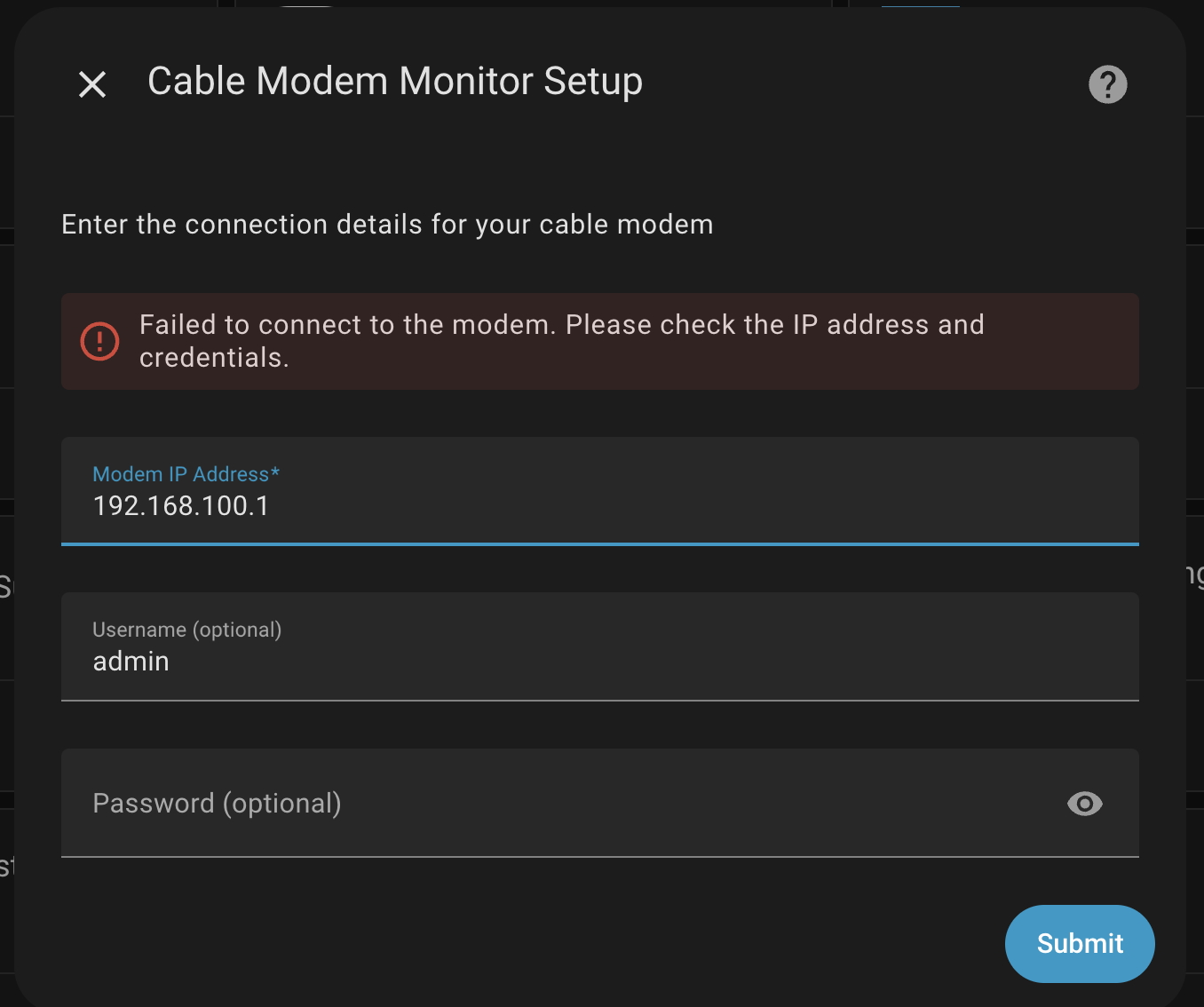
that was fast… Thank you! I tried this but i also get the following error after entering username and password:

Thank you, Ken. That was quick!

It is displaying 57 entities. All of the channel info and stats are being populated and appear sane compared to the modem’s management web page.

However, Software Version and System Uptime are both coming up as Unknown. I guess this should be expected, since neither of those values were on the page that I provided with the channel data. I don’t anticipate ARRIS ever shipping another firmware update for the SB6141, so that’s not a problem. I was thinking that the uptime could be really useful for automations, but thinking about it some more I would probably want the last boot time and that’s not being shown on any page (not to mention that the clock isn’t synched in the modem for some reason and is off by hours and minutes).

Two suggestions:

  1. Can you please change the attribution in the v1.7.0 release notes to GitHub user @captain-coredump?

  2. I never looked at the HA developer’s docs to see if they specify a standard naming convention for sensors and stuff. When I look down the big list of entity states in my HA setup, they all seem to have names starting with either the HA device name or the integration’s name to prevent confusion and name space clashes. Just mentioning it because v1.7.0 is sharing “sensor.system_uptime” which I can see being a point of confusion. If everything could start with either the string “cable_modem_” or the modem’s IP address with underscores instead of dots, it would prevent potential name space clashes (sensor.cable_modem_sensor.downstream_ch_1_snr) and make it easier to search for values in the Developer tools screens.

Thanks again for sharing this awesome integration for a device that I never even thought about having in HA…

1 Like

Interesting idea! I’ve got a Technicolor XB7 model used by Rogers up here in Canada (one of the models at least). I’ll see if I can get you the page info/format to see if you can add it to your supported list.

1 Like

Thanks for all the feedback everyone! This is actually my first open source project after 25+ years in IT and I’m having a blast! This feedback is fantastic!

I’ve been working through your suggestions and wanted to share a quick update:
:white_check_mark: Completed

  1. Attribution updated - Changed to @captain-coredump (thanks for the correction!)
  2. Fixed deprecated config_entry warning - Removed explicit self.config_entry assignment in config_flow.py that was triggering the HA 2025.12 deprecation warning
  3. Fixed a parsing bug - Improved handling of nested HTML tables (affects some Motorola modems)

:arrows_counterclockwise: In Progress

  • Standardized entity naming - Working on prefixing entities with cable_modem_ or IP address to prevent namespace conflicts and improve searchability in Developer Tools
  • Software Version & System Uptime sensors - Investigating why these show as “Unknown” for some users
    All changes are tested and passing 69 unit tests. I’ll push these to a new branch shortly for testing before creating v1.7.1.

Thanks again for the great feedback - this kind of community input is invaluable for making the integration better for everyone!

1 Like

v2.0.0 is now live! :tada:

Big thanks to everyone who’s been testing and providing feedback. This release fixes the upstream sensor issues reported - upstream channels should now appear correctly with proper DS/US naming and cabel_modem_ prefix.

@captain-coredump - thanks for the ARRIS SB6141 HTML sample, it’s now supported!

@Mar1us - I’d love to add support for your modem! Would you be willing to share the HTML from your modem’s status page? (Right-click → View Source, redact any personal info). Just open a GitHub issue or post it here and I can add a parser for it.

Upgrade: Available now via HACS or GitHub. Entity IDs will auto-migrate on first restart.

Full details in the release notes. Let me know if you hit any issues!

1 Like

I’m confirming that the ARRIS SB6141 is still working in v2.0.0, with a footnote that Last Boot Time, Software Version, and System Uptime are all displaying as Unknown. This is expected, since the corresponding data is missing from the device’s web interface.

One thing that I noticed is that the cable_modem_ prefix is not being applied to the sensor names, although the US/DS name change is now there. Example: “sensor.ds_ch_1_frequency”. I did the upgrade via uninstall/reinstall with reboots before and after, FWIW…

1 Like

Hi vreihen,

Thanks for the detailed report and for confirming the ARRIS SB6141 is still working with v2.0.0! You are correct about the “Unknown” values for Last Boot Time, Software Version, and System Uptime on the SB6141 - this is expected since the modem doesn’t provide that information. I may try to make that part dynamic in the future.

Regarding the missing cable_modem_ prefix, you’ve uncovered a tricky caching issue in Home Assistant. Even with an uninstall/reinstall, it seems Home Assistant can sometimes hold on to old entity structures.

I’ve updated the UPGRADING.md file with a new “Troubleshooting” section that includes a more thorough cleanup process to resolve this. You can find it here:

UPGRADING.md - Entities Missing cable_modem_ Prefix After Reinstall (cable_modem_monitor/UPGRADING.md at main · kwschulz/cable_modem_monitor · GitHub)

I’m also investigating a code-level fix to make this migration more seamless in the future, but for now, the steps in the guide should get you sorted out.

Thanks again for your help in identifying this!

1 Like

FYI, I just manually checked all 58 entities and edited those that didn’t update. All of the edits survived a reboot, so I guess that I’m all set for now. Thanks again!!!
1 Like

Hey everyone! Just released v2.3.0 with some exciting updates:

What’s New

Technicolor XB7 Support :new:

  • Full support for Technicolor XB7 (CGM4331COM) modems
  • Used by Rogers (Canada) and Comcast customers
  • Handles 34 downstream + 5 upstream channels
  • Includes XB7-specific metrics (symbol rate, channel type)

ARRIS SB6141 Confirmed Working :white_check_mark:

  • Big thanks to @captain-coredump for confirming the SB6141 parser is working perfectly!
  • All 57 entities displaying correctly

Installation

Via HACS:

  1. HACS → Integrations → Cable Modem Monitor → Update to v2.3.0
  2. Restart Home Assistant

Requesting Feedback

If you’re using any of these modems, I’d love to hear from you:

Confirmed Working:

  • :white_check_mark: Motorola MB Series (MB7420, MB7621, MB8600, MB8611)
  • :white_check_mark: ARRIS SB6141
  • :white_check_mark: Arris SB6183, SB8200

Awaiting Testing:

  • :test_tube: Technicolor TC4400
  • :test_tube: Technicolor XB7 (NEW!)

What I’m Looking For

If you’re testing v2.3.0, please share:

  • ✓ Does your modem get auto-detected?
  • ✓ Are all channels showing up?
  • ✓ Any errors in the logs?
  • :camera_flash: Screenshots welcome! Would love to see your dashboards/entities

Special Thanks

Huge thanks to:

  • @captain-coredump (aka @vreihen) for confirming SB6141 support and providing testing feedback
  • @esand for providing XB7 HTML samples (Issue #2)

Links

Looking forward to your feedback! :raised_hands:

1 Like

I also claim responsibility for overlooking the requirement of HTTP authentication which the XB7 doesn’t support… so it can’t access an XB7 modem yet :stuck_out_tongue:

Just raised an issue on GitHub for my Netgear CM600 Cable Modem - let me know if you need any more info.

Thanks for adding your Modem to the list @chairstacker! I’ll tackle that next after the XB7 is working. Thanks for giving this integration a try!