No problem, no rush!
Seems like this can be useful info for tracking down potential issues - while being able to reboot the modem without having to walk to the other end of the house or using the Xfinity app 
Agreed - I (used to) have issues with older cable modems where they would act up after a while (and needed a power cycle). Being able to see the stats at least and possibly detect odd behaviour from the modem before the modem needs a physical power cycle is something I’m interested in.
On the topic of being able to reboot - just FYI, but the older cable modem I had was so bad that when it was having issues, the first thing that died on it was the web UI, so don’t always bank on it being available to issue remote commands The only sure-fire way to be able to reboot might be to put it on a managed power bar.
Hello,
I have an Arris SB8200 and running 2.3.1 version and it will not connect. When I connect in a browser it works fine.
Glad you guys are seeing the potential value! I made a bunch of changes today and fixed the reboot action on my own Moto modem. Give it a shot. It think it may take a few iterations to get individual modems to work right.
Thanks for reporting this! The SB8200 should be working with the integration, so I’d like to help troubleshoot.
Could you please:
- Enable debug logging - Add this to your configuration.yaml:
logger:
default: info
logs:
custom_components.cable_modem_monitor: debug - Then restart Home Assistant.
- Try adding the integration again and copy any error messages or debug logs from Settings → System → Logs.
- Confirm your modem’s IP address (typically 192.168.100.1) and whether it requires a username/password to access
in a browser (default is usually admin/password for SB8200).
The SB8200 is a DOCSIS 3.1 modem which may need different authentication handling than the older SB6141. Your debug logs will help me identify what’s going wrong and add proper support.
Thanks!
As requested:
This error originated from a custom integration.
Logger: custom_components.cable_modem_monitor.modem_scraper
Source: custom_components/cable_modem_monitor/modem_scraper.py:93
integration: Cable Modem Monitor (documentation, issues)
First occurred: 8:13:47 AM (1 occurrence)
Last logged: 8:13:47 AM
Could not fetch data from any known modem URL.
Also, did confirm that I can ping the modem from the terminal in home assistant
Just re-downloaded latest version from HACS and it is working now.
Might have spoken too soon. The Integration completes successfully, but none of the sensors contain any values. They all say unavailable or unreachable.
Thanks,
Roger
Same issue here - no errors when setting it up and no errors in the HA logs, but all sensors unavailable.
Thanks for reporting this! The “unavailable” sensors typically indicate that the integration is having trouble parsing data from your specific modem model. This is exactly the challenge you both and others in the community have been helping to surface.
I think we’re at an interesting inflection point with this integration. While v2.5 is more modularized and can auto-detect many supported modems, each unique modem configuration still presents potential edge cases. Rather than continuing to chase bugs across every modem variant with hardcoded Python fixes, I’m pivoting to a more sustainable, community-driven approach.
The vision going forward:
- Abstracted authentication - Separating authentication methods as pluggable modules (top priority)
- Data-driven modem mapping - Moving modem configurations out of Python code and into declarative config files
- User contribution tooling - Building a utility that helps users map their modem’s data structure in real-time, which can then be contributed back to a shared modem library
Here’s where it gets exciting: The speed at which this integration has evolved—largely thanks to partnering with AI tools like Claude Code and Gemini CLI for coding, and even Grok for ideation—means we can move fast on these improvements.
Calling all developers! I’m actively looking for collaborators to help architect and build this next generation. This project sat as an idea for over 10 years and in less than two weeks turned into way more than I ever expected. Whether you’re experienced with Home Assistant integrations, web scraping, or just want to learn by contributing, I’d love to have you involved. This is a great opportunity to work on a real-world project that benefits the community.
Thanks for adding support for the Motorola MB8611 
I’m trying to get to a single template sensor that corresponds to the lights at the front of the modem (guide).
Can you tell me how the sensors:
sensor.cable_modem_connection_status
sensor.cable_modem_health_status
sensor.cable_modem_total_corrected_errors
sensor.cable_modem_total_uncorrected_errors
relate to the health reported by the modem UI itself:
- Acquire Downstream Channel (no cable),

- Upstream Connection (cable quality issues),

- Configuration File (indicates account issues),

I can kind of guess, but it would be good to hear from you all,
thx
Great question! The current sensors don’t directly map to those front panel LEDs, but the data is there.
What we have now:
- connection_status / health_status → general online state
- total_corrected/uncorrected_errors → aggregated from channel data
What the modem actually exposes (via HNAP):
The MB8611 has a “Startup Sequence” with exactly the provisioning steps you’re asking about:
- Acquire Downstream Channel → “Locked” / frequency
- Upstream Connection → “OK” / “Operational”
- Boot State → “OK” / “Operational”
- Configuration File → “OK”
- Security → “Enabled” / “BPI+”
These map directly to the front panel LEDs. The data is captured in the fixtures but not yet exposed as sensors.
I’d be happy to add these as sensors in a future release if there’s interest. Also - are you using the MB8611 parser successfully? Thank you very much for working with me the past month to get this one working! Would love to mark it as verified if it’s working for you. If so, feel free to close All Entities Unavailable · Issue #4 · kwschulz/cable_modem_monitor · GitHub with a quick confirmation.
Full list of supported modems: cable_modem_monitor/tests/parsers/FIXTURES.md at 35307897d972d3fb3fbc4a80c8e226cc5c25dddd · kwschulz/cable_modem_monitor · GitHub
P.S. - The project may be moving to a dedicated organization soon to make collaboration easier. Stay tuned!
There’s a problem with v3.10.1 (with SB6141 if it matters). It is reporting an invalid config after rebooting following this latest update:
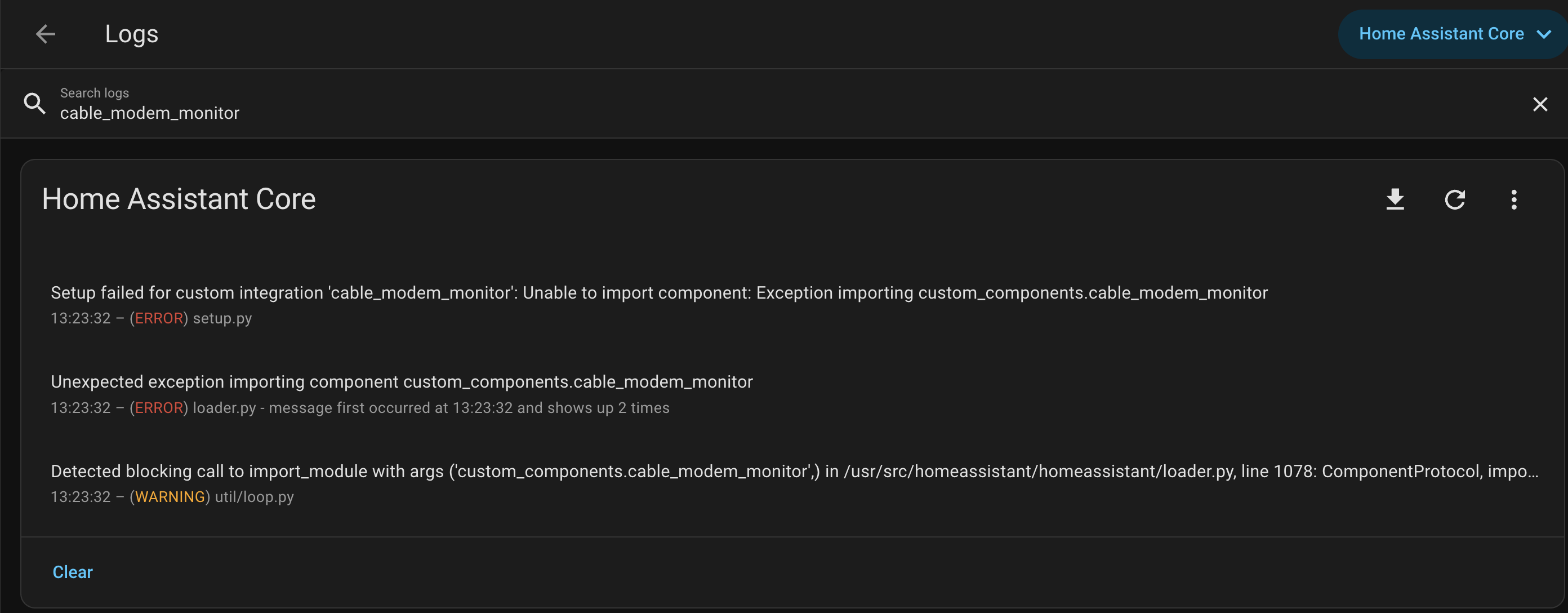
Logger: homeassistant.util.loop
Source: util/loop.py:77
First occurred: 13:23:32 (1 occurrence)
Last logged: 13:23:32

Detected blocking call to import_module with args ('custom_components.cable_modem_monitor',) in /usr/src/homeassistant/homeassistant/loader.py, line 1078: ComponentProtocol, importlib.import_module(self.pkg_path) inside the event loop; This is causing stability issues. Please create a bug report at https://github.com/home-assistant/core/issues?q=is%3Aopen+is%3Aissue For developers, please see https://developers.home-assistant.io/docs/asyncio_blocking_operations/#import_module Traceback (most recent call last): File "<frozen runpy>", line 198, in _run_module_as_main File "<frozen runpy>", line 88, in _run_code File "/usr/src/homeassistant/homeassistant/__main__.py", line 229, in <module> sys.exit(main()) File "/usr/src/homeassistant/homeassistant/__main__.py", line 215, in main exit_code = runner.run(runtime_conf) File "/usr/src/homeassistant/homeassistant/runner.py", line 289, in run return loop.run_until_complete(setup_and_run_hass(runtime_config)) File "/usr/local/lib/python3.13/asyncio/base_events.py", line 712, in run_until_complete self.run_forever() File "/usr/local/lib/python3.13/asyncio/base_events.py", line 683, in run_forever self._run_once() File "/usr/local/lib/python3.13/asyncio/base_events.py", line 2050, in _run_once handle._run() File "/usr/local/lib/python3.13/asyncio/events.py", line 89, in _run self._context.run(self._callback, *self._args) File "/usr/src/homeassistant/homeassistant/setup.py", line 170, in async_setup_component result = await _async_setup_component(hass, domain, config) File "/usr/src/homeassistant/homeassistant/setup.py", line 343, in _async_setup_component component = await integration.async_get_component() File "/usr/src/homeassistant/homeassistant/loader.py", line 1030, in async_get_component comp = self._get_component() File "/usr/src/homeassistant/homeassistant/loader.py", line 1078, in _get_component ComponentProtocol, importlib.import_module(self.pkg_path)
Well that’s not good! I actually picked up a 6141 this week from a friend. I’ll take a look later today and post an update once I know more. Thanks for posting!
If it winds up being an issue with the 6141 and not every other modem as well, I would be fine with deprecating it from the integration because it is grossly obsolete at this point and not worth the effort to maintain…
Hey vreihen, good to see you again!
Thanks for reporting this. You actually caught two issues:
- The blocking import warning you saw - that’s real, and fixed it by moving deferred imports to top-level.
- A much bigger problem - I ran BFG Repo-Cleaner to sanitize some passwords from our test fixtures (HTML captures that contributors submitted from their modems), and it went catastrophically wrong. The tool replaced every # comment character with REMOVED, breaking the entire v3.10.1 release with syntax errors. Lesson learned the hard way, and of course it happens when I don’t follow my own discipline.
v3.10.2 is out now and fixes both. Also deleted v3.10.1 entirely so nobody else can install it.
Also - This project just got officially listed in the HACS default repository, so you no longer need the custom repository URL. You can remove it and just search for “Cable Modem Monitor” in HACS directly.
Hey Ken,
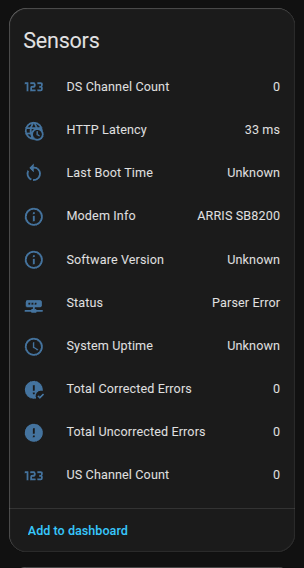
I just installed this integration to get the data from my SB8200v3. The sensors for Last Boot Time, Software Version, and System Uptime are showing as UNKNOWN. The status sensor is showing PARSER ERROR. Any idea on how I can fix this?
Thanks in advance.
Hi Rob! Thanks for the report. The SB8200v3 is a variant I haven’t seen, which likely explains the UNKNOWN sensors (the HTML structure probably differs from what the parser expects).
I’ve been reworking the auth layer in the v3.12 branch to handle variant edge cases better. If you’re comfortable installing from a feature branch, give feature/v3.12.0 a try—if you’re still seeing issues, Sign in to GitHub · GitHub with the diagnostics download attached and I’ll use that to add support for your variant.
FYI, this is a side project so response time varies and I’ve got a bit of a backlog. Optimistic this new auth process does the tricks but either way I’ll do my best to work with you to get your modem running.
Thanks for your interest and support!
I’m in the middle of a v3.12 architecture overhaul that moves modem definitions from Python code to YAML configuration. Instead of writing a custom parser class, you describe the modem’s endpoints and field mappings in a config file. Authentication is response-driven auto-detect across 8 strategies - the system figures out what your modem needs based on how it responds.
Early in this project I paused new modem development to focus on this - previous rewrites were incremental with lots of learning, but this one is targeting the end state architecture. Still a work in progress - focusing on test coverage right now (1400+ tests) and the full conversion may take another release. I’ll post here when it’s ready for testing.
In the meantime, there’s an open issue for the SB8200 where I’m working through some quirks. If you could add a HAR capture from your v3, that would help - the Modem Request has instructions.
that sounds like a much better architecture! the data capture looks intensive, so it won’t be until the weekend that i can go over that.
Ok, i’ve replied to the linked issue w/ my HAR capture. Thanks for your help with this!