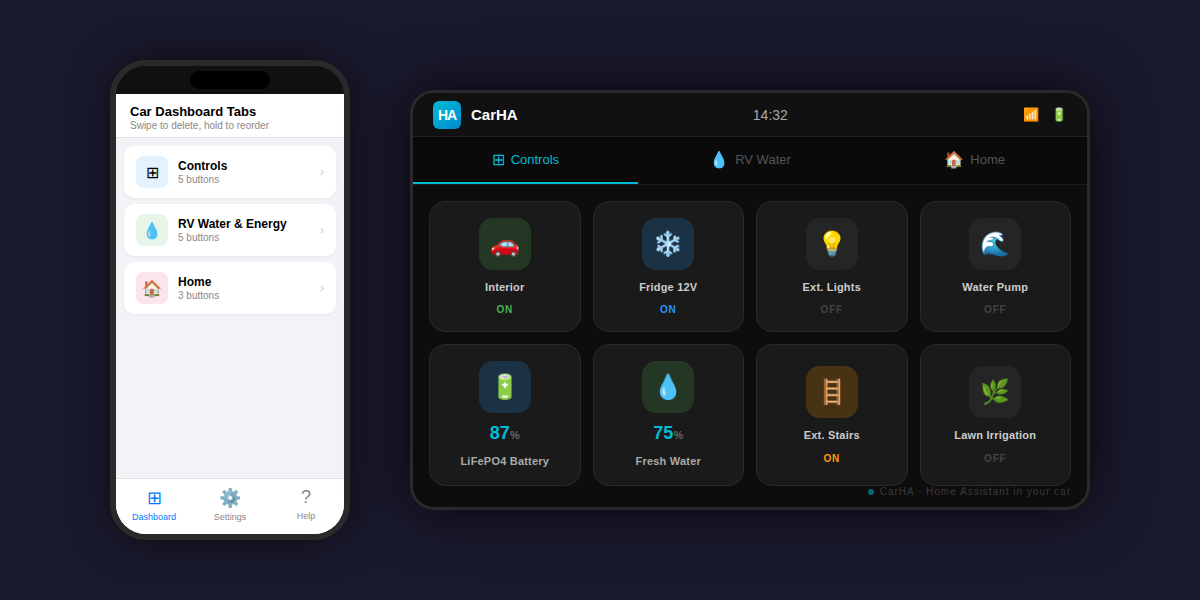
I built a small iOS app called CarHA that lets you control your Home Assistant instance directly from Apple CarPlay.
Why I made it: I have a motorhome with extensive Home Assistant automation (lights, water tanks, leveling, battery monitoring) and wanted quick access from the car screen without pulling out my phone.
Features:
Customizable tabs and buttons (toggle, sensor, input_select, dual-action)
Connects directly to your own HA instance — no cloud, no third party servers
Works over local network, Tailscale, or Nabu Casa
Built-in help screen explaining remote access options and entity setup
It's a free/one-time-purchase app, no subscriptions. Would love feedback from this community since you're the ones who'll actually push it to its limits.
Fair point, and I appreciate the honest feedback. Yes, I used
AI to help draft that response — I should have written it myself.
To clarify: the Companion app does work while driving and has
a solid native CarPlay interface with Actions, Areas, and Controls.
CarHA is a different approach — simpler and more focused.
Instead of navigating through areas or domains, you configure
exactly which buttons and sensors appear, organized in custom
tabs you name yourself. Large colored buttons, sensor values
inline, and geofence zones built in.
One thing CarHA does that the Companion app doesn't have
natively: geofence zones with dual trigger modes. For example:
Drive within 100m of home → notification appears:
"You're near Home. Open gate?" → tap Yes → gate opens
Or set it to Auto mode → gate opens automatically,
no tap needed
I use this daily with my own gate and it works reliably
over Tailscale even when I'm coming back from a long trip.
It's not better than the Companion app — it's just different.
Some people prefer a curated dashboard with only the 5-6 things
they actually use while driving.
Geofence Zones — trigger HA automations when you arrive/leave a location
 WebSocket — real-time state updates without manual refresh
 iOS Widget — control your HA directly from the homescreen
 Backup / Restore — export and import your configuration
 Voice Confirmation — CarHA announces action results through car speakers
Siri Shortcuts — trigger buttons with your voice
This sounds awesome! I just recently installed carplay in my car and have a couple actions set up like arming my home and open/close garage door. In your post you said the app is free, but on the app store, it states it is $4.99. I will have to check this out!
You’re right—I should clarify that. The app used to be free during the initial launch and beta period, but it’s now priced at $4.99. I forgot to update that part of my post, so thanks for pointing it out.
I hope you’ll give it a try! If you have any questions, suggestions, or ideas for new features, I’d love to hear them.
Your app looks interesting, I wish we could have a free period to test it.
I have 2 questions:
1-Is it possible to display a countdown timer that updates automatically (I guess v.3 solves that )?
2- With geofencing, when the notification appears to confirm to open the garage door, doesn’t it appear even if carHA is not displayed (for example, Waze is on the screen)?
Hi, thank you for the review.
What do you mean with
1.
a countdown timer that updates automatically (I guess v.3 solves that )
Be more explicit, so ai can better understand
Honestly I think this app and official are, at best, the same. This app may have improvements and I have not tried it.
I think developers should get paid for their work so Free is not a selling point and paid is not a reason not to buy. I just don’t do 3rd party apps unless I can see a real benefit.
Apple doesn’t allow us to display a live countdown over Waze. We could simulate it with notifications every few seconds, but that’s not ideal.
A better solution could be to add two distances: one where CarHA asks for confirmation, and a second, closer distance where it actually executes the action. What do you think?
Thank you for your feedback — it helped shape some great improvements!
Here’s what’s coming in version 1.5, currently under Apple review (usually 24–48 hours):
Geofence notifications now appear over any app (Waze, Maps, etc.) without interrupting your navigation.
Each geofence zone now supports dual radius:
• Outer radius — triggers a confirmation notification when you get close
• Inner radius — executes the action automatically when you’re very close
Configurable execution mode per zone:
• By Proximity (inner radius)
• By Time (countdown after confirmation)
• Both (first wins)
CarPlay countdown timer — after confirming a geofence action, a countdown is displayed directly in the CarPlay interface.
Custom notification message — you can now edit the notification text per zone.
Configuration from previous version erased, had to restart from scratch;
Geofence radius: cannot change from interface, automatic set at 1 for inner and outer radius (changed in the JSON backup file and copied back);
was never able to trigger the device in geofence from previous versions, will try again. Changed the service from turn_on to toggle. Will let you know;
Cannot change the geofence message, changed it in JSON
Backup and restore: Cannot import from file, only from clipboard;
can change button icon in the dashboard from app, the json backup retains the original icon. Have to change it in app every time I import from clipboard
Cannot have a timer entity in dashboard
App not completely in english, many items still in Română
Honestly, this app shows promise but is still in beta mode,


 )?
)?