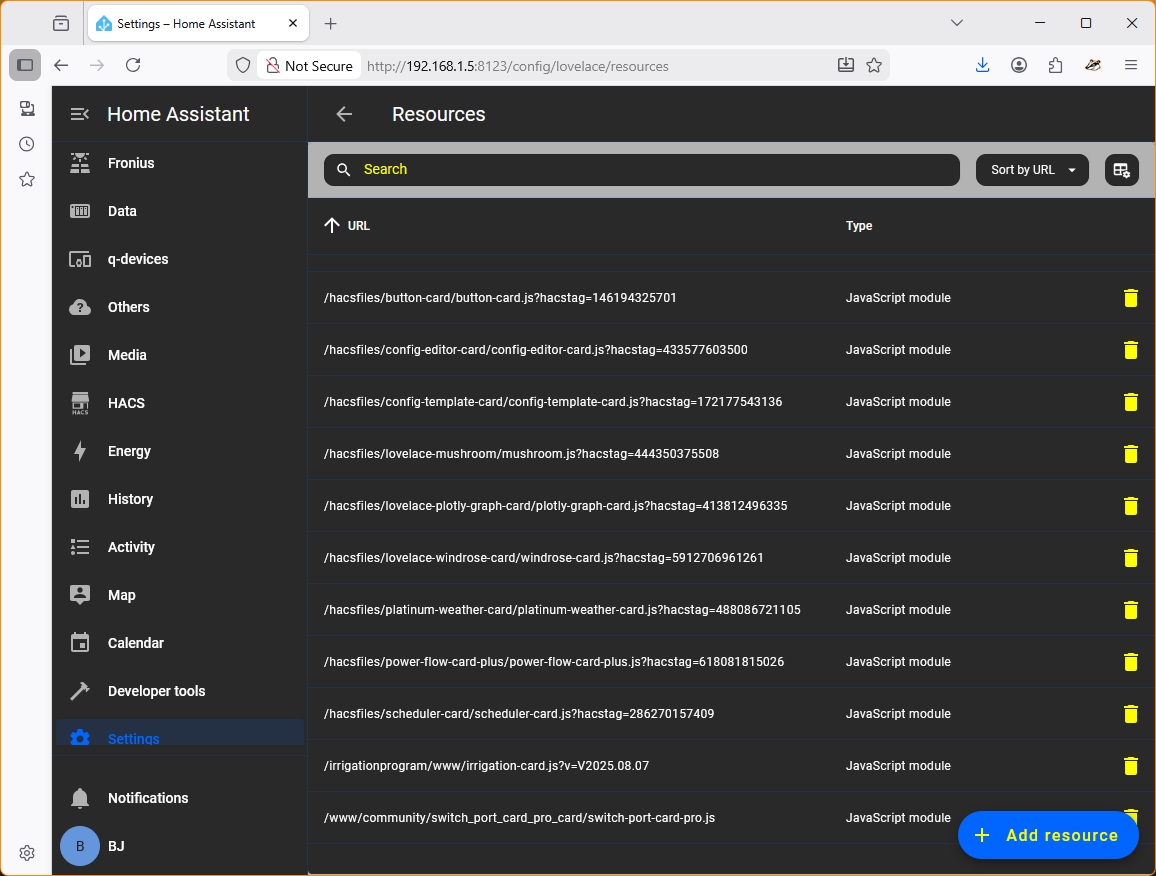
The card is still not working for me. I’ve deleted the integration & removed it. Restarted HA. Used HACS to download the integration, restarted HA, added the intergration. 1 device & 32 entities created (it’s still creating ports 19-24 which don’t exist - don’t worry about that atm).
Then created the dir ../www/community/switch_port_card_pro_card and downloaded switch-port-card_pro.js to it. Then added the resource /www/community/switch_port_card_pro_card/switch-port-card-pro.js and restarted HA.
No errors in the log (other than the 2 blocking errors previously mentioned) but the card is still not available. I’m not sure the resource is registered properly (…/local/… doesn’t work for me so I’ve used the path from below the /homeassistant level - has worked previously for a couple of manually added resources). The .jpg is after a HA restart).
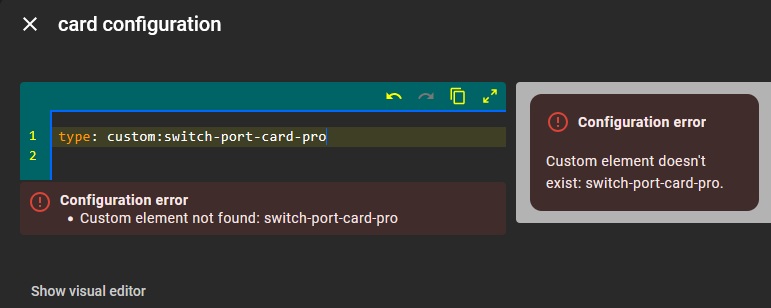
Not working as in when in yaml you want to use the card with
type: custom:switch-port-card-pro
it gives an error?
When looking at your print screen; the resource just above switch-port-card-pro seems to have a non default location? This one is working? Can you work back from that?
Can you doulble check something else for me. In first instance i hoped the card and integration would install together (but did not easily find an example on this nor specifics in the HA documents) so also added to card in the integration repository (hoping it would take care of putting it in the right directory already for use so only thing left would be resource declaration as your are doing). In my installation it did not work / not copy (certainly not register). Can you check your /www/community/ directory if there are 2 similar swtich_port_card_pro directories? (expect not but some people claim with registration that a second card is there which i am trying to figure out how that can be if nothing in the integration registers a card). But apparently there are difference regarding the different types of HA installation that cause some issues i fail to understand at the moment. But am sure at some point we will figure this out
Regarding auto port detection: Can you also share the text that is output of:
snmpwalk -v2c -c public your-switch-ip 1.3.6.1.2.1.2.2.1.2
(assuming ’ public’ is your community string set in switch, else put your own there)
I have made a test setup and got now outputs of 4 different switch types (manufacturers). Yours can help me perfect the auto port discovery
just copy paste the text output of the switch in response. Thanks in advance
Yes, the irrigation integration is working. Tried the same structure without success : /www/community/switch_port_card_pro_card/switch_port_card_pro.js
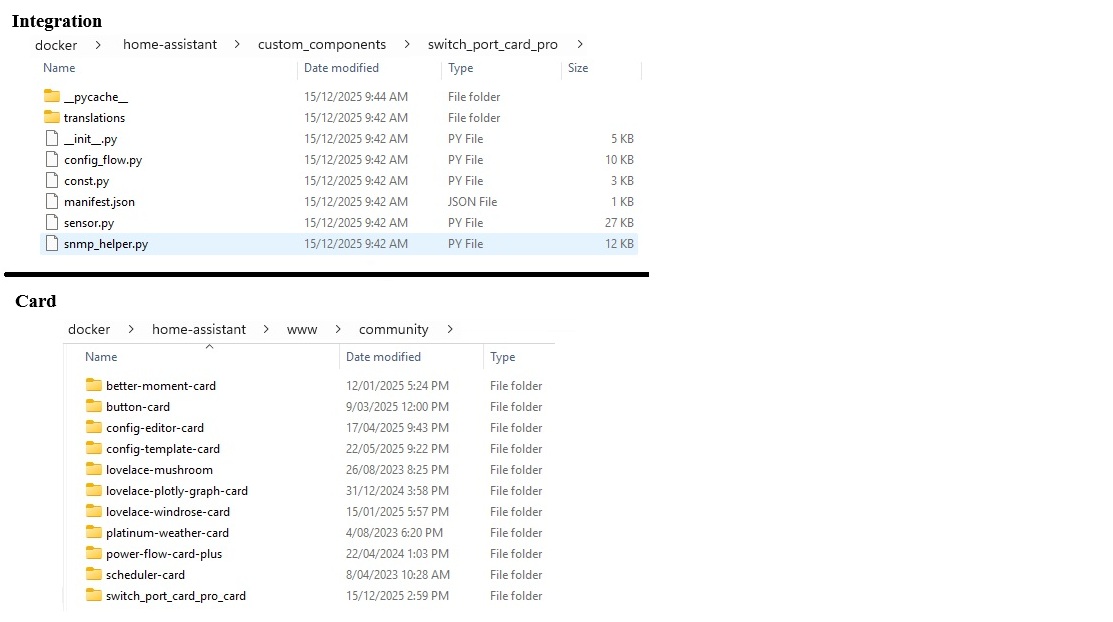
This is confusing. When adding the integration, it is placed in /custom_components/switch_port_card_pro I manually copied the card .js into /www/community/switch_port_card_pro_card/ If I try to download the card as a custom repository, no dir is created.
_pycache_ appears after trying to add the card as a custom repository via HACS (but no folders/files are created in /www/community/ - I created them when manually copying the .js file.
Maybe leave it until (hopefully) the card is included with the integration or as a separate HACS repository.
pycache is kind of compiled python code when integration is run for first time (no relation with card or javascript). Just makes it a bit fast to execute
the irrigation is directly in irrigation/www/here. So you have multiple www directories? And also does not have ‘community’ . You would expect it to be /www/community/irrigation/here.js
No double switch-port-card like directories which i expected but good that it is confirmed.
Otherwise your directory structure is ok. Indeed the integration and card live in different directory structure. Integration in …/custom_components and card in /www/community… At least also in my instalation
Not sure if the card and integration can be installed together at once. ‘Others’ also offer them as separate repositories (and i did not find an example that has card in integration repository that works). I am hoping the HACs integrators / reviewers can tell me where I posed the same question in the pull request.
Any linux client in the same subnet as your switch. Also can be windows where you can install ubuntu (example: https://ubuntu.com/desktop/wsl). Not sure if that is the correct one but search for wsl on windows 11. You can simply start a terminal in windows that way (is awesome)
Or: snmpwalk Examples & Commands (Windows & Linux) Step-by-Step Guide
you can install snmpwalk directly on windows if you don’t like linux
Does this help?
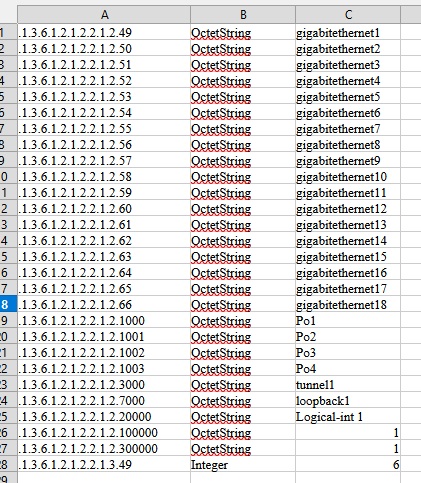
Yes, thanks. Command syntax is a little different but I have a file (I truncated it at 1800 lines) of output. What are you looking for? I’ve attached the 1st 28 lines
The integration created the /www dir inside it’s integration dir. Yes, you would expect the structure you list but that’s not what is created. Configuring the integration creates a notification which is copied and pasted into a blank card - a bit unusual.
Two repositories works OK - one for integration & one for the card.
Thanks for the suggestions. Yes, done that without success.
As suggested, we’ll shift any further discussion to the link above.
please as plain text (need to know exact output; not and excel)
from 1.3.6.1.2.1.2.2.1.2.1 till indeed 1.3.6.1.2.1.2.2.1.2.1003
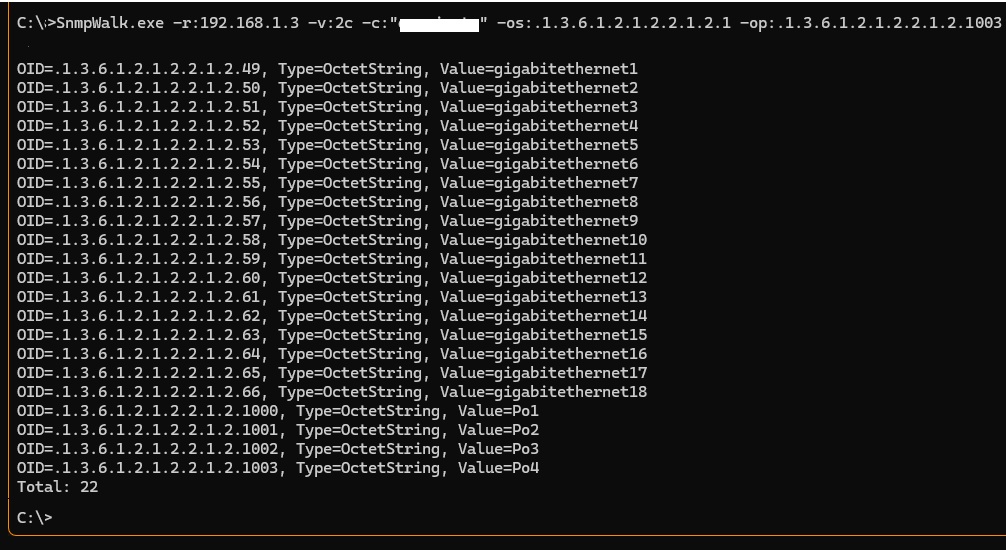
Normally the first port starts at 1.3.6.1.2.1.2.2.1.2.1 so already interesting it starts here at .49 but need to know what is in front of it so i can ignore that part
well it does a little, I need to type it over for my test suite Best if you can copy paste the output straigth here as TEXT
Just a simple text select in that window, CTRL-C, and CTRL-V in here
I am getting close to solving the card with integration combined.
I have made a pre-release that has integrated the card in the integration and now also detects the cisco switch ports correctly.
If you installed the integration: Go to hacs → find the integration in the list → select/click integration → 3-dot menu → re-download → choose to select a version → select version v0.8.3-pre
Why almost done? For some you still need to do 1 manual step if the dashboard does not show right away:
Go to: Settings → Dashboards → 3 dot menu → Resources → Add resource:
URL:
custom_components/switch_port_card_pro/frontend/switch-port-card-pro.js
Resource Type:
Java script.
Done! That’s it, fully working.
Can this break existing early installations?
Maybe… it is best to uninstall the switch-port-card-pro-card (the separate repository for just the card that is now becoming obsolete) as it is now integrated in the integration package. If you encounter an issue, delete your existing hub(s) en re-add them. The text for the settings will most probably be remembered, just select it again. So that should be fairly quick and the sensors will be remembered as well…
wwwooohoooooo!!
oh and when i release the production version it will be selectable in the card section! Got that working too yesterday evening
Only thing left to do is trying to avoid the manual resource adding
By the way:
Manually add resource with URL: custom_components/switch_port_card_pro/frontend/switch-port-card-pro.js, Type: Java script
Is not needed! when adding resource, only browser refresh is needed. You probably would get it working with less HA restarts (at least 1)
Hi @partach, just wanted to say thank you for this network switch status card. I was thinking the other day that it would be nice to add my switches to HA, but when I started reading about configuring the SNMP integration I became less interested . I managed to get your integration installed but had to manually add the dashboard resource to use the card.
I have three types of managed network switches in the house: Netgear GS516TP, Netgear GS110TPv2 and Netgear GS110TPv3. These are not ‘enterprise grade’ products, so CPU load, memory usage, temperature, per-port PoE power etc. are not available through SNMP. However, there is an OID entry with the combined PoE usage in Watts, so I configured that as my custom OID.
For the benefit of others, in addition to the OIDs which were populated automatically when adding the network switch, here are the OIDs I added manually for each switch.
Netgear GS516TP:
VLAN ID OID: 1.3.6.1.2.1.17.7.1.4.5.1.1
Firmware Version OID: 1.0.8802.1.1.2.1.5.1.1.2.4.0
PoE Status OID: 1.3.6.1.2.1.105.1.1.1.5
Custom OID: 1.3.6.1.2.1.105.1.3.1.1.4.1
Netgear GS110TPv2:
VLAN ID OID: 1.3.6.1.2.1.17.7.1.4.5.1.1
Firmware Version OID: 1.3.6.1.2.1.32.2.1.1.1.0
PoE Status OID: 1.3.6.1.4.1.4526.11.16.1.1.1.5
Custom OID: 1.3.6.1.4.1.4526.11.16.1.3.1.1.4.1
Netgear GS110TPv3:
VLAN ID OID: 1.3.6.1.2.1.17.7.1.4.5.1.1
Firmware Version OID: 1.3.6.1.2.1.47.1.1.1.1.10.67108992
PoE Status OID: 1.3.6.1.2.1.105.1.1.1.5
Custom OID: 1.3.6.1.2.1.105.1.3.1.1.4.1
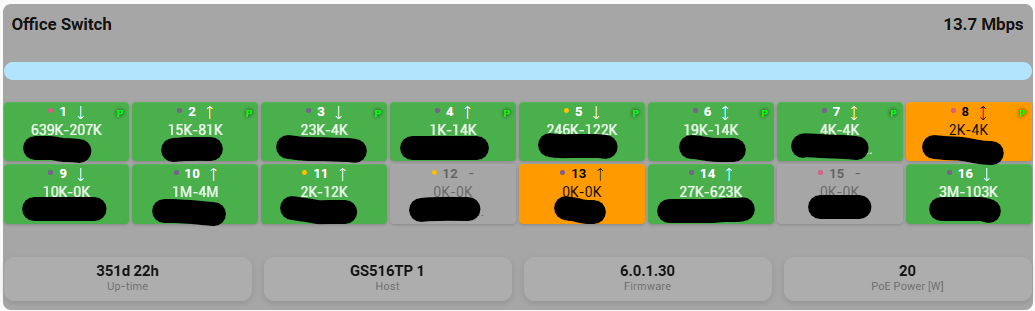
This produces the following overview for each network switch:

 Best if you can copy paste the output straigth here as TEXT