Last month, we launched the Home Assistant Connect ZWA-2, our take on the best possible Z-Wave adapter. Based on the reviews, it sounds like we hit the mark 😎. Today, we’re announcing a new, experimental firmware that allows you to do even more with the ultimate Z-Wave adapter.
I’m Keith, a Senior Hardware and Software Engineer at Nabu Casa, but you also might know me from my work on the ESPHome project. If you weren’t aware, Nabu Casa is the commercial partner of the Open Home Foundation, and the organization that helps build official Home Assistant hardware.
During the launch, one piece of feedback we often received was that people wanted more flexibility in where they could place Connect ZWA-2 in their home — often far away from their Home Assistant system. It was no easy feat (more on that below), but we were able to build a solution that allows you to put it anywhere you have a network connection.
This experimental firmware will allow you to not only leverage the Wi-Fi chip inside the Connect ZWA-2, but also use it with other hardware to facilitate the use of the much-requested PoE. 🎉 This new firmware is only possible because of the second-generation platform we built Connect ZWA-2 on, which is open by design, allowing you to tinker and extend the device you own. Every piece of Home Assistant hardware reflects Nabu Casa and the foundation’s philosophy of constant evolution, and the software it launches with is just the beginning. Whenever we think of a cool new capability, we will work together to add it.
If you want to start using your Connect ZWA-2 with Portable Z-Wave today, visit the brand new home for all the foundation’s web-based tools. Just be aware that this is experimental, and we recommend you read through this blog to understand how it works and its limitations. You can also watch the upcoming ESPHome livestream, where we’ll discuss this new tech in depth.
Getting started
 Home Assistant Connect ZWA-2 connected to a Waveshare ESP32-S3-ETH
NOTE: This firmware is experimental. Do not use it if you’re looking for the most stable Z-Wave experience.
To get started using your Connect ZWA-2 over your local network, you can use one of the two following configurations:
- Wi-Fi - the new firmware will be installed on the Connect ZWA-2 and use its built-in Wi-Fi chip to communicate over your network.
- PoE - the new firmware will be installed on an external development board that supports Power-over-Ethernet (PoE); Connect ZWA-2 will use its stock firmware and will plug into this new device via USB.
First, before installing this new firmware, make sure to back up your Z-Wave network and ensure your Home Assistant instance is running version 2025.10.2 or later. Only after those steps should you use the toolkit website for Portable Z-Wave. The toolkit’s wizard will walk you through the whole process of installing and connecting your device to your network. When the installation is complete, it should join your network and be discovered by both the ESPHome and Z-Wave integrations in Home Assistant.
This firmware has proven to work well in our lab and home environments, but the real world is a different place; your local network and Z-Wave network might behave differently. For this reason, we’re seeking your feedback. If you try it out, please let us know about your experience – good or bad, brief or long-winded – by leaving a comment below. We’re eager to know how and where we can improve it!
The Portable Z-Wave experiment
Before we launch any of our hardware products, we try to get our pre-production batch to as many testers as possible – most are hobbyists and tinkerers from the community, and of course, the first thing they tend to do is get out the screwdriver and open it up (to be fair, it’s designed to be easy to open — no glue, no clips). When looking at the insides of Connect ZWA-2, they were instantly greeted with an ESP32 chip, and were equally excited and confused. It was initially included just as a USB controller, and yes, an ESP32-S3 is a bit overkill for this specific task, but we wanted to give the device room to grow. This brings us to the experiment we are sharing with you today…
Making things mesh
When you use a Z-Wave adapter with Home Assistant, which relies on the Z-Wave JS add-on, they use USB to communicate via a specialized Z-Wave serial protocol. And yes, it is technically possible to run this Z-Wave serial protocol over your network (serial-over-IP), but our testing reveals that it’s not as reliable or as easy as we’d like. Some parts of the Z-Wave serial protocol are latency (delay) sensitive, specifically the acknowledgment of Z-Wave packets. If your network is busy and decides to take its sweet time with one of those critical packets, your Z-Wave device’s connection can time out and fail. This can stall Z-Wave device communication, or even completely break it.
For Z-Wave to work over a network, we need to address the latency-sensitive parts on the actual device; everything else can be forwarded over the network. This is where ESPHome steps in: it’s the open source software for network-capable microcontrollers that runs on ESP32 devices. We built an ESP32 into the Connect ZWA-2, and it has the horsepower (and Wi-Fi antenna) to handle this task.
To help make this all possible, we added Z-Wave support to ESPHome, allowing it to talk to Z-Wave chips. We then added the ability for Home Assistant and Z-Wave JS to communicate with Z-Wave adapters via ESPHome. As this work is open source, it shouldn’t be limited just to our Connect ZWA-2. Theoretically, it should be able to work with any certified Z-Wave adapter connected to an ESP32. However, before we look at supporting other adapters, we want to ensure that it’s stable when running on the Connect ZWA-2.
 Home Assistant connected to the ZWA-2 via its integrated Wi-Fi chip.
 Home Assistant connected to the ZWA-2 via the PoE module.
ESPHome handles serial message acknowledgments internally, then leverages its API (specifically its Protobuf implementation) to send the messages over the network more reliably than serial-over-IP. Even if your home network is bogged down by some spikes in traffic, ESPHome will have you covered, keeping your Z-Wave network stable. That’s not to say this has no impact on performance, but it may be less than you think – or can even notice!
Performance
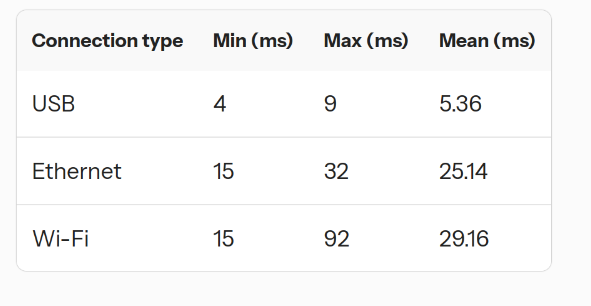
Wi-Fi is very convenient, but the million-dollar question is: how will it impact your Z-Wave network? To find out, we ran some benchmarks to see how Portable Z-Wave stacks up to its USB counterpart.
Compared to a direct serial (USB) connection, a data packet will take longer to travel between Home Assistant/Z-Wave JS and your Z-Wave network when routed through your local network. On a network with only a low to moderate workload, the additional delay is very small and is generally not noticeable. That said, if your network is heavily stressed or the Wi-Fi signal is poor, you should expect packets to take longer to move around, which can lead to a perceivable delay. It can still control your lights and other devices, but it may be a bit slower. Here are some numbers illustrating the typical latency that we were able to achieve across our test environments:
Connection type Min (ms) Max (ms) Mean (ms) USB 4 9 5.36 Ethernet 15 32 25.14 Wi-Fi 15 92 29.16Your results will likely differ somewhat, especially in less ideal conditions and environments. For instance, if you place your Connect ZWA-2 in a spot with really poor Wi-Fi connectivity, you might notice devices not reflecting their actual state or other buggy behavior. Avoid using VPNs or other complex network routing or configuration, as that will add latency. Also, don’t worry about Wi-Fi interfering with your Z-Wave network, as they operate on totally different radio frequencies that don’t interact. I think with a healthy dose of common sense, you can find a great spot that gets both great Wi-Fi connectivity while nicely optimizing your Z-Wave network.
Thanks
This project was brought to you by a collaboration between Nabu Casa and the people below from the Open Home Foundation. None of this would be possible without the support of Home Assistant Cloud subscribers and those who care about Z-Wave and have purchased the Home Assistant Connect ZWA-2. Thank you!
Thanks to Dominic, founder of Z-Wave JS, for quickly jumping in on this project, adding support to Z-Wave JS, and building the browser installation tooling.
Thanks to Nick and Jesse for their support with the ESPHome implementation.
Thanks to Steven for making the new Open Home Foundation toolbox website to allow easy installation of the experiment.
FAQs
Q: Is the Portable Z-Wave experiment limited to the Home Assistant Connect ZWA-2?
A: Theoretically, it should work with other Z-Wave adapters, but thus far we have only tested it with the ZWA-2. The code is part of ESPHome 2025.10, Home Assistant 2025.10.2, and Z-Wave JS v15.15.0. We chose Home Assistant Connect ZWA-2 as the first device with support since it already contains an ESP32-S3. If you’d like to try it out with your favorite Z-Wave adapter, you should start by taking a look at our ESPHome configuration for the ZWA-2 (all that should need changing are the vendor and product IDs to match the Z-Wave adapter).
Q: Is the Portable Z-Wave experiment limited to Home Assistant?
A: No. It is made to work directly with Z-Wave JS. If you use Z-Wave JS v15.15.0, either standalone or with another smart home platform, you are able to use it, too! Configure Z-Wave JS to connect to esphome://<IP OF THE ZWA-2>.
Q: Can I use Ethernet instead of Power-over-Ethernet?
A: Yes. Use a Power-over-Ethernet injector in combination with the Waveshare ESP32-S3-ETH board.
This is a companion discussion topic for the original entry at https://www.home-assistant.io/blog/2025/10/13/portable-z-wave-with-wifi-and-poe