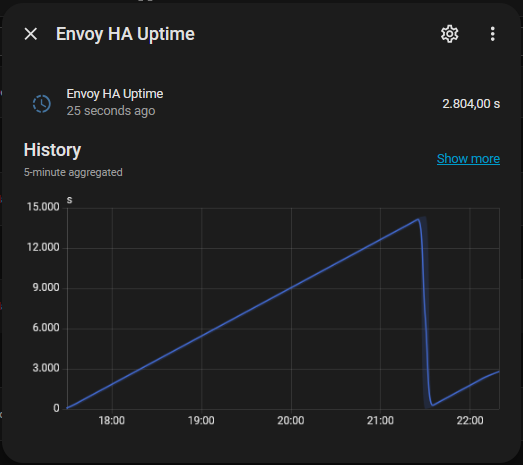
With your the inverters in round 2, the next question is the step down in 2025. Is it something I can expect as well happening somewhere later in round one, or is it just another firmware version phenomena?
Looking at the step down value, between 14 and 15 MWh looking at the screenshot, it also might be related to the magic value, 14 / 12 = 1.16.
Calculating backwards, an overflow supposedly happens when an 8 byte memory location is involved. (FFFFFFFF = 4294967295) Converting that from joules to Wh (/3600) we get 1,193MWh (and small change). That number for your 12 panels totals to: 14.3 MWh. Awfully close to what seems to be the step size in your screenshot. Is it?
Wild guessing, if at that time your Envoy got updated to the current firmware (or a prior firmware with same code change) and all your inverters where beyond the 1,19 MWh mark, the overflow would hit for all right away and drop the lifetime with 12 times overflow.
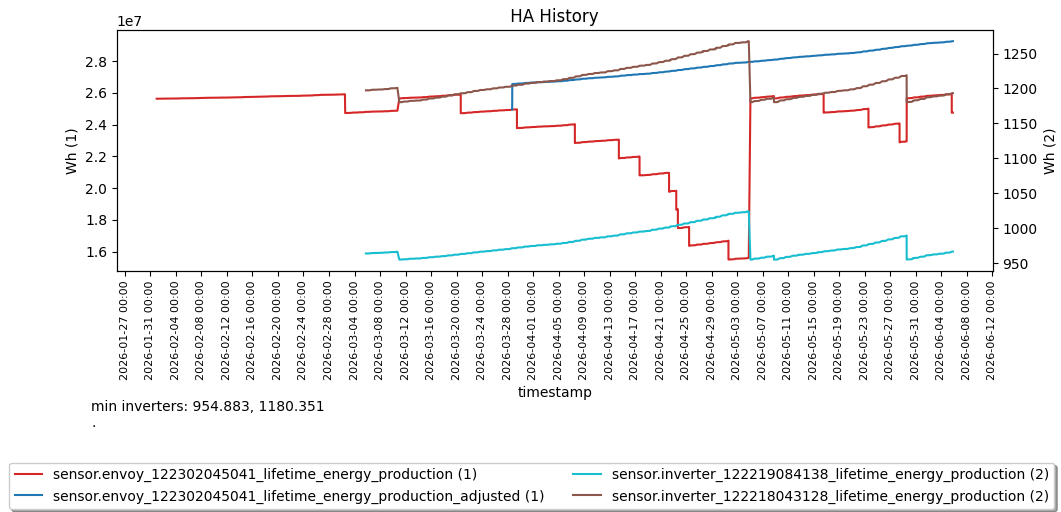
Because the data is drawn from HA’s statistics, the exact times/samples aren’t available, but the jump was:
24,565,018 - 10,249,780 = 14,315,238
So you’re right.
I’m not at home at the moment, so I can’t check the local webserver on the envoy. Does it show details regarding the last firmware change? I can check at the weekend.
Interestingly, since your post, I’ve set up a helper that sums the total of the 12 inverter lifetime energy production values. The current total is 29.42 MWh, which aligns with what the Enphase website is reporting.
Not that I know. I started keeping track of it in a HA entity since early February to be able to trace back these kind of issues. (see manua) That’s when I got 5.3.528. In the Enphase portal event log, it only shows the Envoy restarted. No mention of FW ugrade or alike. Before that my notes tell me I had 8.3.5167 since mid November. Anything I had before has disappeared in eternity.
Looking back in other support cases this behavior was already reported with 8.2.4264 in March of 2025.
The current total is 29.42 MWh, which aligns with what the Enphase website is reporting.
Basically the same here, with one other glitch though. When you take a look at my screenshot some replies back, all inverter lifetime values stepped down with a small value (and envoy lifetime stepped up). That step change is now the offset between summed inverter lifetime and the Enphase portal.
Maybe not the nicest solution, but it works I only use the lifetime for ‘display’ purposes and the daily counter for the energy dashboard. Therefore I just add 8 times (all my invertors rotated within the same week) the max lifetime and use the template-entity-row:
It works (you see the graph on its lowest point yesterday after the last invertor overflowed) and at the right the ‘lifetime’ as MWh. Only clicking it (checking the real value) still shows the overflowed value, but it will increase again over time, allthough missing 8xmax.
Maybe this is of use for someone else too, so sharing it here
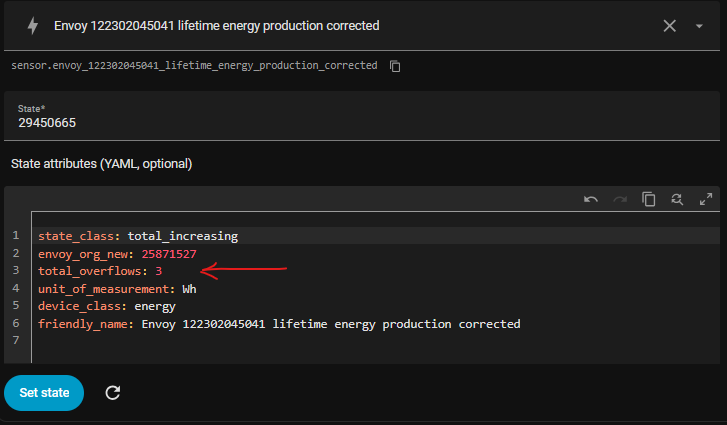
Then change total_overflows to the actual overflows and click set state. Next value change should add the correct number of overflows. If it doesn't change to the correct number, you may have been collding with an actual value update, then try again.
I've found this blueprint, because my daily envoy sensor starts every day at around 4,5kWh. The lifetime sensor is correct and shows the same 24.127865 MWh as the Enphase App. I've set up the blueprint for the lifetime envoy sensor as I don't use the lifetime inverter sensors. But shouldn't an overflow already happened for me? I couldn't find any significant jump up or down...
because my daily envoy sensor starts every day at around 4,5kWh
Daily sensors are not very reliable. During daylight saving time, they reset 1 hour late, at 1am rather then midnight resulting in spikes when using in the energy dashboard.
But shouldn't an overflow already happened for me? I couldn't find any significant jump up or down...
The jumps in the Envoy lifetime value happen when an individual inverter passes 1.19 MWh in its lifetime value. In my case it took like 3 years for the first one to reach that lifetime value.You can check those values in the series overview in the Enphase portal to see if any passed that value yet.
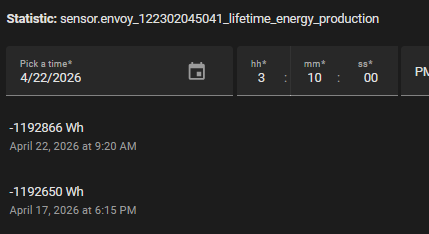
In the energy dashboard you can continue using the uncorrected envoy lifetime value if you want to maintain access to all historical data of it. You need to correct the statistics value each time you see a jump. To correct the jumps resulting in spikes in the energy dashboard, use settings / developer tools / statistics and find outliers for the envoy lifetime value. Change the found negative value of -1.19MWh to zero.
You'll find something similar to 2 of my recent corrections
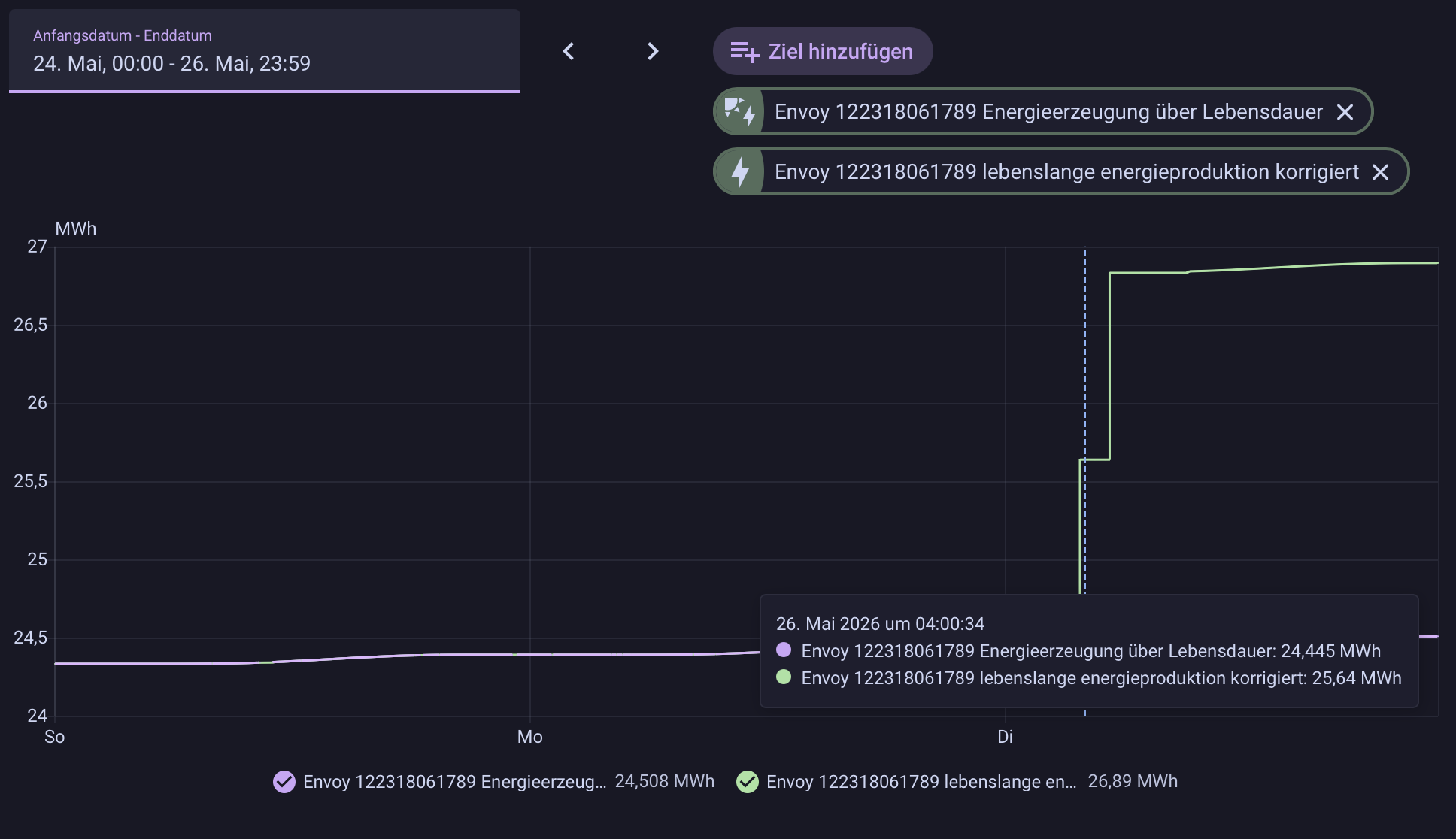
Okay, something did happen and the correct lifetime sensor based on the blueprint says 2 overflows. But when looking at the two sensors side by side (green is the corrected), I don't really understand what happened here. I thought, the corrected sensor would show the right value (e.g. goes up steady) and the original sensor would go down by 1.19MWh for each overflow. But instead, the corrected sensor goes up 1.19MWh? The value in the Enphase App is still 24.5MWh, not 26.83MWh as the corrected sensor is now stating.
Did I setup something wrong? This is my template setup:
- use_blueprint:
    path: marcelhoogantink/correct_envoy_livetime_production_energy.yaml
    input:
      # entity-id of original sensor to be corrected
      envoy_entity: sensor.envoy_122318061789_lebenslange_energieproduktion
      # uptime in seconds
      uptime: sensor.envoy_ha_uptime
      # uom for target
      uom: MWh
  # friendly name of the new sensor for correction
  name: Envoy 122318061789 lebenslange energieproduktion korrigiert
  # unique_id of the new sensor for correction
  unique_id: envoy_122318061789_lebenslange_energieproduktion_korrigiert
Additionally, my Envoy was not available for API calls last night (just before these two jumps). Could it be, that a new firmware version remedies the overflows internally and calculates some stuff so the Envoy is not responding well on API calls? My firmware is 8.3.5289.
I had one time that all my inverter lifetime values stepped down and the envoy lifetime step up. See a previous reply. That happened before I had a correction active.
I then implemented the correction blueprint. That didn't calculate the correct value as the change caused by the inverter lifetime changes wasn't the 1.19MWh. I added another adjusted calculation that doesn't use the step size of 1.19MWh but actual detected changes up and down and started testing it as no-one had reported these inverter lifetime changes at that time.
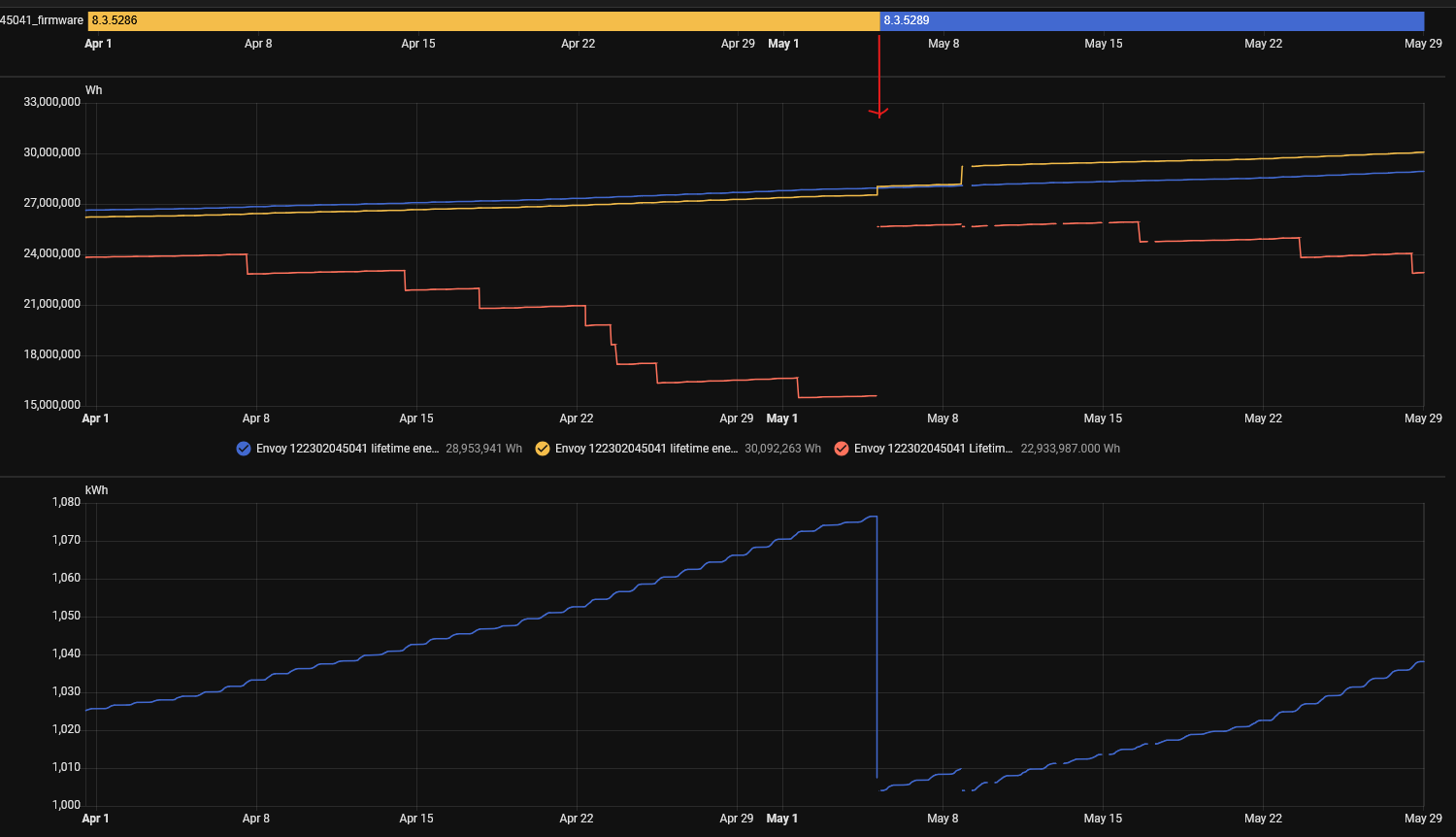
In below screenshot, top-half, the orange line is the corrected value and the blue line is the adjusted value. Both methods handle the lifetime change of 1.19MWh equally well. BUt step-up in lifetime value is only handled correctly by the adjusted method.
Bottom half of the screen shot is one of the inverter lifetime values, all 24 inverters look the same.
Then my Envoy got updated from 8.3.5286 to 8.3.5289, and again inverter lifetime values dropped and Envoy lifetime values stepped up. But not with the 1.19MWh value. And shortly after the update another drop in inverter lifetime and increase (not being 1.19MWh) in Envoy lifetime. Again the adjusted method calculates incorrect, the corrected method under test handled it well again.
So right after the firmware update, the screenshot shows 2 step changes in the corrected value. This resembles very much what you are seeing. If you have individual inverter lifetime energy production values, check if these stepped down at that time. If so you are seeing same phenomena as I do and I probably best publish the correct blueprint as well.
Top half, blue: Envoy lifetime, red: Envoy lifetime corrected using original blueprint, orange: Envoy lifetime adjusted using modified blueprint.
Bottom half the individual inverter lifetime production.
All individual inverter lifetime values are again below the 1.19MWh value. Envoy lifetime value matches the sum of the individual inverter values.
This is the 3th time this happened, no firmware change and once with a firmware change. The Envoy lifetime value is too low compared to Enphase portal, the corrected value to high and the adjusted value (still) matches the Envoy portal lifetime value.
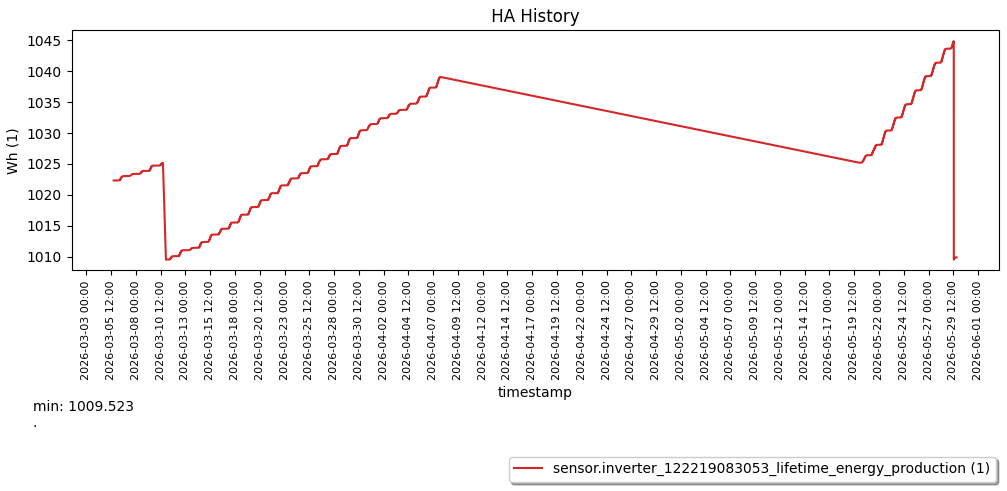
I did look into my history of the livetime values of the inverters, and i my situation, all fall-backs seem to fall back to the same values.
After every fall-back the inverters have the same lower values as at the previous fall-back:
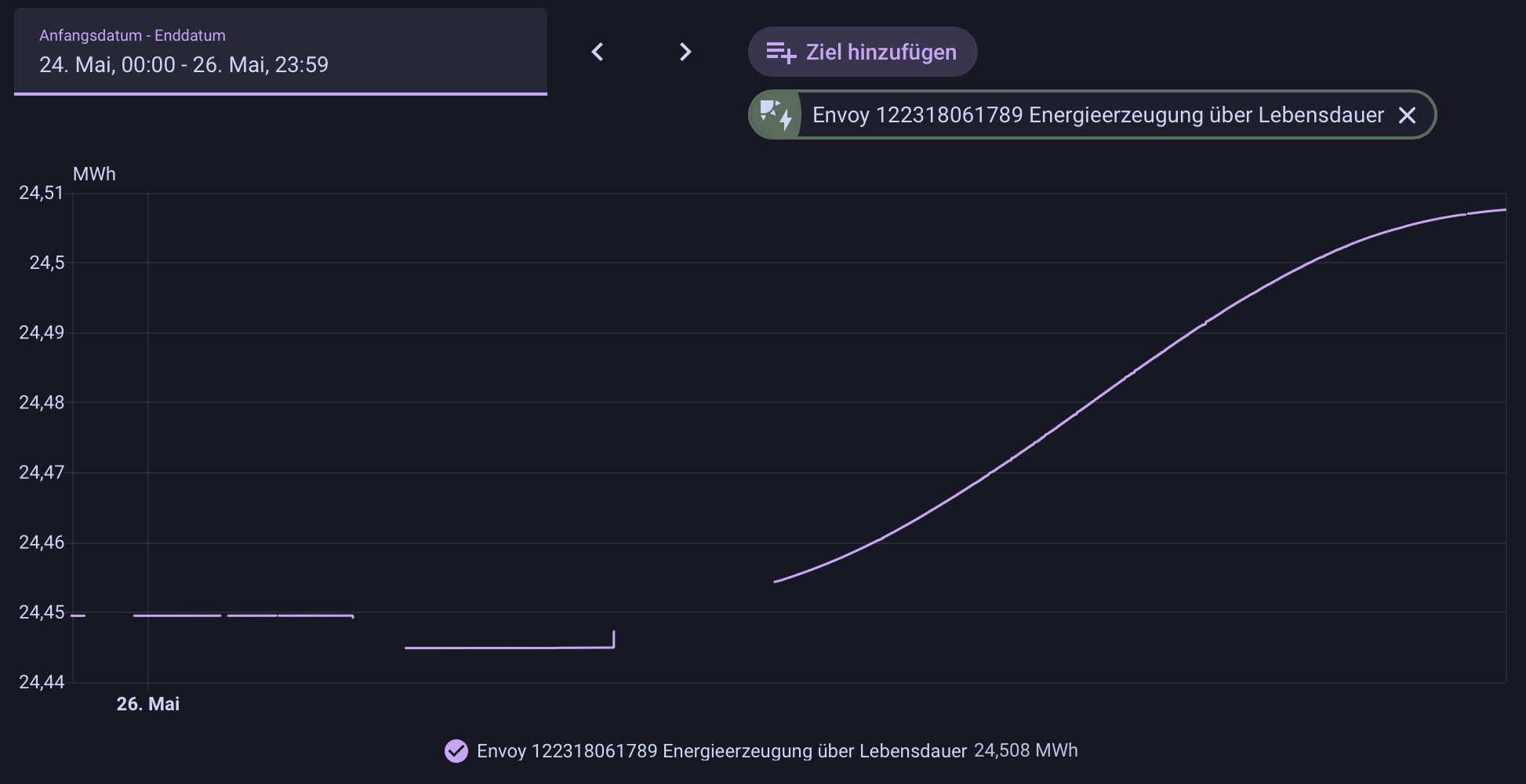
I don't have the lifetime energy production values for all inverters activated. But what I still don't get. The original lifetime value is still the correct value compared to the Enphase app. The corrected lifetime value (because of 2 overflows) is 2,386092 MWh too high. It seems, that I don't need the blueprint?
If your lifetime energy is correct, the the blueprint is not needed. The blueprint will add a correction step up when it detects a downward value change in the lifetime value. Your original picture shows such value changes. If the value change you experienced was an intended correction by the firmware and matches the enphase portal data then some other magic occurred and it seems you are fine now.
So far it seems using step sizes rather then step counts in the blueprint is still working correctly for step size not matching the magic number (which I had). For now, my adjusted blueprint is here: adjust_envoy_livetime_production_energy.yaml · GitHub.
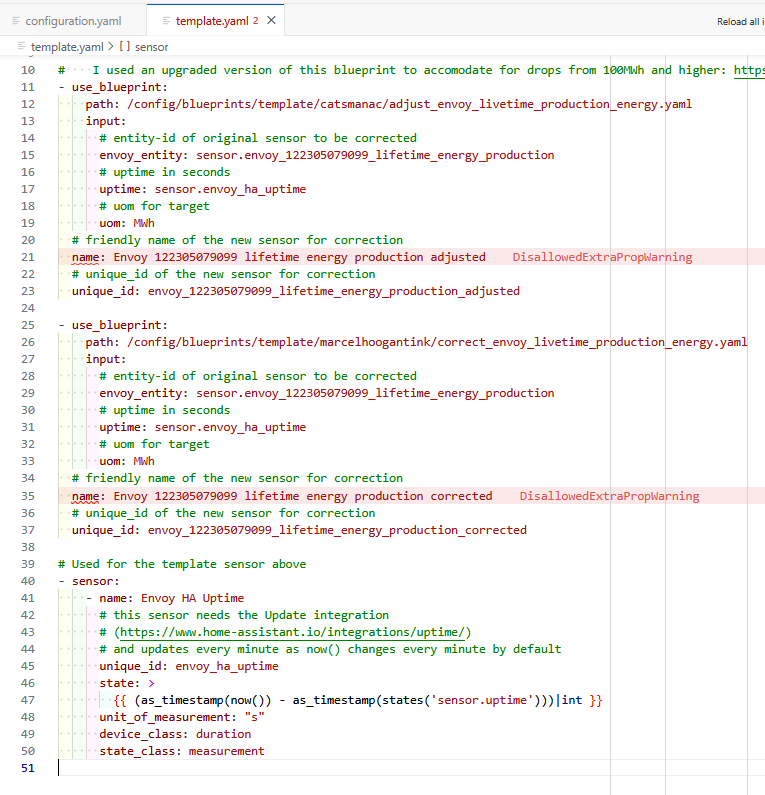
In my template.yaml the "name" does give an error, which refers to the syntax being incorrect. But it is how I copied it and the same as is the example in the "Using blueprints" section on home-assistant.io. So I don't think that is the issue.
 I only use the lifetime for ‘display’ purposes and the daily counter for the energy dashboard. Therefore I just add 8 times (all my invertors rotated within the same week) the max lifetime and use the template-entity-row: