new Version online
works like a charm, but can’t seem to get the numbers on the load side in a positive state. They match, and are correct. But the minus symbol stays, even if I set it to “invert-load: true”
strange…
Hi @stanus74, I just changed my AmperePro integration from REST to your modbus solution. Works great so far, the only issue I have is that I can’t find the correct sensor to display the home consumption: I use the value from SAJ Inverter Power, but this value seems to be to high, compared to the other values.
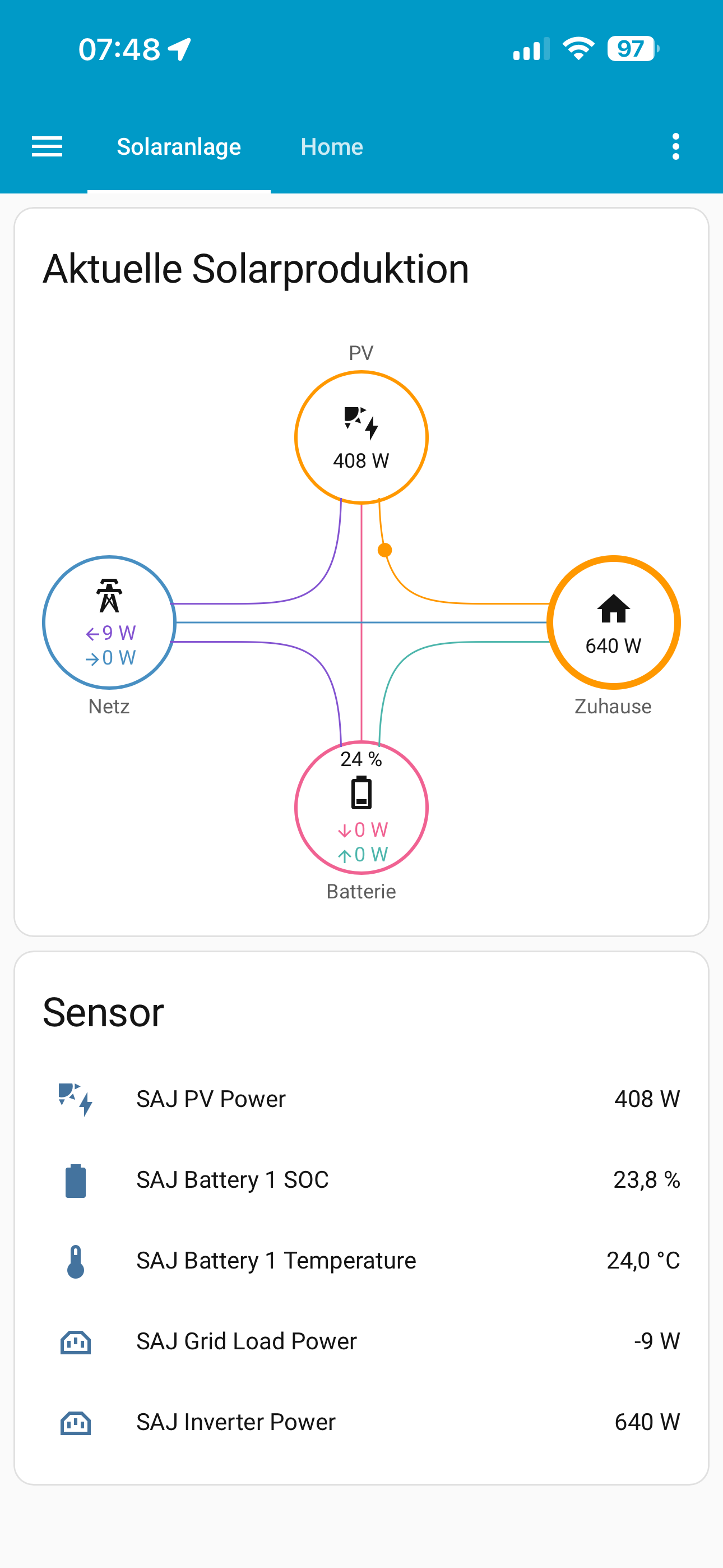
Any idea, what reason this could have?
Thank you very much @stanus74 !! I’m going to test this the coming days, expect some coffees/beers coming your way.
home load sensor is: sensor.saj_total_load_power
type: custom:power-flow-card-plus
entities:
  battery:
    entity: sensor.saj_battery_power
    state_of_charge: sensor.saj_battery_energy_percent
  grid:
    entity: sensor.saj_ct_grid_power_watt
    secondary_info: {}
    use_metadata: false
  solar:
    entity: sensor.saj_pv_power
    display_zero_state: true
    secondary_info: {}
  home:
    entity: sensor.saj_total_load_power
    secondary_info: {}
see also
Thanks @stanus74 ! This looks good.
Thanks Stanus. This update has wreaked havoc with my charging setup and battery isn’t responding to changes. I think it’s all on my end but I need to mess around with it a bit more. has anyone else had any issues?
It would be helpful to describe the problem in more detail.
I test new versions for about two weeks. The current version with battery charge programming.
What exactly did you do? Do you use the HA charge card to program the times, or do you use automation to write data to registers?
Have you installed the new version of Loveacecard 1.1.5?
The number must be in the header. If it is still 1.1.4, clear the browser cache.
The integration offers the possibility to write to a variety of inverter registers.
This can also be used to disable the inverter.
The battery just isn’t responding to supply power to the house or grid. I have tried cycling through App modes 0-3, Passive charging modes 0-2, have set Discharge and Charge time from 00:01 - 11:59 and tried setting all of the Charge and Discharge rates to 1100 but it just wont supply anything to the house or discharge to grid at all. I can get it to charge with grid or solar, but now it’s been at 100% for a few days and Battery power just sits at 0W, so it’s not even using battery for reflux or anything.
Also tried the usual things - restored a older HA backup, rolled back to and older version of the Integration, but not joy. I don’t think it’s to do with your integration, something has happened in the inverter, only thing I can thing is that it requires to have the App mode set in the esolar bluetooth connection again, but I think that’s the same as the app mode you now have in the integration.
I’m loving this integration!
Though I’d like to set up an automation or scene for:
- Selling back to the grid,
- Charging my battery from the grid
Could you advise on what entities/states you’d set for these? I’m just a beginner and am still testing the waters. So far i’ve only been able to change modes depending on the feed in price from the Amber Electric API.
SAJ H2-10K-S3-A
and if so, is there a way to use the function that shows how long the battery will take to charge?
for example, if time to take to charge battery to 100% > the time of sunset, then charge battery from grid to make this time = sunset or before…?
I believe the Sunsynk Power Flow card will show time to charge/discharge if you install that.
Regarding Amber, I am the same as you and have Amber too. I used to have 3 simple automations as below, which worked pretty well. But as above with the latest update I am having issues, I will let you know once it’s hopefully solved.
- If price goes below $x (I had it set to 0.10), enable charging @10kw. It would use whatever excess solar I had first pull up to 10kw from the grid.
- If price is above $x (I have it set to above 0.10), enable discharging (self consumption) so battery would supply you home usage needs only.
- If feed in price goes above $0.50, enable battery dump which pushed the full 10kw to the grid.
I also had a couple of automations which covered overnight charging based on a time window between 1am-6am, which basically said If battery in below xx% and buy price is below $xx, charge battery. That way I had a nice full battery for morning consumption.
Here are the YAML configs I had:
alias: Charging ON
description: “”
triggers:
- trigger: numeric_state
entity_id:- sensor.general_price
below: 0.10
conditions:
- sensor.general_price
- condition: time
after: “06:00:00”
before: “01:00:00”
actions: - action: switch.turn_on
metadata: {}
data: {}
target:
entity_id: switch.saj_charging_control
mode: single
alias: Charging OFF
description: “”
triggers:
- trigger: numeric_state
entity_id:- sensor.general_price
above: 0.10
conditions:
- sensor.general_price
- condition: time
after: “06:00:00”
before: “01:00:00”
actions: - action: switch.turn_off
metadata: {}
data: {}
target:
entity_id: switch.saj_charging_control
mode: single
alias: Battery Dump OFF
description: “”
triggers:
- trigger: numeric_state
entity_id:- sensor.feed_in_price
below: 0.5
conditions:
actions:
- sensor.feed_in_price
- type: turn_off
device_id: b1cfafef69383d0bd41a60587a8b3b03
entity_id: c2c4ecf11f6a8043ae7c85cb9f248af0
domain: switch
mode: single
alias: Battery Dump ON
description: “”
triggers:
- trigger: numeric_state
entity_id:- sensor.feed_in_price
above: 0.5
conditions:
actions:
- sensor.feed_in_price
- type: turn_on
device_id: b1cfafef69383d0bd41a60587a8b3b03
entity_id: c2c4ecf11f6a8043ae7c85cb9f248af0
domain: switch
mode: single
have you try to reset the inverter
I have managed to get everything working with automations and connected to the live feed price with amber.
I’ve been looking for the “SAJ Charge Time Enable (Input)” setting to change it to 0, but I’m only able to locate the “SAJ Discharge Time Enable (Input)” setting? I’m not missing something am I? The Integration has this setting right? @stanus74
I essentially have set up 3 scenes triggered by automations (The Bold is the setting I’m unable to find:
- Charge (Set to Time-of-Use (Mode 1) + Enable Charge Time 1 + set Charge start time to 00:00 + set Charge end time to 23:59 + Disable Discharge Time 1)
- Self-Consumption (Set to Self Consumption (Mode 0))
- Sell (Set to Time-of-Use (Mode 1) + Enable Discharge Time 1 + set discharge start time to 00:00 + set discharge end time to 23:59 + Disable Charge Time 1)
This entity does not exist. The Charge Control switch is used to write 1 to register 3604h, which is required for charging times.
Currently, there is only 1 slot for charging time programming.
@stanus74 I am still having no luck getting my battery to supply power to my house. It seems that no matter what setting I try, it just wont give me anything. I have tried resetting inverter, and also went back to the AI03 with no difference.
Can you confirm what settings the App mode, time etc would need to:
a) Dump battery at full Inverter power, powering house first then the rest to grid?
b) Supply house only (self consumption) at full Inverter power
c) Charge battery at 10kw, solar first then whatever else is needed from grid.
The eSolar SET app has a menu for resetting the inverter.
Have you tried this option?
Or did you just restart the inverter and perform an AIO reload?
If the inverter has actually been reset to factory settings, the settings will be at default.
In ‘Self Use’ app mode, the inverter always charges the battery first.
The inverter should then charge the battery.
Have you contacted SAJ Support? Here in Germany, a service employee can quickly connect to the inverter. I’ve had to use this service before when I had a problem.
Translated with DeepL.com (free version)